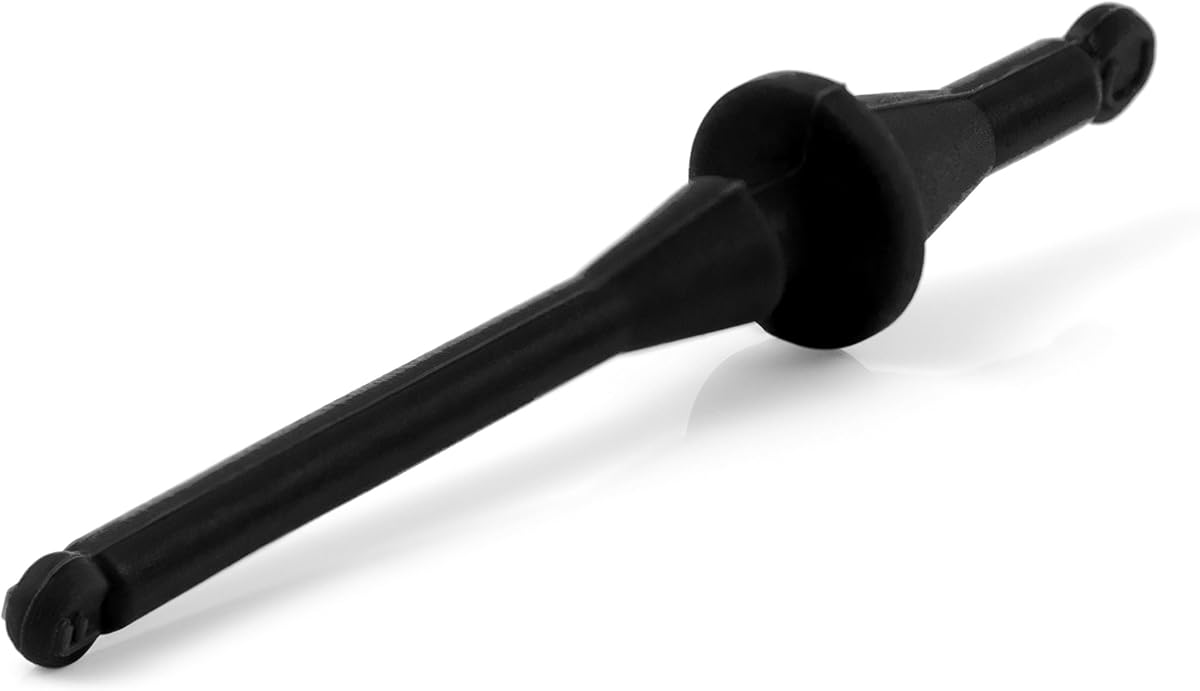
Noctua NA-SAV2
4.7Editor score
20 silicone rubber mounts
Decouples fans from case
Reduces structure-borne noise
PC fan spacer kits are essential accessories for enthusiasts seeking to optimize airflow and reduce noise in their builds. These components bridge gaps between fans and case panels, ensuring efficient air movement without turbulence. Selecting the right kit can significantly impact thermal performance and acoustic comfort during intensive tasks.
We evaluated ten leading products based on compatibility, material quality, ease of installation, and user feedback. Each option offers unique benefits ranging from modular adjustability to specialized acoustic damping. Our analysis focuses on real-world performance data and manufacturer specifications to provide a reliable comparison.
Each pick highlights key strengths and ideal use cases to help you find the perfect match for your system. Prices and availability may change over time, so always verify current details before purchasing. These tools empower you to refine cooling efficiency and minimize vibration across various PC configurations.
4.7Editor score

4.4Editor score

4.6Editor score
As an Amazon Associate we earn from qualifying purchases.
This side-by-side comparison outlines the core specifications and intended applications for each kit. Whether you need shock absorption or precise airflow ducting, these summaries highlight critical differences to guide your selection process effectively.


The Noctua NA-FD1 stands out as a premier solution for small form factor cooling. With a 4.4 rating it addresses the common issue of air leakage between fans and case panels effectively. Its modular design allows for precise adjustments to match various SFF case configurations seamlessly.
We may earn a commission when you buy through this link, at no additional cost to you.
Constructed from high quality EVA foam, this kit bridges the gap between the fan and perforated panels. This ensures fresh air is drawn from outside directly to the cooler. Users report temperature drops of up to 5 degrees Celsius or more with this modification.
While it is not a universal fit for all coolers, compatibility with popular models like the NH-L9i makes it highly valuable. The installation is straightforward requiring no complex tools. However, the cost is higher than buying generic foam strips from a local hardware store.
Anyone building a compact PC with limited airflow space should consider this kit. It is ideal for enthusiasts who value thermal performance and acoustic efficiency. The trusted Noctua quality and warranty provide peace of mind for long term usage.
The spacers adjust from 5 to 45mm in 1mm increments to fit popular cases like Dan A4-SFX.
Bridging the gap enables the cooler to draw fresh air improving cooling performance significantly.
We may earn a commission when you buy through this link, at no additional cost to you.
This 60-piece package offers an economical way to dampen vibrations across multiple fans. Rated 4.5 stars it is perfect for budget builds needing noise reduction without spending much. The silicone gaskets stick easily to the four feet of standard PC fans.
We may earn a commission when you buy through this link, at no additional cost to you.
The primary function is to reduce resonance between the fan and the chassis box. By decoupling these contact points the service life of computer accessories extends. Users can peel them easily without leaving residual glue on the fan surface.
While the adhesive is strong, some users report it might leave slight residue after removal. The silicone is less durable than high grade rubber but sufficient for typical indoor usage. The package includes enough gaskets for up to five large fans.
Budget conscious builders looking to silence noisy fans will find this set indispensable. It is versatile enough for radiator fans or exhaust units. The ability to cut them arbitrarily ensures a custom fit for odd sized mounting points.
The package includes 60 gaskets which can be used for up to five 140mm or 120mm fans.
Suitable for radiator fans cold exhaust fans and chassis fans to extend accessory service life.
We may earn a commission when you buy through this link, at no additional cost to you.
The Noctua NA-IS1-12 Sx2 is a specialized tool for optimizing suction type applications. With a 4.6 rating it introduces a 5mm offset to reduce influx turbulence effectively. This simple addition leads to significantly improved airflow performance in tight spaces.
We may earn a commission when you buy through this link, at no additional cost to you.
Its design targets PC case intake fans and pull fans on water cooling radiators. By reducing turbulence where fans draw air through grills or perforated panels it creates a more pleasant sound signature. The set includes everything needed for secure installation.
The main limitation is that it is strictly compatible with current Noctua 120x25mm fans. It will not work with fans from other manufacturers or smaller thicknesses like 15mm. However for Noctua users the build quality is exceptional.
Enthusiasts focused on achieving silent airflow and high performance should invest in this set. It complements the NF-A12x25 and similar models perfectly. The included screws and mounts ensure a hassle free upgrade for existing cooling systems.
Introducing a 5mm offset can reduce influx turbulences in suction type applications with obstacles.
Set includes two spacers plus eight anti-vibration mounts and various screws for radiators.
We may earn a commission when you buy through this link, at no additional cost to you.
While primarily designed for automotive use this kit serves as a robust example of spacer mechanics. Rated 4.3 it utilizes aluminum to provide durable spacing between fans and shrouds. The 2.00 inch thickness is ideal for large industrial or engine applications.
We may earn a commission when you buy through this link, at no additional cost to you.
The kit helps position the fan closer to the radiator and away from pulleys. This separation prevents interference and ensures safe operation under high vibration conditions. It includes reducer bushings to adapt to various shaft sizes easily.
Installation requires four Allen bolts and hex bolts with washers for security. While overkill for standard PC cases it demonstrates how rigid spacers function mechanically. The dimensions are substantial compared to typical desktop fan accessories.
For users working on large custom cooling loops or industrial PCs this offers proven reliability. It is not a direct replacement for PC kits but shows the importance of secure mounting. The durability justifies the cost for heavy duty applications.
Aluminum spacers include reducer bushing for a durable connection in high vibration environments.
Four Allen bolts and hex bolts with washers secure the fan to the spacer firmly.
We may earn a commission when you buy through this link, at no additional cost to you.
These black rubber gaskets offer a straightforward way to eliminate annoying sounds from spinning fans. Rated 4.0 they are designed for standard 120mm DC and AC fans to stop shell vibration. The pads sit between the fan shell and the PC case directly.
We may earn a commission when you buy through this link, at no additional cost to you.
Vibration during operation often causes very annoying sounds that disrupt quiet environments. This kit addresses that by absorbing shock before it transfers to the case frame. The 2.2mm thickness provides sufficient cushioning without blocking fan movement.
Users find them easy to install without complex hardware or adhesives. However the material is less flexible than pure silicone gaskets. This makes them effective but slightly less versatile for irregular mounting holes.
Anyone dealing with rattling cases will appreciate the immediate noise reduction. They are cost effective for replacing worn out mounts quickly. The standard sizing ensures they fit most common computer case fans.
The shell fan contacted with the PC shell may vibrate and this pad prevents that noise.
These gaskets are easy to install and fit any standard 120mm DC and AC fan.
We may earn a commission when you buy through this link, at no additional cost to you.
This variant of the inlet spacer set maintains the high performance expected from Noctua. Rated 4.7 it is an excellent choice for improving airflow in suction applications. The 5mm offset is carefully engineered to smooth out airflow patterns at the intake.
We may earn a commission when you buy through this link, at no additional cost to you.
When fans draw air through perforated panels or mesh structures turbulence is common. These spacers reduce that resistance leading to lower noise levels and better efficiency. The set is tailored for 120x25mm fans specifically.
It works well with the NF-A12x25 and similar models but excludes thinner variants. The package includes anti-vibration mounts and screws for a complete upgrade experience. User feedback confirms its value in high end builds.
PC builders prioritizing silence and efficiency should consider this highly rated option. It complements water cooling setups and standard chassis intakes. The precision engineering ensures it performs as expected without complications.
Introducing a 5mm offset can reduce influx turbulences in suction type applications effectively.
Sx2 set includes spacers plus anti-vibration mounts and screws for case and radiator installation.
We may earn a commission when you buy through this link, at no additional cost to you.
This pack of 40 rubber screws offers a versatile solution for vibration reduction. Rated 4.6 it is praised for how quickly fans can be mounted or removed. The design works with most standard PC case and CPU fans without modification.
We may earn a commission when you buy through this link, at no additional cost to you.
The black rubber screws reduce noise by decoupling the fan from the frame rigidly. Their size allows them to fit into standard holes effectively. The convenience of swapping them without tools makes maintenance much easier.
While durable for most use cases the rubber material may wear eventually compared to metal. However the low price makes replacements affordable if needed. The kit provides enough screws for multiple fans in a build.
Anyone needing a simple upgrade to reduce noise should look at this option. It is a reliable alternative to standard metal screws. The quick mounting design saves time during assembly.
The universal design fits most fans making it a versatile choice for many builds.
Extremely convenient and quick for mounting and unmounting without tools.
We may earn a commission when you buy through this link, at no additional cost to you.
This 140mm variant offers the same benefits as its smaller counterpart for larger fans. Rated 4.6 it is ideal for systems using big 140mm units like the NF-A14. The 5mm offset is critical for maintaining airflow efficiency.
We may earn a commission when you buy through this link, at no additional cost to you.
When used as intake fans or radiator pull fans it reduces turbulence significantly. This leads to lower noise levels and more pleasant sound signatures. The chromax black finish matches high end aesthetic themes well.
It is compatible with NF-A14 and NF-P14s redux but not other brands. The kit includes all necessary screws and anti-vibration mounts. While pricey the quality justifies the cost for enthusiasts.
Builds centered around 140mm cooling solutions will benefit from this precision. It ensures the fan draws air cleanly through obstructions. The included hardware guarantees a professional installation result.
Compatible with all current Noctua 140x25mm fans like the popular NF-A14 series.
Reducing influx turbulence leads to significantly improved airflow performance and lower noise.
We may earn a commission when you buy through this link, at no additional cost to you.
This kit is designed for quiet builds requiring effective noise suppression. Rated 4.7 it uses premium grade silicone rubber to decouple fans from the case. The black chromax finish blends seamlessly with Noctua industrial fans.
We may earn a commission when you buy through this link, at no additional cost to you.
The mounts work with standard 4.3mm diameter mounting holes on most fans. By decoupling the fan they reduce structure-borne noise effectively. The set includes 20 mounts allowing up to 5 fans to be mounted silently.
While it requires open flange frames the compatibility is broad. The rubber is extra soft and highly tear-proof for durability. The 6-year manufacturer warranty backs the quality of these mounts.
Anyone seeking a silent PC should consider these mounts essential. They offer a professional look and performance. The color match ensures the hardware does not distract from the build.
Premium grade silicone rubber is extra soft and highly tear-proof for long lasting use.
Convenient vibration-free installation reduces structure-borne noise for quiet builds.
We may earn a commission when you buy through this link, at no additional cost to you.
This flush mounting kit provides a clean look while reducing noise. Rated 4.4 it features a flat case-side end for aesthetic appeal. The silicone mounts effectively decouple fans from the PC case to minimize vibration.
We may earn a commission when you buy through this link, at no additional cost to you.
The set includes five defined numbered pawls for various fan thicknesses. This allows it to support standard open corner fans and thicker closed corner fans. The design ensures a professional finish on the exterior of the case.
It works well with Noctua fans and many third-party options. The count of 16 mounts supports up to 4 fans. While less than other kits it offers a unique flush benefit.
Builders focused on clean aesthetics will love this option. It maintains the look of a high-end build while silencing vibration. The thickness pawls ensure compatibility with varied fan models.
Flat case-side end creates a clean exterior look for professional builds.
Five defined pawls support open corner fans and various thickness closed corner fans.
We may earn a commission when you buy through this link, at no additional cost to you.
Choosing the right kit depends on your specific cooling needs and case geometry.
Always check that the kit matches your fan size and brand. Some kits like Noctua's are specific to their models while others fit standard sizes like 120mm or 140mm. This ensures a secure fit and proper airflow optimization.
Verify the dimensions and mounting hole patterns before purchasing.
High quality silicone or EVA foam provides better vibration dampening. These materials are durable and resistant to tearing over time. Avoid cheap plastics that might crack under heat or vibration stress.
Premium materials ensure long term performance and silence.
Look for kits with self-adhesive backing or included screws for quick mounting. Some systems offer modular adjustments that require no tools. A simple process saves time and prevents errors during assembly.
Easy installation reduces the risk of damaging your fans or case.
Consider kits designed to reduce turbulence and improve airflow. These often include offset spacers to bridge gaps between fans and panels. Better airflow leads to cooler components and system stability.
Prioritize designs that optimize air direction for your specific case.
For silent builds focus on kits with effective vibration absorption. Anti-vibration mounts and gaskets prevent noise from transferring to the case. This is crucial for quiet rooms and high performance systems.
Choose rubber mounts that decouple the fan from the chassis effectively.
Reputable brands offer long term warranties like six years. This protects your investment against manufacturing defects or material failure. Support ensures you can replace parts if needed without extra cost.
Check warranty terms to ensure peace of mind for your purchase.
Prices vary from a few dollars to over fifty for specialized kits. Determine if you need a basic gasket set or a premium ducting kit. Balance cost against the performance gains expected.
Budget options exist but may lack the durability of premium materials.
Some kits come in black or chromax finishes to match your build. A clean look is important for transparent cases or visible components. Avoid kits that might ruin the visual theme of your system.
Select a finish that blends seamlessly with your PC components.
Begin by measuring your fan and case opening to confirm the spacer fits. Clean the mounting surfaces to remove dust or grease. This ensures adhesives bond properly and screws sit flush for maximum stability.
When installing adhesive gaskets press firmly for thirty seconds. For screw-in kits ensure they are tightened snugly without overtightening. Over-tightening may strip the rubber or fan plastic. This step prevents loose components.
After installation monitor fan speeds and case noise. Check periodically for wear and tear on the rubber mounts. Replace any damaged parts promptly to maintain vibration isolation. Regular maintenance keeps your system quiet.
Yes they often improve performance by reducing turbulence and air leakage. By bridging gaps they ensure fresh air reaches the cooler directly. Users report temperature drops especially in tight cases where airflow is restricted.
Some silicone gaskets can be cut to fit specific shapes. Always measure before cutting to ensure proper coverage. This allows custom fits for non standard or older fans needing vibration isolation.
Many kits are designed for 140mm fans. Always check the specifications to confirm the size match. Some universal kits cover 120mm and 140mm sizes effectively.
They can reduce noise by decoupling the fan from the case. This prevents vibration transfer that causes buzzing sounds. Acoustic kits are specifically designed to dampen these noises.
High quality silicone and EVA foam are most durable. They resist tearing and heat better than cheap plastic. These materials maintain their shape and effectiveness over many years.
Typically you need one spacer per fan corner. Kits often include enough for multiple fans. Check the count to ensure you have enough for your entire build.
Using external accessories usually does not void hardware warranties. However removing original mounts might affect it. Always check the manufacturer policy before making modifications.
Noctua is widely considered the best for PC kits. Their products are highly rated for quality and fit. Third party brands offer cheaper alternatives with decent results.
Our guide covered ten excellent options for PC fan spacer kits. The Noctua NA-FD1 leads with its modular EVA foam design. It offers precise adjustability for specific small form factor builds.
For budget users the 60pcs damper set provides value for noise reduction. Those seeking high performance should consider the inlet spacers from Noctua. These optimize airflow and reduce turbulence in critical areas.
Always verify current prices and availability before purchasing. Cooling needs vary by case and component layout. Choose the kit that best matches your specific airflow goals.