
Formax FD 300 Desktop Document Folder
4.1Editor score
7400 sheets per hour speed
LCD control panel with counter
Output conveyor for stacking
Finding the right paper folding machine can transform your office workflow by automating tedious manual tasks. Whether you handle mailrooms or print shops, the right device ensures consistent results and saves valuable time for your team.
We compared ten top models based on speed, capacity, fold variety, and user feedback. Our analysis highlights key differences between automatic feeders and manual tools to help you find the perfect match for your specific needs.
Each pick includes detailed specs, pros, cons, and usage scenarios. Prices and availability change frequently, so verify current details before purchasing. This guide aims to simplify your decision-making process with clear, actionable insights.
4.1Editor score

3.9Editor score

4.1Editor score
As an Amazon Associate we earn from qualifying purchases.
This side-by-side comparison evaluates all ten models across key performance metrics. We look at speed, paper capacity, fold options, and build quality to highlight strengths and weaknesses for each option.



The Martin Yale P7500 is a fast letter folder machine designed for busy offices. It produces up to 4000 perfectly folded sheets every hour, making it ideal for mailrooms needing efficiency. Its simple operation allows anyone to use it without training, saving time on daily tasks.
We may earn a commission when you buy through this link, at no additional cost to you.
Key strengths include its automatic feed system and multiple fold options like Letter, Half, Z, and Double Parallel. The stacking tray holds folded documents neatly, keeping workspaces organized. The machine handles 8.5×11 and 8.5×14 paper smoothly, ensuring consistent results.
Trade-offs involve the 50-sheet feed tray, which may require frequent reloading for large batches. While speed is impressive, it is not suited for industrial-level volume. However, for small corporate offices and churches, these limits are acceptable and manageable.
This machine is perfect for offices needing reliable daily folding without complexity. It balances speed and ease of use well. We recommend it for teams looking to automate document prep quickly without heavy investment.
The automatic feed and stacking tray ensure smooth, uninterrupted processing for daily office tasks.
Multiple fold types like Z and Double Parallel meet diverse document formatting needs effortlessly.
We may earn a commission when you buy through this link, at no additional cost to you.
The Formax FD 300 is a top-tier folder for high-volume needs. It folds up to 7400 sheets per hour, handling paper from 4×5 to 8.5×14 inches. The drop-in top-feed system requires no fanning, saving setup time and reducing errors during operation.
We may earn a commission when you buy through this link, at no additional cost to you.
Strengths include the LCD control panel with a 3-digit counter for tracking batches. The output conveyor ensures neat stacking, which is vital for mailrooms. Pre-marked guides allow quick switching between C, Z, V, and Double Parallel folds efficiently.
The higher cost and need for conveyor space may be drawbacks for small setups. However, the speed and efficiency justify the investment for businesses processing large document volumes daily. Reliability and output quality remain strong points.
This model is best for offices or mailrooms needing maximum throughput. It combines speed with user-friendly features. We recommend it for teams prioritizing productivity and organized output above all else.
The LCD panel and AutoBatch function allow precise tracking of documents processed over time.
Adjustable stacker wheels on the conveyor ensure sequential stacking without manual intervention.
We may earn a commission when you buy through this link, at no additional cost to you.
The 13.78 Manual Paper Creaser offers professional-grade creases without power. Designed for cardstock and brochures, it features a positioning block for edge alignment. The upgraded alloy blade delivers sharp lines with minimal deviation, perfect for DIY and home office projects.
We may earn a commission when you buy through this link, at no additional cost to you.
Its ergonomic auto-rebound handle reduces hand fatigue during continuous use. The foldable design saves space on desks, keeping work areas organized. It ensures stable feeding and consistent results, preventing shifts during high-volume tasks manually.
Manual operation naturally limits speed compared to automatic machines. It requires physical effort for each crease, which may tire users over time. Yet for occasional or specialized jobs, the precision and cost savings make it an excellent choice.
This tool is ideal for hobbyists or small shops needing clean folds on thick paper. It balances quality and budget well. We recommend it for those needing a compact, reliable solution without complex machinery.
The alloy blade and grooved platform ensure clean, professional lines without cracking materials.
Foldable panels allow easy storage, keeping desktops clutter-free when not in use.
We may earn a commission when you buy through this link, at no additional cost to you.
The Martin Yale P6500 is a compact folder for small workspaces. It handles 8.5×11 paper in Tri or Half fold formats automatically after manual feeding. It manages up to 1800 sheets per hour, suitable for daily office or school paper handling tasks.
We may earn a commission when you buy through this link, at no additional cost to you.
Its desktop design fits well in mailrooms with limited space. The automatic function folds stapled or unstapled documents when fed by hand, helping prepare pages for mail prep. This flexibility aids routine document organization without extra tools.
Speed is slower than automatic feed models, and manual loading can be tedious for large batches. These limits make it better for low-volume needs. However, for schools or small offices, its simplicity and compact size are valuable trade-offs.
This model suits users needing a basic, space-saving solution. It is easy to operate and reliable for light use. We recommend it for settings prioritizing desk space over high-speed processing.
Its compact design fits small areas while maintaining professional folding capabilities.
Handles both stapled and unstapled papers, adding flexibility to manual workflows.
We may earn a commission when you buy through this link, at no additional cost to you.
The Formax FD 300 Black offers the same high-performance features as the standard model. It produces up to 7400 folded sheets per hour, handling various paper sizes and weights. The drop-in top-feed system allows loading up to 200 sheets without fanning, speeding up setup.
We may earn a commission when you buy through this link, at no additional cost to you.
Features like the LCD control panel and output conveyor ensure organized, sequential stacking of documents. Pre-marked guides help switch quickly between standard fold types. This model maintains the reliability and efficiency expected from Formax machines.
Similar to the standard version, it needs space for the conveyor and costs more than basic units. However, the black finish and consistent performance make it a solid choice for professional environments. It is ideal for busy mailrooms needing robust tools.
We recommend this for offices wanting high capacity with a sleek look. Its speed and organization features save significant time. It remains a top choice for volume-focused workflows.
The AutoBatch function allows processing set numbers of sheets with pauses for efficiency.
Adjustable stacker wheels on the conveyor keep folded documents neatly aligned.
We may earn a commission when you buy through this link, at no additional cost to you.
This manual paper creaser delivers neat indentation lines for laboratory model making. It fits 350mm wide sheets and uses heavy duty alloy blades for precise 0.1mm alignment. The built-in structural guide provides stability, making it ideal for regular workshop technical processing.
We may earn a commission when you buy through this link, at no additional cost to you.
The wider mechanical handle features an automatic rebound homing function, optimizing production workflow. Instant torque feedback after each press helps maintain rhythm and efficiency. Extended positioning blocks fit the entire paper edge securely, preventing slips during use.
It processes solid cardstock under 300g/m³ and corrugated board under 5mm. While manual, it meets strict industrial training standards for quality. The only downside is the physical effort required for high-volume single-sheet indentation tasks.
This model is perfect for studios needing portable precision without power. It balances durability and accuracy well. We recommend it for model makers and workshop technicians requiring consistent results.
The extended positioning block ensures paper stays secure for exact indentation lines every time.
Automatic rebound reduces hand strain and speeds up repetitive creasing operations.
We may earn a commission when you buy through this link, at no additional cost to you.
The United Office Products F100A is a high-speed automatic letter folder for offices and schools. It processes up to 156 sheets per minute, saving time on manual folding tasks. The large 200-sheet hopper reduces frequent reloading, ensuring efficient, uninterrupted operation.
We may earn a commission when you buy through this link, at no additional cost to you.
Clearly marked fold settings simplify setup, accommodating both 8.5×11 and 8.5×14 paper. It creates C, Z, Half, and Double Parallel folds easily. The intuitive LCD control panel with a resettable counter makes tracking completed pieces simple.
The integrated outfeed conveyor collects documents in sequential order, keeping paper organized. While specific ratings are unavailable, the features suggest reliability for daily use. The main trade-off is the need for initial setup to align folds correctly.
This machine is ideal for schools and churches handling notices and flyers. It combines speed with ease of use. We recommend it for organizations needing reliable, organized document preparation.
The 200-sheet capacity allows continuous folding without frequent interruptions.
The conveyor system ensures folded documents stack neatly for easy distribution.
We may earn a commission when you buy through this link, at no additional cost to you.
This manual paper creaser requires no power, making it ideal for craft hobbyists. It handles cardstock up to 300gsm, working well for invitations, brochures, and book covers. Interlocking adjustable guide rails ensure repeatable fold positions effectively preventing paper shifting.
We may earn a commission when you buy through this link, at no additional cost to you.
The upgraded alloy creasing blade delivers neat fold lines with minimal deviation, creating professional-grade results. The widened auto-return handle reduces hand fatigue during long-time operation. Every unit undergoes factory inspection and comes backed by a 2-year warranty.
Foldable compact design enables storage in small apartments or shared workstations. While manual, its reinforced structure avoids wobble during repeated use. The only limitation is the physical effort needed for high-volume tasks.
We recommend this for DIY studios needing reliable, compact tools. It offers quality and warranty support. It is perfect for personal projects or small shops prioritizing flexibility.
Solid metal frame and reinforced base ensure stability for professional-quality creases.
Adjustable guide rails deliver repeatable results without complicated adjustments.
We may earn a commission when you buy through this link, at no additional cost to you.
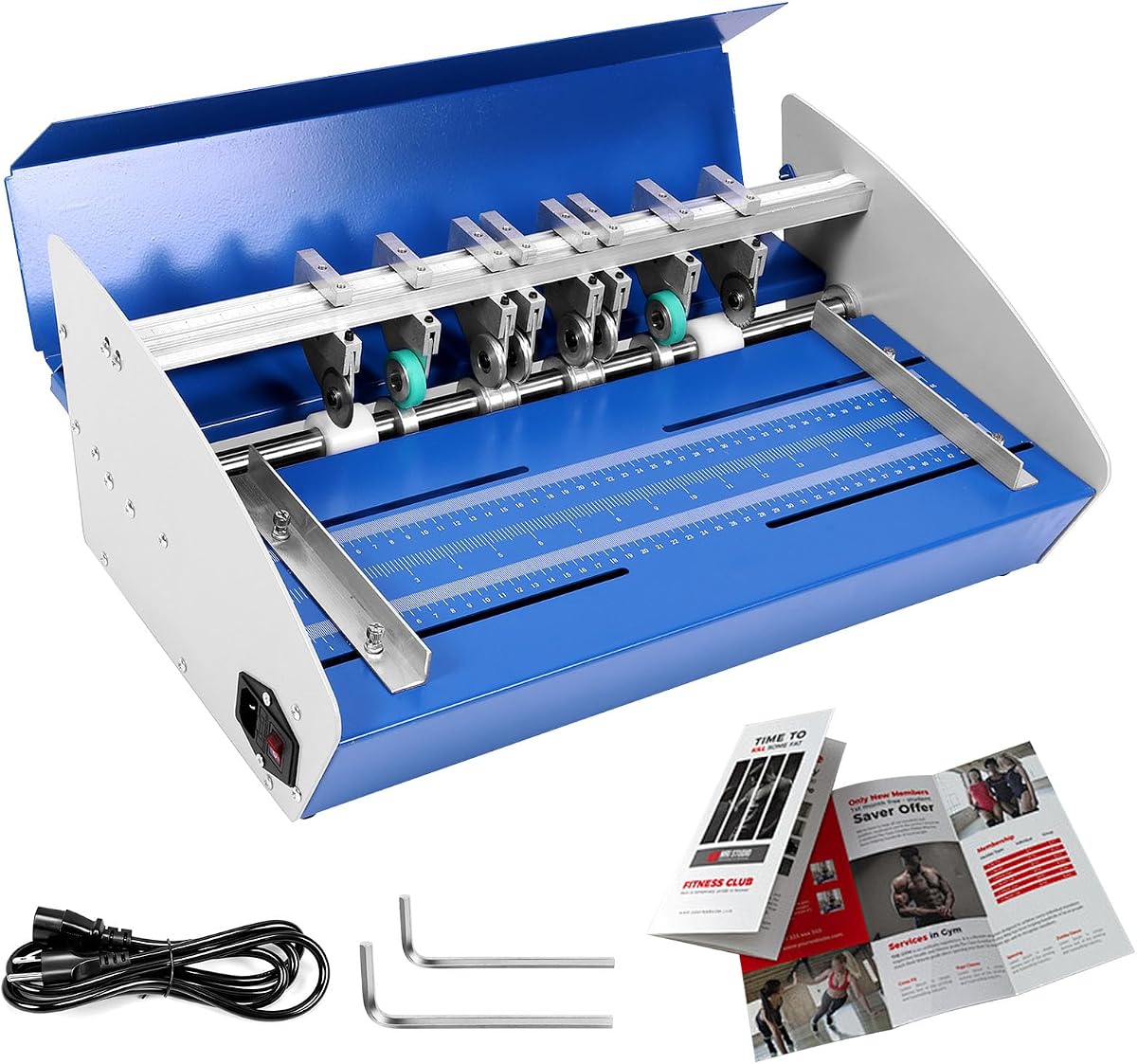
This electric paper machine features multifunctional rollers for creasing, scoring, and perforating. It creates clean, professional folds and tear-off lines without cracking the paper. The robust, solid metal frame ensures stability during operation, providing consistent straight lines for high-volume tasks.
We may earn a commission when you buy through this link, at no additional cost to you.
With a generous 460mm feeding width, it accommodates diverse paper sizes including extended menus and book covers. It is ideal for offices, print shops, and professional craft rooms needing an all-in-one finishing tool. Standard 110V operation ensures easy integration.
While costlier and requiring power, its versatility reduces the need for separate tools. The heavy-duty build justifies the investment for frequent use. The main trade-off is mobility due to electrical dependency.
We recommend this for print shops needing reliable, multi-functional finishing. It balances capacity and durability well. It is a solid choice for professional workflows.
Combines creasing, scoring, and perforating into one compact unit for streamlined work.
The 18-inch capacity handles large documents and book covers with ease.
We may earn a commission when you buy through this link, at no additional cost to you.
The Martin Yale 1217A is a medium duty auto feed folder for offices and schools. It processes up to 10300 sheets per hour with large rubber folding rollers for consistent paper folding. The 250-sheet capacity reduces reloads, making it ideal for high volume tasks.
We may earn a commission when you buy through this link, at no additional cost to you.
It handles paper from 4×4 to 12×18 inches, offering flexible auto folding with 7 fold types. Two adjustable fold tables allow customized folds for various documents. The conveyor belt exit processes stapled or unstapled documents smoothly through manual bypass.
Its large footprint may limit desk space, and medium duty use suggests it is not for continuous industrial runs. Yet for large schools or mailrooms, the speed and capacity are unmatched. The simplified folding chart aids quick setup and reference.
We recommend this for organizations prioritizing speed and capacity. It balances high output with user-friendly features. It remains a top choice for heavy document processing needs.
Processes over 10000 sheets per hour, saving hours on bulk folding tasks.
Seven fold types and adjustable tables ensure versatility for various document sizes.
We may earn a commission when you buy through this link, at no additional cost to you.
Selecting the right paper folding machine requires evaluating several factors. This guide breaks down key considerations to help you find a model that matches your specific workflow and space.
Speed determines how many sheets the machine folds per hour. High-volume environments need models folding 7000+ sheets per hour to prevent bottlenecks. Slower machines suit occasional use and save energy.
Choose speed based on daily document volume to ensure efficiency.
Feed tray capacity dictates how many sheets can be loaded at once. Larger capacities reduce frequent reloading. Consider hopper size relative to typical job batch sizes.
Look for models with ample capacity to minimize interruptions.
Different machines offer different fold options like C, Z, Half, and Double Parallel. Ensure the model supports the formats you need most. Adjustable guides make switching between types easier.
Verify fold variety matches your common document requirements.
Automatic feed machines handle bulk loading while manual ones require hand-feeding. Automatic systems save time but cost more. Manual tools are simpler and cheaper for small tasks.
Pick automatic for speed or manual for simplicity and budget.
Desktop folders occupy less space than large industrial units. Measure your workspace to ensure a proper fit. Foldable manual tools offer the best space efficiency.
Consider your available desk space when selecting a model.
Look for intuitive controls, clear guides, and quick setup features. LCD panels and counters simplify operation. Machines with simplified folding charts reduce training time.
Prioritize user-friendly interfaces to maximize productivity.
Durable metal frames ensure stability during operation. Check for reinforced structures that prevent wobble. Heavy-duty construction supports consistent results over time.
Invest in solid build quality to avoid frequent replacements.
Some models include conveyor systems or stackers to organize folded documents. This feature keeps work areas tidy. Sequential stacking aids mailroom workflows.
Consider output features if neat stacking is critical for your tasks.
Always start by aligning paper correctly in the feed tray. Check settings to match desired fold types. Run a test sheet to confirm alignment before bulk processing.
Regularly clean rollers and guides to prevent jams. Use soft cloths to remove dust or debris. Avoid using harsh chemicals that may damage surfaces.
Store machines in dry areas away from direct sunlight. If unused for long periods, cover them to protect from dust. Regular maintenance ensures consistent performance over time.
Most folding machines handle standard 8.5×11 and 8.5×14 inch paper. Some models accommodate sizes from 4×4 to 12×18 inches. Always check the manufacturer specifications for exact limits before purchasing.
Yes, manual creasers require physical effort and time per sheet compared to automatic feeders. They are ideal for small batches or thick materials. For high volume, automatic models offer significant speed advantages.
Many professional models support cardstock up to 300gsm. Manual tools often handle thicker stock better than basic automatic ones. Check weight limits to ensure smooth operation without jams.
No, most folding machines are designed for simple operation. Clear guides and intuitive controls allow quick setup. Basic familiarity with settings is enough for most office environments.
Common types include C-fold, Z-fold, Half-fold, and Double Parallel. These suit letters, brochures, and invitations. Ensure your chosen model supports the formats you use frequently.
Clean rollers and guides regularly with soft cloths. Check for wear on blades or feed trays. Follow manufacturer instructions for lubrication or adjustments to prevent jams.
This guide highlights top models like the Martin Yale P7500 for speed and the Formax FD 300 for premium features. Each offers unique benefits for different workflows and spaces.
Prioritize speed, capacity, and fold types based on your specific needs. Smaller offices may prefer compact desktop models while large teams need conveyor systems.
Prices and availability change frequently so verify current details before purchasing. Use this guide as a starting point to find the perfect match for your document folding tasks.