
GIGABYTE B650 AORUS Elite AX
4.4Editor score
AM5 socket support
DDR5 memory compatible
PCIe 5.0 M.2
This guide compares the top motherboards with DDR5 for gaming and productivity, highlighting key features like power delivery, connectivity, and thermal
Modern computing demands powerful hardware capable of handling intensive workloads with ease. Motherboards with DDR5 memory support represent a significant leap forward in system performance. These boards unlock faster data speeds and improved efficiency for modern processors.
We evaluated ten top-rated motherboards to find the best options for various needs. Our comparison considers power design, connectivity options, thermal management, and overall value. Each product offers unique strengths for different build requirements and budgets.
Every pick highlights specific features that make it stand out in the crowded market. You will see detailed reviews and specifications to help you make an informed choice. Remember that availability and stock levels can change frequently online.
4.4Editor score
4.5Editor score

4.4Editor score
This side-by-side comparison breaks down the essential specifications of each motherboard. You can quickly identify the right board for your specific processor and performance needs.


This GIGABYTE motherboard stands out as a top choice for AMD users seeking performance without overspending. It earns a solid rating due to its balanced feature set and reliable power delivery system.
We may earn a commission when you buy through this link, at no additional cost to you.
The twin 14+2+1 phase power design ensures stable power for high-end Ryzen processors. Thermal guards and covered MOSFET heatsinks help maintain low temperatures during intensive gaming sessions.
While it lacks some premium ports found on expensive boards, it covers the essentials well. The lack of extra USB headers might be a minor drawback for users with many peripherals.
Builders looking for a reliable AM5 base will find this board excellent. It supports future Ryzen upgrades and offers WiFi6E for fast wireless networking needs.
The digital VRM solution supports demanding Ryzen CPUs with ease for stable overclocking.
Full coverage heatsinks and dedicated M.2 thermal guards prevent thermal throttling.
We may earn a commission when you buy through this link, at no additional cost to you.
This board brings next-gen wireless capabilities to the AM5 platform. The inclusion of WiFi7 ensures you are prepared for the fastest home networks available today.
We may earn a commission when you buy through this link, at no additional cost to you.
With three M.2 slots and PCIe 5.0 support, storage options are plentiful. The power design is slightly upgraded to handle more demanding configurations efficiently.
The 5-year warranty adds peace of mind for long-term builds. However, utilizing the sensor panel link requires compatible accessories which may add cost.
Gaming enthusiasts who want maximum speed will appreciate these upgrades. It is a strong choice for those planning a high-performance rig for years.
WiFi7 delivers lower latency and higher throughput for competitive gaming.
Multiple M.2 slots allow for extensive high-speed NVMe storage arrays.
We may earn a commission when you buy through this link, at no additional cost to you.
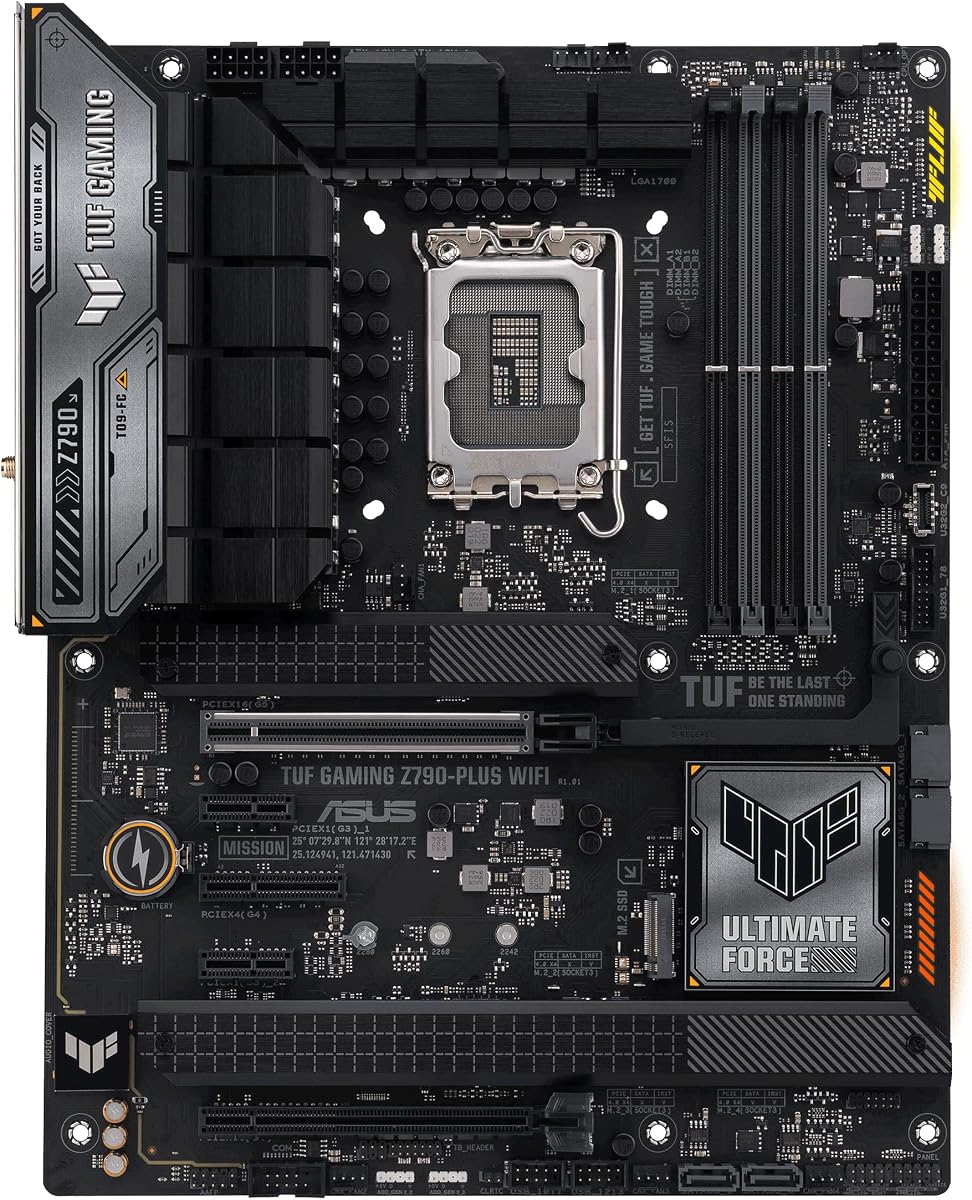
This Intel motherboard is a favorite for its durability and feature set. The TUF components ensure longevity while providing robust performance for gaming and work.
We may earn a commission when you buy through this link, at no additional cost to you.
The 16+1 DrMOS power solution handles high-end Intel CPUs with stability. Thunderbolt 4 support adds versatile connectivity for fast data transfers and external displays.
While it does not include the latest WiFi 7 standard, WiFi 6 is still very fast. The simpler design focuses on utility rather than flashy aesthetics for some users.
Users needing reliability and fast external connectivity will find this ideal. It remains a top pick for Intel builds needing serious expansion capabilities.
TUF components are tested to withstand extreme conditions for long life.
Thunderbolt 4 allows for up to 40Gbps data transfer speeds.
We may earn a commission when you buy through this link, at no additional cost to you.
This package simplifies the build process by including essential RAM. It is perfect for users who want a complete start without sourcing parts separately.
We may earn a commission when you buy through this link, at no additional cost to you.
The board supports memory speeds up to 8200 MT/s with ease. BIOS settings allow for simple one-click overclocking to reach these high speeds quickly.
While the included RAM is a single stick, it leaves room for upgrades. Some might prefer a dual channel kit for better performance immediately.
Building a PC is easier with this comprehensive bundle. It is a smart choice for first time builders needing core components.
One-click settings make high-speed memory tuning simple for beginners.
Getting RAM with the board saves time and reduces compatibility risks.
We may earn a commission when you buy through this link, at no additional cost to you.
This Z790 model delivers strong power handling for Intel processors. The digital VRM ensures stable performance even under heavy loads like rendering.
We may earn a commission when you buy through this link, at no additional cost to you.
Four M.2 slots provide ample space for fast NVMe storage expansion. The thermal guard technology helps keep SSDs cool during data intensive tasks.
While the USB-C options are limited, the board covers most modern connectivity needs. The RGB features are functional but less customizable than premium options.
Users prioritizing power stability and storage will find this board ideal. It balances performance and utility effectively for mid to high-end builds.
Thermal Guard III prevents M.2 SSDs from throttling due to heat.
Q-Flash allows BIOS updates using a USB drive without a CPU.
We may earn a commission when you buy through this link, at no additional cost to you.
This mATX board fits well in smaller cases without sacrificing features. It offers a clean look with its ICE white theme for custom builds.
We may earn a commission when you buy through this link, at no additional cost to you.
The power design is efficient for Ryzen processors in a smaller footprint. WiFi6E ensures wireless speeds remain fast even in crowded networks.
While the limited M.2 slots might hinder heavy storage needs, it is fine for most. The 5-year warranty adds extra value for this smaller form factor.
Perfect for compact gaming rigs or home office setups. It combines style and performance in a manageable size for smaller desks.
The mATX size fits small cases while keeping essential ports available.
A 5-year warranty ensures long term support for the hardware.
We may earn a commission when you buy through this link, at no additional cost to you.
This flagship motherboard is designed for serious enthusiasts demanding top performance. The 18+2+2 power stages handle any Ryzen CPU without breaking a sweat.
We may earn a commission when you buy through this link, at no additional cost to you.
AI features simplify complex tasks like cooling and overclocking automatically. The USB4 ports provide industry leading connectivity speeds for external drives.
The high price reflects the premium components and advanced features included. Some users might find the AI settings too intricate for simple use cases.
Enthusiasts wanting the best performance and latest tech will love this. It is the ultimate choice for high-end gaming and content creation.
AI features adjust cooling and power settings for optimal performance.
Five M.2 slots allow for extensive high-speed SSD arrays.
We may earn a commission when you buy through this link, at no additional cost to you.
This board blends style and performance in a compact and attractive design. The white theme fits well with lighter gaming setups and builds.
We may earn a commission when you buy through this link, at no additional cost to you.
The 12+2 power stages handle standard Ryzen chips with ease. Cooling solutions are well placed to ensure stable operation during long sessions.
While it lacks PCIe 5.0 main slots, PCIe 4.0 is still very fast. The RGB lighting can be controlled easily using standard ASUS software.
It is a great choice for builders who value looks alongside function. It offers strong performance for a reasonable price point.
The white aesthetic offers a unique look for custom white PC builds.
High quality power stages ensure stable performance for most processors.
We may earn a commission when you buy through this link, at no additional cost to you.
This board is built for those who demand the absolute best performance. The power stages and cooling systems are designed for extreme overclocking.
We may earn a commission when you buy through this link, at no additional cost to you.
Five M.2 slots mean you never run out of fast storage space. WiFi 7 ensures your connection is always fast for online gaming.
The price reflects the premium components but might be too much for many. Average users may not utilize all the advanced features available here.
If budget is no object and performance is key this is the pick. It sets the standard for high-end AM5 motherboard design.
Extreme power delivery enables high frequency overclocking stability.
High quality capacitors and alloy chokes ensure long term reliability.
We may earn a commission when you buy through this link, at no additional cost to you.
This board brings AI ready features to the TUF lineup effectively. It supports WiFi 7 for faster wireless speeds than older models.
We may earn a commission when you buy through this link, at no additional cost to you.
The power stages are rated for high performance with Ryzen CPUs. Multiple video outputs allow for flexible monitor setups without extra hardware.
While it lacks extensive RGB options the focus remains on utility. The BIOS Flashback feature simplifies updates for newer processors.
Gamers needing AI features and stable power will appreciate this. It is a reliable choice for modern gaming and streaming.
Integrated AI tools help manage system performance automatically.
Multiple ports allow for multi monitor setups easily.
We may earn a commission when you buy through this link, at no additional cost to you.
Selecting the right motherboard requires balancing several technical factors to ensure long-term satisfaction and performance.
Always verify the socket type matches your CPU generation. AM5 is for AMD Ryzen 7000 and newer while LGA 1700 supports Intel 12th to 14th Gen.
Choosing the correct socket is the first critical step in building a stable system.
DDR5 RAM offers faster speeds but requires compatible boards to unlock full potential. Look for boards supporting high MT/s rates like 6000MHz or higher.
Ensure the board has enough DIMM slots for your intended capacity.
A robust VRM design is essential for stable performance under load. Boards with more power phases generally handle overclocking better.
Higher phase counts ensure consistent power delivery during heavy gaming or rendering.
Check how many PCIe and M.2 slots are available for storage and GPUs. PCIe 5.0 support is future proofing for next gen graphics cards.
More M.2 slots allow for faster boot and load times.
Modern motherboards often include WiFi6E or WiFi7 for faster internet without cables. Look for 2.5GbE LAN for wired networking efficiency.
Strong network integration reduces the need for add-in cards.
Ensure the ATX or mATX size fits your chosen case. Smaller boards save space but may limit expansion options.
Measuring your case dimensions before buying prevents installation issues.
Heatsinks on VRMs and M.2 slots help prevent thermal throttling during long sessions. Look for boards with robust thermal guards.
Good cooling extends the lifespan of your components significantly.
Extras like USB-C front headers and BIOS Flashback add convenience. Consider what ports you will use regularly.
Prioritize features that match your specific workflow needs.
Start by installing the CPU and RAM carefully. Align the notches correctly to avoid pin damage.
Secure the motherboard into the standoffs to prevent shorts. Connect power and data cables firmly.
Update the BIOS to the latest version for best compatibility. Monitor temps to ensure cooling works effectively.
DDR5 offers significantly faster speeds which benefit modern gaming and applications. It is a worthwhile investment for new builds.
Most standard PSUs work fine. High end builds may require higher wattage for stable operation.
Z790 focuses on Intel support while B850 targets AMD AM5 systems. Features vary by chipset and brand.
WiFi 7 provides higher speeds and lower latency. It ensures compatibility with the latest routers.
Three or four slots offer plenty of space for most users. More helps if you use large storage arrays.
Socket compatibility is strict. Check the support list before buying to avoid errors.
RGB lighting uses minimal power. It does not impact gaming speed or rendering.
A 5-year warranty provides long term support. Look for brands with good customer service.
We have highlighted top options for every need from budget to premium. Each pick offers unique strengths for different build requirements.
Prioritize power delivery and connectivity features that match your workflow. The right board ensures stability and speed for years.
Always verify current stock and availability before purchasing online. Changes in inventory can happen quickly during high demand periods.