
Monitor Light Bar Eye-Care USB Reading Monitor Lamp
4.2Editor score
Three color temperature settings
Memory function remembers settings
USB powered for easy use
This guide compares the top 10 monitor light bars for late night gaming, focusing on eye care, RGB lighting, and glare reduction for immersive setups.
Late night gaming sessions often leave eyes strained from the contrast between a bright screen and a dark room. A dedicated monitor light bar provides bias lighting that reduces this contrast and protects your vision during extended play.
We evaluated ten top-rated light bars based on eye care certifications, color temperature ranges, RGB capabilities, and mounting stability. Each product was analyzed for its ability to illuminate the desk without reflecting on the screen.
Every pick highlights unique strengths like music sync, auto-dimming, or ultrawide coverage. Note that prices and availability change frequently, so verify current deals before purchasing to ensure you get the best value.
4.2Editor score

4.7Editor score
4.6Editor score
The following table breaks down the key specifications of each light bar to help you find the perfect match for your gaming setup.


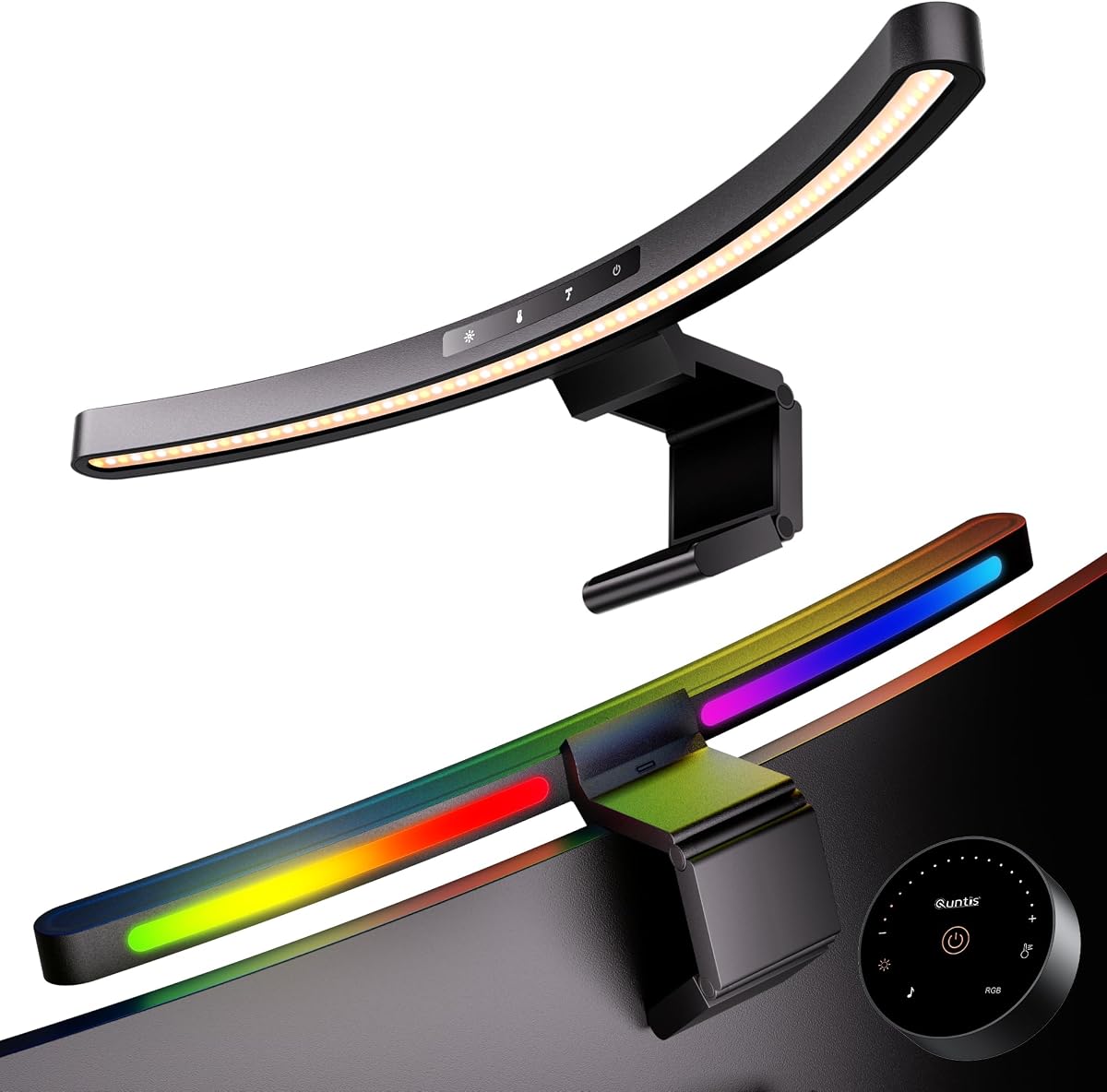
The Quntis Curved Monitor Light Bar 15 RGB Backlight stands out as our top choice for gamers who demand high-quality lighting. With a 4.7 rating, it excels in reducing eye strain while adding a cool RGB ambiance to your setup. Its design specifically targets 34-inch-plus screens, making it ideal for ultrawide gaming rigs.
We may earn a commission when you buy through this link, at no additional cost to you.
Its standout feature is the combination of a 1400 lux front light and 15 RGB backlight modes. The asymmetrical optical design ensures no glare hits your screen, while the 98 CRI provides true color representation for immersive visuals. The auto-dimming sensor is a game-changer for late night sessions, adjusting brightness to ambient light automatically.
While it is a premium option, the stability of its clamp and the versatility of its dual-light system justify the cost. The only trade-off is that it is best suited for larger screens, so smaller setups might feel it is oversized.
Buyers who own large curved monitors and prioritize eye health during long gaming marathons should choose this bar. It balances professional task lighting with gaming aesthetics perfectly, ensuring comfort without sacrificing style.
The 15 RGB backlight modes create a stunning visual effect that enhances the gaming environment without causing distraction.
The precision light sensor ensures your eyes are always protected by adjusting brightness levels based on the room's lighting conditions.
We may earn a commission when you buy through this link, at no additional cost to you.
This lamp focuses purely on eye care and task lighting efficiency. With a 4.6 rating, it delivers 900 lux of light that is perfectly aimed at your desk. The auto-dimming feature is robust, ensuring you never struggle with brightness adjustments during late night gaming sessions.
We may earn a commission when you buy through this link, at no additional cost to you.
Its main strength lies in the asymmetrical optical design that eliminates glare completely. The high CRI of 98 means colors look vibrant and accurate, which is great for games that rely on visual cues. The 78 LED beads provide even lighting across a wide area.
The lack of RGB modes makes it less flashy than other options, but it ensures the focus remains on comfort and clarity. Users who prefer a minimalist setup will appreciate the clean design.
Ideal for gamers who want zero eye strain and maximum focus without distracting lights. It is a reliable workhorse for long sessions where comfort matters more than flashy effects.
Certified to meet rigorous standards for blue light safety, this lamp protects your eyes from harm during extended use.
The built-in sensor monitors ambient light to keep your desk at a constant, comfortable brightness level without manual input.
We may earn a commission when you buy through this link, at no additional cost to you.
Remote control functionality is the key differentiator here. The 4.4 rating reflects its solid performance in adapting to curved monitors. The triple-fold weighted clamp ensures a stable fit on various monitor types, from 17 to 32 inches.
We may earn a commission when you buy through this link, at no additional cost to you.
The 2-hour auto-off timer is a unique feature that helps prevent eye fatigue by reminding you to take breaks. The 45-degree angled design eliminates glare effectively. You can adjust brightness and color temperature directly from your desk without reaching up.
The trade-off is that the remote is an extra component to keep track of. However, for gamers who value convenience during intense sessions, this is a minor inconvenience. The 1200 lux illumination is bright enough for any task.
Buyers who want easy access to settings while gaming will find this bar very useful. It balances professional functionality with gaming-friendly features like the timer and flexible pivot.
This timer reminds you to step away and rest your eyes, promoting healthier gaming habits over long periods.
The weighted clamp design adapts to both flat and curved screens, ensuring a secure fit without damaging the monitor.
We may earn a commission when you buy through this link, at no additional cost to you.
This 15.7-inch bar is a strong contender for gamers on a budget who still want RGB features. The 4.5 rating confirms its quality. It offers 24 RGB modes, making it one of the most colorful options in this price range.
We may earn a commission when you buy through this link, at no additional cost to you.
The asymmetric optical design ensures light goes to the desk, not your eyes. With a CRI of 95, colors remain vibrant and true to life. The memory function means you don't have to reconfigure settings every time you turn it on.
While it lacks auto-dimming, the stepless dimming allows for precise manual control. The triangular counterweight clamp is stable and saves desk space. It fits monitors up to 2.36 inches thick.
Ideal for gamers who want aesthetic appeal without breaking the bank. It provides excellent task lighting and fun RGB modes for a balanced setup.
With 24 distinct RGB modes, you can customize the vibe of your room to match your favorite games or music.
The device remembers your last brightness and color settings, so your ideal lighting environment is ready instantly.
We may earn a commission when you buy through this link, at no additional cost to you.
This product delivers excellent value for money. With a 4.2 rating, it proves that good lighting does not need to be expensive. It covers a 30 by 20-inch area with 800 lux brightness, reducing dark spots on your desk.
We may earn a commission when you buy through this link, at no additional cost to you.
The design is simple but effective. It uses a mechanical switch for controls, which is robust and easy to use. The 45-degree angle ensures no direct light hits your eyes. The memory function recalls your last settings automatically.
The main limitation is the lack of RGB lighting and a shorter 11.8-inch bar. However, for pure task lighting and eye protection, it performs well. It is USB-powered, making it compatible with any port.
Buyers on a tight budget will find this bar a practical solution. It focuses on core functionality and eliminates eye strain effectively without unnecessary features.
Despite its small size, this light bar delivers sufficient brightness for most desks, making it a space-saver.
The mechanical switch allows for quick brightness and color temperature changes without needing complex menus.
We may earn a commission when you buy through this link, at no additional cost to you.
This 15.7-inch bar is designed for wider coverage. The 4.2 rating highlights its reliable performance for basic needs. It covers a 35 by 25-inch area, ensuring even lighting across your desk. The 900 lux brightness is strong enough for late night sessions.
We may earn a commission when you buy through this link, at no additional cost to you.
It uses a mechanical switch for intuitive operation. No remote is needed, just a quick twist or press to change settings. The memory function is handy for quick access to your preferred brightness. The patented counterweight clip ensures a stable fit.
While it lacks RGB effects, it is a solid choice for gamers who want simple, effective lighting. The asymmetric design prevents screen glare. The USB connection is versatile for any desk setup.
Ideal for gamers who value simplicity and broad coverage over flashy effects. It is a straightforward solution for eye comfort and desk illumination.
The extended length of the bar provides even light distribution across large desks, eliminating dark corners effectively.
You can mount this bar in seconds using the counterweight clip, requiring no tools or complicated setup.
We may earn a commission when you buy through this link, at no additional cost to you.
This bar features an elegant aluminum design and fits large screens well. The 4.6 rating reflects its quality build and useful RGB features. The 20-inch length makes it suitable for ultrawide monitors. The 90-degree USB cable leaves room for webcams.
We may earn a commission when you buy through this link, at no additional cost to you.
It offers 15 RGB backlight modes that create a vibrant gaming atmosphere. The color rendering index of 95 ensures accurate colors on your screen. The remote control lets you adjust brightness and color temperature easily. The touch remote is a nice addition.
The brightness is around 800 lux, which is sufficient for most environments. The memory function ensures quick access to your last settings. It is a solid mid-range option with premium aesthetics.
Buyers who want a stylish and functional light bar for large monitors should consider this. It blends professional performance with gaming aesthetics seamlessly.
The aluminum alloy construction looks sleek and ensures the bar stays cool during extended use.
With 15 RGB modes and stepless dimming, you can create the perfect ambiance for any gaming session.
We may earn a commission when you buy through this link, at no additional cost to you.
This bar offers a unique music sync feature that responds to sound in real time. The 4.6 rating confirms its quality. It has 23 RGB effects, combining presets with reactive modes. The 17.7-inch length is ideal for mid-sized curved setups.
We may earn a commission when you buy through this link, at no additional cost to you.
The music sync adds a dynamic element to your setup. When you are listening to music or playing games with audio, the lights dance to the beat. The remote and touch controls ensure easy access to all features. The CRI of 95 ensures accurate color reproduction.
The only trade-off is the price and dependency on ambient sound for music sync. However, the visual impact is worth it. The memory function and 2-hour timer add practical utility.
Buyers who want a dynamic and reactive lighting experience should choose this bar. It is the best choice for gamers who want their setup to feel alive.
The lights react to audio in real time, creating an immersive connection between your sound and visual setup.
A remote and touch buttons ensure you can control settings even if you misplace the remote.
We may earn a commission when you buy through this link, at no additional cost to you.
This product features dual tactile buttons for independent control of the front and RGB lights. The 4.2 rating reflects its straightforward design. The 15.75-inch bar is a good size for standard monitors. The USB-C support adds modern convenience.
We may earn a commission when you buy through this link, at no additional cost to you.
The independent control allows you to adjust the front light for task use and the RGB for ambiance separately. The memory function saves settings for both lights. The design is sleek and mounts easily with a retractable clip.
While the brightness and RGB modes are less extensive than premium models, it is a solid choice for budget-conscious gamers. The USB-C connection ensures compatibility with newer devices.
Ideal for gamers who want independent control of task and ambient lighting without complex settings. It is a simple yet effective solution for desk lighting.
Dual buttons allow you to adjust task lighting and RGB ambiance independently for complete customization.
The USB-C power support ensures you can use this bar with modern laptops and devices.
We may earn a commission when you buy through this link, at no additional cost to you.
YEELIGHT is a trusted brand known for quality lighting products. With a 4.5 rating, this bar delivers professional performance. The aluminum body ensures durability and efficient heat conduction. The flicker-free light is a major benefit for eye health.
We may earn a commission when you buy through this link, at no additional cost to you.
The stepless dimming and 2700K to 6500K range give you precise control. The 95 CRI ensures vibrant and true colors. The touch control is intuitive and modern. It fits monitors from 0.3 to 1.1 inches thick.
While it lacks RGB effects, it is excellent for users who prioritize eye care and simplicity. The camera-friendly design ensures it does not block your webcam. The memory function is helpful.
Buyers who want a reliable and durable light bar should choose YEELIGHT. It focuses on high-quality performance and eye comfort over extra features.
The full-metal body ensures longevity and effective heat dissipation during long gaming sessions.
Touch controls offer precise stepless dimming to adjust brightness exactly to your preference.
We may earn a commission when you buy through this link, at no additional cost to you.
Choosing the right monitor light bar requires attention to several key factors that impact eye comfort and gaming immersion. This section breaks down what to look for.
Look for bars that meet standards like IEC/TR 62778 for blue light safety. Bars with RG0 ratings and flicker-free technology ensure your eyes are protected during long sessions.
Prioritize certifications to ensure the light is safe for extended use and does not contribute to digital eye strain.
An asymmetrical optical design is critical. It directs light to your desk and not onto your screen or eyes, which prevents glare and reflections.
Always choose bars with asymmetric designs to ensure the light enhances your view rather than distracting from it.
A high CRI value, ideally 95 or above, ensures colors appear accurate and vibrant. This is essential for games with detailed visuals or color-critical tasks.
Select a high CRI to enjoy true-to-life colors that match what you see on your screen.
RGB modes add immersion to your setup. Options with music sync or multiple presets allow you to customize the ambiance to match your mood or game.
Choose RGB features if you want an immersive environment that extends the gaming experience beyond the screen.
Ensure the bar offers sufficient lux for your desk size. 900 lux or higher is recommended for large setups. Stepless dimming allows precise control.
Check the brightness range to ensure it meets your needs for both focused work and relaxing play.
Check if the bar fits your monitor thickness. Clamps should be adjustable and non-slip to prevent damage. Some bars are designed specifically for curved screens.
Verify the clamp design to ensure a stable fit that does not slip or damage your monitor.
Control options range from mechanical switches to touch panels and remotes. Remotes offer convenience, while touch controls are more compact.
Pick a control method that allows you to adjust settings quickly without interrupting your gameplay.
USB-powered bars are versatile. Some offer USB-C support. Ensure the cable length is sufficient to reach your power source without clutter.
Choose a power option that integrates seamlessly with your current cable management setup.
Install the bar by placing it centrally on top of your monitor. Ensure the clamp grips the monitor securely without wobbling. Check that the light is angled downward to avoid screen glare.
Use the dimming features to adjust brightness based on room light. For late night gaming, lower brightness levels are better for eye health. Enable auto-dimming if available to save energy and effort.
Clean the bar with a soft, dry cloth to prevent dust buildup. Do not use harsh chemicals. If you are not using it for extended periods, unplug it to conserve power and protect the LEDs.
A monitor light bar is a long LED strip designed to mount on top of a screen. It provides ambient light to your desk without causing glare on the screen. This setup reduces eye strain during long gaming sessions.
Yes, these bars reduce the contrast between a bright screen and a dark room. By providing bias lighting, they prevent your eyes from constantly adjusting. This helps significantly reduce digital eye strain and fatigue.
Many bars like Quntis are designed with flexible clamps or curved designs. Ensure the product specifies support for curved screens. Always check the curvature range before purchasing to ensure compatibility.
Most monitor light bars run via USB. They can plug into your PC or a USB adapter. Some use USB-C for faster power delivery. No special electrical outlet is needed for basic setups.
Cool white around 6000K is good for focus. Warm white around 3000K is better for relaxing. Many bars offer stepless adjustment so you can switch based on the time of day.
Match the length to your monitor size. Bars 15 to 20 inches wide work best for standard monitors. Ultrawide screens need longer bars to ensure even illumination across the desk area.
RGB effects can be distracting if too bright. Use them subtly as backlighting. Most bars allow you to turn off RGB if needed. Dimmed ambient light is usually best for competitive gaming.
Yes, most bars are portable. The clamps are removable and adjustable. Just ensure you do not scratch your screens during installation. The lightweight design makes them easy to swap.
These ten light bars offer a range of features to suit every gamer. Whether you want RGB modes or simple task lighting, there is an option here. The Quntis Curved Monitor Light Bar stands out for its eye care and RGB mix.
Prioritize eye health by choosing a bar with anti-glare and flicker-free design. RGB features are a bonus for immersion but should not compromise the primary function of desk illumination.
Remember that prices change frequently. Check current deals on Amazon to ensure you get the best value for your specific needs and monitor setup.