
Razer Tartarus V2 Left-Handed Gaming Keypad
4.3Editor score
32 programmable keys
Mecha-membrane switches
Directional thumbpad included
Discover the top MMO keyboards for gaming in October 2026. Our guide compares features, switch types, and layouts to help you choose the perfect gear.
Finding the right MMO keyboard can transform your gaming experience by offering specialized layouts and programmable keys tailored for complex in-game actions and macros essential for competitive play.
We have carefully evaluated ten leading models based on switch technology, ergonomic design, customization options, and overall build quality to ensure you get a device that meets your specific gaming demands.
Each pick highlights unique strengths and potential drawbacks so you can make an informed decision, keeping in mind that prices and availability may change frequently across different online retailers.
4.3Editor score

4.3Editor score

2.9Editor score
This side-by-side comparison highlights the key specifications and features of the ten selected products to help you quickly identify which device aligns best with your gaming preferences and budget constraints.


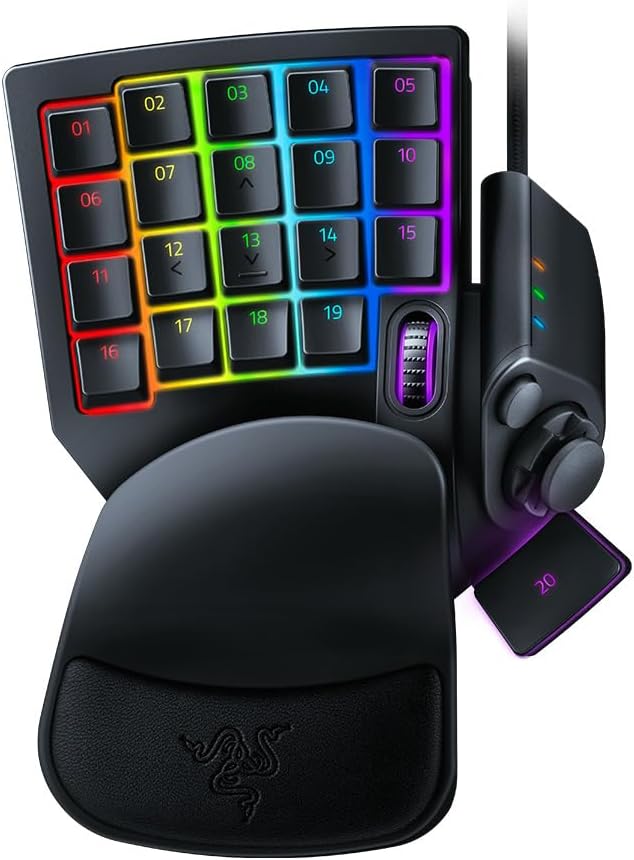

The Razer Tartarus V2 is a dedicated left-handed keypad designed to enhance your gaming setup without the cost of a full board. With a 4.3 rating, it appeals to users who need quick access to macros and commands.
We may earn a commission when you buy through this link, at no additional cost to you.
Its 32 mecha-membrane keys offer tactile feedback similar to mechanical switches while remaining comfortable for long sessions. The 8-way thumbpad improves movement control, making it ideal for MMOs where positioning is key.
While it lacks the durability of mechanical switches, the soft-cushioned design reduces fatigue. The lack of a full QWERTY layout means it serves best as a companion device rather than a primary input tool.
This device is perfect for gamers seeking a cost-effective way to add macro functionality to their rig. If you want to optimize your gameplay without breaking the bank, this keypad delivers solid value.
The wrist rest and angled design help maintain natural hand positioning during extended raids or gameplay.
Remap keys and combinations to execute complex commands easily through intuitive software configuration.
We may earn a commission when you buy through this link, at no additional cost to you.
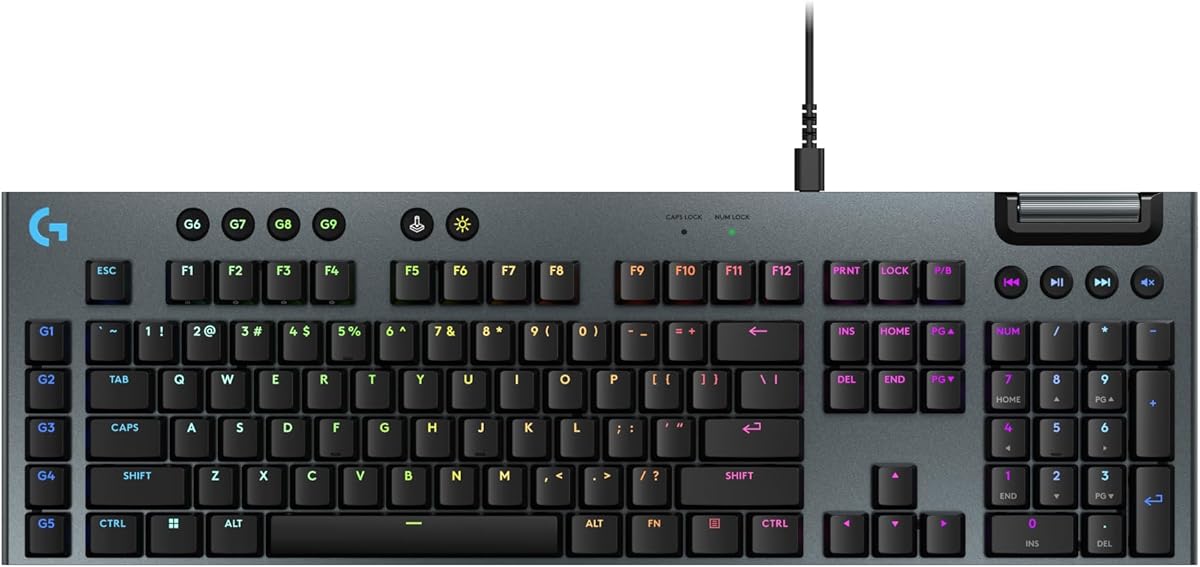
The Logitech G915 X brings next-gen engineering to the table with its low-profile mechanical switches. It offers a full-size layout that includes a numpad, which some users might miss in compact designs.
We may earn a commission when you buy through this link, at no additional cost to you.
Its 1.3 mm actuation point allows for rapid inputs, helping to increase your actions per minute significantly. The sand-blasted aluminum top plate and PBT keycaps ensure durability and a premium typing experience.
However, the lack of wireless support limits mobility compared to other models in this category. The design is sleek but might not suit those who prefer traditional high-profile keycaps for typing comfort.
If you prioritize speed and a modern aesthetic over wireless convenience, this keyboard stands out. It provides a solid foundation for gaming setups that demand both style and performance.
Low-profile switches reduce travel distance for quicker reaction times during intense gaming moments.
Double-shot PBT keycaps resist wear and shine, ensuring legends remain clear over time.
We may earn a commission when you buy through this link, at no additional cost to you.
The SteelSeries Apex 3 is a standout choice for gamers who need a quiet and durable keyboard. With a high 4.6 rating, it balances affordability with features that are essential for shared living spaces.
We may earn a commission when you buy through this link, at no additional cost to you.
Its whisper-quiet switches are rated for 20 million keystrokes, ensuring longevity without disturbing others nearby. The IP32 water resistant protection prevents accidental spills from damaging the internal electronics.
The 10-zone RGB illumination provides a nice visual effect, though it lacks the granularity of per-key lighting. The magnetic wrist rest adds significant comfort during long sessions, which is a rare find at this price point.
This model is ideal for casual gamers or those who type frequently and prefer a quiet environment. It delivers reliable performance and essential protection features without overwhelming complexity.
Water resistance ensures that minor spills won't end your gaming session abruptly.
The wrist rest offers full palm support to reduce strain during extended use.
We may earn a commission when you buy through this link, at no additional cost to you.
The ASUS ROG Strix Scope II X is a full-size mechanical keyboard designed for enthusiasts who value customization. Its hot-swappable feature allows you to change switches without soldering, giving you total control over your typing feel.
We may earn a commission when you buy through this link, at no additional cost to you.
Pre-lubed ROG NX Snow switches provide smooth and thocky keystrokes, which are highly prized in both gaming and typing contexts. The integrated sound-dampening foam further enhances the acoustic quality, reducing unwanted pinging noises.
The PBT keycaps are double-shot, ensuring that legends never fade even after heavy use. While it is wired, the USB-C connectivity offers modern convenience and durability for a permanent desktop setup.
This keyboard is perfect for users who want a durable and customizable rig. If you enjoy tinkering with your hardware and want a high-quality experience, this model is a strong contender.
Change switches easily to tailor the keyboard to your specific preference without technical skills.
Internal foam and pads ensure your keystrokes sound premium and reduce echo.
We may earn a commission when you buy through this link, at no additional cost to you.
The AULA F75 Pro is a compact 75% wireless keyboard that offers remarkable versatility through its tri-mode connection support. It allows seamless switching between Bluetooth, 2.4GHz, and wired connections for various devices.
We may earn a commission when you buy through this link, at no additional cost to you.
The inclusion of a multi-function knob makes it easy to control volume and lighting effects on the fly. The side-printed PBT keycaps add a unique visual style that allows light to shine through the legends effectively.
Pre-lubed stabilizers and switches contribute to a smooth and satisfying typing experience. The 4000mAh battery ensures that you can use it wirelessly for extended periods without frequent charging.
This keyboard is suitable for gamers who switch between devices frequently or prefer a cleaner desk setup. Its combination of features and portability makes it a top pick for modern users.
Connect up to five devices simultaneously and switch between them effortlessly.
Adjust volume and lighting brightness with a simple rotation or click.
We may earn a commission when you buy through this link, at no additional cost to you.
The Keychron C0 HE 8K is a cutting-edge one-handed keypad designed for competitive players who need speed and precision. Its Hall Effect magnetic switches detect key travel in real time, allowing for adjustable actuation.
We may earn a commission when you buy through this link, at no additional cost to you.
With an 8K polling rate, it minimizes latency to near zero, making it ideal for fast-paced titles like Valorant or CS2. The web-based configurator simplifies setup by removing the need for additional software installation.
The compact 35-key layout ensures essential commands are within reach without cluttering your desk. It is versatile enough for streamers and creators who need quick access to shortcuts and macro workflows.
This device stands out as the best choice for users who value high-performance technology. If you are looking for a gaming keypad that rivals mechanical keyboards in speed, this is it.
Keys reset instantly without a fixed reset point for faster repeated keystrokes.
Customize sensitivity from 0.01 mm to suit your specific gaming needs.
We may earn a commission when you buy through this link, at no additional cost to you.
The Razer Tartarus Pro features analog-optical switches that offer a level of control typically found in high-end gaming setups. It allows for adjustable actuation, so you can tune the sensitivity to your exact preference.
We may earn a commission when you buy through this link, at no additional cost to you.
The rapid trigger technology ensures keys reset instantly upon upward motion, which is crucial for rapid fire actions. The 32 programmable keys let you map complex commands, freeing up your main keyboard for other tasks.
Its thumbpad provides natural movement control, which many console players find intuitive. The Chroma RGB lighting syncs with games and hardware for an immersive visual experience that enhances your setup.
If you want a keypad that feels like a pro tool, this model delivers on performance. It is designed for serious gamers who demand precision and customization in their peripheral choices.
Execute nuanced movements and control by varying pressure on individual keys.
The 8-way directional pad mimics console stick controls for natural movement.
We may earn a commission when you buy through this link, at no additional cost to you.
The Razer BlackWidow V4 X is a mechanical keyboard built for rapid inputs and quiet operation. Its yellow switches are linear and smooth, providing instant feedback without loud clicking sounds.
We may earn a commission when you buy through this link, at no additional cost to you.
Six dedicated macro keys expand your command set, allowing you to assign frequently used actions to easily accessible spots. The multi-function roller and secondary media keys offer convenient control over volume and brightness.
Sound dampeners are integrated to minimize noise, ensuring the keyboard sounds as satisfying as it feels. The Chroma RGB lighting is bright and customizable, syncing with your games for dynamic effects.
This keyboard offers a strong balance of features and build quality. If you want a reliable mechanical keyboard with essential gaming tools, this model is a dependable choice.
Program complex actions to dedicated keys for quick access during intense gameplay.
Linear switches and dampeners ensure a smooth and quiet typing experience.
We may earn a commission when you buy through this link, at no additional cost to you.
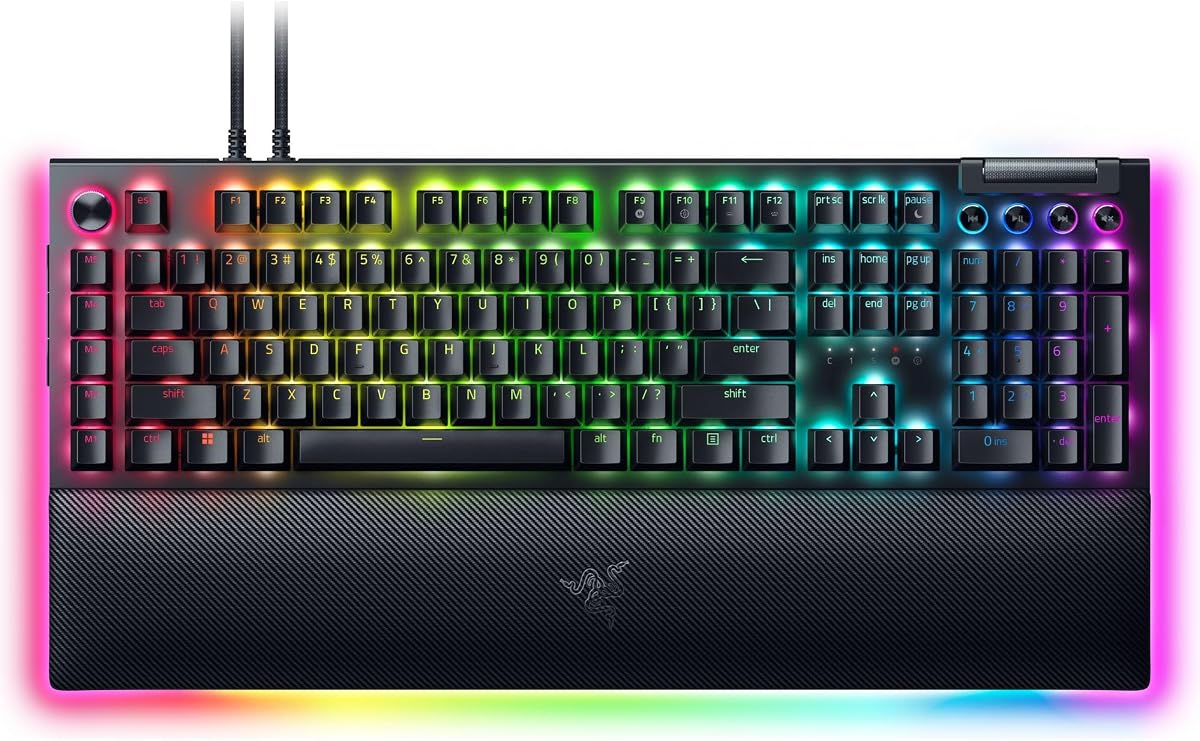
The Razer BlackWidow V4 Pro is a top-tier option for those who love tactile feedback. Its green mechanical switches provide a satisfying bump and click that many enthusiasts find rewarding.
We may earn a commission when you buy through this link, at no additional cost to you.
The command dial adds a unique control element for adjusting volume or lighting effects. A plush leatherette wrist rest with underglow lighting ensures comfort during long sessions and adds to the aesthetic appeal.
Doubleshot ABS keycaps are durable and designed to withstand heavy use. The per-key lighting and underglow effects create an immersive environment that highlights your battlestation.
If you prioritize tactile feedback and premium comfort, this keyboard is an excellent investment. It combines high-end features with a robust design suitable for professional gaming environments.
Assign custom functions to the dial for intuitive control over media and settings.
The wrist rest provides secure support while underglow enhances your setup.
We may earn a commission when you buy through this link, at no additional cost to you.
The Razer Tartarus V2 Pro is designed for professionals who need maximum speed and precision. Its Gen-2 analog optical switches provide rapid trigger functionality and adjustable actuation for ultimate control.
We may earn a commission when you buy through this link, at no additional cost to you.
With true 8000 Hz HyperPolling, it delivers input updates up to 8x faster than conventional peripherals. The anti-drift TMR thumbstick ensures precise movements, making it ideal for fast-paced competitive play.
The doubleshot PBT keycaps offer a crisp feel and resist shine and fade over time. It includes customizable keymaps and a fully adjustable wrist rest to keep your setup optimized for long gaming sessions.
This keypad is the ultimate choice for serious gamers who demand the best technology available. If you want to dominate your games with near-zero latency and professional-grade features, this is the one.
Achieve 8x faster input updates for quicker reactions in critical moments.
Navigate menus and execute precise movements with a reliable analog stick.
We may earn a commission when you buy through this link, at no additional cost to you.
Choosing the right MMO keyboard depends on understanding your specific needs, budget, and preferred playstyle. This guide breaks down the essential factors to consider before making your purchase.
Switches determine the feel and sound of your keyboard. Mechanical switches offer durability and tactile feedback, while membrane options are quieter and often cheaper. Consider whether you prefer linear, tactile, or clicky responses.
Choose mechanical for longevity and precision, or membrane for quiet and cost-effective solutions.
Full-size boards include a numpad but take up desk space. Compact layouts like 75% or tenkeyless save room. Keypads focus on essential keys and macros for MMOs. Decide how much room you have.
Select a layout that balances comfort with available desk space.
MMO games often require many hotkeys and macros. Look for keyboards with dedicated macro keys or high programmability. This allows you to bind complex actions to single keypresses.
Prioritize models with robust macro support to streamline your gameplay.
Long gaming sessions can cause fatigue. Wrist rests and angled designs help maintain natural hand positions. Comfort is crucial for preventing strain during raids or long matches.
Ensure the keyboard has ergonomic features to support your wrists.
RGB lighting adds aesthetics and can help identify keys in dark rooms. Per-key lighting offers more customization than zone-based options. Check if the lighting syncs with your other gear.
Opt for customizable RGB if visual immersion matters to you.
Wired connections ensure stable performance with no lag. Wireless options offer freedom of movement but may introduce latency. Ensure the connection method suits your gaming priorities.
Use wired for competitive play and wireless for versatility.
Build quality affects how long the keyboard lasts. Metal frames and PBT keycaps resist wear better than plastic. Check switch lifespan ratings to ensure long-term reliability.
Invest in durable materials to extend your keyboard's lifespan.
Software allows you to customize macros and lighting profiles. Ensure the app is user-friendly and compatible with your OS. Advanced features often require proprietary software support.
Verify software availability to unlock the keyboard's full potential.
Begin by setting up the software provided by the manufacturer to customize your key mappings and macros. This step ensures that all programmable features are ready for immediate use.
Keep your keyboard clean by gently removing dust and debris with compressed air. Avoid spilling liquids near it to prevent damage to internal components.
Store your device properly when not in use to prevent accidental damage. For wireless models, charge the battery regularly to maintain performance levels.
Mechanical switches are generally preferred due to their durability and precise tactile feedback. However, some users prefer membrane switches for quieter operation. It depends on personal preference and budget.
A dedicated keypad can enhance your experience by providing quick access to macros without cluttering your main keyboard. It is highly beneficial for complex games that require many hotkeys.
RGB lighting is primarily aesthetic but can help with key identification in low-light environments. It does not directly impact performance but adds to the visual appeal of your setup.
Yes, most keyboards are suitable for typing as well as gaming. Look for comfortable keycaps and ergonomic designs if you plan to use it for long periods of writing or coding.
Some models offer wireless connectivity, but wired options are more common for gaming. Check the specifications to ensure the connection method meets your needs.
Use the manufacturer's software to record and assign macro commands to specific keys. Follow the on-screen instructions to map actions to your desired keybinds.
We have reviewed ten top MMO keyboards ranging from budget-friendly keypads to high-end mechanical keyboards. Each model offers unique strengths tailored to different gaming needs.
Consider your priorities such as layout, switch type, and programmability before deciding. The best choice is one that aligns with your specific gameplay and comfort requirements.
Prices and availability can fluctuate, so double-check current listings before purchasing. With the right gear, you can elevate your gaming performance significantly.