
Redragon K618 PRO
4.1Editor score
Tri-mode connectivity support
20 macro keys included
30 percent slimmer design
This guide compares ten top low profile mechanical keyboard options for fast paced games, evaluating speed, durability, connectivity, and value for gamers.
Finding the right input device can transform your gaming experience entirely. Low profile mechanical keyboards offer speed and comfort without sacrificing the tactile feedback gamers crave. They bridge the gap between laptops and desktops for ultimate portability.
We evaluated ten leading models based on actuation speed, build quality, connectivity options, and user feedback. Each product was analyzed for performance in fast paced games to ensure accurate recommendations. Our goal is to help you choose the best fit.
Each pick highlights unique strengths and trade-offs relevant to competitive play. We include detailed breakdowns of switches, connectivity, and customization features. Please note that prices fluctuate frequently, so verify current listings before making a final purchase decision.
4.1Editor score

4.7Editor score

4.2Editor score
Below is a side-by-side comparison of all ten selected keyboards to help you weigh key specifications and features quickly. This table highlights the most critical differences in layout, switch type, and connectivity options across the range.




The Redragon K618 PRO stands out as an affordable entry into low profile mechanical keyboards. It holds a solid 4.1 star rating from users who appreciate its slim design and wireless versatility. This keyboard aims to deliver speed and convenience without a premium price tag.
We may earn a commission when you buy through this link, at no additional cost to you.
Its standout feature is the tri-mode connectivity, allowing seamless switching between USB-C, Bluetooth, and 2.4GHz wireless. The 30 percent slimmer profile ensures quick actuation, which is crucial for fast paced games. Additionally, the dedicated 4×5 macro zone lets you record complex combos instantly without software.
While it offers strong value, the build materials are simpler than higher-end rivals. The software is functional but lacks deep customization options found in more expensive models. However, for budget-conscious gamers needing wireless flexibility, these trade-offs are generally acceptable.
This keyboard is ideal for gamers who prioritize portability and budget over premium aesthetics. It provides a responsive typing experience suitable for daily use and casual competitive play. We recommend it for anyone looking for a versatile wireless solution under fifty dollars.
The ability to switch between three connection types ensures you stay productive across multiple devices without lag or pairing delays.
Dedicated macro keys let you execute complex commands on the fly, giving you an edge in strategy and MOBA games.
We may earn a commission when you buy through this link, at no additional cost to you.
The Razer Ornata V3 delivers a comfortable full-size experience with low-profile keys designed to reduce strain. Its 4.5 star rating highlights user satisfaction with the tactile feedback and build quality. This keyboard blends the best of membrane and mechanical worlds for a balanced feel.
We may earn a commission when you buy through this link, at no additional cost to you.
Its mecha-membrane switches provide a satisfying clicky feedback typical of mechanical keyboards while maintaining the durability of membrane tech. The UV-coated keycaps resist fading and wear, ensuring legends stay clear over time. The included magnetic wrist rest adds significant comfort for long sessions.
One limitation is the lack of wireless connectivity, which may limit desk setup flexibility. The switch feel is also a hybrid that purists might find less distinct than true mechanical switches. However, for general gaming and typing comfort, these drawbacks are minor.
This keyboard suits gamers who want a full layout with ergonomic support and reliability. It is particularly good for those who prefer quiet, consistent keystrokes over intense tactile feedback. Consider it if comfort and durability are your top priorities.
Fusing mechanical snap with membrane durability gives you a unique typing feel that is both precise and reliable.
The soft-touch wrist rest snaps magnetically to the keyboard, offering ample support to prevent wrist fatigue.
We may earn a commission when you buy through this link, at no additional cost to you.
The Keychron K1 Ultra earns our top pick for its exceptional versatility and performance. With a 4.7 star rating, it impresses users with its 8K polling rate and robust customization options. This keyboard bridges desktop power with laptop convenience through its compact design.
We may earn a commission when you buy through this link, at no additional cost to you.
Its tri-mode connectivity supports up to 8K wired polling, ensuring minimal latency for fast-paced games. The hot-swappable low-profile POM switches allow you to change typing feel without soldering. The programmable knob adds convenient control over media and backlighting.
While the price sits in the mid-range, the inclusion of wireless 2.4GHz and Bluetooth makes it versatile. The 80% TKL layout saves space but lacks a numpad, which might not suit everyone. These trade-offs are minimal given the high performance and build quality.
This keyboard is perfect for enthusiasts who demand speed and customization. Whether you are gaming or working, its multi-OS support and smooth switches deliver excellence. We highly recommend it as the best balance of features and value.
The 8000Hz wired polling rate ensures inputs are registered instantly, giving you a competitive edge in games.
Open-source ZMK firmware allows deep key remapping and macros for personalized workflows and gaming setups.
We may earn a commission when you buy through this link, at no additional cost to you.
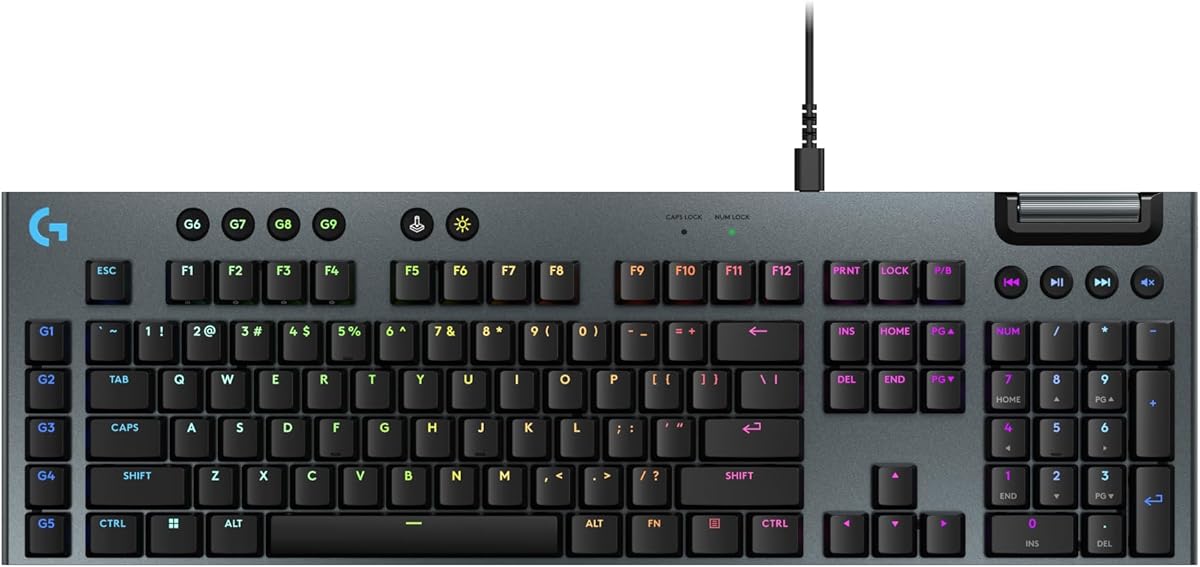
The Logitech G915 X represents a high-end approach to gaming keyboards with a focus on design and control. While it holds a 3.9 star rating, its engineering highlights innovations in slim design and switch precision. This keyboard appeals to users seeking a refined aesthetic and solid feel.
We may earn a commission when you buy through this link, at no additional cost to you.
Its low-profile GL mechanical switches offer a 1.3 mm actuation point for faster responses. The sand-blasted aluminum top plate provides durability and a premium tactile sensation. The KEYCONTROL system lets you set up to 15 functions per key for advanced customization.
Despite its features, some users report inconsistencies in the rating, possibly due to price expectations. The design is elegant but comes at a cost that may be hard to justify for casual players. However, for those who value style and specific features, it remains a strong contender.
This keyboard is best for professionals who need a stylish workspace and robust gaming features. It delivers next-gen engineering without compromising comfort. Consider it if you are already invested in the Logitech ecosystem.
With a 1.3 mm actuation point, this keyboard registers keystrokes faster for rapid-fire commands in games.
The sleek 23mm height and aluminum construction make it a visually appealing addition to any desk.
We may earn a commission when you buy through this link, at no additional cost to you.
The Razer BlackWidow V4 is a top-tier wireless keyboard designed for competitive gaming. It earns our Best Premium badge for its combination of low-profile speed and wireless freedom. With a 4.2 star rating, users appreciate its performance and battery efficiency.
We may earn a commission when you buy through this link, at no additional cost to you.
Its Low Profile Green switches require only 45 g of force for precise inputs. The Hyperspeed wireless technology ensures lag-free connectivity via 2.4 GHz. The 980-hour battery life in Power Saving Mode means you rarely need to recharge during intensive use.
The premium price tag and reliance on a wireless dongle might deter some buyers. However, the solid aluminum top case and double-shot PBT keycaps ensure longevity and a high-quality feel. These factors make the investment worthwhile for serious gamers.
This keyboard is ideal for those who refuse to compromise on wireless performance. It offers the tactile feedback of a mechanical keyboard with the convenience of a low-profile layout. We recommend it for high-end setups demanding speed and reliability.
Ultra-fast 2.4 GHz wireless ensures zero latency, making it suitable for competitive and fast-paced gaming.
With up to 980 hours of battery life, you can game for weeks without needing to plug in.
We may earn a commission when you buy through this link, at no additional cost to you.
The Keychron K3 V2 offers a compact 75% layout that saves desk space without losing essential keys. It is highly rated at 4.4 stars for its reliability and portability. This keyboard is built for productivity and light gaming in a thin form factor.
We may earn a commission when you buy through this link, at no additional cost to you.
Its Broadcom Bluetooth 5.1 chipset allows seamless pairing with up to three devices for multitasking. The open-source QMK firmware enables deep customization, and the reinforced aluminum body ensures durability. Keycaps for both Mac and Windows are included for broad compatibility.
While excellent for typing, the wireless connection may not be ideal for competitive gaming requiring ultra-low latency. The smaller layout also means you might need to use function keys for certain commands. For most users, these are reasonable trade-offs for portability.
This keyboard suits professionals and students who value a clean desk and multi-device support. Its tactile switches provide a satisfying typing experience suitable for long work sessions. We recommend it for those needing a compact mechanical solution.
Connect up to three devices via Bluetooth and switch between them instantly for efficient multitasking.
The K3 features dedicated Mac multimedia keys and includes extra keycaps for seamless integration with Apple devices.
We may earn a commission when you buy through this link, at no additional cost to you.
The Cherry MX 10.0N delivers reliable performance using genuine Cherry MX Low Profile Speed switches. It holds a 4.3 star rating for its build quality and smooth typing experience. This keyboard focuses on the core elements of speed and durability.
We may earn a commission when you buy through this link, at no additional cost to you.
Its linear switches are quiet and responsive, perfect for rapid inputs without distracting noise. The aluminum housing adds a premium feel and structural integrity that plastic cases lack. An integrated aluminum support bar ensures an ergonomic typing angle.
However, it lacks some modern conveniences like wireless connectivity or extensive RGB customization. The higher price reflects the brand reputation but may not offer the best value for budget users. For enthusiasts who trust Cherry switches, it is a solid choice.
This keyboard is best for purists who prioritize switch quality over extra features. It provides a quiet, fast, and durable typing experience suitable for both work and gaming. Consider it if you prefer a straightforward, premium input device.
Genuine Cherry MX Low Profile Speed switches ensure the smoothest linear actuation available on the market.
The aluminum housing provides a sturdy platform that resists flex and maintains a premium aesthetic over time.
We may earn a commission when you buy through this link, at no additional cost to you.
The Razer Ornata V3 TKL offers a tenkeyless layout to free up mouse space. It is a top-rated 4.6 star keyboard that blends comfort with modern features. This keyboard is designed for gamers who want a compact setup without sacrificing ergonomics.
We may earn a commission when you buy through this link, at no additional cost to you.
Its mecha-membrane switches provide precise feedback while the Snap Tap feature prioritizes the latest input for better in-game movement. The magnetic soft-touch wrist rest ensures comfort during extended sessions. The 8-zone Chroma RGB adds dynamic lighting effects to your setup.
The lack of a numpad may not suit users who need numerical input regularly. Wired connectivity limits desk flexibility compared to wireless models. However, the Snap Tap feature adds a competitive edge that many gamers will appreciate.
This keyboard is ideal for competitive gamers with limited desk space. The hybrid switch feel offers a unique experience that balances comfort and speed. We recommend it for those who value ergonomics and modern gaming features.
Snap Tap prioritizes your latest keypresses for smoother movement, giving you a tactical edge in shooters.
The 8-zone Chroma RGB lets you personalize your keyboard with dynamic effects that react to gameplay.
We may earn a commission when you buy through this link, at no additional cost to you.
The Keychron K5 Version 2 brings a full-size wireless experience with powerful customization. With a 4.6 star rating, users love its balance of features and performance. This keyboard is an all-in-one solution for those needing a full layout and wireless freedom.
We may earn a commission when you buy through this link, at no additional cost to you.
It uses QMK firmware for secure deep customization and a 2000 mAh battery for up to 160 hours of life. The Bluetooth 5.2 chipset allows pairing with up to three devices, and acoustic foams ensure quiet keystrokes. It supports Windows and Mac seamlessly.
The keyboard can feel heavier than ultra-slim models, and Bluetooth has higher latency than wired. However, the trade-off is worth it for the flexibility and battery life. For most users, these are minor inconveniences given the robust feature set.
This keyboard is perfect for professionals needing a full layout and multi-device support. It delivers a quiet, reliable typing experience for all-day use. We recommend it for anyone wanting a premium full-size wireless mechanical keyboard.
QMK firmware and the Keychron Launcher allow you to remap keys and update firmware for a personalized experience.
Layered IXPE acoustic foam dampens noise, making it suitable for quiet offices and shared spaces.
We may earn a commission when you buy through this link, at no additional cost to you.
The Ranked G65 Guardian offers a compact 65% layout with a full aluminum frame at a budget price. Its 4.6 star rating reflects strong satisfaction with its build quality and switch flexibility. This keyboard aims to deliver premium features at an accessible price point.
We may earn a commission when you buy through this link, at no additional cost to you.
Its hot-swappable switches let you change the feel without soldering, ideal for enthusiasts. The lubricated stabilizers reduce rattle for a solid typing experience. The matte aluminum case provides durability and a deep acoustic sound profile that feels premium.
The software is basic compared to big brands, and the 65% layout lacks navigation keys. However, the price and aluminum frame make it a standout for those on a budget. These trade-offs are minimal for the value offered.
This keyboard suits gamers who want a compact, durable setup without spending much. It provides a solid typing experience and room for experimentation with switches. We recommend it for budget-conscious users seeking quality.
Change switches instantly using the included tools, allowing you to customize typing feel without soldering.
The full aluminum frame adds weight and stability, ensuring a premium typing experience despite the low price.
We may earn a commission when you buy through this link, at no additional cost to you.
Choosing the right keyboard requires understanding how specific features impact speed and comfort during intense gaming sessions.
Low-profile mechanical switches come in linear, tactile, or clicky variations. For fast-paced games, linear switches are often preferred because they offer smooth travel without a bump to slow you down. Actuation points are shorter in low-profile models, allowing for faster registration.
Choose linear low-profile switches if you need speed and silence.
Wireless keyboards offer freedom but may introduce latency depending on the technology. 2.4 GHz wireless is best for gaming as it rivals wired performance. Bluetooth is great for productivity but generally too slow for competitive titles.
Prioritize 2.4 GHz or wired connections for fast-paced gaming.
Full-size keyboards include a numpad, while TKL and 60% layouts save desk space for mouse movement. Compact layouts are often better for gaming as they allow more room for arm motion. Ensure the layout matches your essential key needs.
Select a layout that balances key availability with desk space.
Aluminum cases provide durability and reduce noise compared to plastic. A solid frame prevents flex during intense typing. Look for double-shot keycaps to ensure legends do not fade over time. Build quality affects the long-term feel of the keyboard.
Look for aluminum housing and double-shot keycaps for longevity.
Polling rate determines how often the keyboard reports to the PC. A rate of 1000 Hz is standard, but higher rates like 8000 Hz reduce input lag further. For fast-paced games, a higher polling rate ensures your movements are registered immediately.
Check for high polling rates to minimize input lag.
Gaming often benefits from macros that automate complex commands. Software should allow easy key remapping. Some keyboards offer onboard memory for storing profiles. Customization helps you tailor the keyboard to your specific playstyle.
Ensure software supports key remapping and macro recording.
A low profile reduces strain on wrists during long sessions. Wrist rests can add comfort but may limit portability. The keyboard angle should feel natural. Ergonomics are vital for sustained performance without pain.
Prioritize ergonomics if you play for long hours.
For wireless models, battery life determines how often you charge. Aim for at least 50 hours if using RGB. Power-saving modes help extend life. Reliable battery life ensures you are not interrupted mid-game.
Verify battery specs to avoid unexpected charging needs.
Keep your keyboard clean by wiping it with a soft cloth regularly. Dust can accumulate under low-profile keycaps, affecting performance. Use compressed air to blow out debris from the switches to maintain smooth travel.
For wireless models, charge the battery when the indicator light turns on. Avoid letting the battery drain completely to prolong its lifespan. Store the keyboard in a cool, dry place when not in use to prevent material damage.
If your keyboard is hot-swappable, change switches only when it is unplugged. This prevents electrical shorts and damage. Regularly update firmware using the manufacturer's software to ensure all features work correctly.
Yes, they are excellent for fast-paced games because the shorter travel distance and actuation points allow for quicker key registration. This can give you a split-second advantage during critical moments in competitive matches.
Many low-profile keyboards use similar high-quality switches and materials as standard mechanical boards. However, the switches may be slightly more fragile due to their size. Look for reputable brands to ensure they withstand heavy use.
Modern 2.4 GHz wireless technology is often as fast as wired connections. Bluetooth is less ideal for competitive gaming due to higher latency. Always check the specific latency ratings before buying.
Most modern keyboards support both operating systems with a simple toggle switch. Key layouts and shortcuts may differ slightly, but firmware updates often resolve compatibility issues. Check the specs for OS support before buying.
You can use a small brush or compressed air to clean between the keycaps without removing them. For a deeper clean, gently wipe the surface with a damp cloth. Avoid harsh chemicals that might damage the finish.
Hot-swappable switches allow you to change the switches without soldering. This lets you experiment with different feels to find the perfect setup. It also makes repairs easier if a switch fails.
Our review highlights diverse options ranging from budget-friendly picks like the Redragon K618 PRO to premium models like the Razer BlackWidow V4. Each keyboard offers a unique blend of speed, comfort, and customization for fast-paced games.
Consider your budget, connectivity needs, and desired layout when making a decision. Wireless flexibility often appeals to modern setups, while wired options provide guaranteed speed. The best keyboard is one that fits your specific gaming style.
We recommend checking current listings for availability and updated pricing. Prices fluctuate frequently, so verifying the latest deal ensures you get the best value. Happy gaming with your new high-performance input device.