
MokerLink 8 Port 10G Managed Ethernet Switch
4.3Editor score
8 x 10G Auto-Adaptive Ports
Web and CLI Management
Compact Metal Desktop Design
This guide compares the top Layer 3 Network Switch models for enterprise and home use, focusing on routing speed, port count, PoE capabilities, and management
Layer 3 Network Switches are essential for modern networks requiring intelligent routing and segmentation. These devices operate at the network layer, enabling efficient traffic management and enhanced security. Choosing the right model ensures optimal performance for your specific infrastructure needs without unnecessary complexity or cost.
We evaluated ten leading models based on port diversity, routing protocols, management interfaces, and build quality. Our analysis includes enterprise-grade units and advanced home lab options to cover a wide range of use cases. Each product was selected for its ability to handle high-throughput environments with reliability and ease of configuration.
Each pick highlights key strengths and ideal scenarios to help you make an informed decision. While these devices offer robust features, ensure compatibility with your existing network topology before purchasing. Please note that specifications and availability can change, so verify current details with the manufacturer or retailer.
4.3Editor score

4.7Editor score
4.4Editor score
The following table provides a side-by-side comparison of all ten selected Layer 3 Network Switch models. It highlights critical specifications including port types, management capabilities, power features, and specific design elements to assist in quick differentiation.




This Layer 3 Network Switch stands out as the top choice for users already invested in the UniFi ecosystem. It combines reliable hardware with intelligent routing features that simplify network segmentation and traffic management. With a strong rating from verified users, it represents a mature product line designed for stability and ease of use.
We may earn a commission when you buy through this link, at no additional cost to you.
The device offers a robust set of Layer 3 features that allow for efficient inter-VLAN routing without relying on an external router. Its integration with the UniFi controller provides a unified view of network health, device status, and traffic patterns. This centralized management reduces the time needed for configuration and ongoing maintenance tasks.
While the performance is excellent, it is important to note that full functionality depends on running the UniFi Network application. Users accustomed to standalone CLI-only devices might find the software dependency restrictive initially. However, the trade-off is a significant reduction in administrative overhead for most home and office environments.
This switch is best suited for small to medium businesses or advanced home labs that require reliable routing and centralized management. If you value a clean interface and proven hardware quality, this model delivers on its promises without unnecessary complexity. It remains a leading option for those prioritizing ecosystem integration over raw standalone utility.
The UniFi integration allows for a single pane of glass to manage switching, routing, and security policies across the entire network infrastructure.
Layer 3 features handle VLAN traffic efficiently, offloading the primary router and ensuring stable performance during high traffic periods.
We may earn a commission when you buy through this link, at no additional cost to you.
This switch offers an accessible entry point into high-speed Layer 3 networking without breaking the bank. Its eight ports support 10G speeds with auto-adaptive capabilities to ensure compatibility with a wide range of connected devices. The robust metal build suggests durability for both desktop and rackmount installation scenarios.
We may earn a commission when you buy through this link, at no additional cost to you.
Management is handled through a web interface and CLI, providing flexibility for users with different skill levels. The inclusion of Layer 3 routing features like IPv4/IPv6 and ARP inspection adds significant value at this price point. Security features such as DoS protection and MAC-based authentication help safeguard the network against common threats.
The primary trade-off is the limited port count, which may require additional switches for larger setups. Additionally, the web interface is functional but lacks the polish of more expensive enterprise solutions. For budget-conscious users needing high throughput and basic routing, these limitations are often acceptable compromises.
This unit is ideal for small offices, media production setups, or home labs that need 10G connectivity without a high investment. If you require a compact solution that balances performance with cost, this model meets those needs effectively. It serves as a practical stepping stone for upgrading network infrastructure.
Ports automatically adapt between 10G, 5G, 2.5G, and 1G rates to match connected devices and maximize link efficiency.
Built-in security protocols like dynamic ARP inspection and port security help prevent unauthorized access and network attacks.
We may earn a commission when you buy through this link, at no additional cost to you.
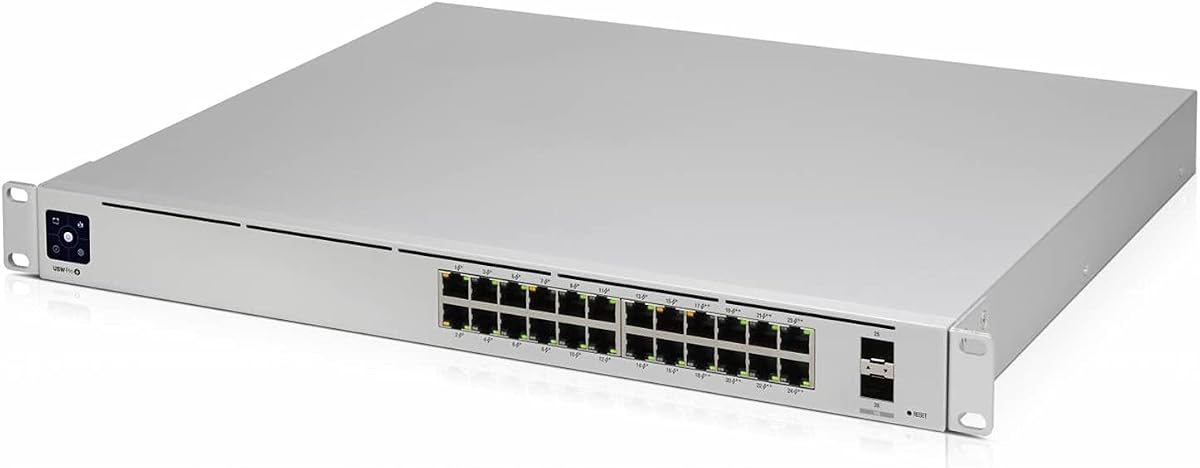
This model provides a premium foundation for networks that do not require powering devices over Ethernet cables. The 24 GbE ports support high-speed connectivity for workstations, servers, and other critical infrastructure. Its built-in power supply ensures stable operation without needing external bricks, contributing to a cleaner and more reliable installation.
We may earn a commission when you buy through this link, at no additional cost to you.
The inclusion of optical fiber media support extends its utility for environments requiring long-distance or noise-resistant connectivity. Layer 3 capabilities allow for efficient segmentation and routing within the switch itself. The unit is designed for professional installation with rack mounting options that optimize space in server closets or wiring cabinets.
While the lack of PoE limits its use for powering IP cameras or access points directly, it remains a strong choice for pure data routing needs. Users planning to deploy separate PoE injectors or switches may find this price point attractive for its high port count and speed. It represents a focused design for data-centric applications.
Ideal for server rooms or office environments where devices have their own power adapters, this switch maximizes port density efficiently. If you need reliable high-speed connectivity without the complexity of PoE management, it serves that purpose well. It is a robust component for building a structured cabling infrastructure.
Support for fiber media options allows for extended reach and better noise immunity in complex wiring environments.
With 24 ports in a compact form factor, it accommodates growth without requiring immediate hardware expansion.
We may earn a commission when you buy through this link, at no additional cost to you.
This switch addresses the growing need for higher PoE budgets to support next-generation wireless access points and PTZ cameras. Ports 1 through 4 can deliver up to 90W per port, making it suitable for power-hungry devices. The combination of 2.5G ports and 10G SFP+ uplinks ensures that bandwidth bottlenecks are minimized across the network.
We may earn a commission when you buy through this link, at no additional cost to you.
Enterprise-grade control is available through OSPF v2 routing and DHCP server capabilities, alongside standard VLAN management. A physical console port is included for IT professionals who prefer direct command-line access over web interfaces. The full-metal casing and active cooling fan ensure the device maintains optimal performance under heavy loads.
The main trade-offs include a limited port count compared to larger 24 or 48 port units and the presence of an active fan which may not suit quiet environments. However, for tech enthusiasts and small businesses requiring high power delivery, these are reasonable compromises. The PoE watchdog feature adds an extra layer of reliability by rebooting frozen devices automatically.
This unit is perfect for studios, creative workspaces, or offices deploying high-density Wi-Fi 7 access points. If you need a mix of high-speed data ports and powerful PoE delivery in a compact form, it is a strong contender. Its features make it a versatile tool for modern network demands.
The 90W per port capability on select ports supports the latest power-hungry network devices without needing external injectors.
A physical console port provides reliable direct access for configuration and troubleshooting via standard CLI tools.
We may earn a commission when you buy through this link, at no additional cost to you.
MikroTik devices are known for their flexibility and deep feature sets, making this switch a favorite among power users. It combines 10G ports with standard Ethernet ports to offer versatile connectivity options. The unit is designed to deliver optimal results through efficient hardware handling of network traffic.
We may earn a commission when you buy through this link, at no additional cost to you.
The CRS series allows for complex routing and switching configurations using RouterOS. This enables advanced features like hardware acceleration for routing tables, which can improve overall network performance significantly. For those who enjoy tinkering with network settings, the device provides extensive control over packet handling and protocols.
The complexity of the software can be a barrier for beginners or those who prefer simple plug-and-play setups. Configuring Layer 3 features effectively requires a good understanding of network administration concepts. However, the return on investment in terms of performance and flexibility is substantial for knowledgeable users.
This switch is ideal for network enthusiasts or IT professionals who need specific routing logic within the switch layer. If you want a compact unit that can be customized for unique network topologies, it offers significant value. It is a powerful tool for those who know how to leverage its advanced capabilities.
Integrated RouterOS allows for detailed configuration of firewall rules and routing protocols within the switch unit.
Dedicated silicon ensures that switching and routing operations are performed at wire speed without CPU bottlenecks.
We may earn a commission when you buy through this link, at no additional cost to you.
This model focuses on fiber connectivity with sixteen SFP ports, making it ideal for backhaul links or connecting distant nodes. The Layer 3 management features allow for intelligent routing decisions directly on the switch. Its 1U design fits easily into standard server racks while maintaining a clean and professional aesthetic.
We may earn a commission when you buy through this link, at no additional cost to you.
The device uses RouterOS to provide a wide range of networking capabilities including VLANs and routing protocols. The console port allows for initial configuration even if the network link is not yet established. Users benefit from the reliability of fiber optics for long-distance connections without signal degradation.
The lack of copper ports means you must have the appropriate SFP transceivers for every connection. This adds to the initial cost and requires more planning than a switch with integrated copper ports. For fiber-specific environments, however, this design is necessary and highly efficient.
This unit is best for networks that rely heavily on fiber for uplinks or inter-building connections. If you need high-density fiber support in a compact rack-mountable unit, it delivers excellent value. It is a specialized tool for professional network environments where fiber is the standard medium.
Sixteen SFP ports provide extensive capacity for fiber connections which are ideal for high-speed and long-distance links.
The 1U grey casing fits standard mounting grids and maintains a professional look in server rack installations.
We may earn a commission when you buy through this link, at no additional cost to you.
This high-density switch is designed for environments where port count is a primary concern. With 48 Gigabit ports, it can connect a large number of devices without requiring multiple units. The four 10G SFP+ ports provide ample bandwidth for uplinks to servers or core routers to prevent bottlenecks.
We may earn a commission when you buy through this link, at no additional cost to you.
The inclusion of a touchscreen display adds a unique way to monitor status and basic settings directly on the unit. It supports Layer 2 and Layer 3 features to handle routing tasks efficiently. The device integrates well with the UniFi ecosystem for centralized management of network policies.
It is important to note that this model uses an external UniFi SmartPower RPS for power redundancy and supply. This means the switch itself does not have an internal power brick, which can complicate desktop setups. However, for rack installations where redundancy is key, this design is practical and professional.
Ideal for larger offices or service providers needing extensive connection points, this switch offers scalability. If you need to connect dozens of devices and value integrated uplink speeds, it is a strong solution. It handles the demands of a busy network environment with professional-grade features.
Forty-eight ports allow for extensive device connection in a single rack unit without needing switch stacking.
A dedicated touchscreen displays port status and network health data for quick local visual checks.
We may earn a commission when you buy through this link, at no additional cost to you.
This switch is designed for environments where noise is a critical factor, such as quiet offices or bedrooms. The fanless design utilizes a metal chassis to dissipate heat silently, ensuring the device does not contribute to ambient noise. It offers high throughput with a switching capacity of 160Gbps to handle heavy data loads.
We may earn a commission when you buy through this link, at no additional cost to you.
All eight ports are 10G SFP+, making it ideal for connecting to fiber modules or DAC cables for server workstations. Layer 3 management includes static routing to optimize traffic flow between different network segments. Security features like ACLs and ERPS help protect the network from loops and internal spoofing attempts.
The requirement for SFP+ modules means that copper connections are not available without additional transceivers. This adds cost and complexity to the initial setup. However, for high-performance workstations or NAS systems that utilize fiber or DAC links, this is often the preferred method of connection.
This unit is perfect for home labs or studios needing silent and high-speed connectivity. If you prioritize noise reduction and 10G speeds, it delivers a quiet and reliable experience. It is a solid choice for specialized setups where silence and performance are equally important.
The fanless design ensures completely silent operation by relying on passive heat dissipation through a metal chassis.
ERPS provides rapid loop recovery to maintain network stability during topology changes or faults.
We may earn a commission when you buy through this link, at no additional cost to you.
This model provides a managed network solution with a mix of speeds to accommodate different devices. The 16 ports include a combination of 2.5G and 1G links to support faster connections where needed. It is designed to integrate seamlessly with the UniFi ecosystem for unified network management.
We may earn a commission when you buy through this link, at no additional cost to you.
The device supports advanced routing and segmentation features that allow for efficient traffic control. With a robust build quality it ensures reliable operation in various installation environments. The throughput is optimized to handle modern data demands without significant latency issues.
For users needing more than 16 ports, this unit may require expansion. Additionally, full functionality depends on the UniFi controller which adds a software layer to the deployment. For those already in the UniFi environment, these trade-offs are well worth the integration benefits.
This switch is a good fit for small offices or home labs that need a mix of speeds. If you want managed features without the complexity of a full enterprise setup, it offers a balanced solution. It is a reliable component for upgrading a network to higher speeds.
Mixing 2.5G and 1G ports allows for targeted speed upgrades to critical devices like NAS or workstations.
Seamless operation with UniFi controllers provides a single interface for managing the entire network.
We may earn a commission when you buy through this link, at no additional cost to you.
This switch combines high-speed connectivity with a generous PoE budget to power multiple devices efficiently. The Etherlighting feature illuminates ports to indicate link status, speed, and native VLAN which simplifies troubleshooting. A silent fanless cooling system ensures the unit runs quietly in any environment.
We may earn a commission when you buy through this link, at no additional cost to you.
Layer 3 capabilities provide advanced routing and segmentation options for better network control. The 180W PoE budget supports multiple cameras, access points, or other PoE devices simultaneously. Its versatile mounting options allow for desktop, wall, or rack installation as needed.
The premium features like Etherlighting and high PoE budget come at a higher price point. It also requires the UniFi controller for full functionality which adds software dependency. For those who value visual diagnostics and high power budgets, the cost is justified by the utility.
This switch is excellent for deployments needing both speed and power in a silent package. If you want visual port indicators and robust PoE capabilities, it stands out in its class. It is a reliable choice for modern smart buildings or tech-enabled workspaces.
Etherlighting ports provide visual feedback on status and speed to simplify network identification and troubleshooting.
Fanless cooling ensures quiet operation making the device suitable for noise-sensitive areas like offices or bedrooms.
We may earn a commission when you buy through this link, at no additional cost to you.
Choosing the right Layer 3 Network Switch involves evaluating port count, speed, power delivery, and management needs to match your specific infrastructure requirements.
Determine how many devices you need to connect and at what speeds. For high-performance needs look for models with 2.5G or 10G ports while standard office use may only require Gigabit connections.
Ensure the switch has enough ports to avoid adding extra switches that can complicate your network topology.
Verify that the switch supports the routing protocols you need such as static routing or OSPF. This is essential for inter-VLAN traffic without relying on a main router.
A switch with good Layer 3 features helps distribute traffic load and improve overall network performance.
If you need to power devices like cameras or access points check the PoE budget and standard. Higher budgets allow for more devices or power-intensive models.
Ensure the total power budget meets the needs of all your powered devices without overloading the switch.
Decide whether you prefer a web interface CLI or software ecosystem for managing the switch. Some users need simple web management while others require advanced CLI tools.
Choose a management style that matches your technical expertise and operational preferences.
Consider whether the switch will be placed in a quiet space or a server room. Silent models use passive cooling while rack-mount units may have active fans for better heat dissipation.
Select a form factor that fits your physical space and thermal requirements effectively.
If you already use a specific brand like UniFi choose a switch that integrates with that ecosystem. This ensures a unified view and streamlined configuration across your network.
Integration reduces administrative overhead and simplifies long-term maintenance tasks.
Look for built-in security features like ACLs DHCP snooping and port security to protect your network. These features help prevent unauthorized access and common attacks.
A secure switch is vital for maintaining the integrity of your internal data and resources.
Consider buying a switch with slightly more capacity than you currently need to accommodate growth. Higher speeds like 2.5G or 10G uplinks can extend the useful life of the device.
Investing in future-ready specs prevents the need for immediate upgrades as your needs evolve.
Start by connecting the switch to your power source and linking your modem or router to an uplink port. Ensure that the physical connections are secure to avoid signal loss or intermittent connectivity issues.
Use the management interface to configure VLANs and routing rules according to your network design. Regularly update the firmware to keep security patches current and improve device stability over time.
Monitor the switch temperature and ensure it has adequate airflow especially in enclosed cabinets. Keep the exterior clean and free of dust to maintain optimal cooling performance and extend the device's lifespan.
A Layer 3 Network Switch can route traffic between different subnets internally which reduces the load on your main router. This leads to faster inter-VLAN communication and better overall network segmentation.
No not all Layer 3 switches support Power over Ethernet. Some models are designed for data routing only and require separate injectors to power connected devices.
Yes a Layer 3 switch can handle basic routing tasks like inter-VLAN routing. However it may not replace a full router for features like NAT or advanced firewall rules.
A web interface is generally easier for beginners while CLI offers more granular control for experts. Choose based on your comfort level and specific configuration needs.
Choose 2.5G if your devices support it and you need a moderate speed boost over Gigabit. Select 10G for high-performance servers or storage that require maximum throughput.
Some switches like UniFi models work best with a dedicated controller for full features. Others can be configured directly via web or CLI without extra software.
Etherlighting is a feature where ports light up with specific colors to indicate status or VLAN. It helps technicians quickly identify connected devices during troubleshooting.
Yes silent operation is highly recommended for home environments to avoid noise distraction. Look for fanless models if the switch will be placed in a living area.
We have reviewed ten top Layer 3 Network Switch models ranging from budget options to premium enterprise solutions. Each offers unique strengths depending on your specific needs for speed, power, and management.
Prioritize features like port count, routing capabilities, and PoE budget based on your current and future infrastructure plans. The right choice will streamline your network and improve performance across all connected devices.
Please verify current availability and details before purchasing as specifications can change. We hope this guide helps you select the perfect switch for your network setup.