
ASRock Arc A580 Challenger
4.6Editor score
8GB GDDR6 Memory
Dual Fan Cooling
DirectX 12 Ultimate
This guide compares ten top Intel Arc GPU models for gaming AI and workstation tasks to help you choose the right graphics card for your specific computing
Intel Arc GPUs have evolved significantly, offering powerful options for gamers and creators alike. This guide explores the latest models designed to handle demanding tasks with efficiency.
We compared performance specs cooling solutions and connectivity across ten distinct cards. Our analysis highlights key strengths in gaming AI inference and professional workload acceleration.
Each pick details real-world capabilities and architectural features found in current listings. Please note that availability and pricing may fluctuate based on market conditions.
4.6Editor score

4.7Editor score

4.5Editor score
This comparison table provides a side-by-side look at the core specifications of every selected Intel Arc GPU. It helps you quickly identify differences in memory clock speeds and form factors.



The ASRock Arc Pro B60 stands out for its massive 24GB memory capacity. It achieves a solid rating for professionals needing significant VRAM. This card focuses on workstation tasks rather than pure gaming performance.
We may earn a commission when you buy through this link, at no additional cost to you.
Its architecture provides strong AI acceleration features for inference. The dual media transcoders support fast video exports in high resolutions. Users benefit from ISV certified drivers ensuring stability in professional software.
The blower style cooling is effective but may generate noise. You must verify your power supply has enough wattage for 200W. Check your case dimensions to ensure the card fits properly.
Choose this card if you need local LLM inference or rendering. It is ideal for Linux-based multi-GPU setups. The hardware scaling options support growing computational needs effectively.
The 24GB memory allows running 70B class models locally. This reduces dependency on cloud services for sensitive tasks.
Four DisplayPort 2.1 outputs enable expansive multi-monitor workflows. This supports high resolutions up to 8K simultaneously.
We may earn a commission when you buy through this link, at no additional cost to you.
This card offers excellent performance for its price point. It excels in modern gaming scenarios at 1440p resolutions. The architecture provides reliable power for content creation tasks too.
We may earn a commission when you buy through this link, at no additional cost to you.
XeSS 2 technology boosts performance through AI upscaling. Metal backplate improves structural rigidity and prevents sagging. Fans stop at low loads for silent operation during light use.
Older titles might show compatibility quirks occasionally. You need a single 8-pin power connector for operation. Verify your system has modern drivers installed for best results.
Buy this if you want balanced gaming and creation power. It is perfect for mid-range systems needing reliability. The cooling design ensures stable temperatures under load.
XeSS 2 improves image quality significantly. It frames higher frame rates without heavy performance cost.
Supports latest display technologies easily. HDMI 2.1a and DP 2.1 offer future proof connections.
We may earn a commission when you buy through this link, at no additional cost to you.
This card combines two GPUs to create a massive 48GB pool. It achieves a high rating among professionals needing local inference. The dual design eliminates need for multi-card setups.
We may earn a commission when you buy through this link, at no additional cost to you.
Each GPU operates at high clock speeds efficiently. Native support for open source models like Qwen and DeepSeek is included. It handles high concurrency workloads well.
The price is significant compared to standard consumer cards. You need a motherboard supporting PCIe bifurcation for full bandwidth. Check your system compatibility carefully before purchase.
Choose this for advanced AI development and research. It supports flexible task assignment across chips. The cooling ensures stable performance during long training sessions.
SR-IOV virtualization allows flexible resource allocation. This supports complex enterprise deployments.
Eliminates need for cloud services for privacy. Runs 70B class models entirely on one card.
We may earn a commission when you buy through this link, at no additional cost to you.
This card provides strong value for entry level creators. It performs well in 1440p gaming scenarios efficiently. The factory overclock ensures optimized performance from the start.
We may earn a commission when you buy through this link, at no additional cost to you.
Dual fan design with silent cooling is efficient. It supports 3 DisplayPort and 1 HDMI output. Metal backplate enhances durability and aesthetics.
You need significant power supply headroom for operation. The card requires two 8-pin connectors. Verify your case space as it is larger than standard.
Select this for general multimedia tasks and gaming. It supports cutting edge visuals with XeSS. The design ensures reliability for long term use.
256-bit interface delivers excellent bandwidth. This ensures smooth data transfer for textures.
Fans stop completely at low temperatures. This ensures silent operation during idle states.
We may earn a commission when you buy through this link, at no additional cost to you.
This card focuses on raw performance and looks. It features a higher boost clock for gaming needs. The cooling system is designed to handle intense loads.
We may earn a commission when you buy through this link, at no additional cost to you.
12GB VRAM provides ample headroom for textures. The blue breathing light adds a unique touch. Metal backplate supports the card structure well.
Software customization options are somewhat limited. Ensure you verify availability in your region. Check for specific driver support on your OS.
Ideal for users valuing performance and style. It handles demanding modern titles well. The build quality supports long term gaming sessions.
Boost clock of 2760MHz helps frame rates. This supports smooth gameplay at high resolutions.
Metal backplate and axial fan are durable. The design resists physical stress effectively.
We may earn a commission when you buy through this link, at no additional cost to you.
This card pairs two GPUs for parallel workloads. It delivers high headroom for complex computing tasks. The turbo fan efficiently exhausts heat from the chassis.
We may earn a commission when you buy through this link, at no additional cost to you.
48GB VRAM supports large scale rendering. It is engineered for AI and professional applications. The design fits standard PCIe slots easily.
You need good airflow to manage the turbo fan. Power supply requirements are substantial for dual chips. Ensure your chassis can handle the heat output.
Choose this for advanced parallel computing. It handles multi-turn dialogues and complex inference well. The compact design saves motherboard space effectively.
Delivers exceptional power for workloads. Ideal for visual computing tasks.
Does not monopolize expansion slots. Fits neatly into standard PCIe slots.
We may earn a commission when you buy through this link, at no additional cost to you.
This bundle combines a GPU and a high quality PSU. It ensures stable power delivery for gaming. The GPU features 2600 MHz clock speed.
We may earn a commission when you buy through this link, at no additional cost to you.
XeSS 2 boosts image quality and performance. The PRO-650G PSU is efficient and clean. Striped Axial Fan design ensures effective heat dissipation.
You save effort by getting power and GPU together. Ensure your system fits ATX standards. Check for case compatibility with the PSU size.
Buy this for a hassle free build. It targets smooth gaming at 1440p. The Gold rated power maximizes system performance.
80 PLUS Gold means lower energy costs. ATX3.1 ready for future standards.
Fans stop completely at idle. Total silence during light usage states.
We may earn a commission when you buy through this link, at no additional cost to you.
This card is perfect for small form factor systems. It supports 16GB of memory in a small package. Requires no external PCIe power connector for operation.
We may earn a commission when you buy through this link, at no additional cost to you.
Slim design fits mini-tower and edge workstations. Robust metal shroud provides protection. Turbo fan ensures heat is exhausted efficiently.
Thermal headroom is limited by the size. Clock speeds are lower than full size cards. Ensure your case allows for the single slot fit.
Select this for compact workstation upgrades. It accelerates AI inference in a small space. Ideal for edge computing environments.
Perfect for mini-tower upgrades. Single slot design maximizes space.
Delivers 170 TOPS INT8 power. Accelerates deep learning directly on your workstation.
We may earn a commission when you buy through this link, at no additional cost to you.
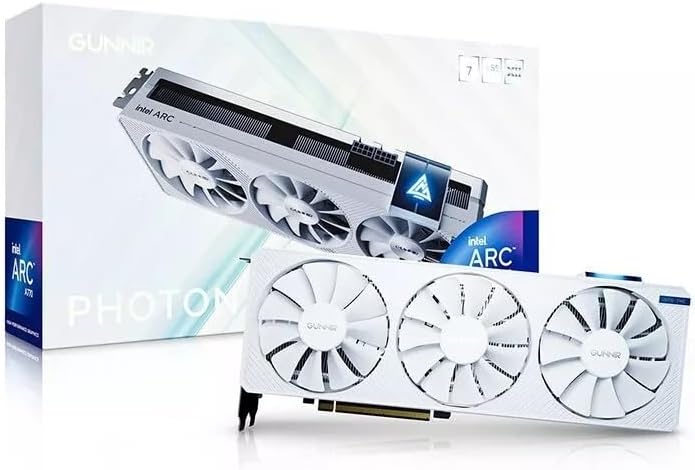
This card provides strong performance for content creation. It includes a triple fan design for stable cooling. The white aesthetic matches clean builds.
We may earn a commission when you buy through this link, at no additional cost to you.
Delivers exceptional performance for gaming and creation. Supports HDMI and DisplayPort for future proofing. Handles demanding workloads with ease.
Requires significant physical space in the case. Ensure your PSU has adequate wattage. Check clearance before installation.
Buy this for clean builds with power. Ideal for handling 4K visual work. The design ensures stable operation under load.
Triple fan design ensures efficient cooling. Maintains stable temperatures during workloads.
Supports 4K monitors fully. Ready to connect to latest displays.
We may earn a commission when you buy through this link, at no additional cost to you.
This card offers simple multi-monitor solutions easily. It features four HDMI outputs for various displays. The low power draw suits small builds well.
We may earn a commission when you buy through this link, at no additional cost to you.
Single fan and single slot config are compact. Exclusive 50W design ensures efficiency. Connects to multiple displays easily.
Limited for modern gaming due to VRAM. Use only for display output or simple tasks. Check your motherboard slot availability.
Choose this for display output expansion. It supports four monitors at once. Ideal for digital signage or light office use.
Four HDMI outputs for multi-display setups. Connect multiple screens easily.
50W TBP keeps power draw low. Simple single fan cooling design.
We may earn a commission when you buy through this link, at no additional cost to you.
Choosing the right GPU requires understanding your workload needs. We have identified key factors to help you decide which model fits your system best.
VRAM determines how much texture data and models you can load. For 1440p gaming 8GB to 10GB is adequate. For AI workloads 48GB is necessary for local inference.
Newer architectures like Xe2 offer better AI acceleration. Older Xe HPG models are cost effective but lack latest features. Check if you need AI upscaling.
Check your power supply wattage before buying. Some cards need multiple 8-pin connectors while others run on 50W. Ensure your PSU has enough connectors.
Blower fans fit better in small cases but are louder. Dual or triple fans are quieter but require more space. Match cooling to your case airflow.
Most modern cards have HDMI and DP. If you need multiple HDMI ports verify the layout. This matters for connecting multiple displays.
Drivers have improved significantly but check compatibility. Professional cards offer ISV certification for stability. Gaming cards focus on frame generation features.
Measure your case clearance carefully. Low profile cards fit mini-towers while standard cards need full towers. Single slot designs save vertical space.
Entry cards cost less but limit high end performance. Premium cards offer huge memory but higher costs. Balance your needs with your total budget.
Install the card into the top PCIe slot and secure it with screws. Ensure all power cables are firmly attached before turning on the system. Check BIOS settings for PCIe bifurcation if using dual GPU cards.