
IDVisor Smart V2 ID Scanner – Drivers License and Passport Age Verification & Customer Management + Charger Cradle, Hand Strap & More.…
4.8Editor score
12 plus hour battery life
Save two photos per customer
GPS find device feature
Age verification is critical for bars and retail stores to avoid fines. Modern ID scanners streamline this process by reading barcodes and validating data instantly. These devices help staff confirm legal drinking age quickly while maintaining customer privacy and security.
We evaluated ten leading ID scanners based on scanning speed, battery life, and software capabilities. Our analysis covers handheld and countertop models suitable for high-volume environments. Each product offers unique features like fake ID detection, compliance logging, and customer management tools.
Every pick includes detailed specs, pros, cons, and real-world usage insights. Prices and availability change frequently so check the latest listings before buying. This guide helps you choose the right tool for your specific business needs and budget requirements.
4.8Editor score

4.9Editor score
4.7Editor score
As an Amazon Associate we earn from qualifying purchases.
The following table presents a side by side comparison of all ten ID scanners reviewed in this guide. It highlights key specifications and capabilities to help you quickly identify which model fits your venue requirements best.


The IDetect ID Scanner stands out as a top choice for age verification with a rating of 4.9. It is designed for bars and clubs needing instant ID checks. Its smart document scanner validates age from all 50 states quickly.
We may earn a commission when you buy through this link, at no additional cost to you.
This device records and calculates age while maintaining customer relationships. It notifies staff if an ID is tampered with or on a watch list. The system optionally takes and stores patron pictures securely. It includes a USB cable and Smart-ID scanning software.
One trade-off is the lack of hologram and watermark detection. However, it provides 100% diligence proof for most scenarios. It is easy to install on tablets and laptops. The kit includes free updates and support.
Businesses needing reliable age verification should choose this model. It fits hospitals banks and busy points of sale. The out of the box use makes setup simple for staff.
Instant validation helps staff confirm age quickly without slowing down service. This keeps lines moving at peak hours.
Security features alert staff to tampered or banned IDs immediately. This reduces liability for the business.
We may earn a commission when you buy through this link, at no additional cost to you.
This countertop model offers a rating of 4.5 for fixed locations. It includes a durable vinyl decal to alert customers. Instant verification happens on every scan to help deter underage sales.
We may earn a commission when you buy through this link, at no additional cost to you.
Standard ID scanning is always free. The system eliminates math mistakes and protects the business during inspections. Optional fake ID detection uses Intellicheck technology. Results appear in less than a second.
It operates continuously when connected to a standard outlet. No batteries are needed for this unit. Manual entry is available for damaged IDs. The compliance log is flexible and exportable.
Ideal for stationary POS points this scanner is reliable. It works fully without a computer. Support is available nights and weekends.
Automatic compliance logs protect businesses during inspections. This reduces manual record keeping work.
Simple operation requires no training. Just scan the barcode and get results instantly.
We may earn a commission when you buy through this link, at no additional cost to you.
The AgeVisor Mini is a compact countertop scanner. It is ready to use in minutes with no extra equipment. Fast operation with 1-second scans makes it efficient for bars and retail.
We may earn a commission when you buy through this link, at no additional cost to you.
Motion activated scanning allows one-handed operation. It calculates age with intuitive icons and notifications. Loyalty tracking counts visits directly on the screen. This helps identify frequent visitors or security risks.
It includes free Barcode Detective subscription. Optional DMVCheck verifies IDs with issuing DMVs. There are no subscription fees required. Complimentary US-based support is included.
Businesses wanting loyalty features should consider this unit. It scans IDs from all 50 states. The setup is simple and hassle free.
Loyalty insights help track repeat customers. This can enhance marketing efforts effectively.
Fast scanning reduces wait times for customers. Motion activation speeds up the workflow.
We may earn a commission when you buy through this link, at no additional cost to you.
The IDVisor Smart V2 offers premium features with a 4.8 rating. It reads passports and IDs from all 50 states. Fast operation takes 1 second per scan. The 12+ hour battery ensures all day use.
We may earn a commission when you buy through this link, at no additional cost to you.
It captures two photos per record for customer management. Over 50000 customers can be saved. The software highlights new vs repeating clients. You can assign loyalty membership with a button press.
Tag customers with custom categories like VIP or banned. GPS locate your scanner via Google Maps. Upload and download records through WiFi or USB. Spare battery charges in the included cradle.
For venues needing advanced CRM this is ideal. It includes lifetime software updates. US-based support is complimentary.
Advanced CRM helps build customer relationships. Data sync keeps records secure.
Security tracking allows remote device location. This protects valuable assets.
We may earn a commission when you buy through this link, at no additional cost to you.
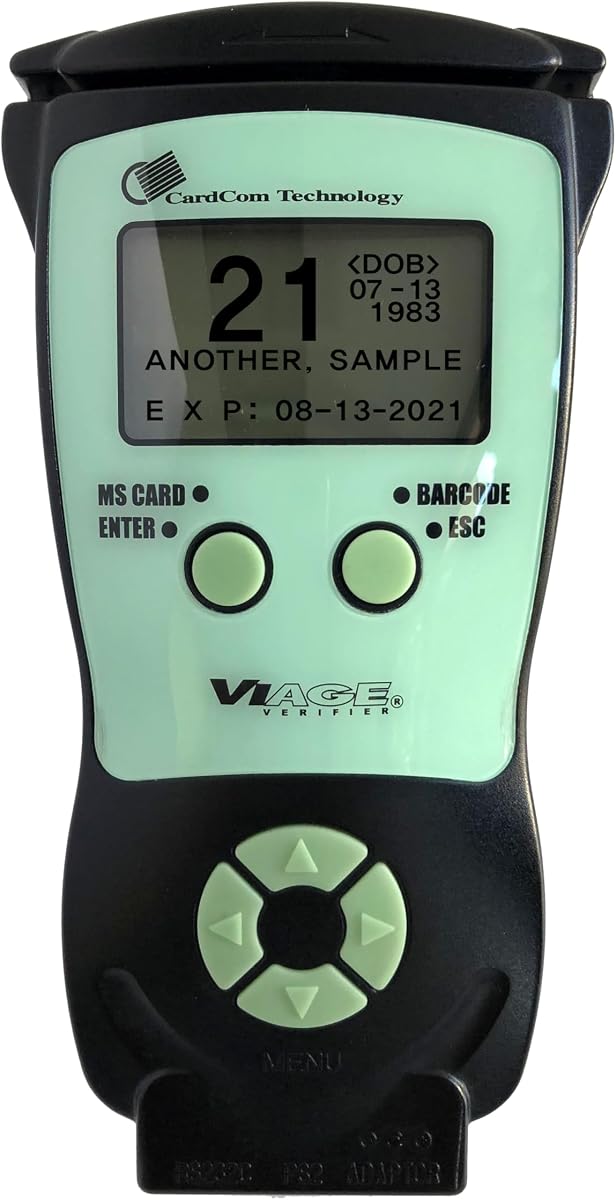
The CAV3200 is a strong budget choice with a 4.7 rating. It scans magnetic stripe and 2D barcode IDs quickly. The compact portable device stands alone without external devices.
We may earn a commission when you buy through this link, at no additional cost to you.
Instant age and expiration display is clear. The backlight ensures easy visibility. Memory can be disabled or enabled for reporting. Compliance software comes free with the device.
There are no hidden fees or subscriptions. All accessories are included. Dual scanning technology covers different card formats. Free updates last for the life of the device.
Businesses wanting affordability should buy this scanner. It works in various environments. Plug and play makes setup simple.
Total cost is low without subscriptions. This fits tighter budgets well.
Portability allows scanning anywhere needed. Standalone mode works without Wi-Fi.
We may earn a commission when you buy through this link, at no additional cost to you.
The IDVisor Smart Plus features a 4.2 rating and large display. It reads passports and IDs from all 50 states. The extra large 5 inch LCD screen is clear. It charges in the included cradle.
We may earn a commission when you buy through this link, at no additional cost to you.
It saves 50000 customers with tags like VIP. Export scan records in Excel format easily. Upload download records from a cloud database. Battery operation lasts over 12 hours.
Intuitive icons and human voice warnings help staff. Challenge questions verify identity details. Lifetime updates and US-based support are included. It is a price performance leader.
For large venues needing clear screens this works. It tracks venue occupancy and visits. It supports loyalty membership assignment.
Display quality ensures visibility in all light. Large screen reduces eye strain.
Export options simplify auditing processes. Excel format integrates easily with reports.
We may earn a commission when you buy through this link, at no additional cost to you.
This portable scanner earns a 4.1 rating for durability. It includes a free vinyl decal to alert customers. Standard scanning is always free with compliance log creation. Fake detection is 90% accurate.
We may earn a commission when you buy through this link, at no additional cost to you.
It charges in under 90 minutes for fast recharge. The rugged hardware is rated IP68 and MIL-STD. It supports U.S. licenses, state IDs, passports, and EAD. No photos are stored.
Compliance logging is customizable. Data retention settings meet audit needs. Mobile Driver's License support is an upgrade. Results appear in less than a second.
High volume environments benefit from this rugged unit. Support is available nights and weekends. It works for bars and clubs.
Durability handles wet environments well. Dust and drops do not stop it.
Compliance logging meets audit standards. Exportable records simplify reporting.
We may earn a commission when you buy through this link, at no additional cost to you.
The Quantum Edge V3 has a 4.5 rating for reliability. It validates age within seconds. Ideal for bars and member clubs. It scans all 50 states, Canada, Mexico, and military.
We may earn a commission when you buy through this link, at no additional cost to you.
Water and dust seal handles wet environments. Small dust does not impact operation. It features a display or side button activated scanner. It vibrates in hand for no entry alerts.
Wi-Fi connection enables easy device linking. PC software allows optional data transfer. The kit includes free updates and support. It is durable for hospitals and banks.
For outdoor or wet venues this fits. It includes an outer carry case. It ensures customer satisfaction during checks.
Waterproof design resists rain splashes. It protects internal components effectively.
Connectivity simplifies data transfer. Wi-Fi reduces cables on desks.
We may earn a commission when you buy through this link, at no additional cost to you.
This second countertop model has a 4.1 rating. It verifies age and expiration on every scan. The system creates a compliance log automatically. It eliminates math mistakes during inspections.
We may earn a commission when you buy through this link, at no additional cost to you.
Optional fake ID detection analyzes encrypted barcode data. You can try it out with free checks. The unit operates when connected to a standard outlet. No batteries are included.
It scans all U.S. driver licenses and state IDs. Manual entry is for worn or damaged IDs. It includes manual entry for passports. Results appear in less than a second.
Businesses needing Go/No/ displays should choose it. It is compliant with key laws. It works fully without a computer.
Simple setup requires no PC. Plug-in power ensures continuity.
State compliance ensures legal safety. It aligns with key verification laws.
We may earn a commission when you buy through this link, at no additional cost to you.
The Swish S1 is a Windows optical scanner. It captures high resolution images of photo IDs. The camera based device scans thick or thin cards. There is no need to insert cards through narrow slots.
We may earn a commission when you buy through this link, at no additional cost to you.
It scans cards ONE SIDE at a time. The scanner does not damage thin or fragile cards. There are no moving parts to cause jams. It is self-powered from the USB port.
The included Scan-ID app reads driver license info. It scans 2D barcodes automatically. Automatic Age Verification checks age of person. The scanner has a small footprint.
For Windows environments this works well. It is TWAIN compliant with medical systems. It scans images to PDF or JPEG formats.
Software inclusion provides full scanning features. It saves and manages searchable database.
Compatibility works with hundreds of apps. TWAIN support enables medical practice use.
We may earn a commission when you buy through this link, at no additional cost to you.
Choosing the right ID scanner depends on your business size, budget, and specific compliance needs. This guide outlines key factors to consider before purchasing.
Fast scanning speed is essential for high traffic venues like clubs and bars. Devices that verify age in under 3 seconds help keep lines moving and improve customer experience. Look for models with barcode scanning that processes data instantly without manual entry.
For handheld units, long battery life ensures the device lasts through a full shift. Models offering 12+ hours reduce downtime for charging. Portable scanners often include spare batteries or swappable options for continuous operation.
Compliance features protect businesses from fines during inspections. Systems that automatically create logs and verify state laws help maintain records. Look for tools that export data for easy reporting and auditing.
Durability ensures the device survives drops, dust, and wet environments common in bars. Look for IP ratings like IP68 or MIL-STD certifications. Rugged designs prevent damage from drinks or accidental drops.
Fake ID detection uses encrypted barcode data to verify authenticity. Some models include free checks while others require credits. Advanced systems compare data against live security databases for higher accuracy.
Customer management tools allow tagging VIPs or banned patrons. Devices that store photos and contact info help build loyalty. This data can be exported or synced to cloud systems for centralized access.
Regular software updates ensure compatibility with new ID formats. Lifetime upgrades keep the device current without extra fees. Check if the model offers free updates or requires paid subscriptions.
Ease of use reduces training time for staff. Simple interfaces with audible or visual warnings help prevent mistakes. Plug and play functionality ensures quick setup without technical expertise.
To start using your scanner, ensure it is fully charged or connected to power. Connect it to your POS or computer via USB or Wi-Fi as instructed. Install any required software on the host device to enable data logging.
When scanning an ID, hold the barcode steady over the scanner slot. The device should read the data in seconds. Check the screen for age results and follow prompts for underage or expired IDs. Store patron photos if enabled for security.
To care for your device, wipe the scanner lens regularly with a soft cloth. Keep the unit in a dry place when not in use. Update software periodically to maintain compatibility with new ID standards.
Some models store photos for security and loyalty purposes. Others do not take photos to protect privacy. Check specific product details before purchasing to ensure alignment with your privacy policy.
Many scanners include free ID updates without hidden fees. Others may require subscription credits for premium detection features. Always review the software terms to confirm long-term costs.
Standalone units work independently without external devices. Countertop models often require power but may not need a PC. Handheld devices can operate on battery with internal memory.
Most models scan all 50 states plus Canada and Mexico. Some support military IDs and international documents. Verify state compatibility in the product specs before buying.
Advanced detection claims over 90% accuracy. It analyzes encrypted barcode data against live databases. Results vary based on the security database and model selected.
Most devices come with standard manufacturer warranties. Check product details for specific terms. Lifetime software support is often included with the hardware.
Basic scanners may not detect holograms or watermarks. Advanced models use encrypted data for better detection. Review features to see if hologram detection is included.
Many scanners come with free software included. Others may require installation of apps on PCs. Check if the device needs extra software for full functionality.
We recommend the IDetect ID Scanner as the top choice for overall performance and reliability. The IDVisor Smart V2 offers premium features for advanced venues needing CRM capabilities. For budget-conscious buyers, the CAV3200 provides solid value without hidden fees.
When deciding, prioritize compliance features that match your local laws. Ensure the device fits your operational flow whether portable or stationary. Select models with long battery life and durable hardware for high traffic environments.
Always check current prices and availability before purchasing. Terms and features may change over time. Use this guide to find the best tool for your business needs.