
MSI 7A64-001R Gaming
4.0Editor score
DDR4 boost technology
Mystic light RGB sync
Gaming LAN with protection
This guide compares the top H270 motherboards for Intel 6th and 7th Gen processors, covering gaming, performance, and budget options with detailed specs.
Finding the right H270 motherboard is crucial for building a stable and efficient PC with Intel 6th or 7th generation processors. These boards offer a balance of features, connectivity, and reliability for various user needs.
We evaluated ten real products based on their specifications, user ratings, and compatibility. This list covers everything from budget-friendly options to premium gaming boards with advanced cooling and audio features.
Each pick highlights key strengths and potential trade-offs to help you decide. Please note that availability and pricing can change frequently, so always check current listings before purchasing.
4.0Editor score

4.2Editor score

4.4Editor score
The following table provides a side-by-side comparison of all ten H270 motherboards included in this guide. Review the key specifications to find the model that best fits your specific build requirements and performance goals.




The ASUS ROG Strix H270F Gaming is a standout option for enthusiasts looking for a balance of performance and style. With a solid rating and robust features, it handles modern tasks with ease while delivering a premium user experience.
We may earn a commission when you buy through this link, at no additional cost to you.
Its industry-leading 8-channel HD audio driven by Japanese capacitors ensures crisp sound for games and media. The Dual M.2 slots and front panel USB 3.1 provide the speed needed for fast storage and peripherals.
While the price is higher than standard boards, the investment pays off in build quality and features like Safe Slot. This reinforced PCIe slot prevents damage from heavy GPUs, ensuring long-term stability.
Gamers and power users should buy this board for its reliable performance and advanced cooling. It is an excellent choice for anyone building a high-end system on the H270 platform.
The SupremeFX S1220A codec delivers immersive sound with reduced noise, perfect for gaming and streaming setups.
FanXpert 4 allows dynamic fan calibration to keep system temperatures low during intense gaming sessions.
We may earn a commission when you buy through this link, at no additional cost to you.
The ASUS Prime H270-PLUS offers top-tier reliability and connectivity for users who value stability. With a high user rating, it stands out as a premium choice for those building a dependable workstation or home PC.
We may earn a commission when you buy through this link, at no additional cost to you.
Integrated Dual M.2 slots with Intel Optane Memory compatibility allow for faster system boot and response times. The 5X Protection III hardware safeguards components against electrical issues, ensuring longevity.
The Safe Slot Core PCIe slots are fortified to prevent damage from heavy graphics cards. This feature is crucial for maintaining integrity during transport or long-term use without loosening over time.
Users seeking a premium, no-fuss motherboard should choose this model. It balances high-end features with solid construction, making it a trustworthy option for critical computing tasks.
Optane compatibility means you can add a cache drive to boost system responsiveness without changing your main storage.
5X Protection III includes overvoltage protection and safe zones for capacitors to prevent hardware failure.
We may earn a commission when you buy through this link, at no additional cost to you.
The MSI 7A64-001R Gaming is an excellent entry point for gamers on a budget who still want style and performance. It supports the latest 7th and 6th gen Intel processors effectively without breaking the bank.
We may earn a commission when you buy through this link, at no additional cost to you.
Features like DDR4 Boost and Mystic Light sync let users tweak memory speed and customize RGB lighting. The Audio Boost 4 with Nahimic 2 ensures immersive sound for games without needing a separate sound card.
Gaming LAN with LAN protect keeps your connection stable and secure from malware during online matches. This focus on network stability is a key differentiator for competitive players.
Budget builders looking for a reliable gaming base should pick this board. It offers essential high-performance features at a competitive price point, making it a smart investment.
DDR4 Boost technology ensures your memory runs at optimal stability and speed for better overall system performance.
LAN Protect uses high quality Ethernet to protect against electromagnetic interference and software attacks.
We may earn a commission when you buy through this link, at no additional cost to you.
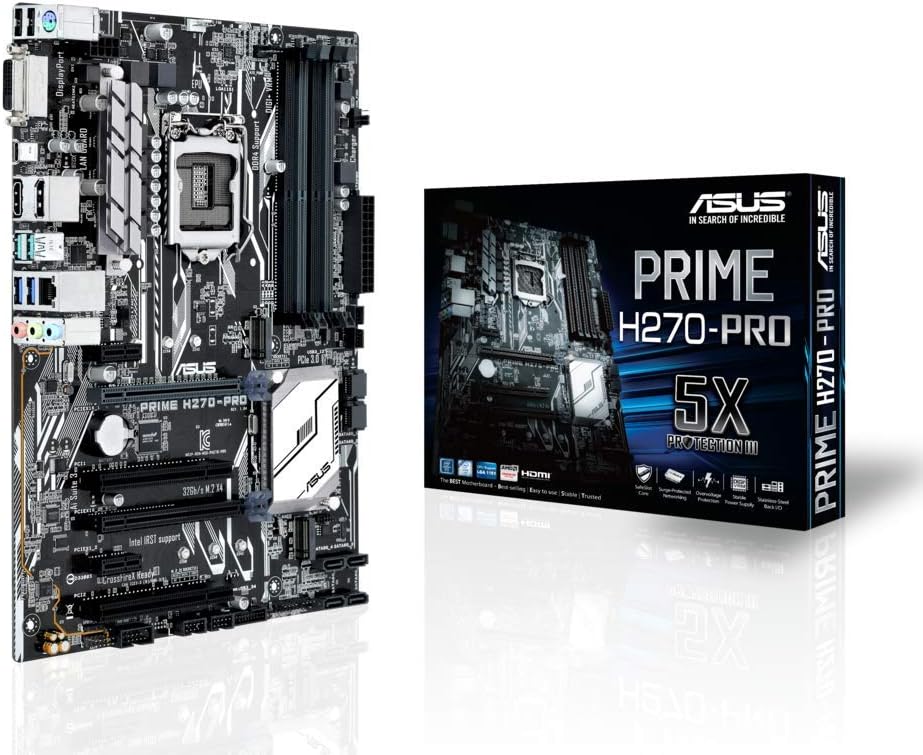
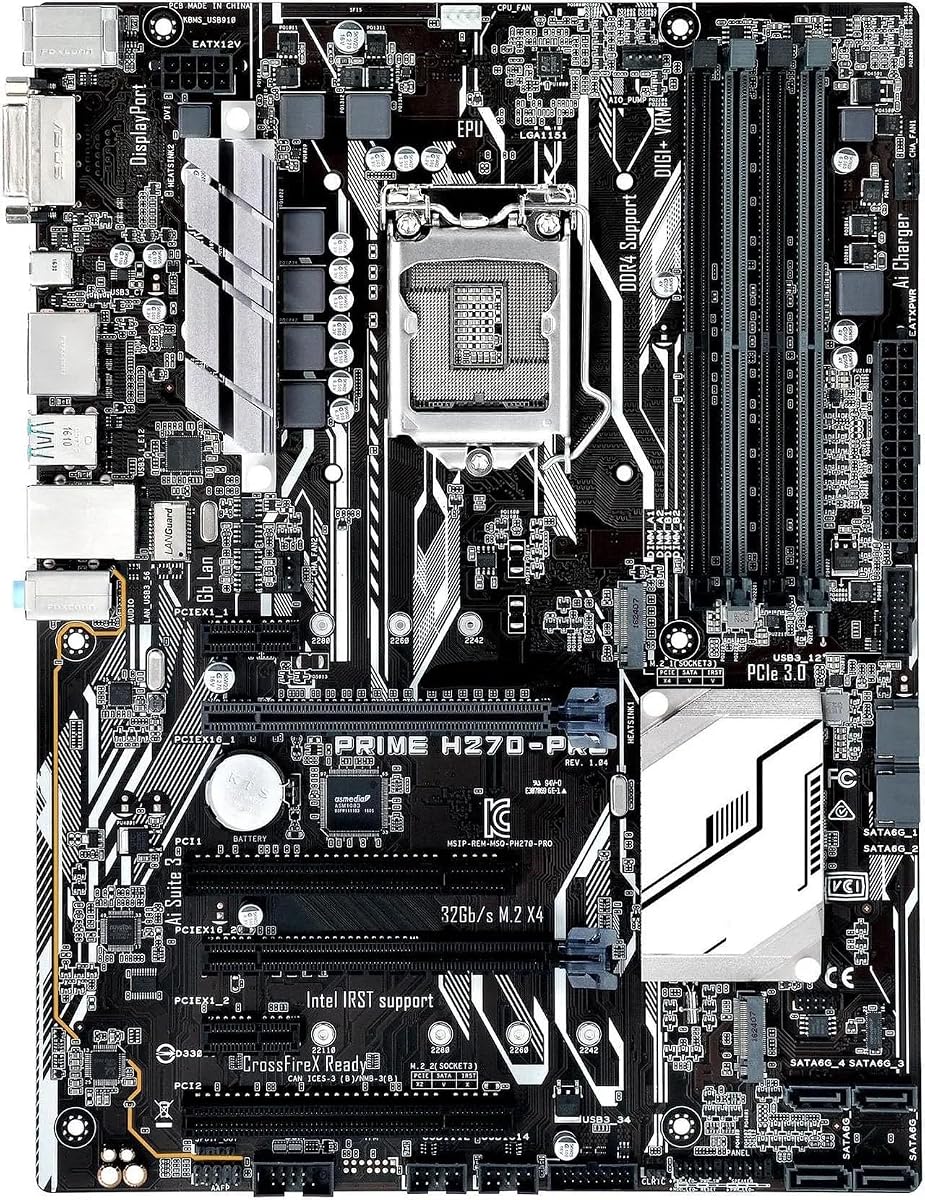
The ASUS Prime H270-PRO is tailored for users who need a dependable board for work or light multimedia. With multiple video outputs and a modern USB Type-C port, it suits office environments well.
We may earn a commission when you buy through this link, at no additional cost to you.
Its ATX form factor provides ample space for expansion while maintaining a clean layout. The 5X Protection III hardware safeguards ensure the system runs smoothly even under high loads.
Supporting up to 64GB of dual channel DDR4 memory means you can handle large datasets or virtual machines. This capacity is rare at this price point and adds significant value.
Professionals needing a stable and feature-rich board should choose this model. It balances modern connectivity with the reliability required for daily productivity tasks.
USB 3.1 Type C ensures you can connect the latest peripherals and transfer data quickly.
Multiple video ports like HDMI and DisplayPort allow for multi-monitor setups to boost productivity.
We may earn a commission when you buy through this link, at no additional cost to you.
The ASRock H270 PRO4 stands out for its unique chipset choice and robust storage options. It offers features often found on higher-end boards, making it a smart pick for storage-heavy builds.
We may earn a commission when you buy through this link, at no additional cost to you.
With an Ultra M.2 slot supporting PCIe Gen3 x4 and SATA3, you get fast storage capabilities right on the board. Six SATA3 ports allow you to connect multiple hard drives for a massive RAID array.
The chipset choice is notable as it provides some flexibility usually reserved for Z-series boards. This allows for efficient performance with compatible Intel Core processors.
Users needing lots of storage connections and PCIe bandwidth should consider this board. It delivers strong performance and connectivity that exceeds typical H270 offerings.
With six SATA ports and M.2 support, you can easily expand your storage without extra controllers.
The chipset allows for robust data throughput and stability during intensive workloads.
We may earn a commission when you buy through this link, at no additional cost to you.
The GIGABYTE GA-H270-Gaming 3 focuses heavily on networking and connectivity for gamers. With the Killer E2500 networking chip, online performance is optimized to reduce lag during critical moments.
We may earn a commission when you buy through this link, at no additional cost to you.
It supports 2-Way Crossfire, allowing you to combine GPUs for better graphics performance. This feature is valuable for users who want to upgrade their visual power later without changing the motherboard.
USB 3.1 Type-C connectivity ensures you stay ahead with modern peripherals. Four DIMM slots give you the flexibility to upgrade memory to higher capacities as needed.
Gamers prioritizing network stability should choose this board. It delivers a solid foundation for online play and offers the versatility needed for future hardware upgrades.
Killer Networking prioritizes gaming traffic to ensure your connection stays fast and responsive.
2-Way Crossfire support lets you add a second graphics card to boost frame rates in games.
We may earn a commission when you buy through this link, at no additional cost to you.
This replacement motherboard is designed specifically to resolve contact issues and failures in existing systems. It is an ideal choice for users looking to restore a damaged system without buying a complete new PC.
We may earn a commission when you buy through this link, at no additional cost to you.
The optimized power design supports multi-core processors efficiently, ensuring smooth performance under high load. Advanced heatsink technology helps dissipate heat effectively to maintain system stability.
While it is a third-party option, the focus on quality assurance and resolving short circuits makes it practical. It addresses common failure points like burnout and dust damage directly.
Users needing a reliable replacement board should consider this product. It offers a cost-effective way to refresh an old system with a component built for stability.
The exquisite craftsmanship and advanced heatsink ensure professional-grade stability under heavy loads.
This board is engineered to fix issues caused by dust or static electricity that damage original components.
We may earn a commission when you buy through this link, at no additional cost to you.
The H270 Performance Motherboard 1151 offers a straightforward solution for basic computing needs. With support for up to 64GB of DDR4 memory, it handles standard tasks and light multitasking well.
We may earn a commission when you buy through this link, at no additional cost to you.
Inclusion of an M.2 slot means you can use fast SSDs for better boot times and storage speeds. The ATX form factor ensures it fits in most standard cases without modification.
Support for a wide range of i3 and i5 CPUs makes it versatile for budget builds. It provides the essential features needed for a functional PC without unnecessary extras.
Users seeking a simple, functional board at a low cost should choose this. It covers the basics effectively for general home or office use.
With M.2 support and 64GB RAM capacity, this board handles daily tasks efficiently and reliably.
Stripping away unnecessary features keeps the price low while maintaining essential modern connectivity.
We may earn a commission when you buy through this link, at no additional cost to you.
The H270 Motherboard 64GB is a simple, straightforward option for users needing a basic platform. It supports DDR4 memory and Intel 6th or 7th gen CPUs to handle standard computing tasks.
We may earn a commission when you buy through this link, at no additional cost to you.
Its design focuses on providing the core connections needed for a system to boot and run. The LGA 1151 socket ensures compatibility with a wide range of affordable processors.
While it lacks advanced gaming or high-speed features, it serves well for general home use. This simplicity makes it easy to install and configure for new users.
Anyone needing a basic board for a secondary PC should look at this option. It provides the essentials at a low cost for reliable everyday performance.
This board focuses on stability and basic connectivity to ensure the system runs smoothly without issues.
A standard ATX size and socket layout make installation simple for builders of any experience level.
We may earn a commission when you buy through this link, at no additional cost to you.
The H270-PLUS Motherboard is a great entry-level choice for those new to PC building. It supports up to i7 CPUs and 64GB of memory, which is impressive for a budget board.
We may earn a commission when you buy through this link, at no additional cost to you.
The inclusion of an M.2 slot adds value by allowing faster storage connections. This helps speed up system boot times and application loading for a smoother experience.
Designed for standard ATX cases, it fits easily into most chassis without needing custom layouts. Its affordability makes it accessible for anyone looking to build a basic machine.
New builders or users on a tight budget should pick this board. It offers the flexibility to upgrade RAM and storage later while keeping the initial cost low.
Support for high-end CPUs like the i7-6700 gives you room to grow without changing the board.
The M.2 slot lets you install a fast SSD for a noticeable boost in system responsiveness.
We may earn a commission when you buy through this link, at no additional cost to you.
Choosing the right H270 motherboard requires understanding your specific needs and the capabilities of the board. This guide covers the essential factors to consider before making your purchase.
Ensure the motherboard supports your specific Intel CPU model. The H270 chipset is designed for 6th and 7th Gen Intel Core processors with LGA 1151 sockets. Always verify the exact CPU support list on the manufacturer's website before buying to avoid incompatibility issues.
Check the socket type and chipset details to match your processor generation. This ensures your system boots correctly and runs without hardware conflicts.
Look at the maximum supported RAM and the number of DIMM slots. Most H270 boards support DDR4 memory up to 64GB. If you plan on multitasking or running virtual machines, aim for a board with at least four slots to allow for future expansion.
Select a board that matches your memory needs. Having enough slots now prevents the need to replace the motherboard later when you need more storage capacity.
Modern builds benefit from having M.2 slots for fast SSDs. Check if the board has one or two M.2 slots and whether they support PCIe or SATA modes. Additionally, count the SATA ports available for traditional hard drives or optical drives.
Prioritize boards with M.2 support for speed. Faster storage significantly improves boot times and overall system responsiveness compared to standard hard drives.
Review the rear I/O panel for USB ports and video outputs. Ensure you have enough USB 3.0 or 3.1 ports for your peripherals. If you do not have a dedicated graphics card, verify that the board supports HDMI, DisplayPort, or DVI.
Choose a board with the right mix of ports for your devices. Adequate connectivity prevents the need for extra hubs and keeps your workspace organized.
The form factor determines the physical size of the motherboard. Most H270 boards are ATX, which fits standard cases. If you are building a compact PC, check if smaller micro-ATX versions are available though they are less common on this chipset.
Match the motherboard size to your PC case. A proper fit ensures all ports are accessible and the board fits securely into the chassis without issues.
Quality power delivery and heatsinks are vital for system stability. Look for boards with adequate VRM heatsinks especially if you plan on using higher-end processors. Good cooling components help maintain performance during long periods of heavy use.
Inspect the cooling design carefully. Better power delivery ensures your CPU gets stable voltage and heatsinks prevent overheating during intensive tasks.
Check the number of PCIe slots for graphics cards or other add-in cards. If you plan on running multiple GPUs or adding capture cards, ensure the board has enough space and lanes. PCIe 3.0 x16 slots are standard for modern GPUs.
Verify the PCIe layout to avoid conflicts. Proper slot spacing allows you to install all the necessary components without physical obstruction.
Built-in audio codecs vary greatly between models. If you care about sound quality, look for boards with dedicated audio capacitors or audio shields. Features like SupremeFX or Audio Boost enhance the listening experience for games and music.
Consider your audio needs when choosing. High-end audio components save you from needing a separate sound card for good sound quality.
When installing your motherboard, ensure the case standoffs match the mounting holes to prevent short circuits. Align the rear I/O panel correctly and secure the board gently without applying too much force to the PCB.
Regularly update the BIOS to the latest version to ensure system stability and compatibility with new components. Use the manufacturer's utility software to flash updates and check hardware monitoring tools for temperature management.
Keep your system clean from dust buildup to maintain optimal cooling. Use compressed air periodically to clean heatsinks and fans which helps prevent overheating and ensures the longevity of your motherboard components.
No H270 motherboards do not natively support Intel 8th or 9th Gen processors. They are designed specifically for 6th and 7th Gen Intel Core processors using the LGA 1151 socket. You will need a newer chipset like H310 or H370 for those CPUs.
Most H270 motherboards support up to 64GB of DDR4 RAM. Some lower-end models might cap at 32GB so check the specific product specifications. Using dual channel memory configurations provides better performance than single channel setups.
H270 motherboards do not support CPU overclocking as the chipset is locked for non-K processors. You can still overclock the memory slightly in many cases though. For full CPU overclocking you would need a Z270 motherboard instead.
Yes most modern H270 motherboards include at least one M.2 slot for SSDs. Some higher-end models feature two slots for additional storage speed. Always check the manual to see which PCIe lanes are affected by M.2 usage.
Some H270 motherboards support AMD CrossFire or NVIDIA SLI for two graphics cards. However performance may be limited due to the chipset. Check the product page to confirm multi-GPU support before purchasing for a gaming setup.
The main difference is that Z270 supports CPU overclocking while H270 does not. Z270 also offers more PCIe lanes and better connectivity options for multiple devices. H270 is generally more affordable and sufficient for most standard users.
Yes H270 motherboards generally support Intel Optane Memory for caching. This allows you to use a small Optane drive to speed up system performance. Ensure your BIOS settings enable the feature for it to function correctly.
You can update the BIOS using a USB drive and the manufacturer's EZ Flash utility. Download the latest file from the brand's support page and follow the on-screen instructions. Always back up your data before attempting a BIOS update.
The H270 motherboard market offers a wide range of options for building a reliable Intel system. Whether you need the premium features of the ASUS ROG Strix or the budget-friendly MSI Gaming PRO Carbon there is a board to fit your specific requirements.
When making your choice prioritize compatibility with your CPU and memory needs. Focus on essential features like M.2 support and port selection to ensure your PC meets your daily tasks and gaming expectations.
Remember to verify current stock and specifications as these models are older generations. Checking the manufacturer website or retailers will give you the most up-to-date details before you complete your purchase.