
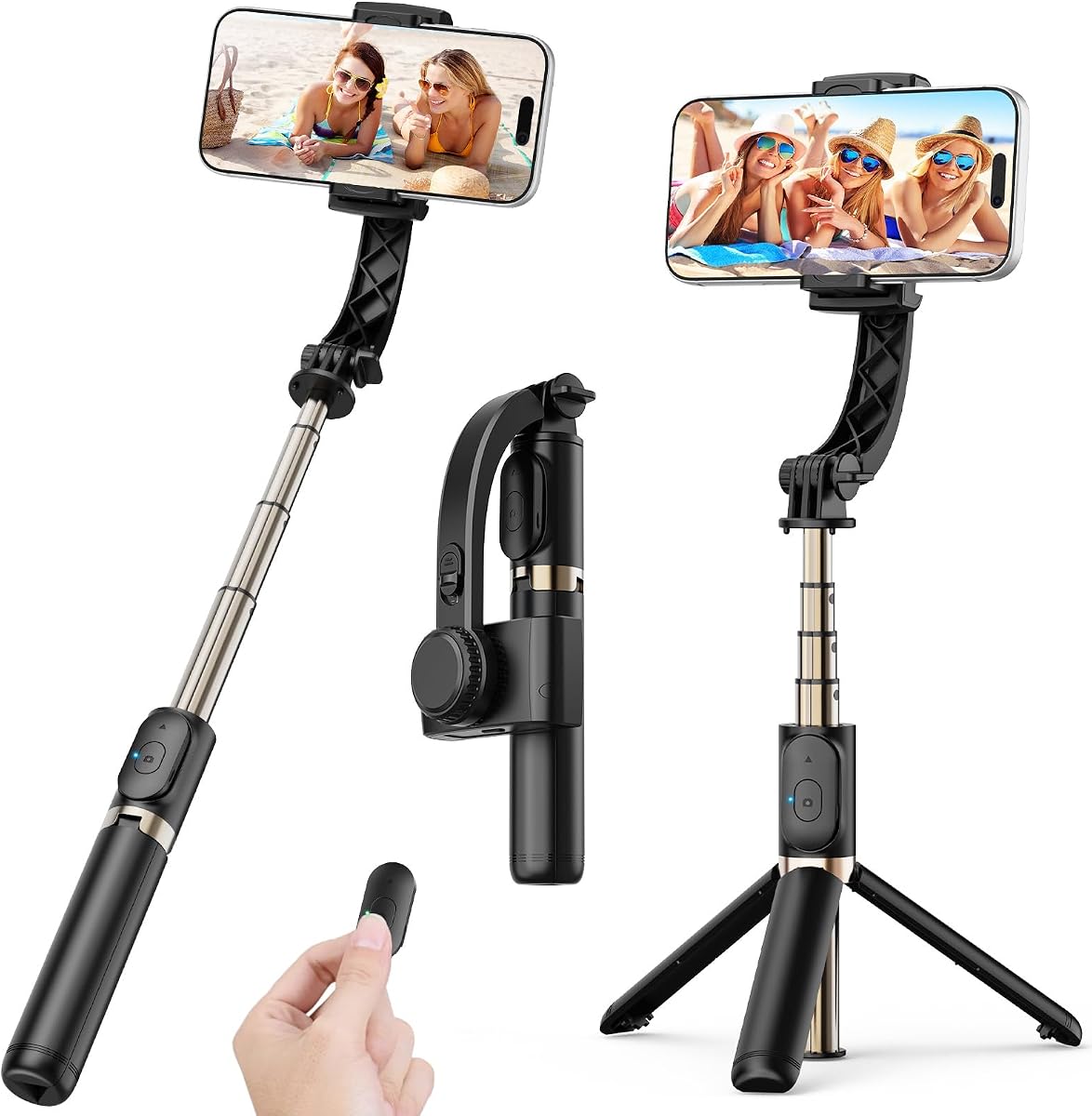
hohem iSteady X3 SE 3-Axis Gimbal Stabilizer for iPhone Android Black
4.2Editor score
Detachable magnetic remote control
11-hour battery life
Foldable pocket-sized design
This guide compares the top 10 gimbals for beginners including stabilization features battery life ease of use and smartphone compatibility to help you choose
Starting your video journey can feel overwhelming with so many tools available. A gimbal stabilizer is one of the most impactful investments you can make to instantly upgrade your content quality. It eliminates shaky footage and lets you focus on storytelling instead of fighting hand movements.
We have carefully evaluated ten top-rated gimbals based on real user feedback and technical specifications. Our analysis covers stabilization performance battery endurance ease of use and compatibility with various smartphone models. Each product was selected to represent different budgets and feature sets for new creators.
Every recommendation includes detailed insights into what makes each device stand out for beginners. You will find pros cons and specific use cases to guide your decision. Remember that prices and availability can change so check the latest details before purchasing your next stabilizer.
4.2Editor score

4.4Editor score

4.5Editor score
This side-by-side comparison highlights the key specifications and unique selling points of each top-rated gimbal. Use this table to quickly identify which device matches your specific needs whether you prioritize battery life portability or advanced tracking features for your shooting style.



The DJI Osmo Mobile 8 stands out as the top choice for beginners seeking professional results. With a rating of 4.4 stars users praise its robust 3-axis stabilization that delivers smooth cinematic footage effortlessly. This gimbal combines tracking audio reception and lighting into one compact device making it ideal for vloggers.
We may earn a commission when you buy through this link, at no additional cost to you.
Key strengths include its seamless 360-degree pan rotation and intelligent tracking capabilities. The built-in tripod and selfie stick add versatility allowing you to capture low-angle shots or group videos without extra gear. You can also charge your phone while filming ensuring long sessions stay powered.
While the price is higher than budget options the features justify the cost for serious creators. The DJI Mimo app offers one-tap editing and tutorials which simplifies the learning curve. Keep in mind that app availability may vary by platform so check compatibility before buying.
Beginners who want a reliable all-in-one solution should prioritize this model. It balances ease of use with advanced features that grow with your skills. Whether filming travel vlogs or daily content this gimbal provides the stability you need to look like a pro.
Active tracking keeps your subject in focus even when you move around. This feature is perfect for dynamic shots where you need the camera to follow you automatically.
With up to 10 hours of operation you can shoot through events or long days without recharging. The ability to charge your phone adds extra convenience for extended use.
We may earn a commission when you buy through this link, at no additional cost to you.
The hohem iSteady X3 SE offers excellent value for beginners on a budget. Rated 4.2 stars it delivers reliable 3-axis stabilization without breaking the bank. This model is designed for travelers and vloggers who need a portable solution that performs well in action-packed scenarios.
We may earn a commission when you buy through this link, at no additional cost to you.
Its standout feature is the detachable magnetic remote control allowing you to shoot from up to 32 feet away. The gimbal folds into a pocket-sized tool weighing just 0.79 pounds which makes it easy to carry anywhere. Battery life is impressive at 11 hours of continuous operation.
Users appreciate the Hohem Joy App which provides AI tracking and creative templates to elevate content quality. Switching between horizontal and vertical screens is effortless making it great for social media. However the app may require some time to master for new users.
If you want professional-grade content without a steep learning curve this gimbal is ideal. It supports a wide range of smartphones including larger models. This budget-friendly option proves you do not need to spend a lot to get smooth stable video.
The detachable remote lets you control recording and shots from a distance. This is perfect for selfies or group videos where you need to be in the frame.
Folding into a small size ensures this gimbal fits in your pocket or bag. You can take it anywhere without worrying about bulk or weight.
We may earn a commission when you buy through this link, at no additional cost to you.
The DJI Osmo Mobile 7P earns the highest rating of 4.5 stars among beginner gimbals. It combines robust 3-axis stabilization with a multifunctional module that includes lighting and audio reception. This all-in-one design helps you capture spectacular shots without needing extra accessories.
We may earn a commission when you buy through this link, at no additional cost to you.
Key features include dual-lens enhanced tracking that keeps subjects in focus even during fast close-up action. The magnetic design allows you to mount your phone and start filming instantly. The included extension rod and tripod offer creative freedom for wide selfies and steady vlogs.
While it is a premium option the performance justifies the investment. The DJI Mimo app provides ShotGuides and one-tap editing to streamline your workflow. Be aware that platform compatibility issues may require downloading the app from the official website.
Content creators who want the best tracking and build quality should choose this model. It delivers cinema-quality masterpieces with ease. Whether you are filming daily vlogs or creative bursts this gimbal helps you look professional from day one.
The module packs intelligent tracking audio and lighting into one unit. This eliminates the need for separate gear and simplifies your setup.
Attaching your phone takes seconds thanks to the magnetic clamp. This saves time and lets you capture moments before they pass.
We may earn a commission when you buy through this link, at no additional cost to you.
The DJI Osmo Mobile 7 is perfect for beginners who prioritize weight and comfort. Weighing only 300 grams it reduces wrist strain during extended shooting sessions. Rated 4.4 stars it offers lossless stability that helps you craft stunning cinema-quality footage effortlessly.
We may earn a commission when you buy through this link, at no additional cost to you.
Its ActiveTrack 7.0 technology tracks subjects in diverse scenarios ensuring smooth movement even during bold moves. The foldable design and built-in tripod make storage and solo creation easy. You can also charge your phone via USB-C which keeps you going during outdoor filming.
The anti-slip handle and ergonomic shape allow for comfortable extended use. Pairing with DJI Mimo gives you access to ShotGuides and one-tap editing. However platform compatibility notes suggest downloading the app from the official site for best results.
If you want a reliable lightweight stabilizer for daily content this is a great choice. It simplifies your workflow and enhances storytelling instantly. Beginners will appreciate how easy it is to capture professional shots from day one.
At 300 grams this gimbal is easy to carry all day. The ergonomic design ensures you can shoot without fatigue.
The two lenses team up for smarter tracking that keeps your subject in focus. This works well even during fast action.
We may earn a commission when you buy through this link, at no additional cost to you.
This 1-axis gimbal stabilizer offers a simple budget-friendly solution for new creators. With a rating of 4.7 stars users love its app-free operation and easy one-button controls. It reduces hand shake effectively making it a reliable choice for vlogging and TikTok videos.
We may earn a commission when you buy through this link, at no additional cost to you.
The extendable aluminum alloy rod reaches 31.5 inches allowing for wide group shots and creative angles. You can fold it down to 7.5 inches for easy storage. The built-in tripod mode lets you set the gimbal on any flat surface for hands-free calls or tutorials.
A detachable Bluetooth remote works up to 32 feet away which is handy for group photos. It fits most smartphones and can connect to GoPro cameras with an adapter. Battery life is shorter at 2 hours but quick charging via USB helps.
If you want a portable and easy-to-use stabilizer without complexity this is ideal. It is perfect for travel and social media content. Beginners can start creating smooth videos immediately without needing to download apps or learn advanced settings.
No apps are required to operate this gimbal. One-button controls let you switch between horizontal and vertical shooting instantly.
The 31.5-inch rod allows you to capture more in your frame. This is perfect for group shots or expansive travel views.
We may earn a commission when you buy through this link, at no additional cost to you.
The AOCHUAN Smart XE is a versatile 3-axis gimbal designed for smartphones. Rated 4.1 stars it works well with most Android phones and iPhones. The focus wheel and zoom slide empower you to shoot like a pro without complicated filmmaking skills.
We may earn a commission when you buy through this link, at no additional cost to you.
It features a 2600mAh battery that supports up to 10 hours of continuous shooting. The palm-sized foldable design makes it portable enough for daily use. AI Face Track 4.0 allows for intuitive control through the AOCHUAN APP including modes like time-lapse and cinematic video.
Users can switch between horizontal and vertical modes with one click for TikTok or YouTube shorts. The anti-shake algorithm ensures smooth video output even during movement. However the app may require learning to access all creative possibilities.
For filmmakers and vloggers seeking a smart control system this gimbal is a strong option. It balances price and performance well. Beginners will find the one-click features helpful to quickly produce professional-looking content without extensive training.
The focus wheel gives you manual control over zoom and focus. This adds a professional touch to your videos without complex setup.
A 2600mAh battery supports 10 hours of shooting. This ensures you can film events or days without worrying about power.
We may earn a commission when you buy through this link, at no additional cost to you.
The DJI RS 3 Mini is an ultra-compact gimbal built for mirrorless cameras. Rated 4.3 stars it weighs only 1.75 pounds yet supports up to 4.4 lbs of camera gear. This makes it ideal for beginners upgrading from phones to professional cameras.
We may earn a commission when you buy through this link, at no additional cost to you.
It includes a 1.4-inch full-color touchscreen with an intuitive UI for easy access to settings. Bluetooth shutter control lets you pair your camera and control recording directly from the gimbal. Native vertical shooting enables quick content creation for social media platforms.
The 3rd-Gen RS stabilization algorithm provides pro-level image stabilization even during low-angle shots. You can carry it easily for travel without bulk. Note that activation requires the DJI Ronin app which may need to be downloaded from the official website.
If you use a DSLR or mirrorless camera this gimbal offers the stability you need. It simplifies the transition to professional equipment. Beginners will appreciate how easy it is to shoot smooth cinema-quality footage with a full camera setup.
This gimbal supports Canon Sony Nikon and Fujifilm cameras. It handles a wide range of lens combinations effectively.
The 1.4-inch touchscreen gives you quick access to settings. This makes adjusting parameters easier during shooting.
We may earn a commission when you buy through this link, at no additional cost to you.
The hohem iSteady Mobile Plus stands out with its ultra-wide-angle mode and creative features. Rated 4.2 stars it delivers cinematic-grade video with a 20% increased motor torque. This ensures smooth footage even with larger phones like the iPhone 15 Pro Max.
We may earn a commission when you buy through this link, at no additional cost to you.
Its inception mode rotates your phone 360 degrees spontaneously adding pizazz to your shots. The 13-hour battery life ensures you can shoot outdoors without interruptions. You can also use the gimbal as a power bank to charge your phone if power runs low.
The Hohem Joy app offers one-click filming templates like Dolly Zoom and CloneMe. This simplifies editing for new creators. However you may need to manually balance larger devices to avoid motor interference with wide-angle lenses.
Storytellers who want unique creative modes should choose this gimbal. It helps you create captivating content with ease. Beginners will enjoy the variety of templates that let them experiment with styles without learning complex editing software.
This mode eliminates motor interference and captures broader views. It expands your creative horizons for landscape shots.
The 360-degree rotation creates master-like cinematic shots. This feature adds visual interest to your videos instantly.
We may earn a commission when you buy through this link, at no additional cost to you.
The FeiyuTech SCORP Mini 2 Kit is a hybrid stabilizer supporting cameras and smartphones. Rated 4.2 stars it weighs 852 grams but handles up to 1.2 kg of payload. This makes it versatile for users who own both phone and mirrorless cameras.
We may earn a commission when you buy through this link, at no additional cost to you.
It features a built-in AI tracker that works independently without connecting to an app. The 1.3-inch touchscreen allows you to operate the gimbal easily at low angles. The kit includes a carrying case and extension rod for a complete setup.
Users can control camera focus via Bluetooth or cable for precise shots. The joystick design simplifies operation. The high payload capacity means you can mount various devices including action cameras and DSLRs for diverse shooting scenarios.
If you want one gimbal that adapts to different gear this is an excellent choice. It bridges the gap between smartphone and camera use. Beginners will find the kit comprehensive enough to start creating high-quality video immediately.
The AI tracker works without an app connection. This makes shooting smoother and easier for quick captures.
The package includes a carrying case and extension rod. This provides everything you need to start shooting effectively.
We may earn a commission when you buy through this link, at no additional cost to you.
The Hohem iSteady M6 Kit stands out with its magnetic fill light and tracking features. Rated 4.3 stars it uses iSteady 7.0 stabilization to capture shake-free creations on the move. This gimbal helps you film smoothly whether walking or running.
We may earn a commission when you buy through this link, at no additional cost to you.
Its OLED display visualizes all gimbal statuses so you can check settings quickly. The magnetic fill light offers cold warm and RGB lighting options to adjust color temperature from 2700K to 6500K. The heavy payload capacity supports up to 400 grams of devices.
You can use magnetic AI tracking in all mobile apps for full camera control. This makes social media video creation easier. The versatile control wheel allows roll axis rotation and focus adjustments which adds professional flexibility.
Beginners who want lighting control should choose this gimbal. It helps you look professional even in low light. With advanced tracking and lighting built-in this model offers everything you need to create engaging social media content.
The magnetic light allows warm cool and RGB options. This helps you adjust color temperature for any shooting environment.
The OLED screen shows all gimbal statuses clearly. You can check battery level and mode settings instantly.
We may earn a commission when you buy through this link, at no additional cost to you.
Choosing the right gimbal involves considering several factors that match your shooting style and device. This guide explains the most important features to look for before making a purchase.
Look for gimbals that offer 3-axis stabilization as it provides the smoothest video footage. Single-axis models are more affordable but may not handle complex movements well. Advanced stabilization algorithms help correct shakes even during fast action or running.
Prioritize 3-axis stabilization for professional-looking results.
Battery life should last through your typical shooting sessions without interruption. Most beginner gimbals offer between 8 to 13 hours of continuous use. Some models also double as power banks to charge your phone during filming.
Choose at least 10 hours of battery life for all-day shoots.
Ensure the gimbal supports your specific smartphone model and accessories. Check weight limits especially if you use larger devices or attach external mics. Some gimbals also support cameras which adds versatility.
Verify weight limits and phone size compatibility before buying.
Beginners should look for features like magnetic clamps and quick balancing. Apps with tutorials simplify the learning curve for new creators. Physical controls like dials and buttons help adjust settings without touching your phone.
Focus on intuitive controls and app support to get started quickly.
A lightweight and foldable design makes it easier to carry your gimbal anywhere. Pocket-sized options are ideal for travel or casual content creation. Check the total weight when including any accessories you plan to attach.
Select a foldable and lightweight model for easy transport.
Advanced gimbals offer AI tracking gesture control and creative modes like time-lapse. These features help you capture dynamic shots without extra effort. Built-in tracking keeps subjects in focus even if you move around.
Look for tracking and creative modes to enhance your content.
Gimbals range from budget-friendly to premium models depending on features. Entry-level options provide basic stabilization while high-end ones include lighting and professional tracking. Determine which features are essential for your needs.
Match your budget with the features you actually need to use.
Durable materials ensure your gimbal lasts through regular use and outdoor conditions. Metal components add weight but improve stability. Rubberized grips prevent slips during long recording sessions.
Invest in sturdy construction for long-term reliability.
To begin use turn on the gimbal and connect it to your smartphone via Bluetooth. Open the companion app and calibrate the motors for best performance. Most apps offer quick start tutorials that guide you through the first setup steps.
Balance your phone on the mount by sliding it until the gimbal holds its position without motor adjustment. Use the quick-release plate or magnetic clamp depending on your model. Always check that the phone is secure before recording to prevent drops.
Clean the gimbal regularly with a soft dry cloth to remove dust and debris. Store it in a protective case when not in use to avoid damage. Avoid exposing the device to extreme temperatures or moisture which can affect battery and motor performance.
Most gimbals require a companion app to access advanced features like tracking and creative modes. However some basic models work without an app using physical buttons. Always check the product details to confirm app requirements before purchasing.
Not all gimbals support every phone model due to weight and size constraints. Check the maximum payload capacity and phone size limits listed in the product specs. Models designed for phones usually fit most standard smartphones.
Balance your phone by sliding it along the mount until the gimbal arms stay still without motor help. Most models include quick-release plates that make this process easier. Proper balancing reduces motor strain and improves video stability.
Average battery life ranges from 8 to 13 hours depending on the model and usage. Some gimbals also support pass-through charging which allows you to charge your phone while shooting. Always check battery specs if you plan long shoots.
Yes gimbal stabilization physically reduces motion while camera stabilization uses software that may crop footage. Gimbals deliver smoother and more natural video especially during movement. This makes them ideal for vlogs and travel videos.
Some gimbals are designed to support action cameras and other devices like DSLRs. Check the product description to see if it lists action camera compatibility. Models like the FeiyuTech SCORP Mini 2 explicitly support multiple device types.
We reviewed ten top gimbals to help you find the perfect stabilizer for your needs. The DJI Osmo Mobile 8 leads overall with its excellent tracking and build quality. Budget buyers will appreciate the hohem iSteady X3 SE for its value and battery life.
When choosing prioritize features that match your style like portability or creative modes. Look for 3-axis stabilization and long battery life to ensure smooth footage. Consider whether you need advanced tracking or simple controls to avoid overpaying.
Remember to check current availability and pricing before purchasing since these can change often. Visit the links provided to see the latest deals and user reviews. With the right gimbal you can capture professional-quality videos with confidence.