
iKKEGOL Upgraded USB Triple Foot Pedal
4.4Editor score
Programmable keyboard mouse
Optical quiet switches
Non slip TPU rubber
This guide compares the top 10 foot pedals for transcriptionists based on durability compatibility ergonomics and software support to help you choose the right
Transcriptionists need reliable tools to maintain efficiency and accuracy during long work sessions. A quality foot pedal allows hands-free control of audio playback, reducing strain and speeding up the transcription process significantly.
We evaluated ten top-rated foot pedals based on build quality, ergonomic design, software compatibility, and user feedback. Each product was selected for its ability to meet the specific demands of professional transcription workflows.
Each pick highlights key features, pros, cons, and ideal use cases to help you find the best fit. Note that product prices and availability may change over time, so check current listings before purchasing.
4.4Editor score

4.5Editor score

4.1Editor score
Below is a side-by-side comparison of all ten selected foot pedals. Review the specifications, images, and links to find the model that best suits your transcription needs and budget.


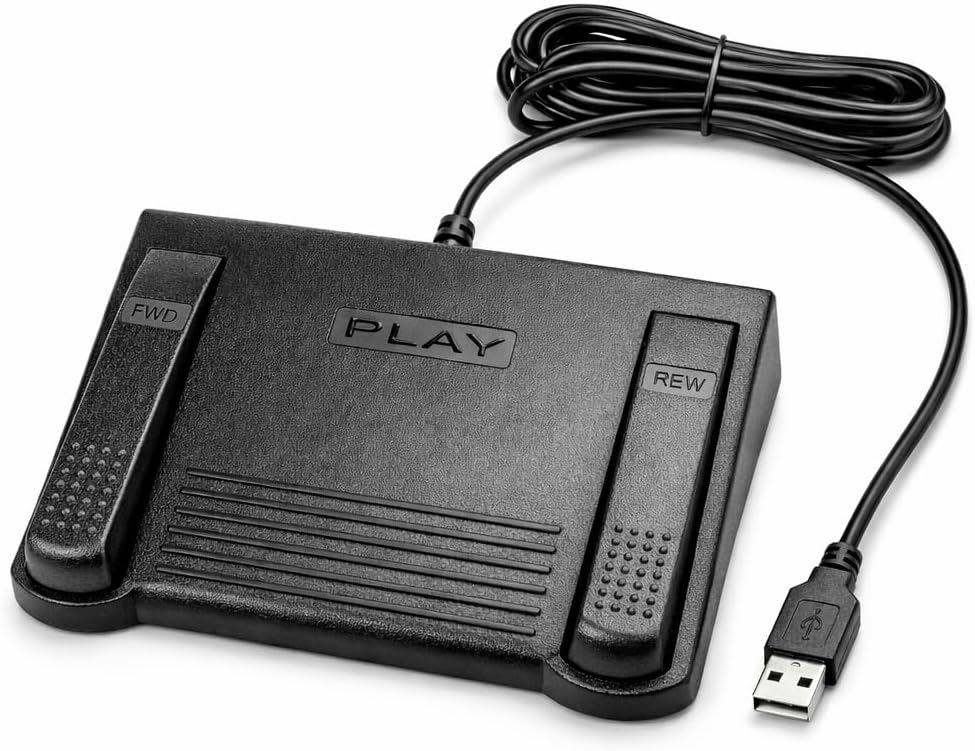


The Infinity 3 USB Foot Pedal Control stands out as a reliable choice for transcriptionists seeking durability and ease of use. With a 4.5-star rating, it delivers consistent performance through heavy-duty micro switches designed for countless hours of operation.
We may earn a commission when you buy through this link, at no additional cost to you.
Its ergonomic design features a wide, central, sloping Play pedal that allows users to easily move between Play, Fast Forward, and Rewind keys without strain. This layout minimizes foot movement and reduces fatigue during long transcription sessions.
While it offers basic functionality, the lack of extensive software customization might limit advanced users who need macro support. However, for standard transcription workflows, its robust build and straightforward operation make it a dependable option.
Transcriptionists who prioritize reliability and comfort should consider this pedal. It is particularly well-suited for professionals who need a no-fuss device that works seamlessly with USB-enabled computers.
Built with ultra-heavy-duty micro switches, this pedal ensures trouble-free performance over time, reducing the need for frequent replacements.
The sloping Play pedal and wide surface area enable natural foot positioning, helping prevent strain during extended use.
We may earn a commission when you buy through this link, at no additional cost to you.
The VEC in-USB-2 Infinity Digital Foot Control is an excellent choice for users who value mobility and flexibility. With a rechargeable battery offering up to 1000 hours of use, it eliminates the need for constant wired connections.
We may earn a commission when you buy through this link, at no additional cost to you.
Its mechanical stop feature prevents accidental triggering of the center pedal while stepping on side pedals, ensuring precise control during transcription. The wide, easy-to-use surface supports comfortable foot placement and reduces fatigue.
Although the rechargeable aspect is convenient, users must remember to charge it periodically. Additionally, it is priced higher than some basic models, which might be a consideration for budget-conscious buyers.
This pedal is ideal for transcriptionists who work across multiple devices or prefer a cordless setup. Its durability and broad compatibility make it a solid investment for professional environments.
Powered by a rechargeable battery, this pedal provides up to 1000 hours of digital recording time for extended use without interruption.
The mechanical stop design ensures that stepping on side pedals does not accidentally trigger the center pedal, maintaining control during use.
We may earn a commission when you buy through this link, at no additional cost to you.
The Philips ACC2330 4-Pedal Foot Control is designed specifically for digital dictation systems. It features easy toe touch control, allowing users to change control areas intuitively while maintaining a relaxed foot position during pauses.
We may earn a commission when you buy through this link, at no additional cost to you.
Its increased center pedal width helps avoid unintended presses of other pedals, enhancing accuracy during transcription. The ergonomic design enables users to swing their foot using the heel, reducing overall strain.
While the toe touch functionality is a unique benefit, it may require an adjustment period for users accustomed to heel-based operation. Additionally, the higher price reflects its specialized design for professional digital systems.
Transcriptionists working with advanced digital dictation software will find this pedal particularly useful. Its precision-focused design supports high-volume transcription tasks where accuracy is critical.
Feel it with your toe when changing control areas for intuitive operation during transcription tasks.
Swing the foot using the heel for easy relax during pause time, minimizing physical strain.
We may earn a commission when you buy through this link, at no additional cost to you.
The DAC 3 Function Foot Pedal boasts a perfect 5.0 rating, reflecting its reliability and user satisfaction. It features large, clearly labeled buttons for Next Job, Rew/Play, and Record, making it straightforward for specific transcription tasks.
We may earn a commission when you buy through this link, at no additional cost to you.
Its USB connector ensures easy connectivity, and the large button size facilitates precise control without accidental presses. The design is optimized for computer software specifically designed for foot control, ensuring seamless operation.
However, its compatibility is limited to certain software, which may not suit all transcriptionists. Additionally, the higher price point might be a barrier for those seeking a more versatile or budget-friendly option.
This pedal is best suited for professionals using compatible software who prioritize simplicity and reliability. Its high rating indicates strong performance in targeted transcription environments.
Buttons are labeled from left to right as Next Job, Rew/Play, and Record for intuitive operation.
The large button size ensures easy pressing and reduces the risk of accidental triggers during use.
We may earn a commission when you buy through this link, at no additional cost to you.
The Infinity USB Digital Foot Control is known for its low profile design, which saves desk space and blends well with workstations. With a 4.5 rating, it offers a reliable non-slip surface area for stable foot placement.
We may earn a commission when you buy through this link, at no additional cost to you.
The USB plug ensures plug-and-play functionality, making setup quick and hassle-free. Its compact form factor is ideal for users with limited desk space or those who prefer a less obtrusive device.
While details about specific features are minimal, the high rating suggests strong performance. However, users seeking extensive customization or detailed specifications may find this product lacking in information.
This pedal is a great choice for transcriptionists who prioritize a sleek, compact design. It works well in environments where space efficiency and simplicity are key.
The low profile design allows the pedal to fit neatly under desks without taking up excess space.
Greater non slip surface area ensures the pedal stays in place during use, preventing slides.
We may earn a commission when you buy through this link, at no additional cost to you.
The Express Scribe Transcription Foot Pedal is designed exclusively for use with Express Scribe software. It features an oversize pedal layout that supports comfortable, low-fatigue operation during dictation and transcription tasks.
We may earn a commission when you buy through this link, at no additional cost to you.
Built with an exclusive internal control board, it ensures precise playback control without needing manual configuration. Users can simply connect via USB and start transcribing immediately, making setup straightforward.
However, its 3.8 rating and limited compatibility with only Express Scribe reduce its appeal for broader use. Additionally, it is not compatible with other popular transcription programs, which may restrict flexibility.
This pedal is best for dedicated Express Scribe users who value seamless integration. Its specialized design ensures optimal performance within that specific ecosystem.
Custom hardware is specifically engineered for Express Scribe to ensure reliable and precise playback control.
Oversized pedal design allows easy movement between play, fast-forward, and rewind functions for low-fatigue operation.
We may earn a commission when you buy through this link, at no additional cost to you.
The ECS-IN-USB-1 Foot Pedal emphasizes ergonomic design to reduce strain during extended transcription. With a contoured layout, it supports natural foot positioning to minimize fatigue over long sessions.
We may earn a commission when you buy through this link, at no additional cost to you.
It offers broad compatibility with major dictation and transcription software, making it a versatile choice for various professional environments. The hands-free control feature allows users to maintain typing flow without interruption.
Despite these benefits, its 3.5 rating suggests some limitations in durability or user experience. Users should weigh the ergonomic advantages against potential performance issues.
This pedal is suitable for transcriptionists who prioritize comfort and software flexibility. It is a good option for those looking for an affordable ergonomic solution with warranty support.
Thoughtfully contoured layout supports natural foot positioning to help minimize strain and fatigue.
Ideal for medical legal insurance and public safety applications with consistent responsiveness.
We may earn a commission when you buy through this link, at no additional cost to you.
The iKKEGOL Upgraded USB Triple Foot Pedal is an affordable option with a 4.4 rating. It features optical switches that are quiet and durable, making it suitable for transcription and other hands-free tasks.
We may earn a commission when you buy through this link, at no additional cost to you.
As a programmable HID device, it allows customization of keyboard mouse and game actions through your feet. This flexibility supports diverse workflows, including media playback and transcription key settings.
While it lacks specific transcription software integration, its programmability offers a wide range of uses. Users may need to invest time in setup but gain significant control flexibility.
This pedal is ideal for budget-conscious transcriptionists or those who need a multi-purpose device. Its durable construction and weight-bearing capacity ensure longevity in various settings.
Optical Switch is quiet and provides easy touch response with minimal resistance for lasting comfort.
There are 4 TPU rubber on hard floors to ensure it stays right where you want it.
We may earn a commission when you buy through this link, at no additional cost to you.
The Philips LFH-2330 Configurable USB Foot Control offers a four-pedal design that can be configured to suit individual needs. Its slim ergonomic design minimizes foot movement and physical strain during transcription.
We may earn a commission when you buy through this link, at no additional cost to you.
A user-friendly wizard allows complete configuration of pedals, providing flexibility for different workflows. The anti-slip bottom surface ensures the pedal stays in the right place during active use.
While the configurability is a strong point, it may require initial setup time. However, this investment pays off in personalized functionality tailored to specific tasks.
This pedal is well-suited for transcriptionists who need customization. Its combination of comfort and flexibility makes it a solid choice for diverse professional settings.
Four pedal design which can be completely configured to suit you using a user-friendly wizard.
Anti-slip bottom surface to keep it in the right place during operation.
We may earn a commission when you buy through this link, at no additional cost to you.
The iKKEGOL Upgraded USB Mechanical Foot Pedal features mechanical switches that physically close circuits for durable, responsive input. With a 4.3 rating, it supports complex macros and key combinations for transcription workflows.
We may earn a commission when you buy through this link, at no additional cost to you.
It includes ElfKey configuration software for detailed programming on Windows and macOS. After setup, it works as a plug-and-play device on Linux or other systems, offering cross-platform flexibility.
While the setup process is more involved, the resulting customization is powerful. However, users may find the initial configuration time-consuming compared to simpler pedals.
This pedal is ideal for transcriptionists who need advanced control and macro capabilities. Its mechanical design and broad system support make it a versatile tool for demanding workflows.
When pressed, the pedal actuates a spring-loaded lever which physically closes an electrical circuit to send the signal.
System support includes windows XP Win10 Win11 Mac and Linux with software upgrades.
We may earn a commission when you buy through this link, at no additional cost to you.
Selecting the right foot pedal can significantly impact your transcription efficiency and comfort. Consider these key factors to find a model that meets your needs.
Ensure the pedal works with your transcription software. Some models are exclusive to certain programs, while others offer broad compatibility.
Check manufacturer documentation to confirm support for your specific software before purchasing.
Look for pedals with ergonomic designs that minimize strain. Features like sloping pedals or wide surfaces improve comfort.
Prioritize models that reduce foot movement and promote natural positioning.
Transcription work involves frequent use, so choose a pedal built to last. High-quality switches and sturdy materials extend lifespan.
Check reviews and product ratings to gauge long-term reliability.
Some pedals require software configuration, while others work immediately upon USB connection. Decide which suits your technical comfort level.
Simpler setups save time, especially for casual users.
A good warranty provides peace of mind against defects or damage. Look for at least one year of coverage.
Consider brands known for responsive customer support.
Foot pedals range from affordable to premium. Balance features with your budget to find the best value.
Invest more if you need durability and customization.
Most pedals use USB connections. Ensure your device has available ports and that the pedal supports your operating system.
Verify plug and play functionality to avoid driver issues.
Place the pedal on a flat surface near your keyboard for easy foot access. Adjust positioning to ensure comfortable foot placement without strain.
Plug the pedal into a USB port and install any required software. Follow the on-screen setup wizard to configure functions as needed.
Clean the pedal regularly with a dry cloth to prevent dust buildup. Check for wear on switches or surface material to maintain performance.
Some pedals require specific software to function properly, while others work via plug and play. Check the product details to confirm compatibility with your system and transcription software.
Many modern USB foot pedals are compatible with Mac systems. However, verify support in the product specifications or consult the manufacturer's website for OS details.
Some models allow customization through provided software, while others have fixed functions. Look for programmable features if you need specific controls for your workflow.
With regular use, a durable foot pedal can last several years. Quality builds and heavy-duty switches extend lifespan, while frequent misuse may shorten it.
Specialized pedals offer better ergonomics and software integration for transcription tasks. If you transcribe frequently, investing in a dedicated model is often worthwhile.
The Express Scribe Transcription Foot Pedal is designed exclusively for that software. It ensures seamless operation and tailored functionality for users of NCH Software.
Rechargeable pedals offer mobility and eliminate cable clutter. For stationary home setups, wired models are often simpler and more cost-effective.
We reviewed ten top foot pedals for transcriptionists, highlighting options like the Infinity 3 USB, VEC in-USB-2, and Philips ACC2330. Each model offers unique strengths suited to different workflows and budgets.
When choosing, prioritize ergonomics, software compatibility, and durability. These factors directly impact your efficiency and comfort during long transcription sessions.
Remember to verify current pricing and availability before purchasing. Prices may fluctuate, so checking the latest listings ensures you get the best deal.