
ASUS Prime AP201 Micro-ATX PC Case
4.7Editor score
Mesh design increases airflow
Supports 360mm radiators
Tool-free side panels
This guide compares ten top ASUS PC cases including TUF and ROG models to help you choose the right chassis for your build based on airflow and features.
Finding the right chassis is crucial for any PC build. ASUS offers a wide range of cases with unique designs and cooling solutions tailored for gamers and professionals.
We evaluated ten top models based on airflow, build quality, and compatibility. Our analysis covers everything from compact micro ATX options to massive full tower gaming chassis.
Each pick highlights key strengths and potential trade-offs. Prices change frequently so check current listings before buying. This guide ensures you find the perfect match for your needs.
4.7Editor score

4.8Editor score

4.6Editor score
We compare ten top models side by side to help you find the perfect match. Each chassis offers unique features tailored for specific build types and cooling needs.


This full tower case stands out with a 4.8 rating and robust support for E-ATX boards. Its TUF gaming spatter pattern gives it a distinct look.
We may earn a commission when you buy through this link, at no additional cost to you.
Cooling is top tier with room for up to seven fans or large radiators. The vertical GPU slot adds flexibility for high end builds.
While the case is heavy it includes ergonomic handles for safer transport. The tight side panel clips ensure security but require care.
Enthusiasts wanting maximum space and cooling will love this chassis. It balances style and function perfectly for serious gamers.
The chassis supports large radiators and multiple fans to keep high-end hardware cool during intense gaming sessions.
The custom TUF gaming spatter pattern sets it apart from generic black cases adding a rugged professional look.
We may earn a commission when you buy through this link, at no additional cost to you.
This compact case offers incredible value with a 4.7 rating. Its mesh design prioritizes airflow making it ideal for budget builds.
We may earn a commission when you buy through this link, at no additional cost to you.
Despite its small size it supports large radiators and PSUs. The tool-free panels make assembly simple for beginners.
It lacks pre-installed fans which means you must buy them separately. The Micro-ATX limit restricts larger motherboard options.
Builders seeking efficiency and low cost should choose this model. It proves small cases can still deliver big performance.
Over 57000 precision-machined holes in the mesh ensure air moves freely through the case for better thermal performance.
The 33L footprint fits easily on desks while still supporting ATX PSUs and high-end graphics cards.
We may earn a commission when you buy through this link, at no additional cost to you.
This high-end chassis delivers premium features with a 4.6 rating. Its aluminum frame and support for massive radiators are impressive.
We may earn a commission when you buy through this link, at no additional cost to you.
Convenience is key with a built-in storage drawer and graphics card holder. The top bars double as handles supporting heavy loads.
The high cost limits accessibility for many users. The sheer size may not fit on standard desks.
Enthusiasts wanting the best should invest in this model. It offers unmatched cooling and convenience features for extreme builds.
Support for up to two 420mm radiators ensures extreme hardware stays cool even under heavy loads.
Features like the hinged tool-free panel and storage drawer make building and managing the PC easier.
We may earn a commission when you buy through this link, at no additional cost to you.
This case offers a stunning panoramic view with a 4.5 rating. Its dual-chamber design separates CPU and GPU cooling effectively.
We may earn a commission when you buy through this link, at no additional cost to you.
The glass panels provide an unobstructed view of internals. Modular design helps streamline installation.
Handling glass requires care to avoid damage. Lack of included fans adds to total cost.
Users wanting style and efficient cooling will love this. It balances aesthetics with functional dual cooling zones.
Independent chambers for CPU and GPU help manage heat better ensuring consistent performance under load.
A front USB 10 Gbps Type-C port allows high-speed data transfer and charging for connected devices.
We may earn a commission when you buy through this link, at no additional cost to you.
This case focuses on clean setups with a 4.1 rating. Hidden connectors optimize cable management for a clutter free look.
We may earn a commission when you buy through this link, at no additional cost to you.
Four ARGB fans are included adding color and cooling immediately. The angled base improves airflow and viewing.
Build materials are basic compared to higher-end models. The rating reflects some user concerns.
Budget builders wanting clean aesthetics should choose this. It offers unique features at a low entry price.
Built for motherboards with hidden connectors helps tuck cables out of sight for a cleaner look.
An 8 degree base enhances airflow efficiency while widening the viewing angle for a better visual experience.
We may earn a commission when you buy through this link, at no additional cost to you.
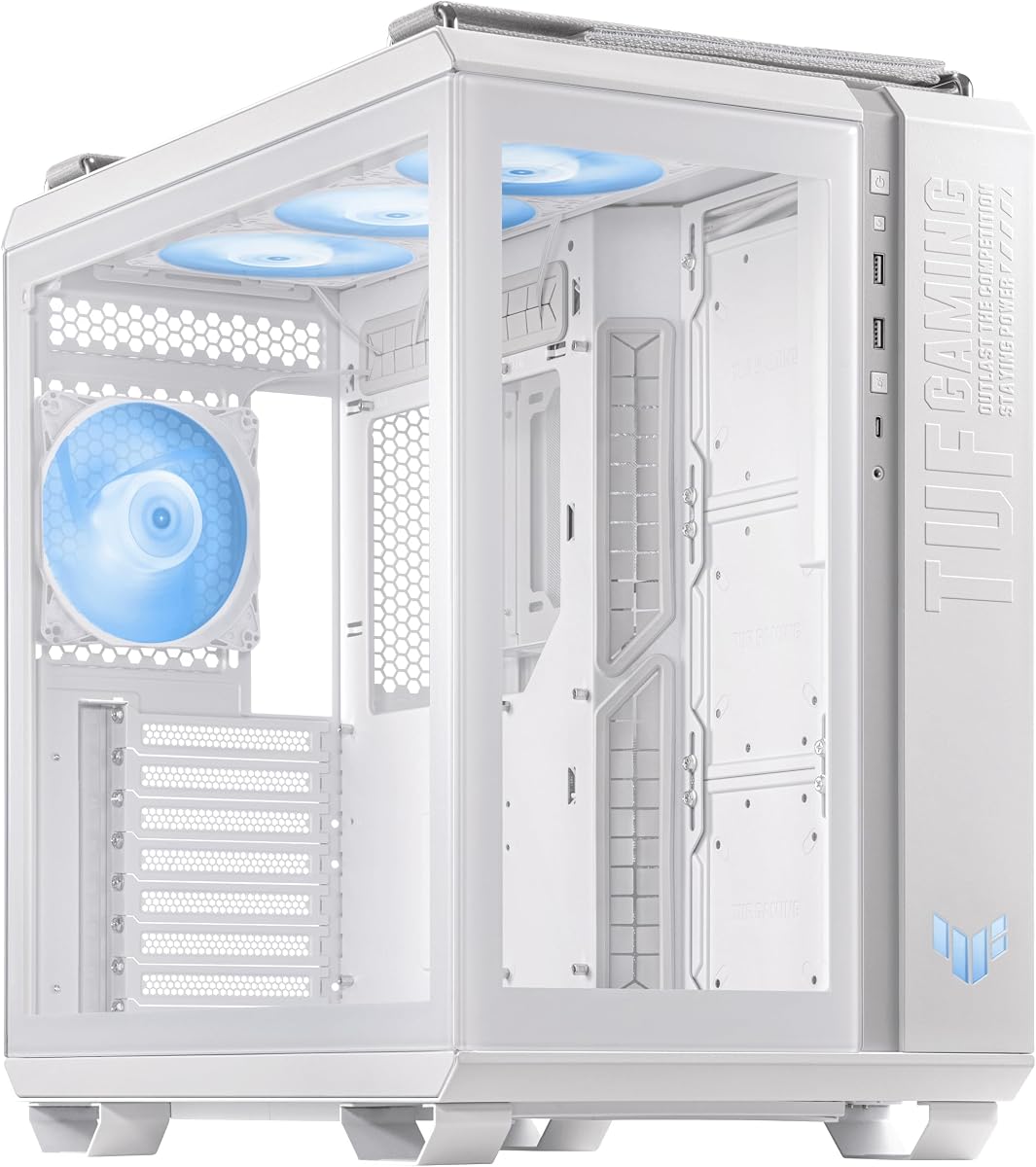
This white edition offers a stunning look with a 4.7 rating. Optimized for TUF gear it simplifies integration.
We may earn a commission when you buy through this link, at no additional cost to you.
Cooling is excellent with multiple fan mounts. The spatter pattern adds visual appeal.
White surfaces show dust easily requiring more cleaning. The higher price reflects its premium design.
Users wanting a cohesive white build should consider this. It matches TUF components perfectly for a clean setup.
Optimized fan and cable placement work seamlessly with TUF motherboards for better control.
Supports 360mm radiators and multiple fans to keep high-performance hardware cool under stress.
We may earn a commission when you buy through this link, at no additional cost to you.
This mid tower offers strong value with a 4.6 rating. Its honeycomb panel prioritizes airflow over glass aesthetics.
We may earn a commission when you buy through this link, at no additional cost to you.
Pre-installed fans and RGB controller add convenience. The headphone hanger is a thoughtful touch.
Internal space is tighter than full towers limiting cable management. Expansion slots are fewer.
Gamers wanting a compact powerful build should choose this. It delivers cooling and style without breaking the bank.
The perforated honeycomb front panel aids airflow ensuring components stay cool during gaming.
A built-in RGB controller hub lets you sync lighting effects easily without extra software.
We may earn a commission when you buy through this link, at no additional cost to you.
This white panoramic case delivers strong performance with a 4.7 rating. Its two chambers support better thermal separation.
We may earn a commission when you buy through this link, at no additional cost to you.
Four pre-installed ARGB fans reduce setup complexity. The USB-C port supports fast storage transfers.
Glass surfaces require regular cleaning to look pristine. The cost is higher than standard cases.
Users wanting white dual cooling zones should consider this. It combines style and function effectively for premium builds.
Divided housing ensures CPU and GPU cool independently improving overall thermal efficiency and stability.
A front 20Gbps Type-C port supports fast data transfer for modern storage devices.
We may earn a commission when you buy through this link, at no additional cost to you.
This case earns a top 4.9 rating for clean setups. Its concealed port design optimizes cable routing.
We may earn a commission when you buy through this link, at no additional cost to you.
The angled base improves airflow and viewing angles. High GPU support fits modern cards easily.
Requires a specific motherboard type for best results. Basic cooling may need fans.
Users wanting clean setups with modern GPUs should pick this. It delivers high aesthetic value and great compatibility.
Built for motherboards with concealed connectors reduces clutter and improves the look of your PC.
An 8 degree base enhances airflow efficiency and widening viewing angles for better visibility.
We may earn a commission when you buy through this link, at no additional cost to you.
This case earns strong marks with a 4.6 rating. Dual chambers ensure CPU and GPU cool independently.
We may earn a commission when you buy through this link, at no additional cost to you.
Tool-free panels and ARGB fans simplify setup. The USB-C port supports fast 10Gbps transfers.
Glass panels add weight to the structure. Assembly requires attention to detail.
Users wanting white dual chambers should consider this. It delivers strong performance and aesthetic appeal for modern builds.
Dual chamber design separates CPU and GPU heat zones improving overall thermal management and stability.
A front USB 3.2 Gen 2 Type-C port supports fast transfer speeds for modern external drives.
We may earn a commission when you buy through this link, at no additional cost to you.
Choosing the right case involves balancing size, cooling, and design. This guide breaks down key factors to consider.
ASUS offers Micro-ATX mid tower and full tower options. Match the case size to your motherboard and component needs to ensure compatibility.
Always verify the case supports your motherboard and GPU dimensions before buying.
Look for mesh designs or ample fan mounts. ASUS cases support large radiators which are crucial for liquid cooling setups.
Prioritize cases with good ventilation if you run high performance hardware.
Some models feature hidden connectors or extended trays to hide cables. Clean internal setups improve aesthetics and airflow.
Check for enough space behind the motherboard tray for tidy routing.
Glass panels offer a clear view but add weight and require care. Metal panels are durable and often better for airflow.
Decide between style and practicality based on your priorities.
USB-C front ports support fast data transfer. Ensure the case has enough PCIe slots for your graphics cards.
Modern cases often include USB 3.2 Gen 2 ports for better connectivity.
Tool-free panels simplify building and maintenance. Look for clips or buttons that allow easy access without screws.
This feature saves time and prevents losing small screws during assembly.
Many ASUS cases support Aura Sync lighting. Pre-installed fans reduce extra costs and simplify setup.
If you want a vibrant build choose a model with RGB hubs or pre-installed fans.
Entry-level cases offer great value but lack premium features. Higher-end models include better materials and unique design elements.
Balance your budget with the features you truly need.
Start by removing all shipping screws and packaging materials. Check for any bent parts and ensure the case sits on a flat stable surface.
Install your hardware following the component guides. Route cables through designated channels and secure them to maintain airflow.
Regularly dust the mesh filters and fans using a compressed air can. Avoid using water on glass or metal surfaces.
Many ASUS cases support water cooling with large radiator mounts. Always check the specific dimensions for compatibility.
The GT501 supports up to 330mm GPUs. Always measure your graphics card before purchasing.
Some models like the A31 Plus include pre-installed fans. Others may require separate purchases.
Replacement panels are available for some models. Always order the correct type to match the frame.
Full tower cases like the GT501 support E-ATX boards. Smaller cases are limited to ATX.
Use a microfiber cloth and glass cleaner. Avoid abrasive materials that could scratch the surface.
The ASUS TUF Gaming GT501 leads as the best overall. The Prime AP201 is a solid budget option while the ROG Hyperion offers premium features.
Prioritize cooling and size based on your components. Dual chamber cases provide better thermal separation.
Prices change frequently so check current listings before buying. This guide helps you choose the perfect case.