
Caydo S1 Art Projector
5.0Editor score
Pure Optical Tracing
Up to 80 inch size
20000 Hours LED
This guide compares the top 10 art tracing projectors for artists, hobbyists, and educators to find the best tool for accurate tracing and creative projects.
Art tracing projectors have revolutionized how creators transfer designs onto canvas, walls, and other surfaces. Whether you are a professional artist or a hobbyist, choosing the right tool can significantly improve accuracy and workflow efficiency.
We evaluated ten leading models based on brightness, resolution, connectivity options, and ease of use. Our analysis covers optical and digital projectors to help you find the perfect match for your specific artistic needs and environment.
Each product selection highlights unique strengths and potential drawbacks to guide your decision. Please note that pricing and availability fluctuate frequently, so verify current details before making your final purchase decision for your studio setup.
5.0Editor score

4.5Editor score

4.0Editor score
The following table provides a side-by-side comparison of the top ten art tracing projectors available in the market today. We have selected these models based on performance, features, and user feedback to help you make an informed choice.



This projector is a top choice for artists seeking precise real-time tracing capabilities. With a rating of 4.5 stars, it stands out for its reliable connectivity and versatile design. The dual-band WiFi ensures that complex sketches are mirrored accurately from your devices.
We may earn a commission when you buy through this link, at no additional cost to you.
The app-free web control is a significant advantage, allowing you to manage settings directly through a browser on both iOS and Android devices. This eliminates the need for proprietary software installations. The adjustable stand provides flexibility for projecting onto various surfaces like walls or canvases.
While it requires a smartphone for control, this setup offers modern convenience. The manual focus button allows for quick adjustments to ensure sharp images. Offline functionality means you can work in studios without stable internet access.
Artists and educators will appreciate the speed and accuracy this tool provides. It accelerates skill development by removing manual tracing difficulties. For those needing a reliable bridge between digital designs and physical art, this model is highly recommended.
The dual-band chip ensures low-latency mirroring of intricate lines from phones or tablets for high accuracy.
Whether online or offline, the projector adapts to your creative environment without interrupting your workflow.
We may earn a commission when you buy through this link, at no additional cost to you.
The Caydo P3 offers high-definition projection ideal for professional artists needing detailed output. Its 4.0 rating reflects strong performance in brightness and color accuracy. The native 1080P resolution ensures that line art and photos project with zero distortion.
We may earn a commission when you buy through this link, at no additional cost to you.
Features like 400 ANSI lumens mean you can work even during the day without darkening the room. The exclusive drawing assistant with modes like Gridify and Sketchify adapts to your workflow. Auto focus and keystone correction ensure the image stays sharp and proportioned.
While the price is higher than budget models, the performance justifies the investment for professionals. The 360-degree swivel base eliminates the need for extra stands. However, transferring images requires using a USB drive or app scan.
This projector is best suited for serious artists who require precision and flexibility. The long lamp life and advanced connectivity options make it a robust tool for various projects. If you want a premium experience, the P3 delivers.
With 400 ANSI lumens, images remain crisp and vivid even without closing curtains during daytime work.
Select artistic modes and backgrounds to adapt the projector to your specific creative style instantly.
We may earn a commission when you buy through this link, at no additional cost to you.
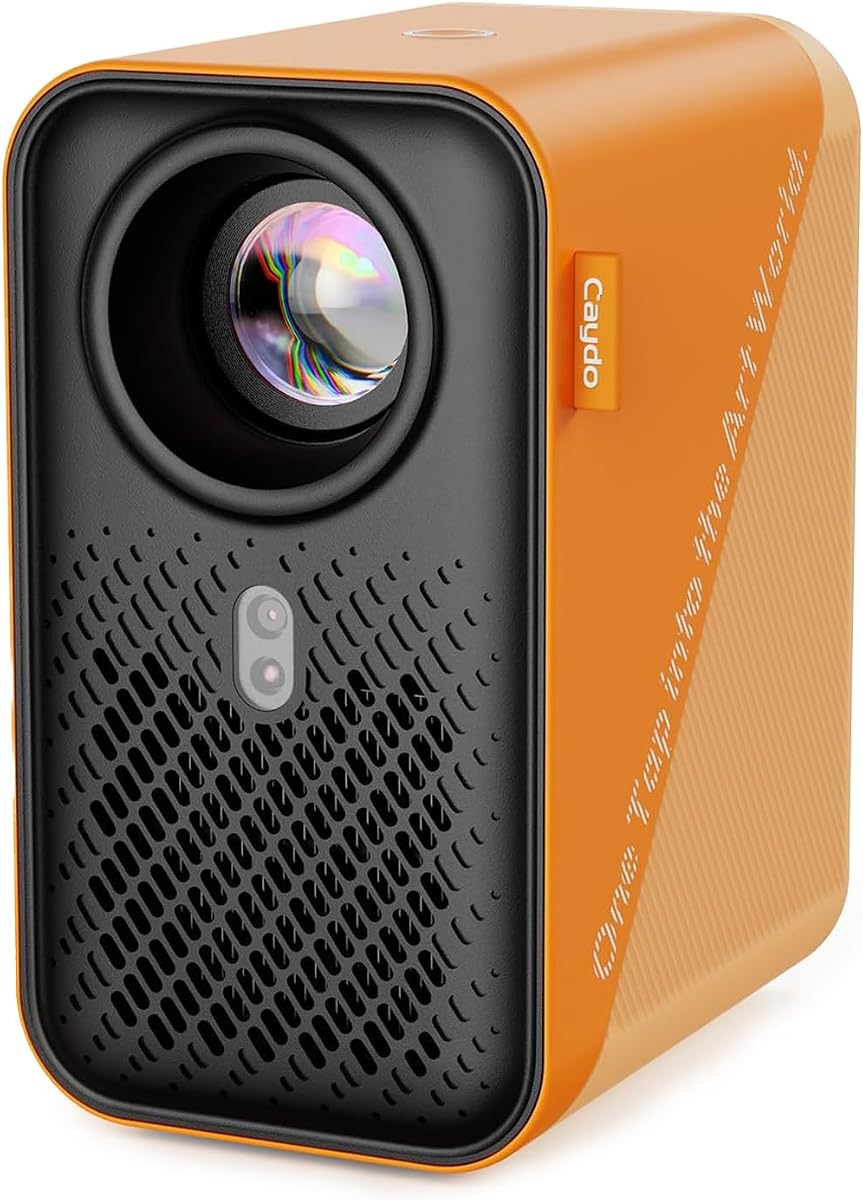
The Caydo S1 is a dedicated optical projector that excels at projecting physical artwork without digital complexity. With a perfect 5.0 rating, it is highly favored for simplicity and reliability. It projects your printed images with clear outlines when used in dim light.
We may earn a commission when you buy through this link, at no additional cost to you.
The fast and accurate focus knob allows you to adjust from blurry to sharp in seconds. You can enlarge designs from 2.5x to 11x, reaching up to 80 inches for murals. The LED lasts up to 20,000 hours, reducing maintenance costs significantly.
Unlike digital projectors, it requires no internet or apps, making it perfect for remote studios. However, it works best with physical prints rather than digital files directly. The room needs to be darker for optimal projection clarity.
This projector is ideal for those who want a simple, plug-and-play solution for tracing. Its portability and long-lasting LED make it a great value for beginners and educators. For pure optical tracing needs, the S1 is unmatched.
Place a printed image under the copy area and start tracing without needing WiFi or digital inputs.
Enjoy years of use with a built-in LED that lasts up to 20,000 hours without replacement.
We may earn a commission when you buy through this link, at no additional cost to you.
The Caydo P1 is designed for artists who want a built-in drawing app for seamless workflow. Its 3.8 rating suggests solid features but mixed user feedback. The exclusive drawing assistant helps with zooming and rotating images easily.
We may earn a commission when you buy through this link, at no additional cost to you.
Image transfer is straightforward via QR code or USB drive. The projector supports 4K video playback and has a long lamp life. Dual band WiFi ensures faster connectivity compared to older models. However, the remote requires batteries which are not included.
The compact sealed optical core prevents dust entry and ensures consistent performance. While it is versatile for both art and home entertainment, some users may find the setup complex. It is a strong option for those already invested in digital art tools.
Artists looking for a balance between digital features and portability will find this useful. The ability to work offline after transferring images is a key benefit. For general use and artistic creation, the P1 offers good capabilities.
Tools like zoom and grid overlay are available directly on the projector without needing a phone.
Dual band 5G WiFi provides lower latency for streaming content or mirroring designs accurately.
We may earn a commission when you buy through this link, at no additional cost to you.
This projector features an upgraded 5G dual-band WiFi for faster and more consistent connections. With a 3.5 rating, it shows potential but has some limitations. The app-free web control allows easy management via your phone browser without installing software.
We may earn a commission when you buy through this link, at no additional cost to you.
It supports both online and offline connections, making it flexible for various studio environments. The adjustable stand helps customize the height and tilt for different surfaces. However, some users may find the focus adjustment manual and less convenient.
The FCC ID certification ensures safety and performance standards are met. While it is good for intricate tracing from phones, it may not be as bright as premium models. It is a solid option for those who prioritize web control features.
For hobbyists and students needing a simple tracing tool, this model is accessible. The ability to work without an app reduces setup time. If you want quick control over your projection, this projector delivers.
Upgraded 5G dual-band chips reduce latency for real-time tracing accuracy on phones and tablets.
Manage rotation and scaling directly in your browser, streamlining your creative process instantly.
We may earn a commission when you buy through this link, at no additional cost to you.
The HI-REEKE projector offers a native 720P resolution suitable for general tracing tasks. Its 3.7 rating indicates decent performance for the price. The included stand allows for overhead or angled placement which is useful for various projects.
We may earn a commission when you buy through this link, at no additional cost to you.
At approximately 3 pounds, it is easy to reposition during work sessions. You can send content via USB, HDMI, or 2.4G WiFi. The projection size scales from 9.5 to 150 inches, supporting large murals or small patterns.
Manual focus and keystone correction help align your images properly. While the resolution is lower than 1080P models, it is sufficient for line art. The setup is ready for creative work with minimal tools needed.
This projector is great for cake decorators and DIY crafters who need portability. The stand makes it versatile for different working surfaces. For small to medium projects, it offers a practical solution.
At 3 pounds, the unit is easy to move around your studio or classroom quickly.
Scale images from small details to 150-inch compositions easily with the zoom feature.
We may earn a commission when you buy through this link, at no additional cost to you.
The Caydo P2 delivers a native 1080P resolution for clear and sharp image projection. Its 3.8 rating reflects reliable performance for artists needing digital support. The exclusive drawing app makes it easier to scale and compose reference images effectively.
We may earn a commission when you buy through this link, at no additional cost to you.
Transfer images by scanning a QR code or using a USB drive. The drawing tools work offline, allowing creativity in basements with poor internet. It supports projection distances from 2.3 ft to 5.8 ft for various room sizes.
While the brightness is lower than the P3, it is still capable for indoor use. The rotating base adapts to different angles without extra stands. You should note that it may need a darker room for optimal contrast.
For those seeking a balance between features and cost, the P2 is a good choice. The offline drawing tools are particularly useful for uninterrupted sessions. If you need a digital drawing helper, this model is worth considering.
Drawing tools remain functional without internet once images are loaded via USB or app.
Native 1080P ensures details in your reference art remain crisp during projection.
We may earn a commission when you buy through this link, at no additional cost to you.
This projector is ideal for creative uses like mural painting and sewing patterns. Its 4.1 rating suggests good user satisfaction for its features. The adjustable telescopic stand adjusts from 15 to 40 inches making it versatile for different setups.
We may earn a commission when you buy through this link, at no additional cost to you.
It supports various connection options including HDMI USB and phone-to-projector upload. The image processing tool offers keystone correction and zoom for better alignment. The bright projection is clear even without closing curtains in some environments.
Make sure the tabletop edge is less than 2.4 inches thick for secure clamping. The USB drive included allows easy online or offline use. This model is great for teaching and presentations as well as art.
For those needing a tall stand and flexible connectivity, this projector is strong. The image processing tools help refine lines before tracing. It is a practical choice for home and professional use.
The four-section stand adjusts from 15 to 40 inches for flexible desktop use.
Features like keystone correction and line art extraction help refine reference images.
We may earn a commission when you buy through this link, at no additional cost to you.
The Kodak Luma 150 Mini offers a portable solution for art tracing and presentations. With a 5.0 rating, it is highly rated for its compact design and features. It includes an adjustable overhead tripod and articulating arm for precise alignment.
We may earn a commission when you buy through this link, at no additional cost to you.
Battery life lasts up to 2.5 hours allowing for extended sessions without a power source. Wireless streaming via Miracast and AirPlay makes it easy to connect to devices. However, 60 ANSI lumens means it works best in dim environments.
HDMI USB and microSD inputs allow versatile media connection options. The DLP engine ensures vivid visuals in both bright and dim settings. This kit is perfect for mobile artists or classroom presentations.
If you need a portable projector that you can take anywhere, this is ideal. The battery and mounting tools make it easy to use on the go. It combines convenience with quality visual clarity for your projects.
Work for up to 2.5 hours without needing a constant power source.
Included tripod and clamp ensure your image is always perfectly aligned for tracing.
We may earn a commission when you buy through this link, at no additional cost to you.
This art tracing projector is designed with kids and beginners in mind. Its 3.4 rating reflects its simplicity and limited features. It supports wireless projection for iPhone and iPad using AirPlay directly which is convenient for Apple users.
We may earn a commission when you buy through this link, at no additional cost to you.
It includes USB and HDMI inputs for additional connection options. The adjustable focus lens allows for clear imaging on walls or canvases. The lightweight foldable stand makes it easy to carry and store in a small space.
It is not compatible with Android phones which may be a limitation for some. The resolution is 480P which is adequate for simple tasks. It serves well for family gatherings and educational purposes.
For beginners looking to trace simple designs or for family crafts, this tool is accessible. The AirPlay feature is great for iOS users. If you need a basic projector for light tracing work, this model fits the bill.
Compatible with iPhone and iPad for easy wireless screen mirroring.
Foldable stand and lightweight body make storage and transport simple.
We may earn a commission when you buy through this link, at no additional cost to you.
Selecting the right art tracing projector involves considering several key factors to ensure it meets your creative needs and workspace constraints.
Digital projectors use WiFi or HDMI to display images from phones or computers. Optical projectors require physical prints to project outlines directly. Choose digital for flexibility and optical for simplicity.
Decide between digital and optical based on whether you prefer working from digital files or physical prints.
Brightness measured in ANSI lumens determines how visible the image is in light. Higher lumens allow for day use without darkening rooms. Lower lumens require a darkened environment for best results.
Look for models with 400+ lumens for daylight use or standard LED brightness for dark rooms.
Resolution affects the clarity of projected lines. 1080P offers sharper details than 720P or 480P. Higher resolution is crucial for intricate sketches and professional accuracy.
Prioritize native 1080P resolution if detail accuracy is your main concern.
Check for WiFi Bluetooth USB and HDMI inputs. Some require app downloads while others use web control or USB drives. Ensure the device supports your phone or laptop operating system.
Choose a model that offers the connection method most convenient for your devices.
A good stand allows for adjustable angles and heights. Some include tripods or swivel bases for versatile placement. Consider how you want to position the projector over your workspace.
Look for stands that allow flexibility to project onto horizontal or vertical surfaces easily.
Portability models often include battery life features. Longer battery life allows work away from outlets. For studio work, battery life may be less critical.
Check battery duration if you plan to move your setup frequently.
Drawing assistant apps offer zoom rotation and grid overlays. These tools help scale and align images automatically. Basic models lack these digital aids.
Select projectors with built-in drawing tools to streamline your workflow.
Art tracing projectors range from budget-friendly optical models to premium digital units. Balance your needs with cost to get the best value. More expensive does not always mean better for your specific use.
Determine your budget range and prioritize features that matter most to you.
Begin by placing the projector on a stable surface or using the included stand to ensure it remains steady. Adjust the height and angle so the image aligns with your canvas or wall.
Connect your device using the appropriate method like scanning a QR code inserting a USB drive or connecting via WiFi. Upload your image and use the zoom or rotation tools to fit the size you need.
Clean the lens regularly with a soft cloth to maintain image clarity. Store the device in a dry place and avoid touching the lens with fingers. For battery powered models charge the unit fully before long sessions.
Not all models require an app. Some use web control or USB drives for image transfer while others need dedicated software. Check the specifications to see if it supports app-free operation or web browser control.
It depends on the brightness. Models with high ANSI lumens can work in semi-bright conditions. However for best results most projectors work better indoors or in shaded areas to ensure image clarity.
Optical projectors project physical prints placed under the lens. Digital projectors display images from phones or computers. Optical is simpler while digital offers more flexibility with file types.
Use the manual focus knob on the projector to adjust clarity. Most models allow you to slide the knob until the lines look sharp. Some have auto-focus features that adjust the lens automatically.
Many digital projectors allow offline work after transferring images via USB. Optical models are naturally offline. WiFi enabled models may need initial setup but often work without internet once loaded.
Yes they are excellent tools for learning drawing and sketching. Beginner models are lightweight and easy to set up. They help children develop accuracy and creativity without frustration.
The Art Projector for Tracing and Drawing stands out as our top choice for its balance of WiFi performance and ease of use. The Caydo S1 offers an excellent budget option for those preferring optical simplicity.
When choosing prioritize brightness resolution and connectivity based on your workspace. Professional artists may prefer higher lumens and digital apps while hobbyists can thrive with simpler models.
Always check current prices and availability before purchasing since these can change. Select a model that aligns with your workflow to maximize your creative potential and enjoy the tracing process.