
MUSETEX Y6 PC Case, Pre-Installed 4 Non-LED Fans, ATX Mid Tower Case, Computer Case with Type-C, 270° Full View Tempered Glass, Black
4.7Editor score
270 degree glass view
Dual chamber design
Type-C I/O port
This guide compares the top ten all black PC case options for performance, aesthetics, and value to help you choose the right chassis for your build.
Choosing the right all black PC case is essential for creating a sleek and professional looking gaming or workstation setup. A well designed chassis ensures proper airflow, easy cable management, and protection for your valuable components while maintaining a consistent visual theme across your entire system.
We evaluated ten top rated models based on build quality, airflow design, component compatibility, and user feedback. Each option was selected to represent different price points and feature sets, ensuring there is a suitable choice for both budget builders and enthusiasts seeking premium materials and advanced cooling capabilities.
Every pick highlights unique strengths like tempered glass panels, pre installed fans, and support for modern motherboards. Please note that product availability and pricing can change frequently, so verify current details before purchasing to ensure you get the best value for your specific needs.
4.7Editor score

4.8Editor score

4.7Editor score
The following comparison table provides a side by side overview of key specifications for each model to help you quickly identify which chassis best fits your hardware requirements and aesthetic preferences.





The Lian Li V100-ATX stands out as a top contender with a 4.8 rating due to its comprehensive out-of-the-box feature set. It includes four PWM controlled ARGB fans and an integrated LED strip, offering immediate visual appeal and airflow without extra purchases.
We may earn a commission when you buy through this link, at no additional cost to you.
Its support for GPUs up to 420mm and CPU coolers up to 178mm makes it versatile for high-end builds. The tool-less side panels simplify component upgrades while maintaining a sleek aesthetic throughout your gaming station.
While the fan noise can reach moderate levels under load, the airflow performance justifies this trade-off for thermal performance. Users should note that lighting control relies on motherboard software integration rather than a physical controller.
This case is ideal for builders wanting a polished look with minimal assembly effort. It balances premium features with practical design, making it a strong recommendation for most ATX mid tower needs.
The pre-installed ARGB fans and integrated strip deliver superior visual impact while ensuring adequate cooling for standard configurations.
Tool-less mounting mechanisms and clean internal layouts reduce assembly time and frustration during initial setup or future upgrades.
We may earn a commission when you buy through this link, at no additional cost to you.
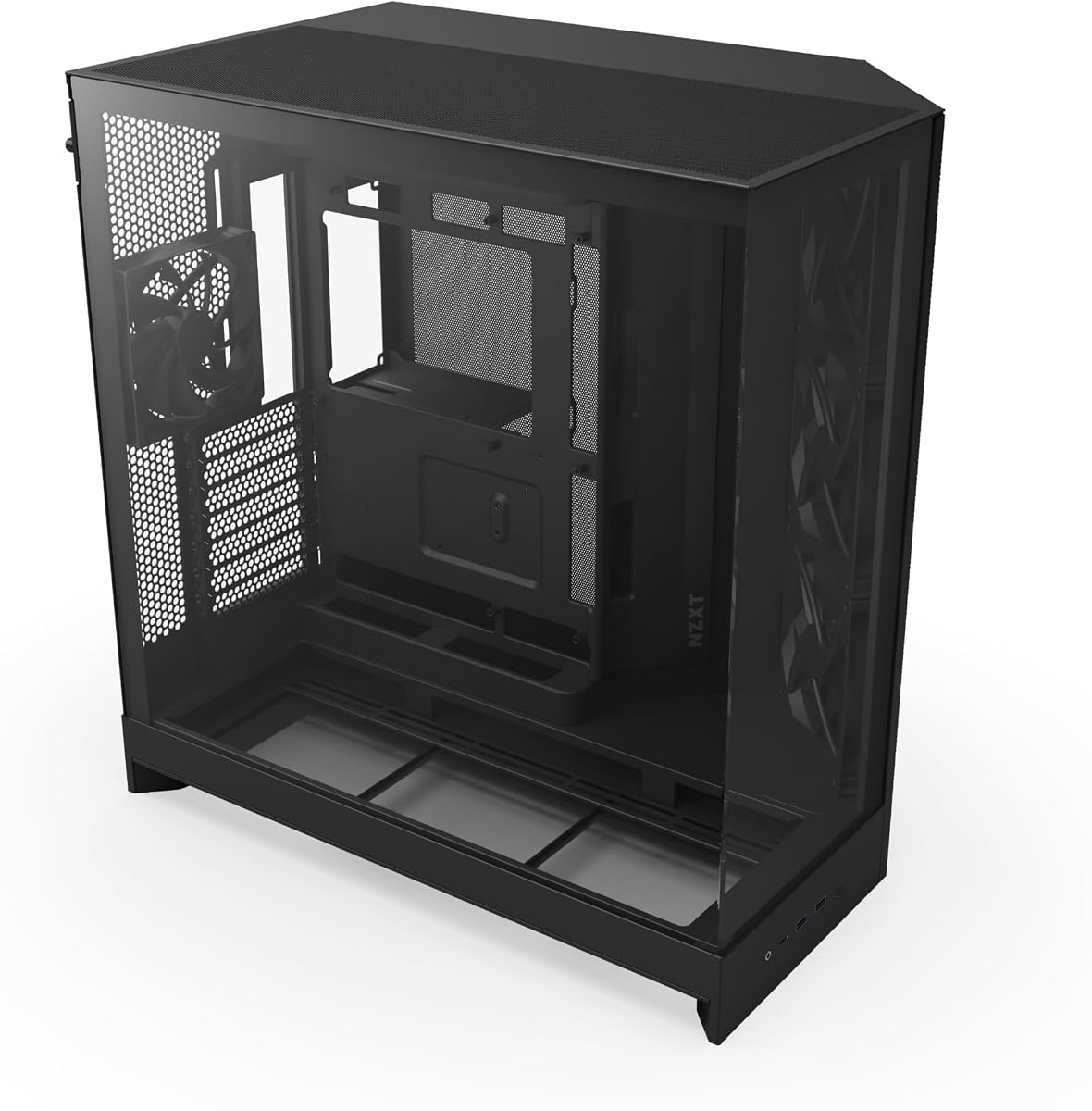
The MUSETEX Y6 offers impressive value with a 270 degree dual glass panel design that showcases hardware better than many competitors at this price point. It comes pre-installed with four fans and a dual chamber layout to aid airflow and cable management.
We may earn a commission when you buy through this link, at no additional cost to you.
Its support for GPUs up to 410mm and 360mm radiators ensures compatibility with powerful components. The inclusion of a Type-C port reflects modern connectivity needs without inflating the cost significantly compared to similar models.
Though the fans are non-LED and the build materials are standard, the thermal performance is solid for the price. Users prioritizing visual display and budget should find this case meets most practical requirements for a gaming PC.
This is an excellent entry level option for those new to PC building who want a modern look. It delivers essential features effectively while leaving room to invest savings into better graphics cards or memory.
The 270 degree glass setup allows for a wide field of view that highlights internal components from multiple angles.
The dual chamber design and independent PSU channel help maintain stable temperatures during heavy usage scenarios.
We may earn a commission when you buy through this link, at no additional cost to you.
The Hyte Y70 Modern represents the peak of aesthetic design with a unified panoramic glass look and dual chamber interior that commands attention. A 4.7 rating reflects its premium build quality and attention to detail across every aspect of the chassis.
We may earn a commission when you buy through this link, at no additional cost to you.
It includes a luxury PCIe 4.0 riser cable and supports massive cooling configurations including side 360mm radiators. The tool-less panels and tight tolerances ensure a professional feel that justifies the investment for enthusiasts seeking a showpiece system.
While the price is higher than average, the included components and superior craftsmanship offer significant value. The large footprint requires adequate desk space, which may be a consideration for those with limited room for a full tower setup.
This case is perfect for users who want their PC to be a centerpiece of their setup. It combines luxury aesthetics with practical performance, making it a top choice for those prioritizing visual impact and build quality.
The three piece panoramic glass creates a seamless visual experience that showcases your build like no other case.
Support for large radiators and ten fan positions ensures top tier thermal performance even with demanding hardware.
We may earn a commission when you buy through this link, at no additional cost to you.
This compact O11 Vision model is engineered for the next generation of motherboard layouts with back-connect compatibility. It maintains the iconic O11 series aesthetics while offering a smaller footprint suitable for those who want sleek design without excessive bulk.
We may earn a commission when you buy through this link, at no additional cost to you.
The patented three-panel glass design ensures an uninterrupted view of components, and the innovative tubing concealment keeps the build looking pristine. It is a strong choice for users adopting cutting-edge hardware configurations from manufacturers like ASUS or MSI.
Although it carries a premium price point, the engineering quality and specific feature set justify the cost for targeted builds. The lack of extensive accessory customization options may deter users who prefer extensive modding capabilities.
Ideal for forward-thinking builders seeking a clean aesthetic, this case delivers on both form and function. It proves that compact can still mean powerful and visually striking when designed with precision and care.
Designed for back-connect motherboards, this case simplifies cable routing for a virtually clean build interface.
The three-panel glass setup provides a wide view of internal components without obstructive frames or bars.
We may earn a commission when you buy through this link, at no additional cost to you.
The NZXT H5 Flow prioritizes airflow above all else with perforated panels and a shroud that facilitates efficient cooling. It includes two quiet fans and supports large radiators, making it a practical choice for systems where thermal performance is a priority.
We may earn a commission when you buy through this link, at no additional cost to you.
The ultra-fine mesh on all panels ensures dust is filtered while allowing maximum air movement. This design approach is ideal for users who prefer functional simplicity over flashy glass or RGB lighting features in their chassis selection.
While it lacks the premium glass look of other models, the build quality and cable management channels are top notch. The compact size ensures it fits easily on smaller desks without sacrificing hardware compatibility or cooling capacity.
This is the right choice for those who want reliable cooling and quiet operation without paying for unused features. It delivers a focused experience that enhances system longevity through superior airflow management.
Perforated shrouds and mesh panels create a direct path for air to cool components effectively.
The included airflow fans are tuned for low noise, ensuring a peaceful user environment.
We may earn a commission when you buy through this link, at no additional cost to you.
The Fractal Design North brings a unique touch of warmth to PC building with a genuine walnut wood front panel. It stands out with a 4.7 rating for its stylish finish and open front ventilation that ensures excellent airflow without sacrificing aesthetics.
We may earn a commission when you buy through this link, at no additional cost to you.
It includes two high quality 140mm PWM fans and offers scratch resistant glass for viewing your build. The use of sustainably sourced materials adds a premium feel that aligns with modern design sensibilities for home and office setups.
While the wood finish might require occasional cleaning to maintain its look, the aesthetic reward is significant. The price is higher than standard plastic options, but the design quality and included components justify the investment for style focused builders.
This case is perfect for those who want their PC to blend seamlessly with sophisticated furniture. It proves that functionality and classic design can coexist in a modern gaming environment.
Sustainably sourced wood and high quality alloys create a unique and classy look for your workspace.
The open front design allows air to enter freely, keeping temperatures low even with demanding hardware.
We may earn a commission when you buy through this link, at no additional cost to you.
The CORSAIR 3200D RS focuses on modern connectivity and support with reverse-connector compatibility and three included ARGB fans. It is designed to make building easier with useful DIY features like reverse connector support and a shroud to hide cables effectively.
We may earn a commission when you buy through this link, at no additional cost to you.
It includes a GPU anti-sag stabilization arm to protect heavy graphics cards and offers a top-mounted 360mm radiator option. These features make it a versatile choice for gamers looking to future-proof their system without needing additional accessories immediately.
While the fan control depends on motherboard software, the lighting effects are vibrant and easy to manage. Users should verify dust filtration needs as the case relies on standard filters rather than magnetic advanced solutions found in other models.
This case is a strong pick for Corsair ecosystem users or those wanting ready-to-use lighting. It balances affordability with high-end features, providing a solid foundation for a mid-to-high performance build.
Support for reverse-connector motherboards helps achieve a cleaner look by hiding cables from the front.
The included anti-sag arm ensures stability for larger GPUs during gaming sessions or intensive tasks.
We may earn a commission when you buy through this link, at no additional cost to you.
The O11D Mini V2 Flow maintains the signature design of the O11 series while optimizing airflow with five reverse blade fans. Its 10 degree slanted bottom design ensures cold air reaches the GPU efficiently, providing solid cooling performance in a compact chassis.
We may earn a commission when you buy through this link, at no additional cost to you.
It includes robust anti-sag brackets for GPUs and pillar-less glass panels for a clean view. This case is particularly well-suited for users wanting a stylish small form factor build that does not compromise on cooling or component support.
While the reverse fans are great for airflow, users must ensure their power supply supports reverse connectors if planned. The lack of extensive drive bays means you may need to rely on SSDs rather than traditional HDD storage.
This is an excellent choice for compact gaming setups that need to look good. It proves that smaller cases can still handle high performance hardware when designed with airflow and aesthetics in mind.
The slanted bottom and reverse fan arrangement direct cool air straight to the graphics card.
Pillar-less glass panels ensure your components are visible without obstruction from structural bars.
We may earn a commission when you buy through this link, at no additional cost to you.
The JONSBO TK-3 Black integrates a one-piece curved glass panel for a distinctive 270 degree display of your build. It supports BTF motherboards and massive cooling setups like dual 360mm AIOs, making it a strong option for high-end enthusiasts.
We may earn a commission when you buy through this link, at no additional cost to you.
With support for GPUs up to 420mm and ATX PSUs, it handles modern hardware with ease. The construction quality uses 0.7mm steel to ensure durability while keeping the chassis sturdy enough for heavy components without bowing.
Although the curved glass requires careful handling during shipping and installation, the visual impact is unmatched. Users should be mindful to keep the protective film on until setup is fully complete to avoid scratches during the build process.
This case is perfect for those seeking a unique look without breaking the bank. It offers premium features like BTF support and extensive cooling options at a competitive price for a modern chassis.
The one-piece curved glass provides a seamless view of your components without visible seams.
Support for multiple radiators ensures your system stays cool during heavy gaming or workstation loads.
We may earn a commission when you buy through this link, at no additional cost to you.
The NZXT H9 Flow offers a dual-chamber design that separates components from the PSU for better thermal performance. It comes with four pre-installed fans and supports up to a 420mm radiator, providing massive cooling potential for modern builds.
We may earn a commission when you buy through this link, at no additional cost to you.
Its panoramic glass paneling showcases every detail of your hardware, and the wide cable channels make management effortless. This case is a strong contender for those wanting a full tower look in a mid-tower footprint with practical cooling features.
While the price is higher than some competitors, the included fan quality and dual-chamber layout offer significant value. The design requires adequate desk space due to its width, which should be considered before purchasing.
This is an ideal choice for users prioritizing thermal separation and clean aesthetics. It combines the functionality of a performance case with the visual appeal of a modern panoramic chassis.
Separating the power supply from other components improves airflow paths and reduces heat buildup.
Support for 420mm radiators allows for exceptional liquid cooling performance with minimal fan noise.
We may earn a commission when you buy through this link, at no additional cost to you.
Selecting the right all black PC case involves balancing visual appeal with technical requirements. This guide outlines key factors to ensure your choice supports your hardware while maintaining a cohesive aesthetic.
Ensure the case supports your motherboard size, typically ATX, Micro-ATX, or Mini-ITX. Check for GPU clearance and CPU cooler height limits to avoid fitting issues with high-end components.
Always verify compatibility dimensions against your specific hardware before purchasing.
Look for cases with mesh panels or perforated designs to facilitate air intake. Pre-installed fans reduce the need for additional purchases and ensure decent airflow out of the box.
Prioritize airflow over glass panels if thermal performance is your main concern.
Steel construction with adequate thickness ensures durability and reduces vibration noise. Tool-less panels allow for easy access without tools during maintenance or upgrades.
Invest in quality materials to protect your investment and extend the case lifespan.
Wide channels, hooks, and tie-down points help hide cables for a cleaner look. Good cable management improves airflow and makes future upgrades significantly easier.
Check internal depth and routing options to ensure cables fit comfortably.
Modern cases include USB Type-C ports alongside standard USB 3.0 options. Audio jacks and microphone inputs are essential for peripherals like headsets.
Ensure the I/O panel matches your connectivity needs before deciding.
Choose between tempered glass for a clear view or mesh for a subtle look. Lighting support like ARGB integration enhances the visual appeal of black cases.
Select a style that complements your room or desk setup.
Magnetic or easy-to-remove filters help keep internal components clean. Dust accumulation can degrade performance over time if not managed.
Check filter locations at the front, top, and bottom for accessibility.
Compare prices relative to included features like fans and power supply mounts. A higher price may be justified by premium build quality or unique design.
Set a realistic budget and prioritize the features that matter most to you.
When setting up your case, mount the motherboard first and organize cables using the provided channels. Secure the GPU and PSU properly using the included screws and brackets to prevent strain on the connectors.
Clean the dust filters regularly to maintain optimal airflow. Use compressed air to blow out dust from the fans and heatsinks every few months to ensure stable thermal performance.
Avoid placing the case directly on the floor if possible to reduce dust intake and accidental knocks. Ensure there is adequate space around the vents to allow proper air circulation.
An all black PC case offers a sleek and professional look that hides dust and scratches better than lighter colors. It creates a uniform visual theme that often matches modern monitors and peripherals.
Generally no, the color does not significantly impact the price. However, premium materials or specific finishes like wood or matte textures might add to the cost.
Matte black cases typically hide fingerprints better than glossy ones. If you prefer a shiny finish, consider a model with a protective coating or easy-to-clean surface.
Yes, most modern cases feature tempered glass panels that allow you to see the GPU regardless of color. If you prefer a solid look, mesh options provide better airflow instead.
Use magnetic dust filters on all intakes and clean them weekly. Keeping the case off the floor and in a clean environment also helps reduce dust accumulation over time.
Steel is the most durable option for cases as it resists dents and corrosion. Aluminum is lighter but may be more prone to scratches depending on the finish.
We explored ten top options ranging from budget-friendly models to premium designs with panoramic glass and advanced airflow. Each case brings unique strengths whether you value visual flair, raw cooling power, or specific features like back-connect support.
Prioritize airflow and motherboard compatibility before focusing on aesthetics to ensure your system runs reliably. Investing in a case that offers tool-less panels and good cable management will make your build process smoother and future upgrades easier.
Remember that prices and availability change frequently so check current listings before making a final decision. Use this guide to find the perfect chassis that balances performance and style for your specific needs.