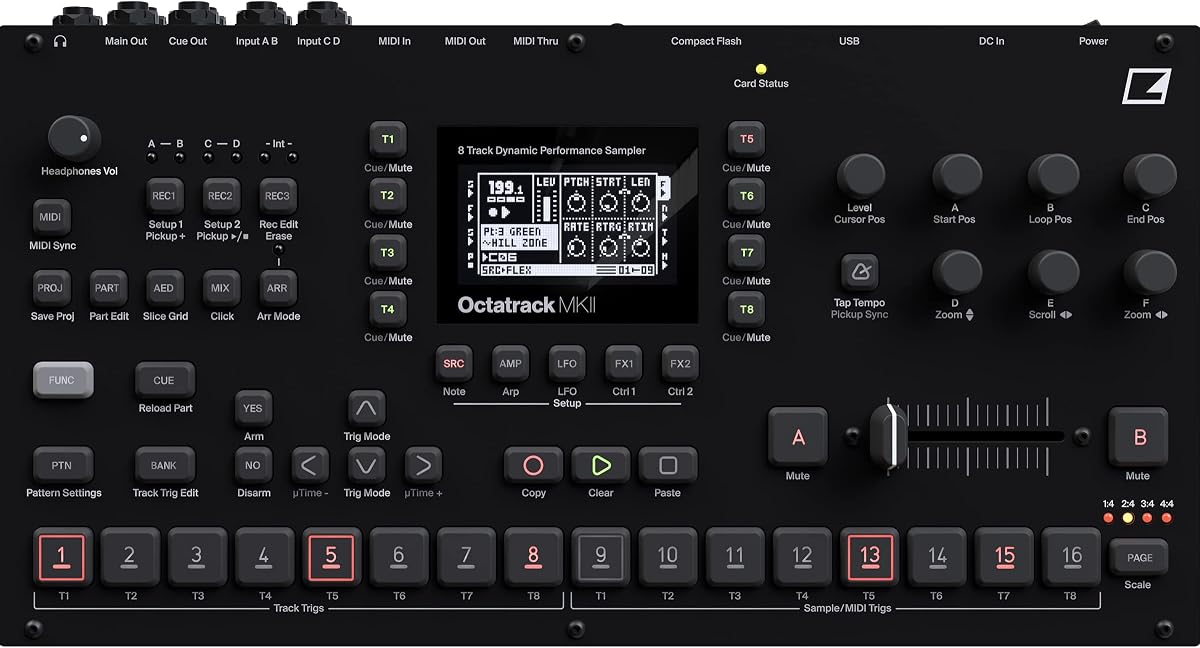
Elektron Octatrack MKII
4.5Editor score
Eight stereo audio tracks
Real-time pitch and time stretch
Rugged backlit buttons
This expert guide compares the top grooveboxes for live performance to help you choose the best standalone sampler and sequencer for your stage setup and
Finding the right groovebox for live performance can transform how you create and present music on stage. These standalone devices combine sampling, sequencing, and synthesis into a portable unit that lets you perform without a computer or complex rig.
We evaluated ten top-rated grooveboxes based on their workflow, sound quality, connectivity options, and ease of use during live sets. Our comparison covers everything from compact beatmakers to powerful workstations designed for professional musicians and producers.
Each pick highlights key features, strengths, and trade-offs to help you match a device to your specific performance style. Note that product availability and pricing may change, so verify details on the retailer site before purchasing your next instrument.
4.5Editor score

4.8Editor score

4.6Editor score
The following table provides a side-by-side overview of the top grooveboxes evaluated in this guide. Each entry lists the product name, a link to view more details, and key specifications relevant to live performance scenarios.




The Akai Professional MPC Sample is a compact portable sampler and sequencer that delivers the iconic MPC workflow in a modern format. With a 4.8 rating, it stands out as an ideal entry point for beatmakers and performers who want standalone operation.
We may earn a commission when you buy through this link, at no additional cost to you.
Its battery-powered design includes a built-in speaker and internal microphone, allowing you to record and play anywhere without a DAW. The 16 responsive pads and 2.4-inch display make sampling and chopping fast and fluid for all skill levels.
While the display is small and pad count is limited compared to larger units, these trade-offs are acceptable for portability. The onboard FX processors and legacy support for existing MPC users add significant value for creative sound design.
If you need a versatile production hub that fits in a bag and connects to your live rig easily, this device is a top choice. It bridges the gap between hobbyist gear and professional tools effectively.
Battery operation and built-in speaker let you sketch ideas anywhere without power outlets or computers.
MPC OS integration allows seamless project movement between desktop and standalone environments for consistency.
We may earn a commission when you buy through this link, at no additional cost to you.
Ableton Move is a standalone instrument designed for making music anywhere with a built-in battery, speaker, and microphone. Its 4.8 rating reflects strong performance in portability and creative flexibility for live sets.
We may earn a commission when you buy through this link, at no additional cost to you.
The 32 velocity-sensitive pads with polyphonic aftertouch allow expressive playing of chords, melodies, and drums directly on the device. Internal resampling and time-stretching features enable remixing on the fly without connecting to a computer.
While it has only four tracks and relies on Wi-Fi for some integrations like Ableton Cloud, these limits are manageable for sketching ideas. The curated sound library and tight integration with Push 3 make it a powerful companion.
Move is best suited for Ableton users who want a compact device to capture ideas and trigger clips live. Its seamless wireless transfer capabilities save time during performances and rehearsals.
Polyphonic aftertouch on 32 pads adds nuance to velocity and pressure for dynamic performances.
Built-in Wi-Fi lets you transfer audio and sets to Live or Push 3 quickly without cables.
We may earn a commission when you buy through this link, at no additional cost to you.
The Elektron Octatrack MKII is an eight-track performance sampling workstation that offers deep control over audio and MIDI. It has a 4.5 rating due to its robust build and advanced sequencing capabilities.
We may earn a commission when you buy through this link, at no additional cost to you.
Its OLED screen provides clear visibility, while the contactless crossfader and high-resolution encoders ensure precise adjustments during live use. Real-time pitch shifting and time stretching allow flexible audio manipulation without affecting tempo.
The device has a steeper learning curve and higher price than entry models, but these are acceptable for professionals needing power. Balanced audio inputs and 50 million press rated buttons ensure reliability in touring environments.
For producers and performers who demand granular control over samples and sequences, this unit delivers unmatched depth. It serves as a central hub for complex live setups where reliability matters.
Real-time pitch and time stretch features allow dynamic sound design without stopping the song.
Contactless crossfader and encoders offer smooth adjustments for mixing and parameter changes live.
We may earn a commission when you buy through this link, at no additional cost to you.
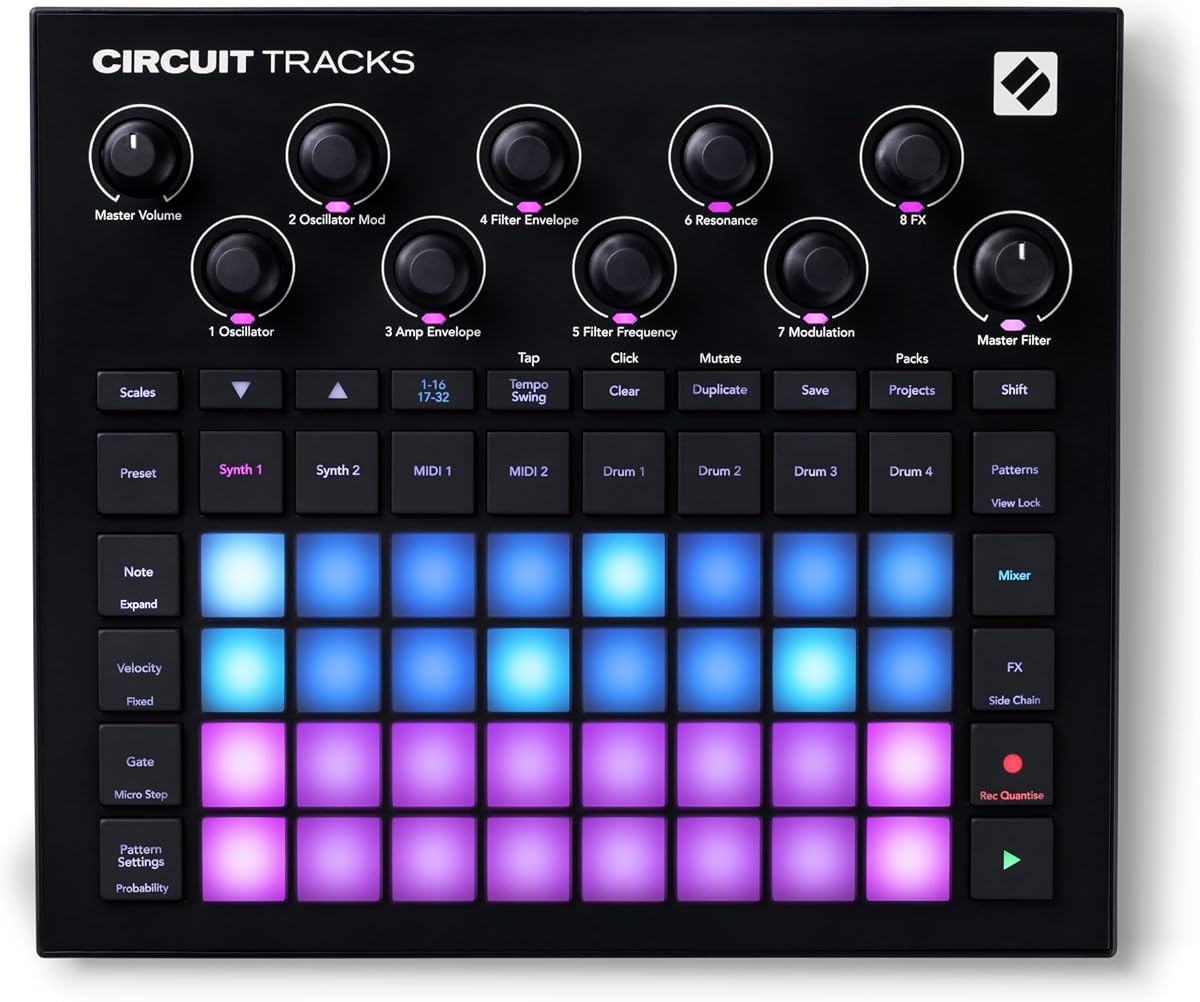
Novation Circuit Tracks is a groovebox that combines synth, MIDI, and drum tracks into a single portable unit. With a 4.7 rating, it appeals to creators who want expressive performance with straightforward controls.
We may earn a commission when you buy through this link, at no additional cost to you.
You can create 32-step patterns that chain into longer sequences, keeping music evolving with probability and mutate functions. The velocity-sensitive pads and tactile knobs make it easy to manipulate sounds and MIDI without deep menus.
While polyphony may be limited compared to dedicated synths and some sounds require software, the workflow is fast and fun. The ability to send CC automation and control external hardware expands its role beyond internal sounds.
This groovebox is excellent for live performers who need a compact tool for generating loops and melodies on stage. Its intuitive design lowers barriers to creating complex arrangements quickly.
Probability and mutate features automatically vary patterns to keep performances fresh and dynamic.
Dedicated MIDI tracks let you automate synthesizers and effects units without needing a computer.
We may earn a commission when you buy through this link, at no additional cost to you.
Roland MC-707 is a professional music production workstation designed for standalone creation and live performance. Its 4.3 rating reflects reliability and sound quality despite its complexity for beginners.
We may earn a commission when you buy through this link, at no additional cost to you.
It offers eight tracks with 128 clips each, plus 90 types of track and master effects for detailed sound shaping. The 128-step sequencer allows precise programming, and SD card storage supports extensive libraries.
The device is heavier than portable options and setup can take time, but these trade-offs are acceptable for full productions. Comprehensive connectivity like MIDI and USB ensures it integrates into any rig effectively.
Musicians needing a complete studio in a box for live sets or recording will appreciate this workstation. It balances powerful features with a workflow designed for serious music creation.
Track and master effects provide studio-grade sound shaping directly on the hardware without plugins.
Multiple jacks and ports let you connect to mixers, synths, and computers seamlessly.
We may earn a commission when you buy through this link, at no additional cost to you.
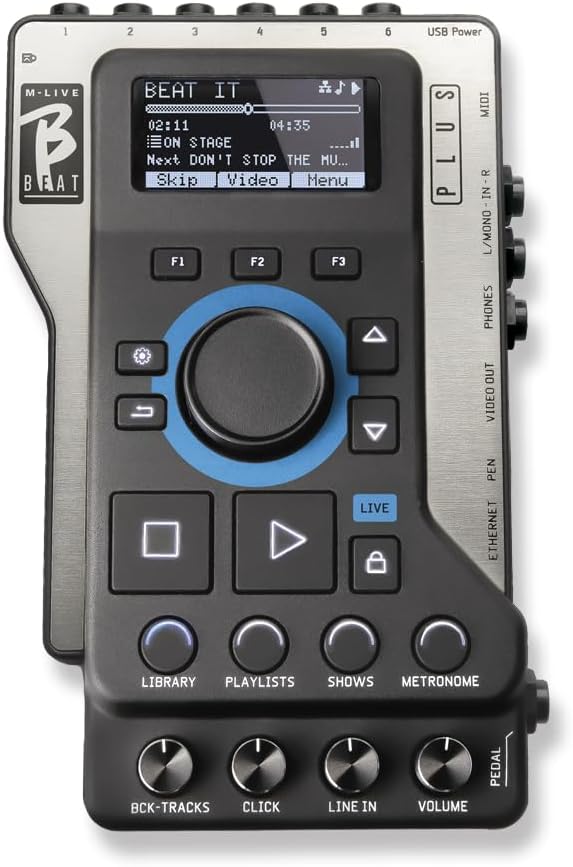
M-Live B.Beat Plus replaces laptops and mixers with a compact solution for multitrack backing playback. It has a 4.7 rating for reliability and features that help bands manage complex live shows.
We may earn a commission when you buy through this link, at no additional cost to you.
You can play up to 16 mono or 8 stereo tracks with video sync via HDMI for a professional show management experience. Live loops, markers, and stem removal tools let you adapt performances on the fly.
Since this unit focuses on playback rather than original sequencing, it requires preprepared files and a different workflow. However, for bands needing reliability and video sync, these limitations are acceptable trade-offs.
This player is ideal for professionals who want to streamline their rig without sacrificing control over arrangements. It brings order to large track counts and visual elements in real time.
HDMI video sync ensures lighting and visuals match your audio tracks perfectly during songs.
Markers and live loops allow you to extend solos or jump sections without stopping the track.
We may earn a commission when you buy through this link, at no additional cost to you.
The Elektron Digitakt II is a 16-track drum computer and sampler with deep sequencing power for live use. Its 4.4 rating highlights strong sound design capabilities and flexible audio tracks.
We may earn a commission when you buy through this link, at no additional cost to you.
It supports stereo or mono samples across tracks, with 128-step sequencing and 3 assignable LFOs per track for modulation. Song mode lets you create full compositions, and swappable filters offer diverse sound shaping options.
While it lacks onboard sample storage and requires file transfers, these constraints encourage a focused workflow. The multiple trig modes and effects like delay and reverb per track add depth to performances.
This drum computer suits producers who want precise control over beats and samples without overwhelming menus. It is a reliable tool for electronic music and live sampling sets.
Swappable filters and per track LFOs give you extensive control over timbre and movement.
128-step sequencer with Euclidean generators allows complex rhythmic patterns easily.
We may earn a commission when you buy through this link, at no additional cost to you.
myTRACKS Groovebox is designed for beginners to make music without lessons or apps using an intuitive play interface. With a 4.6 rating, it stands out as the most accessible option for creative exploration.
We may earn a commission when you buy through this link, at no additional cost to you.
You can build complete tracks with drums and instruments using hands-on controls for shaping sound with filters and echoes. The built-in sampler lets you record world sounds and transform them into music instantly.
While this device lacks advanced pro features and has a simpler sound engine, these limits keep costs low and focus fun. It prioritizes discovery over technical complexity, making it great for entry users.
This groovebox is perfect for anyone wanting to start creating music immediately without a steep learning curve. It brings musical freedom to a broader audience effectively and affordably.
Musical notes automatically work with sets so sounds always fit well without theory knowledge.
Built-in mic lets you capture ambient sounds and turn them into usable music textures.
We may earn a commission when you buy through this link, at no additional cost to you.
Roland MC-101 brings the sounds of the MC-707 into a compact four-track groovebox. It has a small form factor and runs on AA batteries, making it highly portable for musicians.
We may earn a commission when you buy through this link, at no additional cost to you.
The ZEN-Core synthesis system delivers high-quality Roland sounds, and sample players let you import your own voice or instrument audio. You can sync imported audio with tempo and process it with built-in effects.
Since it has fewer tracks and effects than larger workstations, it requires more planning for complex arrangements. However, its light weight and battery operation make it easy to design and perform anywhere.
This model suits producers who prioritize mobility and sound quality without heavy gear. It is a solid choice for sketching ideas or performing short sets on the go.
ZEN-Core engine provides access to defining electronic and dance sounds for genres.
AA battery operation lets you design patterns and perform without access to power outlets.
We may earn a commission when you buy through this link, at no additional cost to you.
The Akai APC40 MKII is a MIDI pad controller that offers complete command of Ableton Live for live performance control. It has a 4.8 rating for reliability and seamless integration with DAW workflows.
We may earn a commission when you buy through this link, at no additional cost to you.
Its 5×8 clip launch matrix with RGB feedback lets you trigger clips and loops visually, while faders and knobs control mixer parameters. The crossfader supports dynamic mixing styles for DJ and live setups.
Since it does not generate sounds internally and relies on a computer DAW, it is not a standalone groovebox. However, for control purposes, it offers unparalleled mapping and performance features for Live users.
If you want hands-on control over clips, lighting, and effects in Live, this controller is a top choice. It transforms digital workflows into tactile performances efficiently and flexibly.
Direct mapping to Ableton Live parameters lets you tweak tracks and effects without touching a mouse.
RGB feedback on clip buttons helps you see status and status quickly in dark stages.
We may earn a commission when you buy through this link, at no additional cost to you.
Choosing a groovebox for live performance requires considering workflow, sound quality, portability, and integration with your existing gear. The factors below help you evaluate what matters most for your stage needs.
A standalone groovebox should operate without a computer to reduce setup complexity. Look for built-in batteries, speakers, and storage so you can play anywhere without cables.
Prioritize units with robust power options and internal storage to avoid dependency on external hardware during live sets.
Evaluate the synthesis and sampling capabilities to ensure the device produces the sounds you need. High-quality engines allow richer tones and more expressive control for performances.
Choose a groovebox with sound engines that match your genre and performance style for consistent audio output.
The layout of pads, knobs, and screens affects how quickly you can manipulate sound live. Intuitive controls reduce mistakes and keep you focused on the performance.
Look for responsive pads and dedicated encoders that offer hands-on control without deep menu diving.
Ensure the device has MIDI, audio, and USB ports to integrate with mixers and external gear. Good connectivity expands your sound possibilities on stage.
Check for balanced inputs and output ports that suit your venue and system requirements.
A groovebox for live use should be durable and lightweight enough for transport. Rugged construction protects against wear from touring.
Select a model with sturdy materials and compact dimensions for ease of travel and storage.
Built-in effects like reverb, delay, and EQ help shape your sound without external processors. Real-time manipulation adds creative flexibility.
Choose units with ample effect types and per-track processing for detailed sound design live.
If you use DAW software, ensure the groovebox syncs well with it for file transfers and control. Integration saves time and maintains workflow consistency.
Verify compatibility with your software ecosystem to avoid friction during setup and performance.
Some devices require time to master. Consider your experience level and how quickly you need to perform with the unit.
Choose a device that matches your skill level to maximize productivity and enjoyment on stage.
Start by loading samples and setting up tracks in a controlled environment before your show. Organize your setlists to ensure quick access during performance.
Keep firmware updated and back up your projects regularly to avoid data loss. Use protective cases during transport to prevent physical damage.
Clean knobs and pads with soft cloths to remove dust. Store in a dry place to protect internal electronics from moisture and heat.
A groovebox is an all-in-one electronic instrument combining sequencers, samplers, and synthesizers. It allows musicians to create and perform music without needing a computer, offering portability and hands-on control.
Most grooveboxes are standalone and do not require a computer during performance. Some may benefit from a computer for editing or loading samples, but they function independently for live sets.
Yes, many grooveboxes include recording capabilities and storage for saving tracks. You can record ideas, arrange them, and perform them live without external recording hardware.
Grooveboxes support a wide range of genres including electronic, hip-hop, indie, and experimental music. Their flexible sampling and synthesis engines suit various styles.
Some grooveboxes are designed with intuitive workflows for beginners. Others may have steeper learning curves. Look for units with guided modes or tutorials to ease the start.
Connect using MIDI, USB, or audio cables to match mixers or speakers. Check compatibility with your existing setup for seamless integration and signal flow.
The top picks like Akai MPC Sample and Elektron Octatrack offer distinct advantages for different performance styles and budgets. Each device provides standalone power to reduce stage complexity.
Consider your need for portability versus advanced features before choosing. A device that matches your workflow will enhance creativity and reliability on stage.
Check current pricing and availability for each model to ensure you select the right fit. Prices may vary, so confirm details before finalizing your purchase decision.