
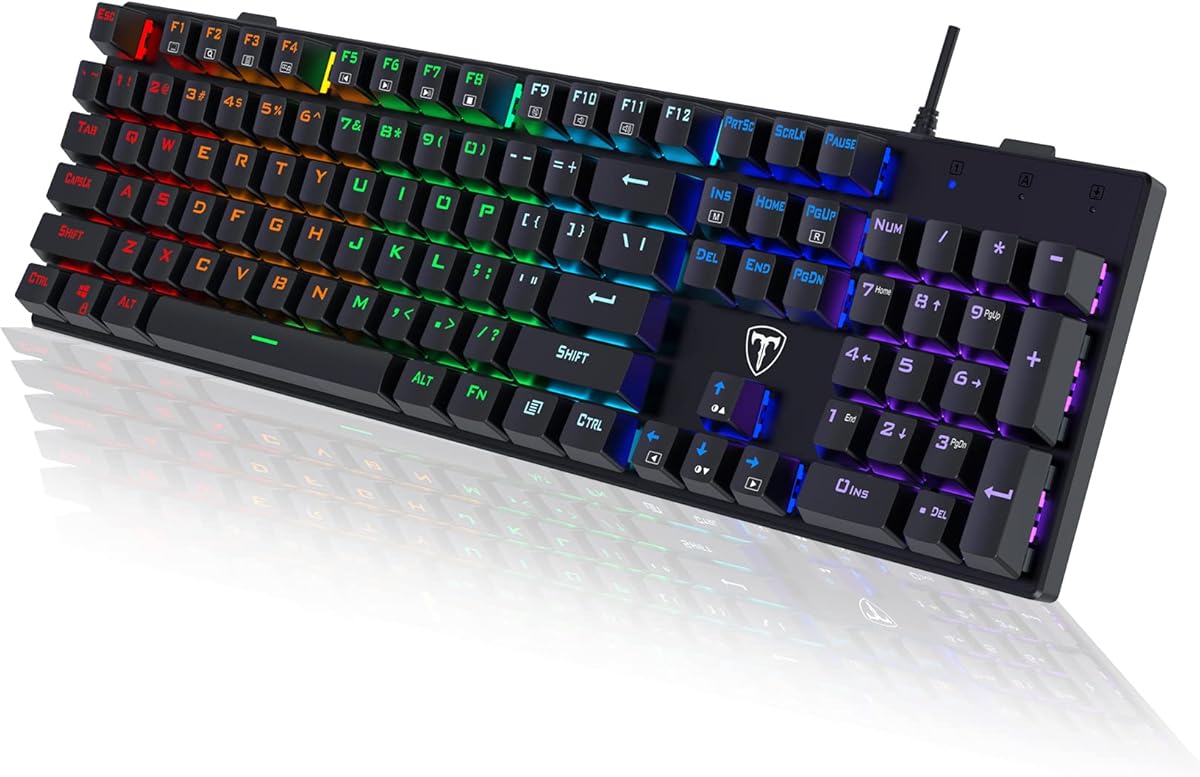
Guiheng Wired Portable 60% Mechanical Gaming Keyboard
4.3Editor score
Compact sixty key layout design
Rainbow backlit LED effects
Dust proof and splash resistant
This guide compares the top ten affordable mechanical keyboards for gaming and typing, evaluating build quality, switch feel, and lighting features to help you
Finding a reliable mechanical keyboard does not have to break the bank. Today the market offers many budget friendly options that deliver excellent performance without the high price tag. Whether you are a gamer or a professional typist, there is a perfect match for your needs.
We have carefully selected and evaluated ten distinct models to bring you this comprehensive list. Each product was chosen based on user feedback, build durability, and feature sets. Our goal is to highlight the best value picks available right now.
Every pick in this guide showcases unique strengths and specific use cases. You will find detailed insights into switch types, layouts, and customization options. Please note that product availability and costs may change over time.
4.3Editor score

4.5Editor score

4.5Editor score
This side by side comparison overview the key specifications and standout features of each selected mechanical keyboard. Use this table to quickly identify which model aligns best with your specific typing or gaming requirements.






The Redragon K671 stands out as a top contender in the budget mechanical keyboard market. With a solid user rating and features typically found in higher priced models, it delivers impressive value. The inclusion of hot swappable switches is a major highlight for enthusiasts.
We may earn a commission when you buy through this link, at no additional cost to you.
Its build quality is robust, featuring double shot PBT keycaps that resist wear and shine over time. The red switches provide a smooth linear feel ideal for gaming and fast typing. Additionally, the eleven programmable backlight modes allow for significant customization.
While the software is functional, it lacks the depth of more expensive ecosystems. Macro editing is supported but has some limitations regarding color changes. These trade offs are minor considering the overall feature set and price point.
Anyone looking for an affordable entry into hot swappable keyboards should consider this model. It balances performance, durability, and aesthetics well. We recommend it for gamers and typists seeking reliable tools without overspending.
The ability to change switches without soldering allows for easy experimentation and maintenance.
PBT keycaps ensure long lasting legends and a textured feel that many users prefer.
We may earn a commission when you buy through this link, at no additional cost to you.
The Guiheng 60% keyboard is a perfect choice for those on a tight budget. It packs a surprising amount of functionality into a small, portable chassis. The compact layout frees up valuable desk space for mouse movement.
We may earn a commission when you buy through this link, at no additional cost to you.
Its rainbow LED backlighting adds a touch of gaming flair without costing extra. The red switches offer a smooth typing experience suitable for both work and play. Compatibility with various operating systems makes it versatile.
The lack of dedicated arrow keys can be inconvenient for some users. Navigation relies on function layer combinations which might slow down certain workflows. However, for casual use, this is often acceptable.
We recommend this keyboard for students or travelers needing a reliable, affordable solution. Its durability and portability make it a strong candidate for on the go use. It proves you do not need to spend much to get a mechanical feel.
The sixty percent form factor removes the numpad and function row to maximize desk real estate.
Vibrant rainbow lighting effects help create an immersive environment in low light settings.
We may earn a commission when you buy through this link, at no additional cost to you.
The AK96 Mechanical Keyboard brings modern tech to the budget segment. Its standout feature is the smart display and rotary knob for quick adjustments. This adds a layer of convenience usually found in premium boards.
We may earn a commission when you buy through this link, at no additional cost to you.
The ninety six percent layout retains arrow keys and a numpad while staying compact. Hot swappable switches allow for future upgrades without replacing the entire board. The USB C connection ensures a secure and modern cable interface.
The knob functionality can take some time to learn effectively. Software support exists but documentation could be clearer for new users. These minor hurdles are outweighed by the unique customization options.
This board is ideal for users who want extra control features without a high cost. It works well for media control and quick settings adjustments. We suggest it for tech enthusiasts looking for innovation.
The physical knob allows for intuitive volume and brightness adjustments without software.
Keeping the numpad and arrows in a smaller frame saves space while maintaining utility.
We may earn a commission when you buy through this link, at no additional cost to you.
The wegear Clicky Keyboard is designed for those who love a tactile typing experience. Its blue switches provide crisp clicks that confirm every keystroke. This makes it excellent for transcription and gaming precision.
We may earn a commission when you buy through this link, at no additional cost to you.
The full size layout includes a numeric pad for data entry tasks. Anti ghosting ensures all key presses are registered during intense gameplay. Adjustable kickstands help find a comfortable typing angle for long sessions.
The loud click sound might disturb others in shared environments. The fixed color row lighting lacks the variability of full RGB zones. However, the visual effect is still vibrant and functional.
We recommend this keyboard for home users who prioritize feel over silence. It offers a satisfying typing experience at a very low cost. If noise is not an issue, this is a top pick.
The blue switches offer a distinct bump and click that enhances typing satisfaction.
Includes all standard keys including the numeric pad for complete productivity utility.
We may earn a commission when you buy through this link, at no additional cost to you.
The Redragon K668 is a comprehensive package that balances features and price well. Its extra four hotkeys provide quick access to mute, calculator, and other functions. This enhances productivity without needing complex function layers.
We may earn a commission when you buy through this link, at no additional cost to you.
Hot swappable switches allow users to customize the feel of their board easily. The vibrant RGB lighting includes a music sync mode that reacts to system audio. Pro software enables deep customization of macros and lighting.
The one zero eight key layout is slightly wider than standard full size boards. Users with limited desk space might prefer a ten keyless option. However, the added utility often justifies the footprint.
We suggest this model for users wanting maximum features under a budget. It is versatile enough for gaming and office work alike. The hot swap feature alone makes it a standout choice.
Dedicated hotkeys streamline workflows by providing instant access to common tools.
Music sync lighting creates a dynamic visual experience that matches your audio output.
We may earn a commission when you buy through this link, at no additional cost to you.
The Redragon K617 offers a sleek compact design perfect for portable setups. Its sixty percent form factor saves significant space on the desk. This is ideal for users who want room for large mouse movements.
We may earn a commission when you buy through this link, at no additional cost to you.
Hot swappable switches and pro software support are rare at this price point. The switches are rated for millions of presses ensuring long term durability. The white and grey colorway looks modern and clean.
Navigation requires using function layers since there are no dedicated arrow keys. New users may need a few days to adjust to the layout. However, many gamers prefer this minimal footprint.
We recommend this keyboard for gamers who prioritize desk space. It combines portability with advanced features like hot swapping. If you prefer a compact setup, this is a top contender.
Removing the numpad frees up room for low sensitivity mouse gaming setups.
The hot swap socket allows you to test different switch types easily.
We may earn a commission when you buy through this link, at no additional cost to you.
The Logitech G413 SE brings premium build quality to the affordable range. Its brushed aluminum top case provides a rigid and sleek finish. This ensures minimal flex during intense typing or gaming sessions.
We may earn a commission when you buy through this link, at no additional cost to you.
PBT keycaps are resistant to heat and wear, maintaining texture over time. Tactile mechanical switches offer consistent performance and feel. Logitech is a trusted brand with strong software support options.
The price is higher than other budget models on this list. The backlighting is single color white rather than full RGB. However, the durability and finish justify the extra cost for many users.
We suggest this keyboard for those who value build integrity and brand trust. It is a reliable choice for daily use in demanding environments. If longevity is your priority, this is a smart buy.
An aluminum magnesium alloy top case gives the board a sturdy and high end feel.
PBT plastic resists shine and fading better than standard ABS keycaps.
We may earn a commission when you buy through this link, at no additional cost to you.
The Newmen GM611 is a portable option designed for gamers on the go. Its compact sixty percent layout fits easily into bags for travel. A detachable cable makes packing and storage much simpler.
We may earn a commission when you buy through this link, at no additional cost to you.
N-key rollover ensures accurate input during complex gaming combos. The rainbow backlight offers multiple modes and brightness levels for visibility. Red switches provide a smooth linear action suitable for rapid key presses.
The included USB cable is relatively short which limits setup options. Software support is minimal compared to larger brands. However, for a plug and play device, it functions well without bloat.
We recommend this keyboard for LAN parties or travel. Its portability and reliable performance make it a great companion. If you need a travel mechanical keyboard, this is a strong choice.
A detachable cable and compact size make this board easy to carry in a backpack.
N-key rollover prevents missed keystrokes during fast paced gaming moments.
We may earn a commission when you buy through this link, at no additional cost to you.
The Newmen GM325Pro offers a full size layout with a rugged metal plate. This build style ensures durability and a premium look at a low cost. The detachable cable adds convenience for cable management.
We may earn a commission when you buy through this link, at no additional cost to you.
Side lighting effects create a unique ambient glow around the board. Red linear switches are smooth and quiet enough for shared spaces. Smart shortcuts and media controls provide useful functionality.
The RGB is limited to side edges rather than per key lighting. This means less customization for individual key colors. However, the side glow still adds a nice aesthetic touch.
We suggest this model for users who want a sturdy full size board. It is great for productivity and gaming without breaking the budget. If you need a numpad and durability, this fits the bill.
A metal top panel prevents flex and increases the lifespan of the keyboard.
Edge lighting provides a subtle and stylish illumination effect.
We may earn a commission when you buy through this link, at no additional cost to you.
The RisoPhy Mechanical Keyboard stands out with its ultra slim profile. This low profile design reduces wrist strain and fits well in tight spaces. It retains a full size layout with all essential keys.
We may earn a commission when you buy through this link, at no additional cost to you.
Spill resistant drainage holes protect the internal electronics from liquid accidents. Blue clicky switches provide clear tactile feedback and satisfying sound. The anti ghosting feature ensures accurate input during gameplay.
The keycaps are ABS which may develop shine over heavy use. The lighting modes are fewer compared to more expensive models. However, the functional features like spill resistance add real value.
We recommend this keyboard for users who want a slim footprint. It is practical for office and home use. If you prefer a low profile board with full keys, this is a top pick.
An ultra slim design helps reduce hand fatigue during long typing sessions.
Strategic holes allow liquids to drain away quickly to prevent damage.
We may earn a commission when you buy through this link, at no additional cost to you.
Selecting the right budget mechanical keyboard involves balancing features, layout, and build quality. This guide covers the key factors to consider before making your purchase.
Keyboard layouts range from full size to compact options like ten keyless or sixty percent. Full size boards include a numeric pad which is essential for data entry. Compact layouts save desk space for mouse movement.
Consider your desk size and usage. Choose full size for productivity or compact for gaming.
Mechanical switches come in linear, tactile, and clicky varieties. Linear switches are smooth and quiet, ideal for gaming. Tactile and clicky switches provide feedback for typing accuracy.
Decide based on your noise tolerance. Clicky switches are loud while linear are quiet.
Hot swappable boards let you change switches without soldering. This feature allows future customization and repair. It adds significant value to budget boards for enthusiasts.
Prioritize hot swap sockets if you want to experiment with different switch types later.
Look for sturdy frames and durable keycaps like PBT. Metal plates reduce flex and improve feel. Plastic frames are cheaper but may feel less solid.
Check for metal tops or thick plastic to ensure long term durability.
Backlighting ranges from single color to full RGB. RGB allows customization and gaming vibes. Fixed lighting saves cost but limits options.
Choose RGB if aesthetics matter to you or fixed if you just need visibility.
Wired connections offer stability and zero latency. USB C is becoming standard for better durability. Wireless options cost more and need charging.
Stick to wired for gaming reliability and ease of use in budget models.
Anti ghosting ensures all key presses are registered. N key rollover is the highest standard. Essential for gaming where multiple keys are pressed at once.
Ensure the keyboard supports full anti ghosting to avoid missed inputs.
Good software allows macros, remapping, and lighting edits. Some budget boards lack deep software support. Check reviews for software ease of use.
Look for dedicated apps if you plan to use macros or advanced settings.
To keep your keyboard in top shape, clean it regularly using a soft brush or compressed air. Dust and crumbs can accumulate under keycaps and affect switch performance over time. Always turn off your device before cleaning to avoid accidents.
Avoid eating or drinking over your keyboard to prevent spills. Even spill resistant models can suffer from liquid damage if not handled carefully. Use a mouse pad near the keyboard to keep debris away from the edges.
Customize your lighting and macros using the provided software. Learn how to use function layers for compact boards to access all features. Updating firmware can also fix bugs and improve performance.
Yes, many budget mechanical keyboards use durable switches rated for millions of keystrokes. Look for models with strong keycaps and solid frames. Proper care will ensure they last for years of daily use.
You can change switches if the board is hot swappable. This feature is becoming common in affordable models. Check the product details for hot swap support before buying to ensure flexibility.
Compact layouts like sixty percent or ten keyless are best for gaming. They free up space for mouse movement. Full size boards are better if you need a numeric pad for other tasks.
Most mechanical keyboards are compatible with both Windows and Mac. Some key labels may differ but functionality remains similar. Check the product description for specific Mac support details.
Mechanical keyboards offer a more tactile feel and longer lifespan. They usually have better anti ghosting for gaming. The switches are also easier to maintain and customize.
Yes, blue switches are designed to be clicky and loud. They provide strong tactile feedback but might disturb others in quiet spaces. If noise is a concern, consider linear red switches instead.
We have reviewed ten excellent options that balance cost and performance. The Guiheng and Redragon models offer great value for budget seekers. Logitech and AK96 provide premium features at accessible price points.
Prioritize features like hot swapping, layout, and switch type based on your needs. Durability and software support also play key roles in long term satisfaction. Choose a board that fits your desk space and style.
Remember that prices and availability can change frequently. We recommend checking the current listings before making your final decision. This guide ensures you find the best tool for your typing journey.