
OMTech K40+ 45W Desktop CO2 Laser Engraver & Cutter
4.4Editor score
45W laser power output
12 by 8 inch workspace
LightBurn software support
This guide compares the top CO2 laser cutters for 2026, evaluating power, workspace size, safety features, and software compatibility to help you choose the
CO2 laser cutters are powerful tools for crafting, prototyping, and small-scale manufacturing. They use a gas laser to cut or engrave non-metallic materials like wood, acrylic, and leather with high precision and speed for many projects.
We compared ten top-rated models based on laser power, working area, safety features, and software compatibility. Our analysis includes user feedback, technical specifications, and real-world performance metrics to ensure you find a reliable machine.
Each pick highlights specific strengths like automation, speed, or budget value. Prices and availability change frequently so check current listings before buying to get the best deal for your specific laser cutting needs today.
4.4Editor score

4.5Editor score

The following table compares all ten CO2 laser cutters side by side. We highlight key specifications like power, workspace dimensions, and compatibility to help you quickly identify the best fit for your budget and production needs.



The xTool P3 80W leads our list with its intelligent automation system and industrial-grade power. It earns a strong 4.5 rating for combining speed, safety, and a massive workspace that handles diverse materials efficiently.
We may earn a commission when you buy through this link, at no additional cost to you.
Its flagship 80W laser cuts through 20mm wood and 25mm acrylic effortlessly. The Automated Creation System uses LiDAR ranging and dual HD cameras to ensure perfect positioning and minimal setup time for any project.
While the price is high, the efficiency gains from AI-powered Smart Nesting and Variable Batch Fill justify the investment. The Class 1 safety rating provides peace of mind during extended operation without extra enclosures.
Buyers seeking a professional workflow that minimizes manual effort will find this model ideal. It transforms complex designs into finished products quickly with precision that diode lasers cannot match for clear acrylic.
LiDAR ranging and dual HD cameras create a seamless place and go workflow that automates setup and alignment.
AI-powered Smart Nesting achieves 98.7% material utilization to reduce waste and maximize output for large projects.
We may earn a commission when you buy through this link, at no additional cost to you.
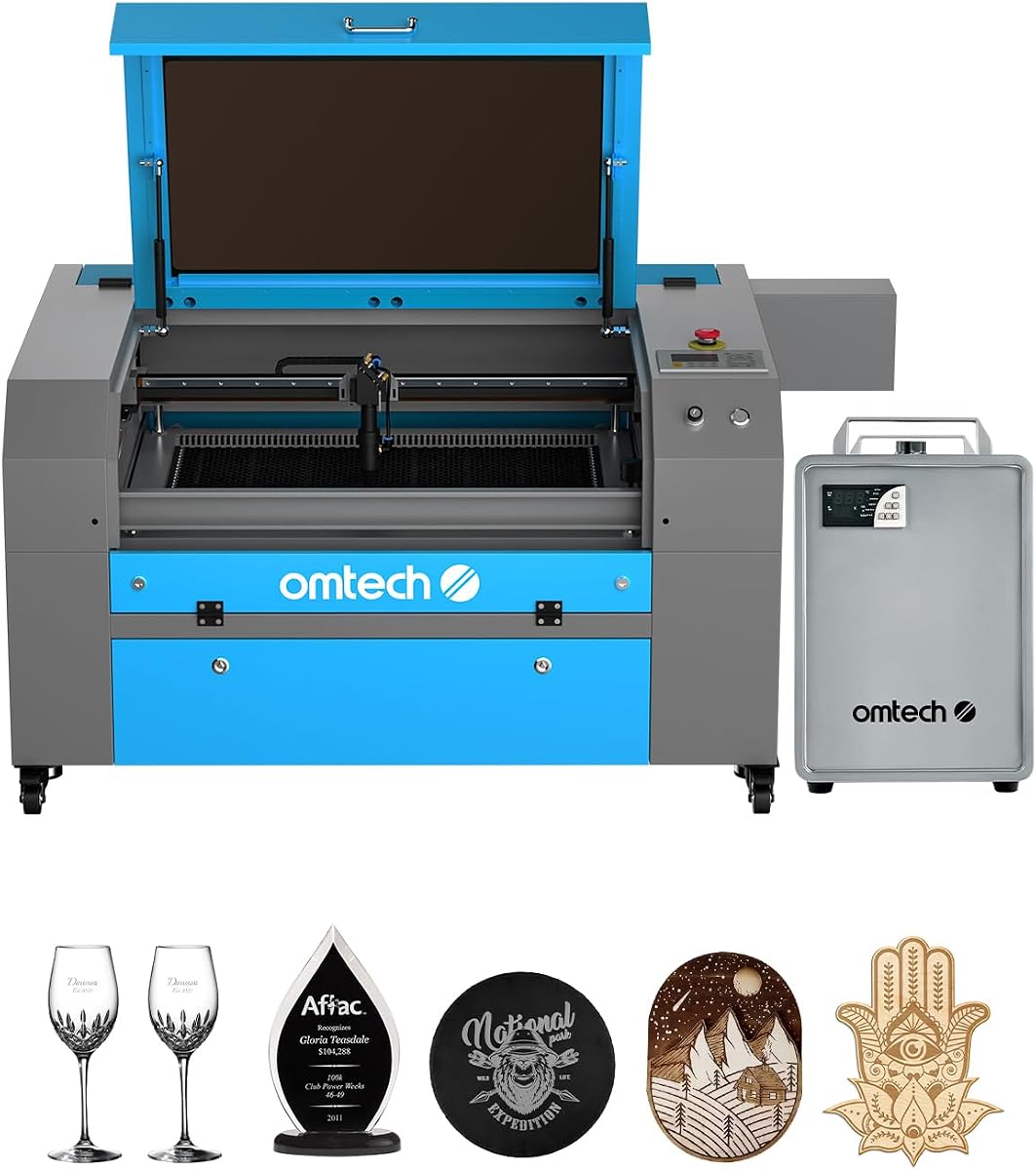
The OMTech K40+ 45W offers a cost-effective entry into CO2 laser cutting. With a 4.4 rating, it balances performance and affordability, making it perfect for hobbyists and small businesses starting out.
We may earn a commission when you buy through this link, at no additional cost to you.
Upgraded to 45W, it slices through 10mm acrylic and 8mm wood with ease. The integrated air assist system clears debris and reduces fire risk during high-power cutting jobs for safer operation.
While the 12 by 8 inch workspace limits large projects, it handles standard materials well. Full support for LightBurn and LaserGRBL ensures flexible control whether you are a beginner or expert user.
Ideal for DIY enthusiasts needing reliable performance without a steep cost. Its compact design fits easily on standard workbenches while still delivering professional results for personal and commercial use.
The enhanced 45W power boosts cutting speed by 1.5 to 2 times compared to previous models for faster output.
Seamless control with LightBurn and LaserGRBL offers easy navigation and precise execution for all skill levels.
We may earn a commission when you buy through this link, at no additional cost to you.
The OMTech Pro 130W stands out with industrial-grade power and precision servo motors. While new to the market, its specifications promise high-speed engraving up to 1200 mm/s for professional production demands.
We may earn a commission when you buy through this link, at no additional cost to you.
Its 130W laser tube cuts thick non-metallic materials quickly and cleanly. The built-in CW-5200 water chiller maintains stable temperatures to ensure consistent performance during extended engraving sessions without overheating.
The 35 by 55 inch workspace accommodates large items that smaller machines cannot handle. Four-way pass-through doors make it easy to load longer materials without cutting them to fit inside.
Investors in large-scale manufacturing or heavy production should consider this model. The futuristic design includes flame-retardant windows and status lights for enhanced safety and visibility during critical engraving operations.
Upgraded servo motors and ball-bearing guide rails enable rapid engraving speeds up to 1200 mm/s for efficiency.
Built-in chiller maintains stable temperatures within 0.5 degrees Fahrenheit to extend tube life and ensure cut quality.
We may earn a commission when you buy through this link, at no additional cost to you.
The VEVOR 100W offers an impressive workspace size for its class. With a perfect 5.0 rating, it promises extreme speed and precision for projects requiring substantial material coverage in a single setup.
We may earn a commission when you buy through this link, at no additional cost to you.
Its 100W laser cuts materials up to 0.59 inches thick in one pass. The honeycomb bed ensures structural stability while front and back pass-through doors open up even greater possibilities for long projects.
An intuitive digital control panel works with third-party graphic software like LightBurn and CorelDRAW. Transfer files via USB disk or network cable for easy workflow management across Windows and macOS systems.
Creators needing large format cutting without moving materials will find this ideal. The air assist blows away smoke and dust to protect lenses while movable wheels keep the heavy unit rolling smoothly.
The 24 by 35 inch working area provides 840 square inches of space to fit large projects comfortably.
Intelligent laser head with red-dot pointer ensures high precision and smooth incisions without burrs on any surface.
We may earn a commission when you buy through this link, at no additional cost to you.
The OMTech Maker 90W delivers commercial-grade power for deep engraving on various materials. While new, its specifications indicate strong performance with a bundled water chiller for extended usage sessions.
We may earn a commission when you buy through this link, at no additional cost to you.
It engraves as deep as 0.4 inches on wood and acrylic at speeds up to 23.6 inches per second. The Yongli H2 tube offers up to 8000 hours of usage for reliable long-term operation.
The 20 by 28 inch work area fits most standard projects while four-way pass-through doors handle longer items. The widened viewing window is made from flame retardant material for lasting safe use.
Buyers seeking a middle ground between power and size should consider this model. Built-in air assist efficiently removes smoke to protect lenses while interlock covers cut the beam if the window opens.
High-performance Yongli H2 tube extends lifespan when consistently used at lower settings for durability.
Built-in air assist removes smoke and dust to protect your laser lenses and reflective mirrors during operation.
We may earn a commission when you buy through this link, at no additional cost to you.
The OMTech Maker 60W stands out with LightBurn software bundled for intuitive navigation. It holds a strong 4.7 rating for consistent performance and features like autofocus that simplify the setup process.
We may earn a commission when you buy through this link, at no additional cost to you.
The workbeds adjust up and down at the touch of a button. The preinstalled autofocus finds the right focal distance for you so you can start right to work without manual struggle.
A 20 by 28 inch work area supports most small to medium projects. The flame retardant viewing window ensures safe use while the built-in air assist removes smoke and dust effectively.
This model is ideal for buyers wanting a complete package ready to use immediately. The combination of software, chiller, and autofocus provides a smooth experience for safe and clean engraving.
The preinstalled autofocus automatically finds the right focal distance to save time and ensure consistent results.
Widened viewing window is made from flame retardant material to ensure lasting safe use during operation.
We may earn a commission when you buy through this link, at no additional cost to you.
The OMTech K40+ 45W is a repeat entry with a focus on compact utility. With a 4.5 rating, it continues to offer global support and high-speed engraving capability for small businesses.
We may earn a commission when you buy through this link, at no additional cost to you.
It slices through 10mm acrylic with ease. The high-speed capability allows you to get more done in less time with precision that meets the needs of DIY makers and small projects.
A compact workspace supports standard materials efficiently. The honeycomb bed handles flat items while the detachable base allows optional rotary axis for cylindrical engraving to expand your creative potential.
Ideal for workshops with limited space needing reliable performance. The integrated air assist reduces wood carbonization and fire risk during high-power cutting jobs for safer operation.
24 by 7 global support delivers expert assistance and local demos to ensure peace of mind wherever you are.
Integrated 45 degree air assist auto-adjusts airflow to protect the lens and reduce fire risk during cutting.
We may earn a commission when you buy through this link, at no additional cost to you.
The OMTech Pronto 100W delivers unmatched efficiency with speeds up to 39.4 inches per second. It transforms creative visions into reality quickly by reducing production time significantly for competitive advantage.
We may earn a commission when you buy through this link, at no additional cost to you.
Its 100W laser tube provides the power needed for thick materials. The advanced autofocus technology ensures consistent high-quality results with minimal effort during intricate design or cutting tasks.
The 40 by 24 inch work area accommodates most projects comfortably. Equipped with a powerful air pump and fan, the cuts remain clean and reduce material burn for high-quality output.
Ideal for makers needing speed without sacrificing power. Comprehensive protection features like water protection and temperature alarms ensure safe engraving with peace of mind for extended production.
Experience revolutionary engraving speeds up to 39.4 inches per second which is 37 percent faster than traditional models.
Superior airflow with powerful air pump ensures precise cuts and enhances work quality by reducing burn.
We may earn a commission when you buy through this link, at no additional cost to you.
The OMTech Pronto 130W offers a massive workspace for large format projects. With a perfect 5.0 rating, it transforms artistic visions into realities with 130W power and speeds up to 39.8 inches per second.
We may earn a commission when you buy through this link, at no additional cost to you.
Autofocus technology finds the right focal distance at the touch of a button. This reduces manual adjustments and guesswork so you can handle large items with ease immediately.
The 51 by 35 inch work area is one of the largest available for desktop machines. Two-way pass-through doors make it a breeze to accommodate larger and longer items without cutting them first.
Ideal for creatives needing space and speed. The tube offers up to 12000 hours of usage while temperature alarms and cover protection ensure your safety is always prioritized during work.
With speeds up to 39.8 inches per second, it transforms artistic visions into realities that draw applause.
The honeycomb and aluminum blade beds feature a 51 by 35 inch work area to fit large projects easily.
We may earn a commission when you buy through this link, at no additional cost to you.
The OMTech K40+ 45W provides a basic entry point for laser engraving. While limited in specs, it maintains the core value of affordable desktop cutting for those just starting their projects.
We may earn a commission when you buy through this link, at no additional cost to you.
Its Class 2 safety rating ensures basic protection during operation. The compact format allows it to sit easily on standard workbenches without requiring special ventilation or enclosures.
This model fits budgets strictly constrained for initial projects. It supports basic materials like wood and acrylic with standard settings that are easy to configure for simple designs.
Buyers needing minimal investment for hobby use may prefer this option. It serves as a functional entry into the category without complex features or higher power requirements.
This model serves as a functional entry into the category without complex features or higher power requirements.
We may earn a commission when you buy through this link, at no additional cost to you.
Selecting the right CO2 laser cutter depends on your production needs, space, and budget. We break down the key factors to help you compare models effectively.
Laser power determines how thick a material you can cut in one pass. Higher wattage like 100W or 130W allows faster cutting of dense materials like thick acrylic. Lower wattage models such as 45W are suitable for thin wood and engraving tasks.
Choose higher power if you need to cut thick materials regularly.
The working area defines the size of materials you can process without cutting them down. Desktop models offer small 12 by 8 inch areas. Large format models provide 35 by 55 inch spaces for industrial needs.
Match the workspace size to the dimensions of your typical project materials.
Class 1 safety rating means the machine is fully enclosed to prevent exposure to laser radiation during operation. Class 2 requires user caution with viewing windows. Look for interlocks that cut power when the door opens.
Prioritize Class 1 ratings for safety without needing additional protective housing.
Software compatibility determines how you design and send jobs to the machine. Most CO2 lasers support LightBurn which is industry standard for ease of use. Verify if LightBurn is included or if you must buy it separately.
Ensure the machine works with your preferred design software for smooth workflow.
An air assist system blows compressed air on the cutting area to clear smoke and debris. This protects lenses and reduces fire risk while improving cut quality. Check if air assist is built-in or requires external pumps.
Select a model with integrated air assist for cleaner cuts and better safety.
Water cooling is required for most CO2 laser tubes to prevent overheating. Some bundles include a water chiller while others require you to buy one. High power tubes demand stable cooling for consistent performance.
Look for bundles with chiller if buying high power tubes separately.
Autofocus features automatically adjust the focal distance based on material height. This eliminates manual dialing and ensures consistent results across different materials. Some models use motors while others use manual adjustment.
Autofocus saves time and reduces setup errors for frequent users.
Reliable brand support ensures access to technical help and replacement parts. Models with global support teams or local demos offer peace of mind. Warranty periods vary from one to two years on major components.
Choose brands with documented support networks for long term reliability.
Start by setting up the machine in a well ventilated area. Connect the air assist and water chiller if included to ensure proper cooling and safety during operation.
Align the laser tube using the red-dot pointer to ensure accurate cuts. Focus the lens based on the material thickness provided in the user manual.
Clean the lens and mirrors regularly using alcohol and soft cloth to prevent burn marks. Keep the work area free of debris to avoid fire hazards.
CO2 lasers cut most non-metallic materials like wood, acrylic, leather, paper, and fabric. They do not cut metals directly but can engrave coated metals. Always check material safety data before cutting.
Clean the lens and mirrors regularly to avoid burn marks. Change the water in the chiller weekly to prevent algae growth. Lubricate the rails monthly to ensure smooth motion.
Yes, a water chiller is necessary to cool the laser tube during operation. Overheating can reduce tube life and cause inconsistent cutting performance. Bundles often include one for convenience.
Most machines support LightBurn and LaserGRBL for design and control. LightBurn is often preferred for its advanced features and user interface. Always verify compatibility before buying.
CO2 lasers are safe when used with proper safety features like enclosure and interlocks. Class 1 machines provide high safety ratings. Always wear appropriate eyewear and work in ventilated areas.
Most CO2 laser tubes last between 8,000 to 12,000 hours. Usage patterns and cooling stability affect lifespan. Keep track of hours used to plan for future replacements.
We highlighted top picks like the xTool P3 for automation and OMTech models for power. Each product offers distinct strengths depending on your workspace and material needs.
Prioritize safety and software compatibility when making your choice. Budget models work for hobbies while high power suits industrial needs.
Prices and availability change so check current listings before buying to ensure you get the best deal for your specific laser cutting needs.