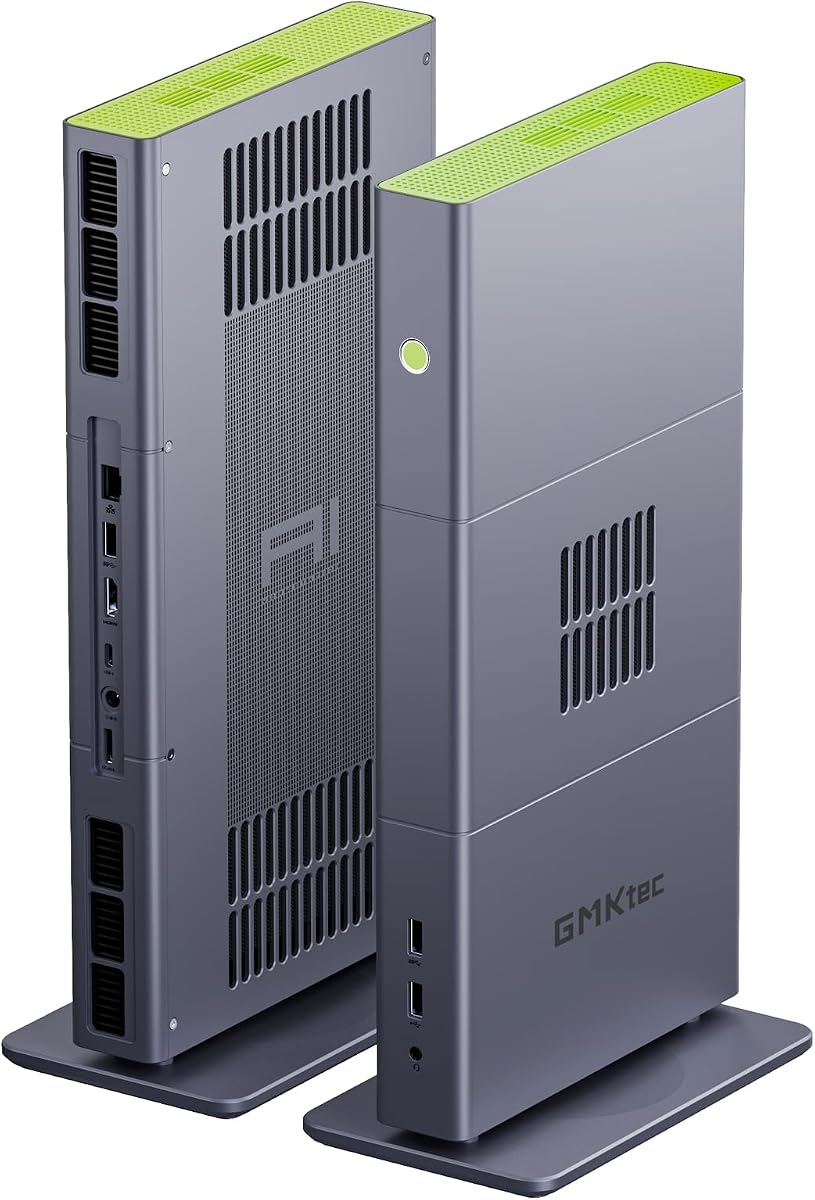
GMKtec X3 AI Mini PC
4.1Editor score
AMD Ryzen AI Max+ 395
128GB LPDDR5X RAM
OCuLink External GPU Support
2TB PCIe 4.0 SSD
This guide compares the top 10 mini PCs for Fusion 360, evaluating processors, RAM, graphics, and connectivity to help you choose the right compact desktop for
Finding a mini PC for Fusion 360 requires balancing performance with compact design. You need a processor that handles 3D modeling smoothly without taking up desk space. This guide reviews ten models capable of running CAD software efficiently for professionals and hobbyists alike.
We compared each system based on CPU power, memory capacity, storage speed, and graphics capabilities. Our analysis focuses on how well these mini PCs handle multitasking and complex assemblies in Fusion 360. We also consider connectivity options for multiple monitors which are essential for productive workflows.
Each pick highlights specific strengths like expandability or port density. Prices and availability change frequently so always verify current listings before buying. This list helps you find a reliable machine that fits your budget while delivering the power needed for precise engineering work.
4.1Editor score

4.8Editor score

4.9Editor score
This side-by-side comparison helps you evaluate key specifications across all ten mini PCs. We highlight processing power, memory options, and display capabilities to show which models are best suited for running Fusion 360 and similar CAD applications without compromise.


The Glorlin Mini PC with Ryzen 7 6800H stands out as a top contender for running Fusion 360. Its 8-core architecture provides ample threads for multitasking while the high clock speed ensures responsive performance during 3D modeling sessions.
We may earn a commission when you buy through this link, at no additional cost to you.
Equipped with 16GB LPDDR5 RAM, this mini PC handles complex assemblies efficiently. The Radeon 680M graphics unit supports smooth rendering and viewport navigation. Triple display support allows users to monitor tools and models simultaneously without lag.
While 16GB RAM is sufficient for most tasks, heavy simulations might benefit from an upgrade. The lack of PCIe 4.0 SSD support is a minor limitation compared to newer standards but does not significantly impact daily use.
This model is ideal for professionals needing a compact workstation. Its balance of power and portability makes it a strong recommendation for anyone seeking a reliable mini PC for Fusion 360 workflows.
The Ryzen 7 6800H delivers 8 cores and 16 threads reaching up to 4.7GHz which ensures smooth handling of complex CAD operations and rendering tasks.
Support for triple 4K displays via HDMI DisplayPort and Type-C enables efficient workflow management by allowing multiple windows and tool palettes on separate screens.
We may earn a commission when you buy through this link, at no additional cost to you.
The GMKtec X3 AI Mini PC represents the pinnacle of compact computing power for Fusion 360. With 128GB LPDDR5X RAM and the Ryzen AI Max+ 395 processor, this system handles extremely large assemblies and rendering tasks without bottlenecks.
We may earn a commission when you buy through this link, at no additional cost to you.
Its OCuLink port allows connection to external GPUs which expands graphical capabilities beyond integrated solutions. This feature is invaluable for users who need desktop-class rendering power in a small form factor.
The 2TB PCIe 4.0 SSD provides ample space for project files and software installations. While the price is significantly higher than other options, the performance justifies the cost for professional engineering studios.
This mini PC is best suited for power users who require maximum performance. It eliminates performance barriers and ensures that Fusion 360 runs smoothly even with the most demanding workloads.
The Ryzen AI Max+ 395 features 16 cores and advanced AI engines that accelerate computing tasks and improve responsiveness for complex CAD modeling and simulations.
OCuLink connectivity supports external GPU docks enabling users to upgrade graphics performance for high-end rendering or gaming without replacing the entire system.
We may earn a commission when you buy through this link, at no additional cost to you.
The BMAX Mini PC B6 offers an affordable entry point for running Fusion 360. Its Intel Core i3 8109U processor provides sufficient power for light to moderate 3D modeling tasks without breaking the budget.
We may earn a commission when you buy through this link, at no additional cost to you.
With dual 4K display support, users can extend their workspace effectively. The inclusion of Windows 11 Pro adds value for business users needing advanced features. Compact design allows flexible placement in small offices.
The 12GB RAM and 256GB SSD handle basic operations well but may struggle with heavy multitasking. Upgrading storage is possible via M.2 slots which helps maintain long-term utility.
This model is perfect for students or hobbyists starting with CAD design. It balances cost and functionality to provide a reliable desktop experience for essential Fusion 360 features.
The Core i3 8109U processor delivers 3.6GHz speed that manages everyday CAD tasks and web browsing with ease for users on a tighter budget.
Dual 4K HDMI and DP outputs allow users to work across two screens improving productivity by keeping toolbars and models visible simultaneously.
We may earn a commission when you buy through this link, at no additional cost to you.
The GMKtec M6 Ultra delivers robust performance for Fusion 360 with its Ryzen 5 7640HS processor and 32GB DDR5 RAM. This configuration ensures smooth multitasking even when running multiple applications alongside CAD software.
We may earn a commission when you buy through this link, at no additional cost to you.
Triple display support enhances workspace flexibility by allowing separate screens for design, documentation, and communication. The high-speed 1TB SSD ensures quick load times for large projects and software updates.
While the price is moderate, the inclusion of 32GB RAM future-proofs the system for demanding tasks. Dual 2.5G LAN ports are beneficial for fast file transfers on a local network.
Ideal for professionals who need extra RAM for rendering or virtual machines. This mini PC offers a balance of power and connectivity suitable for demanding work environments.
32GB of fast DDR5 RAM ensures that large assemblies and background processes run simultaneously without slowing down the system or causing stutter.
Support for three 4K displays via USB4 HDMI and DP allows users to maximize screen real estate for efficient multitasking and workflow management.
We may earn a commission when you buy through this link, at no additional cost to you.
The Getorli Mini PC features Ryzen 5 7430U processor which balances power and efficiency well for Fusion 360. It supports triple 4K display output allowing users to organize tools and models across multiple screens effectively.
We may earn a commission when you buy through this link, at no additional cost to you.
Equipped with 16GB DDR4 RAM and 512GB SSD, it provides adequate memory for smooth operations. The dual 2.5G LAN ports are useful for reliable network connectivity in office environments requiring stable internet or local server access.
While DDR4 is slightly slower than DDR5 it remains sufficient for most CAD tasks. The aluminum alloy shell helps dissipate heat effectively ensuring long-term stability during continuous use.
This model suits users needing reliable connectivity and display options. It offers a practical solution for daily design work without compromising on essential networking features.
Support for triple 4K displays via HDMI DP and Type-C enables efficient screen usage by allowing simultaneous viewing of different application windows.
Dual 2.5G LAN ports ensure stable high-speed network connections which are vital for transferring large design files and maintaining online collaboration.
We may earn a commission when you buy through this link, at no additional cost to you.
The BOSGAME E5 Mini PC features Ryzen 5 3300U processor which delivers steady performance for Fusion 360. It includes 16GB DDR4 RAM and a 512GB NVMe SSD ensuring quick boot times and responsive system interaction.
We may earn a commission when you buy through this link, at no additional cost to you.
Triple display capability via HDMI DP and USB-C allows for expanded workspace efficiency. The dual LAN ports are particularly useful for users who require reliable wired connections for data transfer or network tasks.
While the processor is older it still handles moderate CAD tasks competently. The ability to upgrade RAM to 64GB adds longevity to the device for more demanding future needs.
This mini PC is suitable for users prioritizing connectivity and expandability. It provides a functional platform for essential design work within a compact footprint.
The system allows RAM upgrades up to 64GB enabling users to increase performance capacity for larger projects or more intensive multitasking scenarios.
Multiple display ports allow connection of three monitors improving productivity by keeping reference material and design tools accessible on separate screens.
We may earn a commission when you buy through this link, at no additional cost to you.
The GMKtec G3 Ultra Mini PC offers 16GB LPDDR4 RAM which is generous for this price range. While the Pentium Gold 7505 processor is entry-level it manages basic Fusion 360 tasks smoothly for light modeling work.
We may earn a commission when you buy through this link, at no additional cost to you.
Dual 4K HDMI outputs provide flexible display options for dual monitor setups. The 512GB SSD ensures adequate storage for software and projects though SATA speeds are slower than NVMe alternatives.
The system features an upgraded cooling fan to maintain quiet operation during use. This makes it suitable for home offices where noise levels need to remain low.
This model is best for budget-conscious users with lighter design needs. It delivers essential capabilities for 3D design without requiring a large investment.
16GB LPDDR4 RAM provides sufficient headroom for running multiple applications alongside Fusion 360 ensuring smoother multitasking for daily design tasks.
Two HDMI ports allow connection of two 4K monitors enhancing workspace flexibility by enabling users to view design tools and models simultaneously.
We may earn a commission when you buy through this link, at no additional cost to you.
The Glorlin Mini PC with Ryzen 5 3501U offers a budget-friendly option for users new to Fusion 360. Its 16GB DDR4 RAM and 512GB SSD provide sufficient resources for basic 3D modeling and rendering tasks.
We may earn a commission when you buy through this link, at no additional cost to you.
Support for triple 4K displays allows expanded workspace organization. This feature helps users separate reference images, CAD tools, and project files across multiple screens for better workflow efficiency.
While the processor is older it remains capable of handling lightweight design work. WiFi 6 ensures stable connectivity for cloud collaboration features often used in modern design software.
Ideal for students or hobbyists exploring CAD. This mini PC delivers essential functionality at an accessible price point without compromising on essential features.
Multiple display outputs enable users to connect three screens allowing for organized layouts where tools and designs can be viewed simultaneously.
Standard inclusion of 16GB DDR4 RAM ensures smooth operation of multiple apps and prevents memory bottlenecks during routine design tasks.
We may earn a commission when you buy through this link, at no additional cost to you.
The KAMRUI AK1PLUS Mini PC provides an economical solution for Fusion 360. Powered by Intel Celeron N5095 it handles basic CAD tasks adequately for users working on simple designs and projects.
We may earn a commission when you buy through this link, at no additional cost to you.
It features 16GB RAM which ensures smooth multitasking. The dual 4K HDMI support enables a dual monitor setup essential for efficient design workflows. Storage expansion allows adding up to 4TB total via M.2 and 2.5-inch slots.
This model is compact and energy efficient suitable for small desks. While speed is limited compared to higher-end models it remains a practical choice for entry-level design needs.
Best for students or hobbyists needing an affordable mini PC. It balances cost and functionality to provide a viable platform for learning and basic engineering work.
Support for M.2 SATA NVMe and 2.5-inch SSDs allows users to increase storage capacity significantly for large project files without replacing existing drives.
Dual 4K HDMI outputs enable multi-monitor setups improving productivity by allowing designers to work on tools and models simultaneously.
We may earn a commission when you buy through this link, at no additional cost to you.
The Bmax B1 Plus Mini PC serves as an entry-level option for light Fusion 360 usage. Its Intel Celeron J3355 processor supports basic modeling tasks but may struggle with complex assemblies or heavy rendering.
We may earn a commission when you buy through this link, at no additional cost to you.
With 6GB RAM and dual 4K HDMI support it offers limited but functional display versatility. Storage expansion via M.2 slots allows adding faster drives if performance needs grow over time.
Compact dimensions and low noise levels make it ideal for small home offices. While performance is modest it remains a cost-effective choice for basic design and drafting work.
This model is best for users with tight budgets. It provides essential capabilities for entry-level CAD tasks while maintaining a small footprint.
Dual M.2 slots allow adding SSDs to increase storage speed and capacity which helps maintain system responsiveness as project sizes grow.
Dual HDMI outputs enable connection of two monitors improving workflow efficiency by allowing multiple windows to remain visible at once.
We may earn a commission when you buy through this link, at no additional cost to you.
Choosing the right mini PC requires analyzing several key factors that impact CAD performance. This guide covers processors, memory, storage, graphics, and connectivity to help you select a system tailored to your design needs.
The CPU is the most critical component for Fusion 360. Look for multi-core processors like AMD Ryzen 7 or Intel Core i5/i7 to handle complex assemblies and simulations efficiently. Higher clock speeds ensure responsive viewport navigation and rendering.
Prioritize systems with at least 6 cores and modern architecture for smooth performance.
RAM capacity determines how many applications you can run simultaneously. For Fusion 360 16GB is the minimum recommended amount to manage large assemblies without lag. DDR5 or LPDDR5 memory provides faster data access which improves system responsiveness.
Choose models with upgradeable slots to future-proof your investment.
Integrated graphics like Radeon 680M or Intel Iris Plus handle basic 3D modeling but dedicated or external GPU support helps with rendering. Check GPU specs for VRAM and compute units if you plan heavy visualization work.
Ensure the mini PC supports external GPU expansion if graphical performance is a priority.
Fast NVMe SSDs are essential for quick boot times and loading large project files. Aim for at least 512GB to accommodate software and local backups. Expansion slots allow adding more storage without replacing the drive.
SSD speed significantly impacts how quickly you can access and save design data.
Multiple display ports are vital for expanding your workspace. Look for HDMI DisplayPort and USB-C outputs to support dual or triple monitors. USB 3.2 and Ethernet ports ensure fast peripheral and network connections.
Verify port availability matches your monitor and peripheral requirements before purchasing.
Effective cooling systems maintain consistent performance during long design sessions. Mini PCs with smart fans and heat pipes reduce thermal throttling and keep noise low for quiet workspaces.
Check reviews for noise levels to ensure the device operates discreetly during use.
Most mini PCs come with Windows 10 or 11 which supports Fusion 360 natively. Ensure the system allows software licensing and updates without restrictions. Some models include Pro editions which add useful security features.
Confirm OS compatibility with your CAD software and existing workflow tools.
Warranty coverage provides protection against hardware defects. Look for at least one year of support with accessible customer service. Some manufacturers offer extended parts warranties which add value for professional use.
Choose brands with reliable support to minimize downtime in case of issues.
Start by connecting the mini PC to a reliable power source and high-quality monitor cables. Use HDMI or DisplayPort for best video output quality. Ensure your network is stable for cloud-based CAD collaboration features.
Keep the mini PC in a well-ventilated area to prevent overheating. Dust accumulation can block vents and reduce cooling efficiency so clean air filters regularly. Avoid placing the device near windows with direct sunlight to manage internal temperatures.
Install regular system updates and driver patches to maintain performance. Back up design files to external drives or cloud storage daily. Monitor CPU usage during rendering to ensure the system stays within safe thermal limits.
Fusion 360 requires at least 16GB of RAM for smooth operation with larger assemblies. While 8GB may work for simple sketches it often leads to slowdowns when multitasking. Aim for 16GB or more to ensure consistent performance during design work.
Yes many mini PCs with integrated Radeon graphics can handle basic rendering. However complex models benefit from desktop GPUs via external expansion. Check if the mini PC supports eGPU docks for enhanced rendering capabilities.
Most mini PCs support dual or triple display outputs via HDMI DisplayPort and USB-C. This is essential for efficient workflows as it allows separate screens for tools and designs. Verify port counts match your monitor setup requirements.
Mini PCs consume less power than traditional desktops which makes them efficient for long work hours. They also generate less heat reducing cooling costs. Ensure adequate ventilation to maintain performance during continuous use.
Many mini PCs include M.2 or 2.5-inch slots for adding SSDs. Check the manual for compatible drive types and maximum capacity. Upgrading storage helps manage large design files without replacing the entire system.
Windows 10 or 11 is the standard OS for Fusion 360 ensuring full compatibility with drivers. Some models include Windows 11 Pro which adds useful features for professionals. Avoid using macOS as Fusion 360 does not support it natively.
Processor speed significantly impacts how fast you can build and render models. Multi-core processors ensure smooth multitasking during complex tasks. Aim for modern CPU generations with at least 6 cores for best results.
Modern mini PCs are built with durable materials like aluminum to withstand daily use. Proper cooling and maintenance extend their lifespan. Choose models with warranty coverage to protect your investment.
The top picks for Fusion 360 include the Glorlin Ryzen 7 6800H for balanced performance and the GMKtec X3 AI for premium power. The BMAX B6 remains a strong budget choice for essential design tasks.
Prioritize memory capacity and multi-core processors when selecting your mini PC. Ensure the system supports your required display configurations and connectivity options for efficient workflow.
Always check current prices and availability before purchasing as deals change frequently. This guide helps you identify reliable systems that deliver the performance needed for your design projects.