
LEKATO MIDI Cable MIDI to USB C
4.5Editor score
Ultra low latency transmission
Intelligent LED indicators
Universal Mac and Windows support
This guide compares the top 10 MIDI interface for Mac options to help musicians and producers find the right connectivity and performance for their studio
Finding the right MIDI interface for Mac is essential for musicians who want to connect keyboards and controllers to their digital audio workstations without latency issues.
We compared ten top-rated models based on compatibility, build quality, driver support, and feature sets to help you choose the best hardware for your specific workflow needs.
Each pick highlights key strengths and potential drawbacks so you can make an informed decision while keeping in mind that availability and pricing may change over time.
4.5Editor score

4.6Editor score

4.5Editor score
The following table provides a side-by-side look at the key specifications and features of each model to help you quickly identify the right fit for your needs.





The CME U6MIDI Pro stands out as a versatile 3-in-3-out interface that balances professional features with ease of use for Mac users seeking reliable MIDI connectivity.
We may earn a commission when you buy through this link, at no additional cost to you.
Its standout quality is the ability to function as a standalone unit with MIDI routing and filtering capabilities, which eliminates the need for a computer in some live or recording scenarios.
While it requires the UxMIDI Tools software for advanced configuration, the high-precision transmission ensures that your notes and controllers sync perfectly without jitter or data loss.
This interface is ideal for producers who need robust connectivity and want to avoid audio dropouts during critical recording sessions on their Mac systems.
You can configure MIDI split and merge settings directly on the device without needing your Mac connected every time.
High-speed optocouplers guarantee that your digital piano or synthesizer data arrives accurately with zero latency.
We may earn a commission when you buy through this link, at no additional cost to you.
The LEKATO MIDI Cable offers an entry-level solution for Mac users who simply need to bridge a standard MIDI keyboard to their computer via USB-C.
We may earn a commission when you buy through this link, at no additional cost to you.
It features a built-in driver that makes setup effortless and includes intelligent LED indicators that help you quickly troubleshoot connection issues during your sessions.
While it lacks the advanced routing capabilities of more expensive units, its stable transmission and soft copper material ensure your data flows reliably without interference.
This cable is perfect for beginners or those who only need a basic connection without the need for complex MIDI management features.
Red and blue lights clearly show power and signal transfer status so you know your connection is active.
Get reliable connectivity without spending a lot on a full-featured interface if you only need basic control.
We may earn a commission when you buy through this link, at no additional cost to you.
Although primarily an audio interface, the Focusrite Scarlett 2i2 4th Gen is a top choice for Mac users who want high fidelity sound alongside MIDI capabilities.
We may earn a commission when you buy through this link, at no additional cost to you.
Its Auto Gain feature ensures your levels are perfect instantly and Clip Safe prevents any recording from being ruined by sudden loud spikes during your creative process.
While the MIDI routing is standard and not as flexible as dedicated MIDI boxes, the superior audio quality makes it worth the investment for vocalists and instrumentalists.
Choose this if you prioritize studio-quality sound and want a complete recording package with Pro Tools and Ableton Live included out of the box.
Use the same converters found in top professional studios to capture your instruments with crystal clear precision.
Access industry-leading plugins and mastering tools immediately after setup to start producing music right away.
We may earn a commission when you buy through this link, at no additional cost to you.
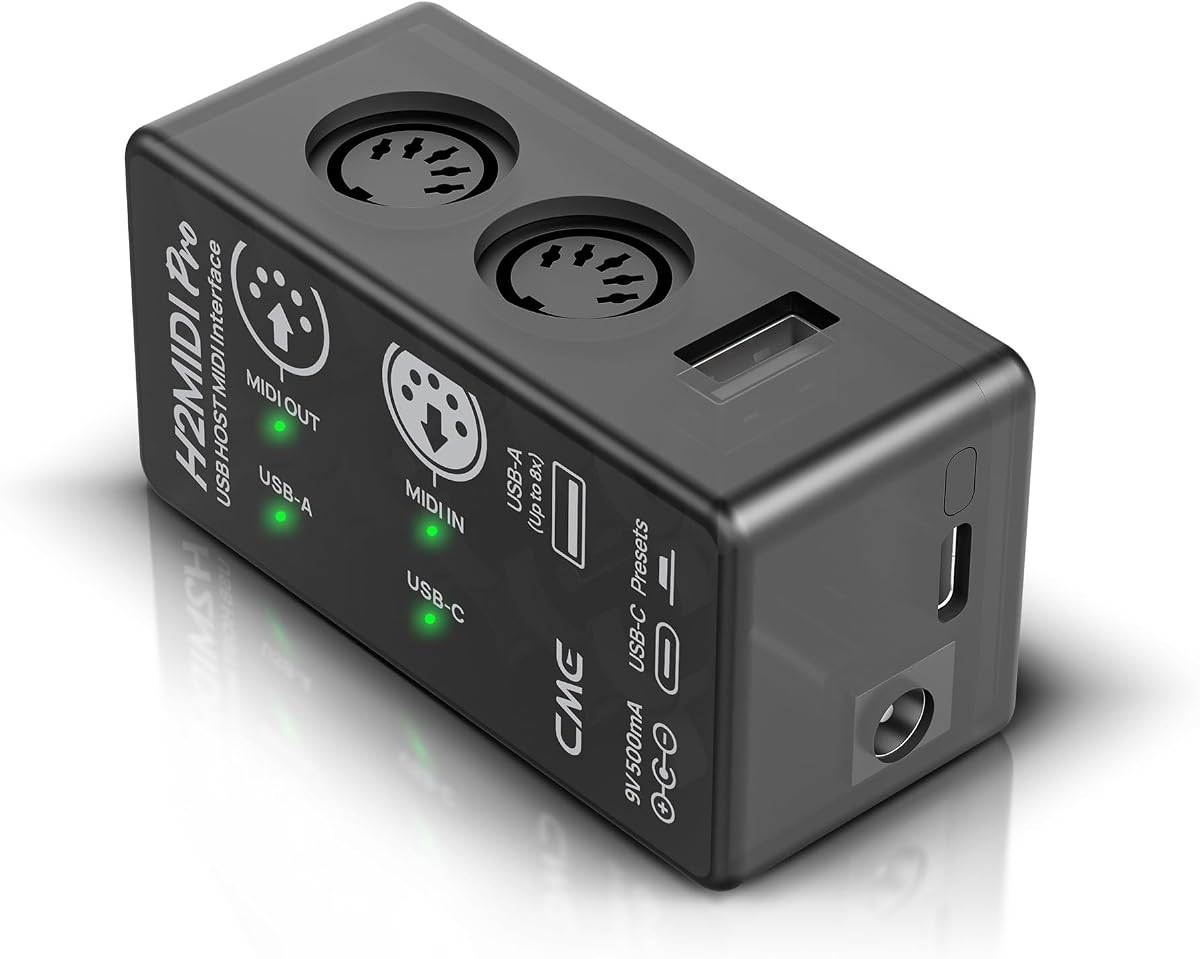
The CME H2MIDI Pro excels as a hybrid device that lets you connect USB MIDI devices directly to legacy hardware without needing your Mac running.
We may earn a commission when you buy through this link, at no additional cost to you.
Powered by a 32-bit processor it handles complex MIDI messages like MTC and MPE with high precision ensuring your digital setup remains accurate.
You can save up to four different configurations on the device itself which allows for quick switching between different instrument setups during a performance.
This is a smart choice for musicians who work in hybrid environments mixing modern controllers with vintage synths that rely on 5-pin DIN connections.
Bridge the gap between modern USB controllers and older gear that uses traditional MIDI cables easily.
Store multiple routing settings on the unit to switch instantly between different band setups.
We may earn a commission when you buy through this link, at no additional cost to you.
The FORE T1 MIDI USB is designed for simplicity and reliability making it a solid option for those needing a straightforward connection to their Mac.
We may earn a commission when you buy through this link, at no additional cost to you.
It uses a high-performance FTP chip to ensure there is no delay in your MIDI data transmission and it supports major DAWs like FL Studio and Cubase.
While it does not include an adapter for Type-A ports the bus-powered design means you do not need extra power sources to run it on your laptop.
Ideal for basic setups this interface gets your keyboard connected quickly so you can focus on creating music rather than configuring drivers.
Skip the hassle of downloading drivers by using the built-in system that works right out of the box.
High-quality wire with multi-layer protection ensures your connection remains stable and safe from interference.
We may earn a commission when you buy through this link, at no additional cost to you.
The Focusrite Scarlett Solo 3rd Gen provides a simple way to record vocals and guitar with high quality audio and basic MIDI support for Mac users.
We may earn a commission when you buy through this link, at no additional cost to you.
The Air mode on the pre-amp adds clarity to acoustic instruments and the Gain Halos help you see exactly when your levels are optimal.
While it is less focused on MIDI routing than dedicated interfaces it handles your connection needs well enough for most singer-songwriters.
With a three-year warranty included this device offers peace of mind for professionals and hobbyists alike looking for a durable recording setup.
Activate Air mode to give your vocals a brighter presence in the mix during recording sessions.
Use the Gain Halos to set the perfect recording level without needing to guess or constantly check meters.
We may earn a commission when you buy through this link, at no additional cost to you.
This FORE MIDI USB interface provides a compact solution for mobile producers who need to connect a keyboard to their Mac while on the go.
We may earn a commission when you buy through this link, at no additional cost to you.
It features an intelligent LED indicator to show signal transfer status and includes a high-performance FTP chip for stable data transmission.
While it lacks advanced routing options it is perfect for simple setups where you just need a reliable connection without extra bulk.
Consider this if you value portability and need a straightforward way to get your MIDI signals into your digital audio workstation quickly.
Take your studio setup anywhere with a small interface that fits easily in your backpack.
Red and blue lights help you verify connections instantly when setting up in new environments.
We may earn a commission when you buy through this link, at no additional cost to you.
The PIYONE Audio Interface delivers professional 24-bit/192kHz resolution at a competitive price point for Mac users looking for high quality sound.
We may earn a commission when you buy through this link, at no additional cost to you.
It includes combo XLR inputs that accept microphones and instruments while phantom power ensures you can run condenser mics without extra gear.
While it is primarily an audio device it allows MIDI pass-through and monitoring features that make it useful for small home studio setups.
Choose this if you need reliable performance and high resolution without spending on a top tier brand name.
Capture every nuance of your performance with high resolution converters designed for studio quality.
Connect both microphones and guitars simultaneously thanks to versatile combo jacks on the unit.
We may earn a commission when you buy through this link, at no additional cost to you.
This is a robust audio interface that accommodates band setups with two inputs allowing you to record vocals and guitar at the same time.
We may earn a commission when you buy through this link, at no additional cost to you.
Auto Gain sets the perfect level instantly and Air mode adds a rich harmonic drive that lifts vocals to the front of your mix.
While it does not offer extensive MIDI routing it covers the recording basics with professional quality that suits serious musicians.
It is a strong pick for bands and producers who need a flexible tool to record multiple sources while keeping quality high.
Let Auto Gain handle the technical side of setting levels so you can focus on the music.
Use Air mode to give your recordings a polished sound that stands out in any mix.
We may earn a commission when you buy through this link, at no additional cost to you.
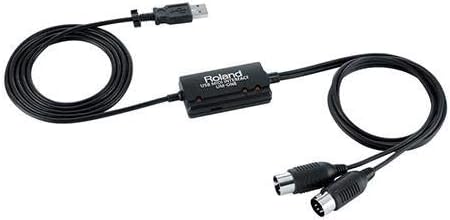
The Roland UM-ONE-MK2 is a classic choice that offers a simple one-in-two-out connection for musicians who want a trusted brand name.
We may earn a commission when you buy through this link, at no additional cost to you.
Its integrated cable design reduces clutter and the data indicators help you monitor your input and output flow at a glance.
While it is less advanced than newer USB-C models it still delivers low latency and tight timing for most standard keyboard setups.
This device is a great option for those who prefer a straightforward physical design and reliable performance from a legacy manufacturer.
Trust a pioneer in PC MIDI technology to provide consistent performance without technical surprises.
Benefit from a streamlined design that removes the need for extra adapters or loose cables.
We may earn a commission when you buy through this link, at no additional cost to you.
Selecting the right MIDI interface for Mac involves considering your specific needs regarding connectivity, latency, and software integration.
Check whether your devices use 5-pin DIN or USB-C connections to ensure compatibility with your Mac.
Choose USB-C interfaces for modern setups to leverage higher data speeds and bus power options.
Low latency is critical for real-time performance so look for interfaces with dedicated hardware processing.
Opt for models with high-speed chips to avoid delays between your actions and the sound you hear.
Assess how many keyboards or controllers you need to connect simultaneously to your computer.
Select an interface with enough ports to handle your current setup plus room for future expansion.
Look for plug-and-play options that do not require extra drivers for your Mac operating system.
Ensure the manufacturer provides reliable support and firmware updates for long-term compatibility.
Some interfaces offer standalone routing which allows you to mix signals without a computer.
This feature is useful if you plan to use your gear for live performances or non-digital setups.
Invest in units with durable materials like copper cabling to prevent signal interference and damage.
Solid construction ensures your connection remains stable even when moved around frequently in your studio.
Many audio interfaces include DAWs and plugins that save you money and streamline your workflow.
Check what software is included to ensure it meets your needs for recording and editing tracks.
Budget interfaces are available for basic needs while premium models offer advanced features and reliability.
Decide how much you are willing to invest based on your level of professionalism and usage frequency.
Begin by connecting the interface to your Mac using a high-quality USB-C cable to ensure stable power and data transfer.
Install any necessary drivers or configuration software to optimize your signal routing and prevent potential compatibility issues.
Store the interface in a dry and safe place to protect it from dust or physical damage that could disrupt its performance.
A dedicated interface is recommended if you need low latency and reliable connections for professional recording. Basic keyboards might work with simple cables but dedicated hardware ensures better performance and stability for serious production work.
Audio interfaces capture sound waves while MIDI interfaces transmit digital instructions like notes and controls. Some devices combine both functions allowing you to record sound and control virtual instruments in one unit.
Yes most listed interfaces are compatible with Logic Pro X on Mac. They follow standard USB-MIDI protocols which allow seamless integration with Apple's native software for recording and editing.
Many modern interfaces support plug-and-play operation on macOS without requiring extra drivers. However you should always check the product details to confirm if specific software is needed for advanced features.
Most USB-C interfaces support iOS devices when used with the appropriate camera connection adapter. Ensure your specific model lists iOS compatibility to avoid connection issues on your iPad or iPhone.
Use a high-speed USB connection and close background applications to free up system resources. Choosing interfaces with dedicated hardware processing also helps minimize delay between input and sound output.
MIDI Thru ports allow you to connect multiple devices in a chain so one signal can reach several synthesizers at once. This feature simplifies setups and reduces the need for complex routing software.
Yes vintage synthesizers and many legacy keyboards still rely on 5-pin DIN connections. Interfaces with DIN ports allow you to integrate older hardware into modern digital setups easily.
The CME U6MIDI Pro offers the best all-around features for standalone and studio use while the LEKATO cable provides a budget-friendly entry point.
Prioritize low latency and connection counts that match your hardware to ensure smooth recording and performance sessions on your Mac system.
Remember to verify current availability and pricing details before purchasing since product specs and costs can change over time.