
FLASHFORGE Creator 5 Pro
4.0Editor score
4 Independent Toolheads
65°C Active Heated Chamber
Near-Zero Waste System
Discover the best 3D Printer for Figurines and Models in October 2026 with our expert guide comparing top FDM and multi-color options for detailed prints.
Finding the right 3D Printer for Figurines and Models can transform your creative hobby into a professional-grade production line. Whether you are designing custom miniatures for tabletop games or creating detailed art pieces, the machine you choose defines the quality of your output. Modern printers now offer unprecedented speed and precision, making high-detail modeling accessible to enthusiasts of all skill levels without sacrificing reliability or ease of use.
We have evaluated the latest market offerings by analyzing print resolution, material compatibility, speed, and multi-color capabilities. Our selection process focuses on machines that excel at producing intricate geometries and smooth surface finishes essential for figurines. Each product listed below has been chosen for its ability to handle complex models while maintaining user-friendly features that reduce setup time and troubleshooting headaches.
Each pick in this guide highlights specific strengths such as fast printing, auto-calibration, or advanced filament handling systems. We have organized the list to help you find the perfect match for your budget and project requirements. Please note that product availability and pricing can change frequently, so always verify current details before making your final purchase decision online.
4.0Editor score

4.7Editor score

4.4Editor score
The following table provides a detailed side-by-side comparison of all ten selected printers to help you evaluate their specific capabilities. We have included key specifications such as build volume, speed capabilities, and unique features that distinguish each model for figurine and detailed model production.





The Bambu Lab A1 stands out as a top-tier choice for users seeking speed and accuracy without complex setup. It delivers exceptional quality for figurines thanks to its high-resolution extrusion capabilities and robust software support.
We may earn a commission when you buy through this link, at no additional cost to you.
Its standout feature is the active flow rate compensation which ensures smooth surfaces on vertical walls essential for detailed models. The high acceleration allows rapid printing while maintaining precision that rivals much more expensive industrial units.
While the open frame design limits some high-temperature material printing without modifications, the performance on standard filaments is unmatched. Beginners will appreciate the auto-calibration which eliminates the usual friction of getting started with 3D printing.
This printer is ideal for hobbyists and professionals alike who need reliable results for tabletop miniatures. It balances speed and quality perfectly making it a highly recommended purchase for serious model creation.
The A1 uses high acceleration and flow compensation to print figurines quickly without losing fine detail on vertical surfaces.
Automatic calibration handles bed leveling and Z-offset so you can start printing your models immediately without manual adjustments.
We may earn a commission when you buy through this link, at no additional cost to you.
The P2S takes performance to the next level with a combo package that includes the advanced AMS 2 Pro system. It is built for users who need to print complex multi-material figurines with high consistency.
We may earn a commission when you buy through this link, at no additional cost to you.
Key strengths include the adaptive airflow system that keeps overhangs crisp while maintaining temperature stability for engineering filaments. This ensures that your detailed parts remain dimensionally accurate throughout the print process.
While the initial setup requires some familiarity with the AMS system, the benefits of multi-color printing without manual intervention are significant. The enclosed design also helps with warping on larger models.
This machine is perfect for advanced users who need production-level speeds and reliability. It is a strong investment for those serious about creating high-end custom models regularly.
The AMS 2 Pro allows seamless switching between filaments so you can print complex parts with supports or color details automatically.
Adaptive airflow ensures that delicate features do not warp during printing even when using materials that require specific cooling profiles.
We may earn a commission when you buy through this link, at no additional cost to you.
The Creator 5 Pro offers industrial-level capabilities with four independent toolheads that eliminate the need for purging between colors. This is a game changer for efficient production of complex multi-colored figurines.
We may earn a commission when you buy through this link, at no additional cost to you.
Its key strengths lie in the CoreXY motion structure and active heated chamber which provide immense stability and print quality. The waste reduction system saves money on filament which adds up over time for large projects.
While the system is complex and requires a dedicated space due to its size, the performance is unmatched in its class. The dual HEPA filtration makes it safe for indoor use even with high temp materials.
This is an ideal choice for professionals or serious hobbyists who need maximum throughput. It is built to handle demanding jobs that would overwhelm standard desktop printers.
The tool changer switches heads instead of flushing filament so you save money and time when switching colors on detailed models.
High torque timing belts and linear rails reduce vibration so your figurines have smooth vertical surfaces and accurate dimensions.
We may earn a commission when you buy through this link, at no additional cost to you.
The P1S delivers reliable performance with a fully enclosed design that ensures stable temperatures during prints. This makes it versatile for a wide range of filaments including those that warp easily.
We may earn a commission when you buy through this link, at no additional cost to you.
It boasts a high speed of 500mm/s combined with automatic bed leveling to streamline the printing process. The machine is perfect for creating miniatures and figures consistently without manual calibration hassles.
The only downside is that the multi-color system is sold separately which increases the total cost of ownership. However for single-color high-quality prints it performs exceptionally well out of the box.
This printer is perfect for users who want reliability and speed without the complexity of more industrial machines. It is a strong contender for general purpose 3D printing needs.
The fully enclosed body keeps heat consistent so larger models do not warp during the printing process ensuring better final quality.
Support for tough materials like ABS and ASA lets you print durable parts that withstand different environmental conditions.
We may earn a commission when you buy through this link, at no additional cost to you.
The AD5X brings multi-color printing to a lower price point with its Independent Filament System technology. It offers a robust build volume and high speed that rivals more expensive machines.
We may earn a commission when you buy through this link, at no additional cost to you.
Its standout features include a 300°C nozzle and fully automatic leveling that simplifies the setup process. This allows users to print a wide variety of materials without worrying about bed calibration.
The trade-off is that the software is less advanced than competitors and the machine can be noisy during filament swaps. However the print quality remains high enough for detailed figurines and models.
This printer is ideal for beginners looking to enter the world of multi-color printing without breaking the bank. It provides excellent value for the features included in the package.
The IFS allows you to print with multiple colors simultaneously so you can create vibrant designs without changing spools.
High temperature nozzle capabilities mean you can print engineering plastics that require more heat than standard PLA.
We may earn a commission when you buy through this link, at no additional cost to you.
The Snapmaker U1 introduces a unique tool changer system that switches heads in just five seconds instead of purging filament. This innovation reduces waste and speeds up the multi-color printing process significantly.
We may earn a commission when you buy through this link, at no additional cost to you.
It combines this with a CoreXY motion system that ensures high speeds and stability for precision printing. The machine is designed to handle mixed materials in a single print for complex prototypes.
The main limitation is the build volume which is smaller than some competitors limiting the size of individual models. However for detailed parts and miniatures it is highly effective and efficient.
This printer is best suited for makers who need speed and versatility in a compact form. It is a solid option for workshops needing consistent and fast output.
Automatic tool changing prevents waste and saves time so you can produce more parts in less time than traditional printers.
Ability to combine flexible and rigid filaments allows for functional parts that need different material properties.
We may earn a commission when you buy through this link, at no additional cost to you.
The SPARKX i7 integrates AI directly into the printing workflow allowing users to generate 3D models from photos instantly. This feature simplifies the process of creating custom figurines and personalized gifts.
We may earn a commission when you buy through this link, at no additional cost to you.
It comes mostly pre-assembled which reduces setup time significantly for beginners. The machine also includes an AI camera that monitors prints to prevent failures before they ruin the model.
While the AI photo generation is a unique feature it may still need manual tweaking to achieve perfect detail. The quiet night mode makes it suitable for home environments where noise is a concern.
This printer is perfect for casual users who want to try 3D printing with minimal setup. The AI features add a modern touch to the hobby making it more accessible.
Upload a photo and generate a 3D model directly in the software saving time on manual modeling for portraits.
The built-in camera detects issues early so you can fix them immediately and avoid wasting time and material.
We may earn a commission when you buy through this link, at no additional cost to you.
The Adventurer 5M Pro packs high-speed printing into a compact enclosed design. It uses a CoreXY structure and vibration compensation to deliver smooth results on detailed prints.
We may earn a commission when you buy through this link, at no additional cost to you.
Its key feature is the 3-second quick-swap nozzle which allows easy maintenance and size changes without tools. This makes it convenient for users who switch between different detail requirements frequently.
While the build volume is smaller it is sufficient for most figurines and models. The dual filtration system ensures a clean environment making it safe for indoor use even with strong materials.
This printer is a strong choice for users needing a reliable and fast desktop solution. It balances speed and usability well for general purpose modeling tasks.
Quick-swap nozzle design means you can change sizes without tools so you are always ready for different print needs.
Dual filtration keeps the air clean during prints protecting your health and your workspace from fumes.
We may earn a commission when you buy through this link, at no additional cost to you.
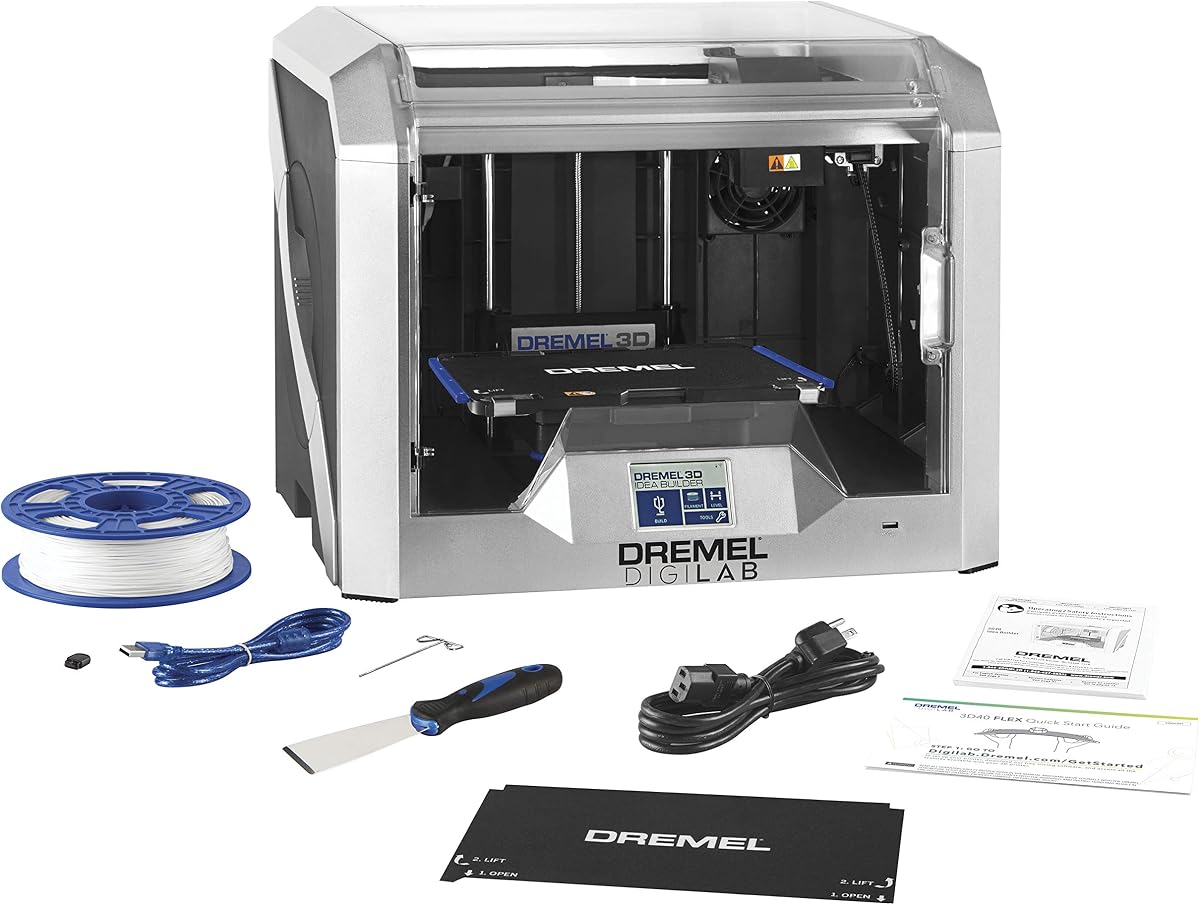
The Dremel DigiLab 3D40 focuses on reliability and ease of use making it a great entry point for new users. It features a flexible build plate that makes removing prints easy without damage.
We may earn a commission when you buy through this link, at no additional cost to you.
Its resolution of 50 microns ensures high quality on small details which is crucial for miniatures. The machine is designed for safety and consistency with a fully enclosed housing and easy filament detection.
While it is slower than modern high-speed printers the reliability and support from Dremel make it a safe bet. It is ideal for educational settings or users who prioritize ease over speed.
This printer is perfect for beginners and schools where reliability is key. The high resolution output ensures that your models look professional even without complex settings.
Flexible build plate allows prints to be popped off easily without bending the bed or damaging your models.
Dremel provides extensive customer service and warranty support so you have help if you encounter any issues.
We may earn a commission when you buy through this link, at no additional cost to you.
The A1 Combo includes the AMS Lite multi-color system making it ready for multi-material printing out of the box. It combines the speed and precision of the A1 with the versatility of AMS.
We may earn a commission when you buy through this link, at no additional cost to you.
It features active flow compensation and automatic calibration to ensure consistent prints with minimal user intervention. This makes it highly reliable for complex models that require multiple colors.
The lack of an enclosed chamber limits its use for certain high-temperature materials but for most standard filaments it is excellent. The multi-color capability adds significant creative freedom for users.
This is the best option for users who want a full multi-color setup without buying separate components. It offers the most value for those prioritizing versatility and speed.
Includes AMS Lite so you can start printing multiple colors immediately without additional purchases or setup.
Active flow compensation ensures that the flow of plastic is consistent even when switching between colors or speeds.
We may earn a commission when you buy through this link, at no additional cost to you.
Selecting the right machine depends on several factors that influence your output quality and workflow efficiency. This section outlines the key considerations to help you make an informed decision for your specific needs.
For detailed figurines the minimum layer height capability is critical to ensure smooth vertical surfaces and fine features. Look for machines that support layer heights below 0.1mm for high-quality results on small parts.
In summary prioritize printers with high-resolution extruders and stable motion systems for detailed work.
The build volume determines the maximum size of your models which is essential for full-body figurines or groups of miniatures. A larger bed allows for more flexibility but may require more space in your workspace.
In summary choose a volume that matches your typical project sizes to avoid unnecessary cutting and assembly.
If you plan on creating vibrant models a system with multi-color support is highly beneficial. Tools like AMS or IFS allow you to switch colors automatically without manual interruption.
In summary multi-color systems save time and add design freedom to your creative process.
Faster printers reduce the time it takes to complete large batches of models which is vital for efficiency. Look for machines with high acceleration and optimized flow rates that do not sacrifice quality for speed.
In summary high speed allows you to iterate on designs more quickly and produce more units.
Ensure the printer supports the materials you intend to use such as PLA ABS or engineering filaments. Higher nozzle temperatures and heated beds are often required for tougher plastics.
In summary broader material support gives you more options for durability and finishing.
Automatic calibration and user-friendly interfaces reduce the barrier to entry for new users and improve reliability. Features like auto bed leveling ensure successful prints from the first run.
In summary easy setup means more time printing and less time troubleshooting.
Enclosed printers provide better temperature stability for high-temperature materials while open frames offer better cooling. Consider your primary material needs when deciding on the chassis type.
In summary enclosed units are safer for warping materials while open frames are simpler for cooling plastics.
Strong community support and reliable slicing software are crucial for troubleshooting and optimizing prints. Check for active forums and official support options before purchasing.
In summary good software support extends the life and usability of your printer.
Start by ensuring the build plate is clean and level to prevent adhesion issues. Use a scraper or brush to remove dust before every print session.
Monitor the first few minutes of every print to ensure the layers are adhering correctly. Adjust Z-offsets if needed using the interface provided.
Maintain your printer by cleaning nozzles regularly and checking belts for tension. Regular maintenance ensures long-term precision and reliability.
For detailed figurines a layer height of 0.1mm or lower is recommended to ensure smooth surfaces and fine features. This allows for greater precision on intricate details like facial expressions and textures.
While PLA can be printed without a heated bed using one at around 50 to 60 degrees Celsius improves adhesion. This helps prevent warping especially on larger base plates for your models.
Multi-color printers use systems like AMS or IFS to manage multiple spools and switch between them automatically. This allows for seamless color changes without manual intervention during the print.
An enclosed printer is not strictly necessary for miniatures but it helps maintain consistent temperatures and reduces drafts. This ensures better quality especially when using materials that are sensitive to cooling.
It is good practice to clean the nozzle after every few prints to prevent clogs from dried filament. Regular cleaning ensures smooth extrusion and consistent print quality.
For complex models soluble supports like PVA are ideal as they dissolve in water after printing. This removes the need for manual removal which can damage delicate features on your figurines.
We have reviewed ten top options ranging from budget-friendly kits to industrial-grade machines. Each offers unique benefits depending on your specific needs for speed, color, and detail.
When choosing prioritize features that align with your most frequent project types. Whether it is multi-color capabilities or high resolution the right fit will enhance your creative workflow.
Prices and availability are subject to change so verify current details before purchasing. Always check for warranty terms and support options to ensure a smooth experience.