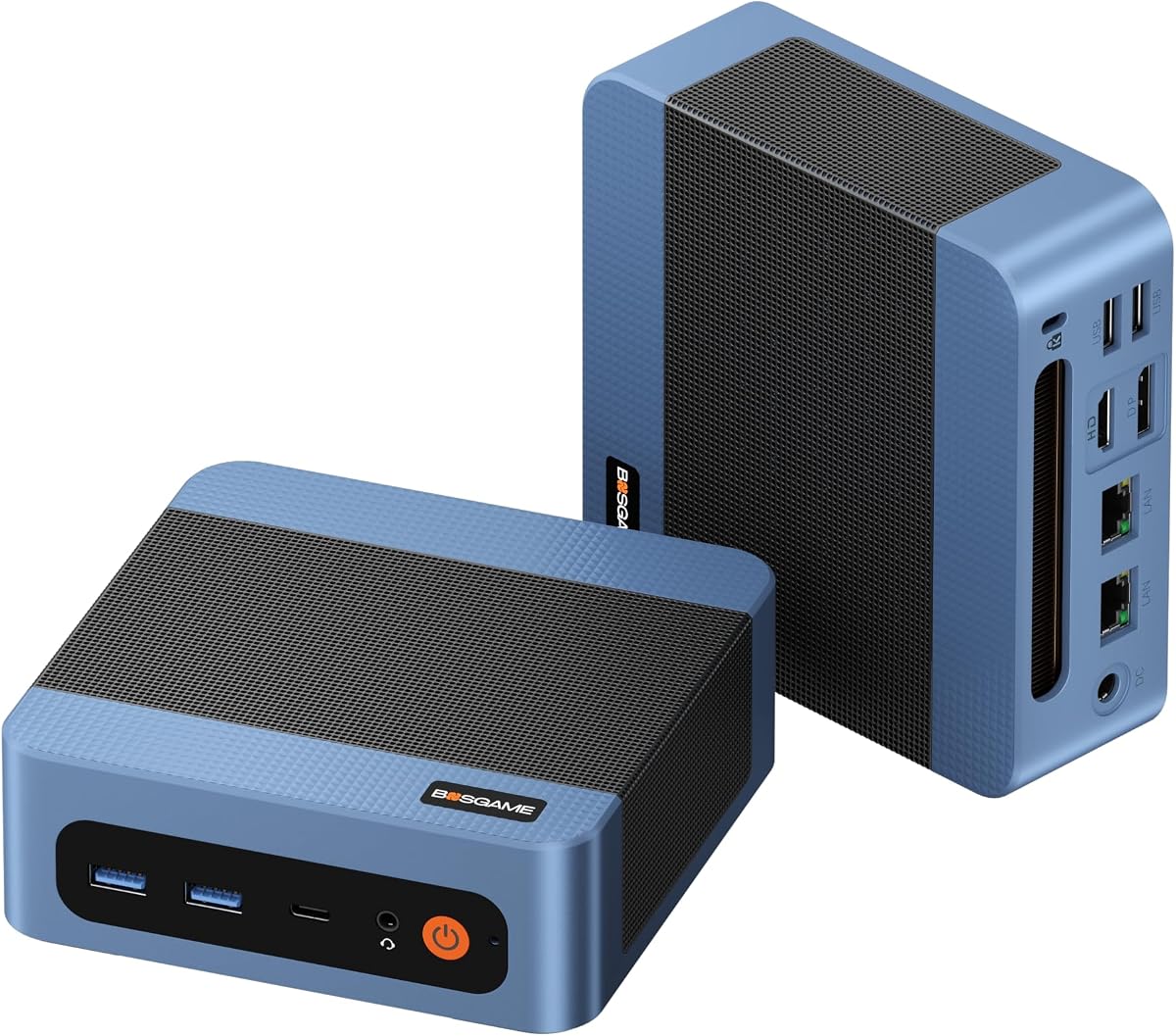
BOSGAME E5 11 Pro Mini PC, AMD Ryzen 5300U 4C/ 8T, Business Home Office PC
4.4Editor score
Ryzen 5 5300U Processor
Radeon 6-Core Graphics
Dual 2.5GbE LAN
Find the ideal Mini PC for PS2 and PS3 Emulation with our detailed guide comparing performance, graphics, and compatibility for retro gaming enthusiasts.
Retro gaming has never been more accessible thanks to powerful mini PCs capable of running classic console emulators. These compact systems offer the processing power needed for smooth PlayStation 2 and PlayStation 3 emulation without taking up much space on your desk or entertainment center.
We evaluated ten top mini PCs based on their processor strength, graphics capabilities, memory, and storage options. Our comparison focuses on how well each unit handles the demands of popular emulators like PCSX2 and RPCS3 to ensure a lag-free gaming experience.
Each pick highlights key features, pros, cons, and ideal use cases to help you choose the right system. Prices and availability change frequently, so please verify current details before making your purchase to ensure you get the best value for your gaming setup.
4.4Editor score

4.3Editor score

4.4Editor score
This side-by-side comparison breaks down the core specifications of each mini PC to help you understand their strengths for emulation workloads and daily computing tasks.


The ACEMAGIC K1 stands out as a top-tier option for serious emulation enthusiasts. It boasts a high rating and exceptional specifications that tackle the demanding requirements of PS3 emulators with ease.
We may earn a commission when you buy through this link, at no additional cost to you.
At its core is the AMD Ryzen 7 7735HS processor which delivers robust performance. Combined with 24GB of LPDDR5 RAM and Radeon Graphics 680M it ensures smooth gameplay even for complex titles.
While it is more expensive than budget options the performance gains are significant. The trade-off in cost is justified for users who want reliable frame rates and minimal stuttering during extended gaming sessions.
This mini PC is ideal for gamers seeking a powerful yet compact solution. It offers the best balance of modern specs and connectivity for a premium retro gaming experience.
The 7735HS processor excels in multi-threaded tasks which are crucial for emulation. This ensures consistent performance without thermal throttling during long playtimes.
Support for triple 4K displays means you can connect multiple screens for a immersive setup. This feature enhances productivity and entertainment beyond just gaming.
We may earn a commission when you buy through this link, at no additional cost to you.
The BOSGAME E5 11 Pro is a powerhouse designed for performance. It holds a high rating and features a modern Ryzen 5 processor that handles emulation workloads efficiently.
We may earn a commission when you buy through this link, at no additional cost to you.
Its Radeon 6-Core Graphics provide excellent support for running older console games smoothly. The dual 2.5GbE LAN ports ensure stable network connectivity for online multiplayer features.
While the base RAM is adequate the system supports upgrades for heavy multitasking. The silent design keeps noise levels low which is perfect for home theater setups.
This unit is perfect for those who need a versatile mini PC. It balances business and gaming needs effectively offering reliable performance at a premium level.
Dual 2.5GbE LAN ports provide ultra-fast network speeds. This is beneficial for streaming content and online gaming without latency issues.
The motherboard supports adding more storage which is crucial for large game libraries. This flexibility extends the life of the device over time.
We may earn a commission when you buy through this link, at no additional cost to you.
The Beelink SER3 is an excellent entry point for emulation. It has a strong rating and offers a balance of performance and cost that appeals to many users.
We may earn a commission when you buy through this link, at no additional cost to you.
Powered by the Ryzen 3 3200U it handles lighter emulation tasks well. The Vega 3 graphics are sufficient for PS2 games and some lighter PS3 titles.
Although it is budget-friendly it still provides essential features like dual HDMI and fast SSD storage. This makes it a practical choice for casual gaming setups.
This mini PC is best for users on a budget. It proves that you do not need to spend a fortune to enjoy retro gaming on a modern compact system.
Despite its lower price the SER3 includes modern connectivity and storage. This ensures it remains relevant for everyday tasks beyond just gaming.
Its compact size allows for easy transport and placement. You can mount it behind a monitor to save space in your living room.
We may earn a commission when you buy through this link, at no additional cost to you.
This Beelink SER3 variant is a reliable all-rounder for daily computing. It earns a high rating for its stability and consistent performance in various scenarios.
We may earn a commission when you buy through this link, at no additional cost to you.
The Ryzen 3 3200U processor provides adequate power for light emulation. The included 256GB NVMe SSD ensures quick boot times and responsive application loading.
While graphics performance is limited to PS2 levels it is still a capable machine for general tasks. The energy efficiency helps keep electricity costs low.
It is suitable for those who need a secondary PC. Its Windows 11 Pro license adds value for users requiring a full OS experience out of the box.
This model is known for its consistent operation over time. It minimizes crashes and freezes which is important for a smooth gaming experience.
Multiple USB ports and HDMI outputs offer flexible peripheral connections. This allows you to connect controllers and external drives easily.
We may earn a commission when you buy through this link, at no additional cost to you.
This version of the Beelink SER3 boosts memory and storage significantly. It is rated well for handling more demanding tasks alongside emulation work.
We may earn a commission when you buy through this link, at no additional cost to you.
The 16GB DDR4 RAM allows for smoother multitasking. The 500GB SSD provides ample room for storing your game libraries and applications.
Although the CPU is the same as the base model the extra memory helps in managing background processes. This leads to a more stable performance during emulation.
It is a great choice for users who need more than just basic specs. The extra storage and RAM make it future-proof for a few years of usage.
The increased RAM capacity allows running other apps while gaming. This helps in keeping Discord or browsers open without impacting performance.
A 500GB drive is generous for a mini PC. You can store a large number of ISO files and save data without worrying about space.
We may earn a commission when you buy through this link, at no additional cost to you.
The C4 SE Mini PC offers a step up in CPU power with the Ryzen 5 3500U. It has a solid rating for its ability to handle moderate workloads and light gaming.
We may earn a commission when you buy through this link, at no additional cost to you.
Integrated Radeon Vega 8 graphics provide better rendering than lower-end models. This helps in achieving higher frame rates for compatible PS2 games.
The inclusion of dual LAN ports is a unique feature for networking. Triple display output allows you to set up an immersive entertainment station.
This model is ideal for users needing a balance of features. It is a strong contender for those who want more graphical performance without paying premium prices.
The Vega 8 GPU delivers noticeably better visuals. This is crucial for maintaining stable frame rates in graphically intense emulation scenarios.
Triple display support via HDMI DP and USB-C gives versatility. You can dedicate screens for chat or system monitoring while playing.
We may earn a commission when you buy through this link, at no additional cost to you.
The GMKtec G10 provides robust performance with 16GB of RAM and a Ryzen 5 processor. It is rated well for its ability to handle multiple tasks smoothly.
We may earn a commission when you buy through this link, at no additional cost to you.
Its Vega 8 graphics are capable of supporting casual gaming needs. The 16GB memory helps prevent bottlenecks when running emulation alongside other apps.
While the SSD is a bit smaller the system supports extensive expansion. This allows you to add more storage as your game library grows over time.
This unit is perfect for users who value performance. It combines strong hardware with connectivity options that cater to modern home office and entertainment needs.
With 16GB of RAM you can run heavy applications without slowdown. This is key for maintaining stability during long gaming sessions.
The 2.5G LAN port supports faster wired connections. This reduces latency when downloading games or streaming content to your system.
We may earn a commission when you buy through this link, at no additional cost to you.
This BOSGAME E5 variant stands out for its massive 1TB storage and 16GB of RAM. It offers a reliable solution for users needing space for many games and files.
We may earn a commission when you buy through this link, at no additional cost to you.
The Ryzen 5 5300U processor ensures efficient performance for daily tasks. The triple display capability makes it versatile for multitasking setups.
While it lacks a dedicated GPU the integrated graphics are sufficient for PS2 emulation. The large SSD eliminates the need for immediate external storage purchases.
It is an excellent choice for those prioritizing storage. You get a complete system ready to handle your media and gaming library from day one.
A 1TB drive allows storing a vast collection of content. This prevents the need for constant management of limited internal space.
Triple display support enhances workflow efficiency. You can easily monitor system stats or manage downloads while gaming.
We may earn a commission when you buy through this link, at no additional cost to you.
The KAMRUI Pinova P2 offers a modern feature set with a 4-core processor and 16GB of RAM. It is rated well for its ability to handle 4K content and light gaming.
We may earn a commission when you buy through this link, at no additional cost to you.
The Radeon Vega 5 graphics provide decent performance for emulated titles. Triple 4K output via HDMI DP and USB-C gives it versatility for modern displays.
While the RAM is soldered the 16GB capacity is sufficient for most users. The efficient cooling keeps the system quiet during daily tasks.
This model is great for users who want a sleek and capable system. It balances price and features effectively for home office and entertainment use.
The Ryzen 4300U offers solid performance for its size. It handles emulation tasks well while keeping power consumption in check.
Triple 4K support allows for high-resolution output. This is useful for connecting to large TVs for an immersive viewing experience.
We may earn a commission when you buy through this link, at no additional cost to you.
The Bmax Mini PC B1 Plus is one of the most affordable options available. It holds a reasonable rating for basic tasks and light usage scenarios.
We may earn a commission when you buy through this link, at no additional cost to you.
The Intel Celeron J3355 is a budget processor that handles simple emulation. Dual HDMI ports allow for dual screen setups which is rare at this price.
Performance is limited by the older architecture and RAM. However the M.2 SSD expansion slot allows you to upgrade storage if needed.
This model is suitable for very basic needs. It is a starting point for those who want to try emulation on a budget before investing in better hardware.
Its low cost makes it accessible for everyone. This allows users to enter the world of mini PCs without a large financial commitment.
Support for M.2 SSDs helps overcome limited eMMC storage. This makes it easier to store more games and files over time.
We may earn a commission when you buy through this link, at no additional cost to you.
Selecting the right mini PC for emulation requires understanding key hardware factors that influence performance and stability.
The CPU is the most critical component for emulation. PS3 emulation in particular benefits from multi-core processors like the Ryzen 7 or Ryzen 5. Higher clock speeds and efficient architecture ensure that the system can interpret game instructions accurately without lag.
Look for CPUs with at least four cores and modern architectures to handle complex emulation requirements effectively.
Integrated graphics play a major role in rendering game visuals. Radeon Vega graphics are generally preferred over Intel UHD for PS2 and PS3 emulation due to better shader processing. Stronger graphics ensure smoother frame rates and better upscaling options.
Prioritize models with Radeon Vega 3 or higher to achieve optimal visual performance in games.
Sufficient RAM is vital for running emulators and other applications simultaneously. 16GB is recommended for smoother multitasking and loading large game assets. While 8GB can work it may limit performance when running other programs in the background.
Choose a mini PC that supports at least 16GB of RAM or can be upgraded easily.
Emulation requires fast storage for quick boot times and loading games. NVMe SSDs are superior to eMMC or HDDs. Also consider expandable storage if you plan to build a large library of games and media files.
Ensure the mini PC includes an M.2 slot for future storage expansion.
Adequate USB ports are needed for connecting controllers and other peripherals. Dual HDMI outputs provide flexibility for multi-monitor setups which can be useful for managing emulation configs. Network ports ensure stable connectivity for online features.
Verify that the device has enough USB 3.0 or higher ports for your controller needs.
Mini PCs can heat up during intensive gaming sessions. Efficient cooling systems prevent throttling that would slow down performance. Look for models with dual fans or copper heat pipes that maintain cool temperatures under load.
A silent and efficient cooling system ensures long-term reliability during extended play.
Reliable build quality and warranty support are important for peace of mind. Check for brands that offer customer service and have certifications like CE or FCC. A solid warranty can save you from unexpected hardware failures.
Select a mini PC from a reputable brand with a warranty of at least one year.
To begin set up your mini PC by connecting it to a display via HDMI or DisplayPort and attaching your controllers via USB or Bluetooth. Ensure your OS is updated for compatibility with modern emulation software.
Install reputable emulators such as PCSX2 for PS2 or RPCS3 for PS3. Configure graphics settings based on your mini PC capabilities to balance performance and visual fidelity. Always test games to find optimal settings.
Regularly clean the ventilation areas of your mini PC to prevent dust buildup which can cause overheating. Keep your emulation software and system drivers updated for the best stability and security.
Yes a mini PC with a strong multi-core processor like Ryzen 7 and good integrated graphics can run PS3 emulation smoothly. Models like the ACEMAGIC K1 offer sufficient power for demanding titles. Ensure you have at least 16GB of RAM for best results.
For PS2 emulation a mini PC with a Ryzen 3 or 5 processor and Radeon Vega 3 graphics is ideal. 8GB of RAM is usually enough but 16GB offers better performance. Look for NVMe SSDs to reduce load times and improve responsiveness.
No most mini PCs rely on integrated graphics which are sufficient for PS2 and many PS3 games. Dedicated GPUs add cost and power consumption which mini PCs lack. Integrated Radeon Vega graphics provide good performance without extra hardware.
You should have at least 256GB of storage to install the OS and several games. A 512GB or 1TB SSD is recommended for larger libraries. Expansion slots allow you to add more storage as your game collection grows.
Most modern mini PCs are compatible but performance depends on hardware strength. Ensure your mini PC has a 64-bit CPU and sufficient RAM. Check emulator system requirements before purchasing to guarantee smooth operation and feature support.
DualShock 4 and Xbox controllers work well with Windows via USB or Bluetooth. Most emulation software supports these natively. Ensure your mini PC has enough USB ports or Bluetooth capabilities for your setup and controller needs.
We hope this guide helps you find the right mini PC for your gaming needs. Our top picks like the ACEMAGIC K1 and BOSGAME E5 offer powerful performance while budget options like Beelink SER3 provide affordability without sacrificing basic features.
Consider your budget and performance requirements when making your decision. Prioritize specs like processor strength RAM and storage to ensure your mini PC can handle the emulators you want to run smoothly.
Always check current prices and availability before buying. Technology and stock levels change frequently so verifying details ensures you get the best deal for your perfect mini PC setup.