
OHAYO Computer Speakers
4.5Editor score
Built-in G-Sensor technology
Bluetooth 5.3 and USB modes
Dynamic RGB lighting effects
Discover the top clip on speakers for laptop and desktop monitors. This guide compares sound quality, connectivity, and mounting options to help you choose.
Finding the right audio solution for your workspace can transform your daily productivity and entertainment experience. Clip on speakers offer a space-saving alternative to bulky desktop units by attaching directly to your monitor or laptop bezel. These devices deliver enhanced sound without cluttering your desk, making them ideal for home offices and compact setups.
We evaluated ten top-rated models based on sound performance, ease of installation, and compatibility with various operating systems. Each product was analyzed for its build quality, connectivity options, and user feedback to ensure a reliable selection. Our goal is to help you find a speaker that integrates seamlessly into your existing technology stack.
Each pick below highlights specific strengths such as bass response, control interfaces, and mounting stability. Keep in mind that availability and pricing can fluctuate based on market demand and seasonal promotions. Always verify the latest details on the product page before making your final purchase decision to ensure you get the best value.
4.5Editor score

4.2Editor score

4.2Editor score
This table provides a side-by-side overview of all ten models included in our review. We highlight key specifications such as connectivity types, control methods, and unique features to help you quickly identify which device matches your specific needs and budget requirements.
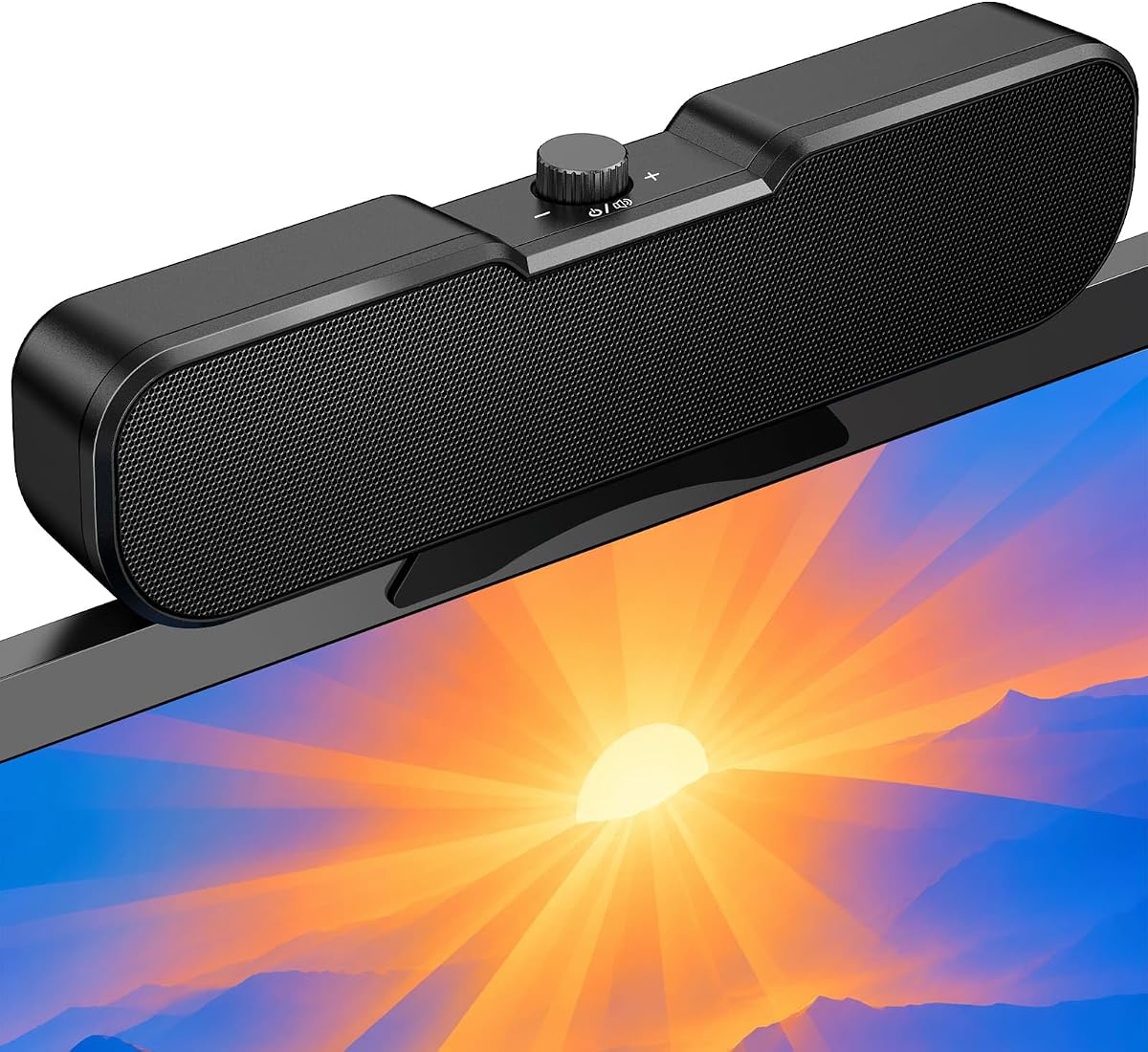


This model stands out as a top contender for those seeking reliable audio enhancement without cluttering their workspace. It holds a solid rating from users who appreciate its ability to adapt to different mounting positions automatically. The design focuses on functionality and ease of use, making it a practical choice for everyday tasks.
We may earn a commission when you buy through this link, at no additional cost to you.
The adaptive-channel-switching feature ensures that left and right audio channels remain correct regardless of whether the speaker is clipped to the top or bottom of your monitor. This is managed by a G-sensor that detects orientation instantly. Additionally, the touch controls offer a modern interface for muting and adjusting volume without fumbling for knobs or physical switches.
While the sound is powerful and the bass is deep due to the passive radiators, users should note that the device relies on a USB connection for both power and audio. This means you need an available USB port on your computer. Some may find the lack of physical buttons less tactile, but the touch interface is responsive and easy to learn.
This speaker is ideal for professionals and students who need clear audio for meetings and media consumption on a budget. Its compatibility with Windows, macOS, ChromeOS, and Linux makes it versatile for diverse tech environments. We recommend this unit for anyone looking to upgrade their laptop audio with a simple, effective clip-on solution.
The G-sensor ensures stereo imaging remains accurate whether you mount the speaker on the top or bottom edge of your display.
With a built-in USB-C adapter, this speaker connects seamlessly to both traditional PCs and modern devices like MacBooks and tablets.
We may earn a commission when you buy through this link, at no additional cost to you.
The OHAYO speaker offers a premium experience with features that go beyond basic audio output. It boasts a higher power output and versatile connectivity options that include Bluetooth streaming alongside direct USB connection. Users appreciate the extra flair provided by customizable RGB lighting which can sync with audio rhythms for a dynamic visual effect.
We may earn a commission when you buy through this link, at no additional cost to you.
Its 16W maximum output power delivers loud and clear sound suitable for gaming and video calls. The built-in G-Sensor automatically switches audio channels based on mounting position, ensuring consistent stereo quality. The volume roller provides precise control from zero to one hundred percent, and the integrated microphone supports clear communication during online meetings.
While the RGB lighting adds a nice aesthetic touch to your setup, it may not suit minimalist workspaces. Also, the Bluetooth mode still requires a USB cable for power, so it is not entirely wireless in terms of energy. However, the low latency and stable transmission up to twenty meters make it excellent for wireless streaming from phones or tablets.
This speaker is perfect for gamers and enthusiasts who want a blend of high-quality audio and visual customization. It fits well in environments where desk space is limited but performance and style are priorities. If you value extra features like system notification sync and robust bass, this model is a strong candidate for your setup.
Switch effortlessly between Bluetooth for mobile devices and USB for direct computer connection with a single button press on the unit.
The RGB lighting can visualize your music in real-time with under fifty milliseconds of latency for an immersive experience.
We may earn a commission when you buy through this link, at no additional cost to you.
This Inwa model is an excellent choice for those looking to improve audio without spending a lot of money. It delivers clear stereo sound through two large-sized speakers and a passive radiator, ensuring that music and calls come through with good definition. The design is straightforward and focuses on the essential features needed for a desktop setup.
We may earn a commission when you buy through this link, at no additional cost to you.
The spring clip mechanism allows you to attach the speaker securely to the top, sides, or bottom of your monitor. It fits most monitors up to 1.18 inches thick and includes silicone pads to protect the surface. Control is simplified with three buttons on top for volume up, volume down, and mute, making adjustments intuitive and fast.
While it lacks advanced features like RGB lighting or Bluetooth connectivity, it offers solid value for its price. The USB connection handles both power and audio, so you do not need extra cables or drivers. Some users might find the volume buttons slightly less precise than a knob, but they are sufficient for daily adjustments.
Ideal for budget-conscious buyers, students, or anyone with a secondary workspace, this speaker provides reliable performance. The lifetime product technical support adds peace of mind regarding long-term use. We recommend this for simple office tasks or casual media consumption where cost-effectiveness is the primary goal.
The spring clip design lets you attach the speaker in seconds without tools, fitting a wide range of monitor thicknesses securely.
Two large drivers and a passive radiator work together to lift sound forward, creating an immersive experience for a small device.
We may earn a commission when you buy through this link, at no additional cost to you.
This speaker is designed for simplicity, removing the need for separate volume control buttons on the device itself. Instead, it allows you to adjust volume directly through your computer system, which can streamline your workflow if you are already using software controls. The sound quality is impressive for its size, offering deep bass and clear stereo output.
We may earn a commission when you buy through this link, at no additional cost to you.
The mounting mechanism is user-friendly, allowing the speaker to be clipped onto the top, side, or bottom of monitors with thicknesses ranging from 0.1 inch to 1 inch. It saves desk space effectively and can also rest smoothly on your desk if needed. The included USB-C adapter ensures it works with modern devices that lack traditional USB ports.
One trade-off is the absence of a dedicated mute button on the hardware. You must rely on system settings or a keyboard shortcut to mute audio quickly. While this might seem limiting, it keeps the device sleek and avoids clutter. The passive radiator helps achieve a rich bass response that is often missing from smaller speakers.
This model is a great fit for users who prefer a minimalistic interface and do not need extra controls on the speaker. It works well for video conferencing and general media playback. If you value a clean look and straightforward setup over physical tactile controls, this is a strong option to consider.
Adjust volume directly from your operating system for a streamlined setup that removes redundant hardware controls from your desk.
The patented clamp design lets you attach to various monitor positions or place the unit flat on your desktop surface easily.
We may earn a commission when you buy through this link, at no additional cost to you.
This speaker distinguishes itself with unique control features like a dedicated M-Button for one-touch muting and a tactile volume wheel. These elements provide a more interactive experience compared to standard button controls. The build quality is solid, and the sound is engineered for immersive stereo audio with enhanced bass, making it suitable for gaming and movies.
We may earn a commission when you buy through this link, at no additional cost to you.
The universal dual USB and Type-C connectivity ensures it works with a wide range of systems including Windows PCs, MacBooks, and even smartphones. The spring-loaded clip with soft silicone protection attaches securely to the top or side of your monitor. It fits up to 1.26 inches thick, offering flexibility for various monitor sizes and shapes.
While it may be slightly more expensive than basic models, the added control precision justifies the cost for many users. The volume wheel allows for smooth adjustments without clicking through preset levels. However, it relies on a single USB-powered cable for both power and audio, which limits placement options slightly if no USB port is nearby.
If you are a gamer or power user who values quick access to mute and precise volume control, this speaker is a top contender. It delivers high-quality sound and reliable performance across different devices. We recommend this for anyone who wants a premium feel without sacrificing the convenience of a clip-on design.
The unique M-Button combines one-touch mute and power functions, offering quick adjustments that speed up your daily workflow.
An intuitive tactile volume wheel provides smooth and precise control that feels faster and more natural than button-based alternatives.
We may earn a commission when you buy through this link, at no additional cost to you.
This Inwa model focuses on delivering surprisingly clear audio through its dual 5W high-sensitive drivers. The design is ultra-narrow, ensuring it stays out of the way while providing enhanced audio over built-in laptop speakers. It is easy to install, working with Windows, macOS, ChromeOS, and Linux without the need for additional drivers.
We may earn a commission when you buy through this link, at no additional cost to you.
The clip-on mount allows the speaker to attach to the top of your monitor or sit flat on your desk. It adapts to various thicknesses and offers an adjustable angle to direct sound exactly where you need it. Simple one-touch controls for power, volume, and mute are conveniently placed on the top panel for quick access.
While it may not deliver deep bass due to its compact size, the clarity of voice and mid-range frequencies is excellent for calls and music. The included USB-A to USB-C adapter expands its reach to modern devices. Some users might prefer a larger unit for more bass, but this model excels in clarity and convenience.
This speaker is perfect for small offices or home setups where space is at a premium. Its versatility in placement and compatibility with various devices makes it a flexible choice. We recommend this for professionals who need reliable audio for video calls without taking up too much room on their desk.
The ultra-narrow clip stays out of your screen's way so you get clear uninterrupted visuals while enjoying enhanced audio.
The adjustable angle on the mount lets you direct sound exactly where you need it for an immersive listening experience.
We may earn a commission when you buy through this link, at no additional cost to you.
This model is praised for its broad compatibility with major operating systems including Windows, macOS, ChromeOS, and Linux. It offers a reliable solution for users who switch between devices or have diverse tech environments. The sound quality is strong, featuring loud output and deep bass thanks to dual ultra-magnetic drivers and passive radiators.
We may earn a commission when you buy through this link, at no additional cost to you.
The adaptive-channel-switching feature ensures that audio channels remain correctly positioned whether clipped to the top or bottom of the monitor. This flexibility is valuable for different desk setups. Additionally, the USB-C adapter allows connection to newer devices like MacBooks and iPads without needing extra dongles or converters.
Users should ensure their computer audio driver is up to date for optimal performance. Some monitor USB ports may not support audio output, so connecting directly to a computer port is recommended. The touch control interface is intuitive but may require a learning curve if you are used to physical knobs.
This speaker is ideal for those who need a versatile audio solution that works across multiple platforms. Its ability to handle both USB and USB-C connections makes it a practical choice for modern workspaces. We recommend this for anyone looking to enhance audio on a laptop or desktop without compatibility concerns.
Works with Windows macOS ChromeOS and Linux to ensure seamless audio enhancement across your diverse technology stack.
The G-sensor ensures left and right channels stay correct regardless of whether you clip the speaker top or bottom.
We may earn a commission when you buy through this link, at no additional cost to you.
This speaker delivers impressive sound quality with a focus on bass response through its passive radiator. It offers high-quality stereo sound and deep volume in a compact form factor. The design eliminates separate volume control buttons, allowing you to adjust settings directly through your computer system for a streamlined experience.
We may earn a commission when you buy through this link, at no additional cost to you.
The clip-on mount quickly attaches to the top, side, or bottom of monitors with thicknesses between 0.1 inch and 1 inch. This saves desktop space and keeps the workspace neat. The USB-C adapter ensures compatibility with modern devices, while the passive radiator enhances low-frequency output for music and movies.
While the lack of physical buttons keeps the look clean, it means you must use software controls for volume changes. Some users may find this convenient while others prefer tactile controls. The deep bass is a standout feature, making this unit enjoyable for media consumption in small environments.
This model is best for users who prioritize sound quality and a clean desk over hardware controls. It is suitable for general office work and entertainment. If you want to upgrade your audio without adding clutter and value good bass, this speaker is a practical choice to consider.
The passive radiator works with the drivers to deliver impressive deep bass that enhances music and movie audio quality.
Adjust volume directly on your system to eliminate the need for separate speaker buttons and simplify your workspace setup.
We may earn a commission when you buy through this link, at no additional cost to you.
The OHAYO speaker brings gaming-focused features like Bluetooth 5.3 with Low Energy Audio technology to ensure seamless streaming. Its 16W maximum output power delivers the volume and bass needed for immersive gameplay. The built-in G-Sensor ensures accurate stereo imaging by auto-switching channels based on mounting orientation.
We may earn a commission when you buy through this link, at no additional cost to you.
The RGB lighting can sync with system notifications or audio rhythm in real-time, adding visual flair to your setup. This makes it a standout for gamers who value aesthetics. The volume roller provides precise control from zero to one hundred percent, ensuring you can set the level quickly during intense sessions.
While the RGB feature is engaging, it can be turned off for professional settings. The need for USB power even in Bluetooth mode is a small trade-off for the connectivity flexibility. The smooth volume roller and built-in microphone make it well-rounded for both gaming and communication.
This speaker is perfect for gamers and streamers who want a versatile device that handles both media and chat. The combination of sound power, lighting, and smart features makes it a favorite. We recommend this if you want a speaker that feels alive and adapts to your entertainment needs.
The RGB lighting syncs with audio rhythm and Windows 11 system notifications to enhance your visual experience without affecting sound.
Bluetooth 5.3 ensures stable transmission with low latency for smooth gaming and video streaming up to twenty meters.
We may earn a commission when you buy through this link, at no additional cost to you.
This Cirqon model simplifies audio control with a single knob that manages power on/off and volume adjustments. The design is compact and lightweight, making it easy to carry and fit into any workspace. It ensures loud and clear sound without distortion even at maximum volume, suitable for daily office needs.
We may earn a commission when you buy through this link, at no additional cost to you.
The sturdy clamp fits screen thicknesses between 0.1 and 0.98 inches, providing a secure attachment to the top, bottom, or sides of monitors. It includes a USB-C adapter for wide compatibility across systems like Windows, Mac, Android, and Linux. The five-foot cable and tie help keep your desk neat.
While it lacks advanced features like Bluetooth or touch controls, the single knob is intuitive and reliable. Some users might find the mounting range slightly limited compared to models that fit thicker monitors. However, the sound quality and simplicity make it a practical choice for those who want no fuss.
Ideal for users who prefer basic controls and a small footprint, this speaker delivers essential performance. The USB and USB-C power support makes it versatile for different ports. We recommend this for anyone seeking a straightforward clip-on speaker that does the job without extra complexity.
One knob controls power on/off and precise volume adjustments eliminating the need for complicated button layouts.
The upgraded non-slip clamp fits a range of screen thicknesses and supports the unit independently for stable placement.
We may earn a commission when you buy through this link, at no additional cost to you.
Selecting the right clip-on speaker involves evaluating several factors to ensure compatibility and performance for your specific setup.
The clamp design is critical for stability and safety. Look for speakers with adjustable clamps that fit your monitor's thickness range. Silicone pads are essential to prevent scratches on your device surface. Ensure the clamp can handle the weight of the speaker without tipping your screen over.
Check whether the speaker uses USB or USB-C connections. Some devices require a specific adapter for modern laptops. USB-C provides versatility but may need an extra dongle for older systems. Bluetooth capabilities allow wireless streaming but usually still need USB for power.
Look for units with passive radiators or dual drivers for better bass response. The wattage of the output affects volume and clarity in noisy environments. Frequency response range determines how well the speaker handles lows and highs. Avoid models that sound thin or distorted at high volumes.
Decide between touch controls, physical knobs, or buttons based on preference. Knobs offer precise adjustment while buttons are simple to use. Some models allow system volume control which reduces hardware clutter. Ensure the interface is accessible when the speaker is clipped to your monitor.
Most clip-on speakers draw power from the USB port, which is convenient. This means you do not need extra wall outlets. However, it requires an available USB slot on your computer. Ensure your ports support audio output if using monitor USB hubs.
Consider the physical dimensions to ensure the speaker does not block your view. A slim profile is best for small monitors or laptops. Weight matters for portability and stability. Choose a color that matches your existing device setup for a cohesive look.
Verify the speaker works with your operating system such as Windows or macOS. Check if it supports specific devices like iPads or Android phones. Drivers should not be required for plug-and-play functionality. Read reviews to confirm real-world compatibility with your hardware.
Price varies from budget models to premium units with extra features. Determine if you need advanced features like RGB lighting or Bluetooth. Basic speakers offer solid sound for a lower cost. Consider the longevity and warranty support when assessing value.
To install your clip-on speaker, identify a flat, sturdy edge on your monitor or laptop bezel. Attach the speaker gently to ensure the clamp does not damage the surface. Connect the USB cable to an available port on your computer to provide both power and audio signals.
Adjust the volume and audio settings on your computer to optimize sound output. If your speaker has physical controls, familiarize yourself with them for quick changes. Position the speaker so that sound projects directly toward you for the best listening experience.
Keep the speaker clean by wiping it with a dry cloth to prevent dust buildup. Avoid exposing it to moisture or extreme temperatures. Regularly check the clamp for tightness to ensure it remains secure on your device over time.
Most clip-on speakers work with laptops that have a USB or USB-C port. However, the clip must fit the monitor thickness of your device. Some thin laptops may not have enough surface for a secure clamp. Check the compatibility specs before buying.
No, most clip-on speakers are plug-and-play and do not require additional software. They function directly through the operating system's audio output. However, ensure your computer audio drivers are up to date for best performance and stability.
Many models offer sufficient volume and bass for casual gaming. Look for units with higher wattage and passive radiators for better immersion. For competitive gaming, you may still prefer headphones to hear directional audio clearly.
Most clip-on speakers require a constant power connection via USB to function. While some support Bluetooth audio, they still need USB for power. There are few wireless battery-operated options in this category.
High-quality speakers include silicone pads on the clamp to protect the monitor surface. Ensure the pads are in place and clean before installation. Avoid forcing the clamp if your monitor is too thick or curved.
Yes, they often provide better sound quality and clarity than built-in laptop speakers. You can mute the internal speakers in settings to avoid audio echo. This is a common setup for improved media and call experiences.
We hope this guide has helped you find the perfect audio solution for your workspace. Whether you need simple controls or advanced features like RGB lighting, there is a model to suit your needs. Each option reviewed offers unique strengths in sound quality and mounting versatility.
Prioritize features that match your daily tasks. Gamers may prefer high output and lighting while office workers might value simple knobs. Ensure the connectivity matches your device ports to avoid extra adapters. Consider your budget and how much desk space you have available.
Prices and availability can change, so always check the latest offers on the product page. Investing in a good speaker enhances your focus and entertainment. Take time to read current user reviews before finalizing your purchase to ensure ongoing satisfaction.