
ARCTIC Fan Controller
4.6Editor score
Ten ports for multiple fans
Independent PWM control per port
Zero cable chaos solution
This guide compares the top front panel fan controller models for precise cooling control, featuring LCD displays, PWM support, and temperature monitoring.
Finding the right front panel fan controller helps you manage PC temperatures effectively. These devices allow you to adjust fan speeds manually or automatically based on real-time thermal data.
We evaluated ten models based on build quality, display clarity, and compatibility with various fan types. Each option offers unique features like RGB lighting, temperature alarms, and multiple channel controls.
Each pick highlights specific strengths for different user needs and budgets. Keep in mind that prices can fluctuate regularly so verify the current cost before making your final purchase decision.
4.6Editor score

5.0Editor score

4.2Editor score
The following table provides a side-by-side overview of all ten selected front panel fan controllers to help you compare their core specifications and key features quickly.
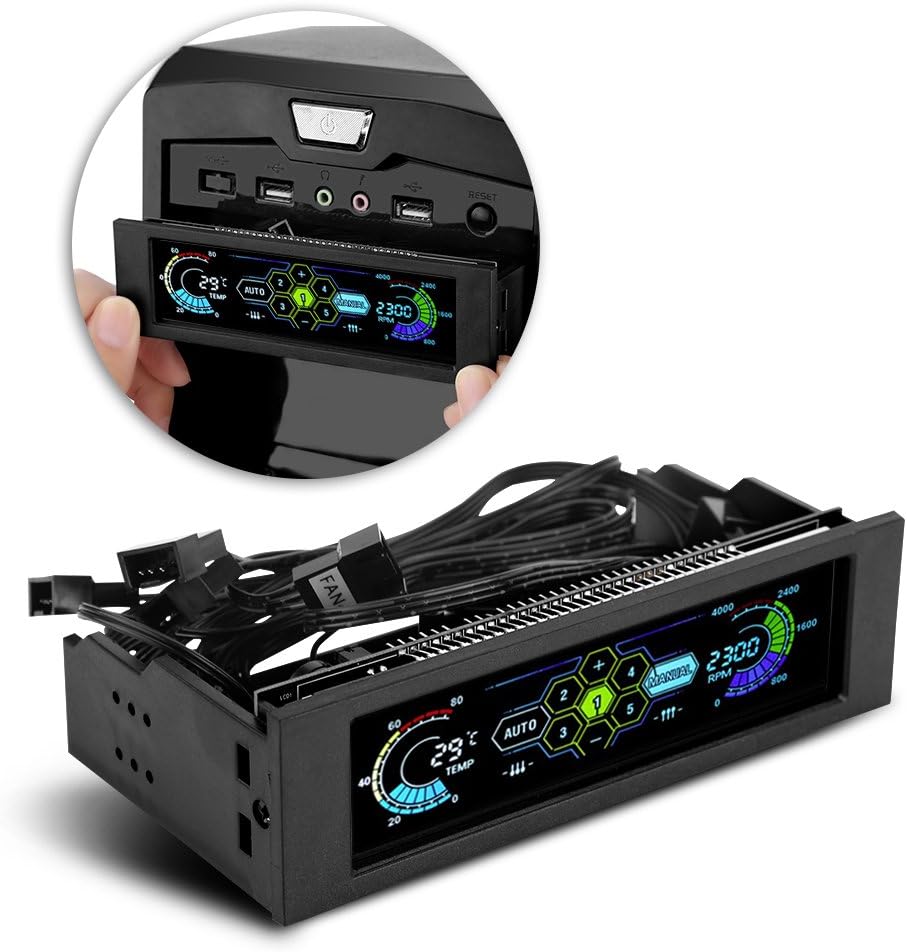


The STW‑6041 stands out as a reliable solution for managing PC cooling with a clear LCD interface. It receives top marks for its build quality and ability to monitor multiple fan speeds simultaneously.
We may earn a commission when you buy through this link, at no additional cost to you.
Its aluminum alloy panel undergoes multiple matt treatments for a premium look. The LCD screen displays four sets of fan speeds and temperatures, giving you a comprehensive view of system health.
While it requires a 5.25 inch drive bay slot, this is standard for most mid to full tower cases. The PWM circuit helps reduce high frequency noise effectively during operation.
This controller is ideal for users who want manual and automatic temperature management without complex software. It offers a balance of features and reliability that few competitors match.
The wide LCD screen ensures you can see temperature and RPM data at a glance without booting into BIOS.
High specification capacitors and aluminum materials ensure the unit withstands heat and lasts longer over time.
We may earn a commission when you buy through this link, at no additional cost to you.
The V BESTLIFE controller offers a straightforward approach to fan management with its auto and manual mode options. It is designed to keep you informed about system status through a large LCD screen.
We may earn a commission when you buy through this link, at no additional cost to you.
You can control the speed of up to five fans which is helpful for systems with many cooling points. The alarm temperature range is manually settable between forty and ninety degrees for custom safety thresholds.
It alerts you immediately if a fan breaks down ensuring you do not overlook critical cooling failures. This makes it a practical choice for home servers or workstations requiring consistent uptime.
While it lacks flashy features like RGB lighting, it delivers core functionality reliably. Users seeking a no fuss controller will appreciate its simplicity and effective monitoring capabilities.
Switch between automatic thermal regulation and manual speed adjustment to suit different usage scenarios easily.
Managing five fan channels allows for detailed airflow control across intake and exhaust zones in your case.
We may earn a commission when you buy through this link, at no additional cost to you.
This SaiDian controller is a budget friendly choice for those needing basic fan speed regulation and status monitoring. It includes essential features like temperature display and fan failure alarms.
We may earn a commission when you buy through this link, at no additional cost to you.
The large screen shows temperature fan speed and alarm settings clearly. It can control three groups of fans which may be sufficient for smaller builds or specific cooling setups.
When high temperatures or abnormal fan conditions occur the alarm sounds to prevent hardware damage. You can adjust speed manually or set limits automatically to maintain safe operating conditions.
While it may not have the premium finish of higher end models it gets the job done effectively. It is a good starting point for users entering the world of manual fan control.
Tracks essential metrics like temperature and RPM to help you maintain a stable system environment without extra costs.
Designed for standard optical drive bays it fits into most PC cases without requiring extensive modification.
We may earn a commission when you buy through this link, at no additional cost to you.
The Commander F6 offers a premium experience with its RGB LCD screen and individual control knobs for up to six channels. It is built for users who want to maximize both performance and visual appeal.
We may earn a commission when you buy through this link, at no additional cost to you.
It features six temperature sensors and voltage control knobs allowing precise adjustments per channel. You can also connect up to two Lumi LED strips to enhance your case lighting scheme.
Short circuit protection and a warning alarm ensure safety during operation. The unit comes with a one year warranty which reflects the brand confidence in its durability.
While it is more expensive than basic controllers the added aesthetic and functional features justify the cost. It is an excellent choice for custom PC builders who value visual impact.
Integration with RGB strips lets you match fan control with your overall system theme for a cohesive look.
Individual knobs per channel give you tactile control over each fan group without needing digital menus.
We may earn a commission when you buy through this link, at no additional cost to you.
The Ejoyous controller focuses on delivering reliable cooling management with a focus on noise reduction. Its PWM circuitry allows for precise fan control while reducing annoying high frequency noises.
We may earn a commission when you buy through this link, at no additional cost to you.
Four separate controllers allow for quick manual adjustments or automatic regulation based on thermal demand. The wide LCD display keeps track of RPM and four temperature values conveniently.
A double safety function includes thermal alarms and standstill detection to protect your hardware. The aluminum alloy panel offers a robust execution that resists wear and maintains a professional appearance.
This unit is a strong contender for those who prioritize silence and stability over extra features. It provides a solid foundation for a quiet and efficient PC build environment.
Adjusting fan performance as needed helps lower noise levels when full speed is not required for cooling.
Monitoring for standstill and overheating ensures you are alerted before critical issues occur.
We may earn a commission when you buy through this link, at no additional cost to you.
This Arctic controller is distinct because it is a hub rather than a traditional front panel unit. It supports ten ports with individual PWM control managed through software like Windows or Linux.
We may earn a commission when you buy through this link, at no additional cost to you.
It is an excellent choice for builds with limited drive bays or those who prefer internal hubs over front panel slots. It reduces cable chaos by centralizing management without needing Y splitter cables.
The device supports native driver support allowing wide compatibility with fan control software. You get consistent power output up to two amps per port which helps drive larger fans effectively.
If you prefer software control and clean internal routing this hub is the budget friendly option. It simplifies airflow management significantly while keeping the exterior of your case clean.
Using Windows or Linux drivers allows you to script complex cooling curves without manual knob adjustments.
Eliminating extension cables reduces clutter inside the case improving airflow and aesthetics simultaneously.
We may earn a commission when you buy through this link, at no additional cost to you.
The Noctua NA-FC1 is a compact manual controller designed to work as a speed reducer or tandem with motherboard control. It is ideal for those who want to tame high speed PWM fans quietly.
We may earn a commission when you buy through this link, at no additional cost to you.
Its no stop mode prevents fans from dropping below 300 RPM avoiding potential BIOS errors. This makes it reliable for fans that need a minimum speed to stay operational.
It comes with a three way splitter cable allowing control of up to three fans simultaneously. The six year warranty is industry leading and shows high confidence in its build quality.
If you do not need temperature sensors this manual knob is highly effective and space efficient. It is a practical choice for compact cases where drive bays are not available.
The manual knob offers direct tactile control which is useful for tuning fans without software dependencies.
Ensures fans remain active enough to prevent BIOS warnings which helps system stability.
We may earn a commission when you buy through this link, at no additional cost to you.
This Delinx unit is a versatile DIY kit that can be used for PC cooling or other thermal regulation scenarios like 3D printers. It supports both automatic and manual control modes for flexible management.
We may earn a commission when you buy through this link, at no additional cost to you.
It features a digital display that switches between temperature and fan speed readings. The controller includes a five channel fan hub and a temperature probe for complete setup out of the box.
Its voltage range supports 5V to 24V making it compatible with various fan types. The module is compact enough for non standard builds where a traditional 5.25 bay controller won't fit.
It is a great pick for hobbyists or server admins who need more than a simple PC case fan controller. The included features make it a strong all-rounder for complex cooling needs.
Working with 5V to 24V systems allows for broader use across different electronics projects.
A built in five channel hub simplifies wiring by avoiding extra splitters.
We may earn a commission when you buy through this link, at no additional cost to you.
This controller adds a unique touch by displaying the date and time alongside fan speeds. It serves as a functional dashboard for your system status on the front panel.
We may earn a commission when you buy through this link, at no additional cost to you.
It includes the safety system with high temperature alarms and fan anti-seize protection. You can see all four sets of fan speeds and temperatures clearly on the LCD screen.
The PWM circuit helps reduce noise while allowing manual or automatic speed adjustments. The alloy panel treatment ensures it fits various chassis designs without looking out of place.
While reliability is average compared to top tier brands it offers a good range of monitoring features. It is useful for those who want to see system info without logging into software.
Tracking time on a system controller is handy for logging or general utility purposes.
Simultaneous speed and temperature display provides immediate feedback on system load.
We may earn a commission when you buy through this link, at no additional cost to you.
This controller is designed to manage up to five groups of fans making it suitable for large case builds. It features a big LCD screen to display system status clearly.
We may earn a commission when you buy through this link, at no additional cost to you.
It includes auto and manual mode switches allowing flexible control over fan speeds. The alarm temperature range can be manually set from 40 to 90 degrees for custom safety levels.
It alerts you immediately if a fan breaks down so you can react quickly to cooling issues. The display also shows hard disk state which helps you monitor storage health alongside temperature.
While it has some reliability concerns it offers a high channel count at a reasonable price. It is worth considering if you need to control more than four fans without adding extra hardware.
Managing five fan groups allows detailed cooling control for complex setups.
Tracking hard disk state helps you stay aware of drive health without separate software.
We may earn a commission when you buy through this link, at no additional cost to you.
Selecting the right controller requires considering several key factors to ensure it meets your specific cooling needs and case layout.
Most traditional controllers are designed for 5.25 inch optical drive bays. Ensure your case has an available slot before purchasing a panel mounted unit to avoid installation issues.
If you lack a bay consider using a hub like the Arctic model which mounts internally or adhesive for a different solution.
Determine how many fans you need to control. Some models support three channels while others support five or more. Choose a unit that matches your fan count to avoid extra splitters.
More channels provide better airflow zoning but can increase complexity. Balance your needs with the physical constraints of your build.
Controllers often offer auto or manual modes. Auto mode adjusts speed based on temperature probes while manual lets you set fixed speeds. Decide which level of automation suits your workflow best.
Dual mode units offer the most flexibility allowing you to switch between automatic safety and manual precision as needed.
LCD panels vary in size and information shown. Some show only RPM while others show temperature time and hard drive status. A larger screen makes it easier to monitor multiple data points at once.
If you prioritize aesthetics look for units with RGB lighting that can sync with your other components for a cohesive look.
Look for features like over-temperature alarms and fan anti-seize warnings. These alerts prevent hardware damage if a fan fails or if temperatures spike unexpectedly.
Basic audible alarms are helpful but visual indicators on the display provide additional confirmation of critical issues.
Aluminum alloy panels are generally more durable than plastic ones. High specification capacitors ensure the controller can handle high temperatures and last longer over time.
Solid construction is especially important if the controller will be exposed to frequent handling or harsh environments.
Check that the controller supports the voltage of your fans. Most modern fans run on 12V but some may use 5V or higher. Ensure the unit matches your requirements to avoid damaging the fans.
Universal voltage support found in versatile units provides extra flexibility for mixed fan setups or non-PC projects.
A longer warranty period often indicates higher build quality. Some models come with a year of coverage while others offer up to six years.
Reliable customer support is essential in case you encounter wiring issues or defects during installation.
Start by connecting the controller to a 12V power source from your PSU and then plug in your fans. Ensure the PWM or voltage wires match the fan headers correctly for proper operation.
Use the included temperature probe to monitor internal heat levels. Place the probe on a hot area like a VRM or GPU to get accurate readings for automatic cooling adjustments.
Clean the unit occasionally with a dry cloth to prevent dust buildup on the display. Avoid spraying liquids directly on the panel to ensure long-term reliability and clear visibility.
Most controllers connect directly to power rather than a motherboard header. Some hubs support motherboard signaling but traditional panels are designed for independent power.
PWM uses pulse width modulation for precise speed changes while voltage control adjusts the power level directly. Most modern fans use PWM for better efficiency.
Yes many controllers support multiple sensors so you can monitor different areas like CPU and GPU zones. This helps you set more accurate cooling profiles.
Yes most controllers support 3-pin fans but you may need to set them to fixed speeds since voltage control is used instead of PWM modulation.
Use an internal hub or an adhesive mount to place the controller inside the case. This avoids the need for a front panel slot entirely.
This could mean the probe is not connected or a fan is not detected. Check all wiring connections to ensure the system recognizes the fans correctly.
We recommend the STW‑6041 for most users due to its reliable LCD display and solid build. It balances essential features well and offers a great overall experience.
If you need a budget option the ARCTIC hub is efficient and reduces cable chaos. For high end needs the Commander F6 provides unmatched aesthetics and controls.
Remember to check current prices and availability before buying since these details can change. Ensure you pick a model that fits your case and cooling requirements exactly.