
ASRock J4125M
3.4Editor score
Quad-Core J4125 Processor
DDR4 Memory Support
Compact Micro-ATX Design
Discover the top low power motherboard options for efficient builds. This guide compares ten models for performance, connectivity, and reliability in 2026.
Finding the right low power motherboard ensures efficient performance for servers, NAS, and compact builds. These boards balance energy savings with robust connectivity for modern tasks.
We compared ten models based on processor efficiency, connectivity options, and build quality. Our analysis highlights reliable choices for home labs and professional deployments.
Each pick showcases unique strengths like dual LAN ports or compact designs. Prices vary by retailer so check current deals before finalizing your component selection.
3.4Editor score

4.4Editor score

4.5Editor score
This side-by-side comparison highlights key specifications across ten efficient boards. Review power profiles, expansion slots, and networking capabilities to find your ideal match.




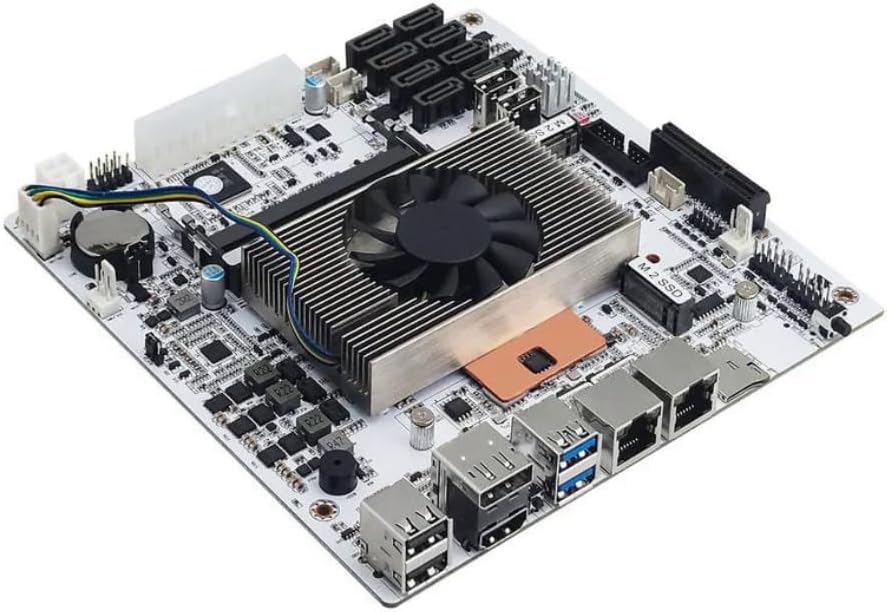
This industrial NAS board stands out for its networking capabilities and efficiency. With a 4.5 rating it delivers stable performance for server environments needing high throughput.
We may earn a commission when you buy through this link, at no additional cost to you.
The N5105 processor offers four cores and threads with strong integrated graphics. Four 2.5GbE ports enable robust network segmentation or link aggregation for demanding workloads.
Boot times may be longer as the board reads memory details carefully. Dual power connectors ensure stable operation but require compatible PSUs for reliable startup.
Ideal for advanced home labs needing network security or multimedia streaming. Choose this board for its connectivity and durability in critical deployments.
Four 2.5GbE ports provide exceptional bandwidth for virtualization or NAS use cases.
HDMI 2.0 and DP 1.4 support dual 4K displays for versatile media applications.
We may earn a commission when you buy through this link, at no additional cost to you.
A budget-friendly micro-ATX board featuring an integrated J1800 processor. It suits simple office or light server tasks where cost efficiency matters most.
We may earn a commission when you buy through this link, at no additional cost to you.
The dual-core CPU handles basic compute needs with low power draw. DDR3 support keeps memory costs low for users repurposing existing components.
Expansion options are limited with basic PCIe slots. Still it offers reliable connectivity for legacy systems or basic NAS builds on a tight budget.
Perfect for retrofits or entry-level servers needing minimal power. Select this board when budget constraints outweigh modern performance needs.
VGA DVI and HDMI outputs ensure support for older monitors without adapters.
Low TDP design keeps electricity costs down for 24/7 operations.
We may earn a commission when you buy through this link, at no additional cost to you.
This micro-ATX board offers strong value with Ryzen 5000 support and PCIe 4.0. It is a versatile choice for builds needing modern features without high cost.
We may earn a commission when you buy through this link, at no additional cost to you.
The 3+3 power phase ensures stable power delivery for Ryzen chips. Dual M.2 slots provide fast storage options alongside four SATA ports for flexibility.
VRM may struggle with extreme overclocking but fits standard use well. Gigabit LAN meets basic needs though lacking multiple network ports for advanced setups.
Recommended for home users upgrading to Ryzen for general use. It balances modern connectivity with cost-effectiveness for mainstream applications.
Compatible with Ryzen 5000 series for significant performance over legacy AM4 boards.
PCIe 4.0 M.2 slot enables high throughput SSDs for faster boot and load times.
We may earn a commission when you buy through this link, at no additional cost to you.
The PRO B550M-P features Core Boost for stability and AI cooling for noise. It is suited for builders wanting performance without sacrificing thermal efficiency.
We may earn a commission when you buy through this link, at no additional cost to you.
DDR4 boost speeds reach 4400+ MT/s for responsive systems. Gen4 M.2 support offers future-proof storage while PCIe 4.0 x16 supports high-end GPUs.
Audio is standard but sufficient for general use. Lack of onboard WiFi means relying on USB dongles or wired LAN for connectivity needs.
Ideal for silent home PCs needing robust performance. Choose for balanced features and thermal management in quiet builds.
AI cooling adjusts fans dynamically based on system temperatures for optimal noise.
Memory boost technology unlocks higher RAM speeds for better application responsiveness.
We may earn a commission when you buy through this link, at no additional cost to you.
A cost-effective micro-ATX board with an integrated J4125 quad-core CPU. Perfect for low-power builds needing basic compute and storage expansion capabilities.
We may earn a commission when you buy through this link, at no additional cost to you.
The CPU provides adequate performance for lightweight NAS or office tasks. DDR4 support modernizes memory usage compared to older DDR3 platforms.
PCIe 2.0 limits bandwidth for add-on cards. Still it serves well for dedicated servers where GPU or high-speed PCIe expansion isn't needed.
Best for budget-conscious users needing efficient power use. Select this for reliable basic computing without high power costs.
Built-in J4125 reduces complexity and cost compared to separate CPU purchases.
Ultra low TDP ensures minimal electricity costs for continuous operation.
We may earn a commission when you buy through this link, at no additional cost to you.
This board offers strong DDR4 support up to 4733+ OC for responsive performance. It is a solid pick for office systems needing versatile display and storage.
We may earn a commission when you buy through this link, at no additional cost to you.
Three video outputs ensure compatibility with various monitors. Full spike protection safeguards ports from electrical surges enhancing system longevity.
Limited M.2 options may restrict NVMe expansion. Power delivery is adequate for non-overclocked CPUs but lacks premium VRM robustness.
Recommended for reliable office or media builds. Select this board for its connectivity and stability features.
HDMI DVI-D and VGA outputs support multi-monitor setups effortlessly.
Full spike protection guards ports against power surges for hardware safety.
We may earn a commission when you buy through this link, at no additional cost to you.
A compact mini-ITX board featuring Intel WiFi and Bluetooth connectivity. It fits SFF cases well with strong VRM support for Ryzen CPUs.
We may earn a commission when you buy through this link, at no additional cost to you.
Six digital PWM phases provide stable power for 5000 series chips. PCIe 3.0 x4 M.2 offers decent storage speeds though not 4.0.
Q-Flash Plus allows BIOS updates without a CPU which is handy for troubleshooting. The higher price reflects its feature density and form factor.
Best for small form factor builds needing wireless. Choose for reliability and compact design with modern connectivity.
Intel dual band WiFi and Bluetooth remove the need for extra USB adapters.
Mini-ITX layout enables small PC builds for space-constrained environments.
We may earn a commission when you buy through this link, at no additional cost to you.
This board delivers Wi-Fi 6E and 8-phase power for stable performance. It stands out for wireless needs and high-end audio quality.
We may earn a commission when you buy through this link, at no additional cost to you.
DDR4 support reaches 4733+ OC for responsive memory. Hyper M.2 provides PCIe Gen4 storage for fast data throughput.
Audio codec offers rich 7.1 sound for immersive experiences. USB count may require headers for full peripheral support in some setups.
Ideal for wireless-centric builds needing performance. Choose this for top-tier connectivity and audio features.
Wi-Fi 6E supports 6GHz band for ultra low latency connections.
Realtek ALC1220 delivers premium audio for entertainment setups.
We may earn a commission when you buy through this link, at no additional cost to you.
A dedicated server board with U-series CPU and dual LAN ports. It provides extensive storage and networking for virtualization or NAS systems.
We may earn a commission when you buy through this link, at no additional cost to you.
Eight SATA ports allow massive storage arrays. Dual 2.5GbE LAN enables network segmentation for improved performance or security.
Known sleep mode issues may disrupt uptime. Cooling fan may be audible in quiet environments though efficient.
Best for advanced users needing specific port counts. Select this for dedicated storage and networking builds.
Dual 2.5GbE LAN supports link aggregation for increased bandwidth.
Eight SATA ports enable large storage arrays for media or backup.
We may earn a commission when you buy through this link, at no additional cost to you.
Equipped with i5 8265U this NAS board balances compute and storage. It supports virtualization for diverse workloads and high data throughput.
We may earn a commission when you buy through this link, at no additional cost to you.
Eight SATA ports plus dual NVMe offer hybrid storage solutions. Dual 2.5GbE LAN enables fast network operations for large files.
ES processor versions may lack full optimization. No sleep mode ensures constant uptime but increases power usage slightly.
Best for power users needing robust compute. Select this for advanced NAS and virtualization needs.
i5 8265U provides strong processing for transcoding or virtualization tasks.
Eight SATA plus dual NVMe supports tiered storage configurations effectively.
We may earn a commission when you buy through this link, at no additional cost to you.
Selecting the right low power motherboard involves balancing efficiency and functionality.
Look for low TDP CPUs like N-series or U-series chips to minimize power draw. These processors suit 24/7 operations without excessive heat generation.
Prioritize processors with strong multi-core performance for multitasking workloads.
DDR4 memory offers better speed and efficiency compared to legacy DDR3 options. Ensure compatibility with your intended CPU for optimal performance.
Check maximum supported capacity to accommodate future storage or virtualization needs.
Multiple LAN ports and USB headers allow versatile networking and peripheral connections. Select boards matching your device and network requirements.
Confirm the number of SATA ports and M.2 slots for your storage goals.
Micro-ATX and Mini-ITX boards save space while offering essential ports. Ensure the case you choose supports the selected motherboard dimensions.
Smaller boards reduce power usage but may limit expansion capabilities.
Heatsinks and fan headers keep components cool during prolonged usage. Look for passive cooling options for silent operation if possible.
Stable thermal performance prevents throttling under sustained workloads.
Verify power connectors match your PSU configuration. Some industrial boards need dual 24-pin and 4-pin inputs for startup.
Proper power ensures reliable system stability and longevity.
PCIe x1 or x16 slots add network cards or NVMe adapters. Ensure sufficient lanes for planned upgrades or specialized tasks.
Limited slots may restrict future flexibility so plan ahead.
Multiple HDMI or DisplayPort outputs allow multi-monitor setups for advanced tasks. Confirm audio codecs meet sound quality expectations.
HDMI 2.0 or higher supports modern display resolutions comfortably.
Connect power cables carefully ensuring all required connectors are seated to prevent startup errors. Follow manufacturer guidelines for BIOS setup to optimize settings.
Install heat sinks or fans near critical chips to maintain safe operating temperatures. Regular cleaning removes dust that could cause overheating.
Update BIOS via Q-Flash tools when new versions become available for better compatibility. Monitor system health to catch power anomalies early.
Low power motherboards use efficient CPUs and optimized VRMs to reduce electricity use. They often omit high-performance features that consume more energy. These designs suit servers and NAS units that run continuously.
Many boards support current Ryzen or Celeron processors. Check socket compatibility such as AM4 or LGA1200 before buying. Newer chips offer better efficiency and performance.
Mini-ITX saves space but limits expansion slots. Micro-ATX offers more ports while keeping energy use low. Choose based on case size and future needs.
Use passive coolers or small fans to keep temps low. Ensure case airflow is unobstructed. Monitor temperatures to adjust fan curves when necessary.
Yes low power motherboards are built for continuous operation. Industrial models have better durability for servers. Proper cooling ensures long-term reliability.
Choose a PSU with 80 Plus efficiency to reduce wasted energy. Ensure connector types match the motherboard. A 400 watt unit often suffices.
Our top picks include industrial boards with multiple LAN ports and compact Ryzen options. Each model balances energy efficiency with essential connectivity features.
Prioritize processor efficiency and port counts that match your workload. Reliable power delivery ensures stable operation for critical tasks.
Always verify current pricing and stock levels before purchase. Deals vary by vendor so check multiple retailers for the best offers.