
Integral 4GB Crypto-197
4.1Editor score
FIPS 197 Certified
Auto-Lock Feature
Zero Footprint No Software
This guide compares the top ten encrypted USB flash drives for secure data storage, evaluating hardware encryption, compliance standards, and usability
Protecting sensitive data on portable devices is more critical than ever in today's digital landscape. An encrypted USB flash drive offers a robust solution for securing confidential files against unauthorized access or physical theft risks.
We have carefully evaluated ten leading models based on their encryption standards, build quality, and ease of use. Our analysis focuses on hardware-based security, compliance certifications, and real-world performance metrics to help you choose wisely.
Each pick highlights specific strengths such as FIPS validation, biometric access, or rugged durability. Please note that availability and pricing may change frequently, so verify current details before making your final purchase decision today.
4.1Editor score
4.6Editor score

4.5Editor score
The following table provides a side-by-side comparison of all ten selected drives, highlighting key specifications such as encryption type, interface speed, and unique security features to simplify your selection process.


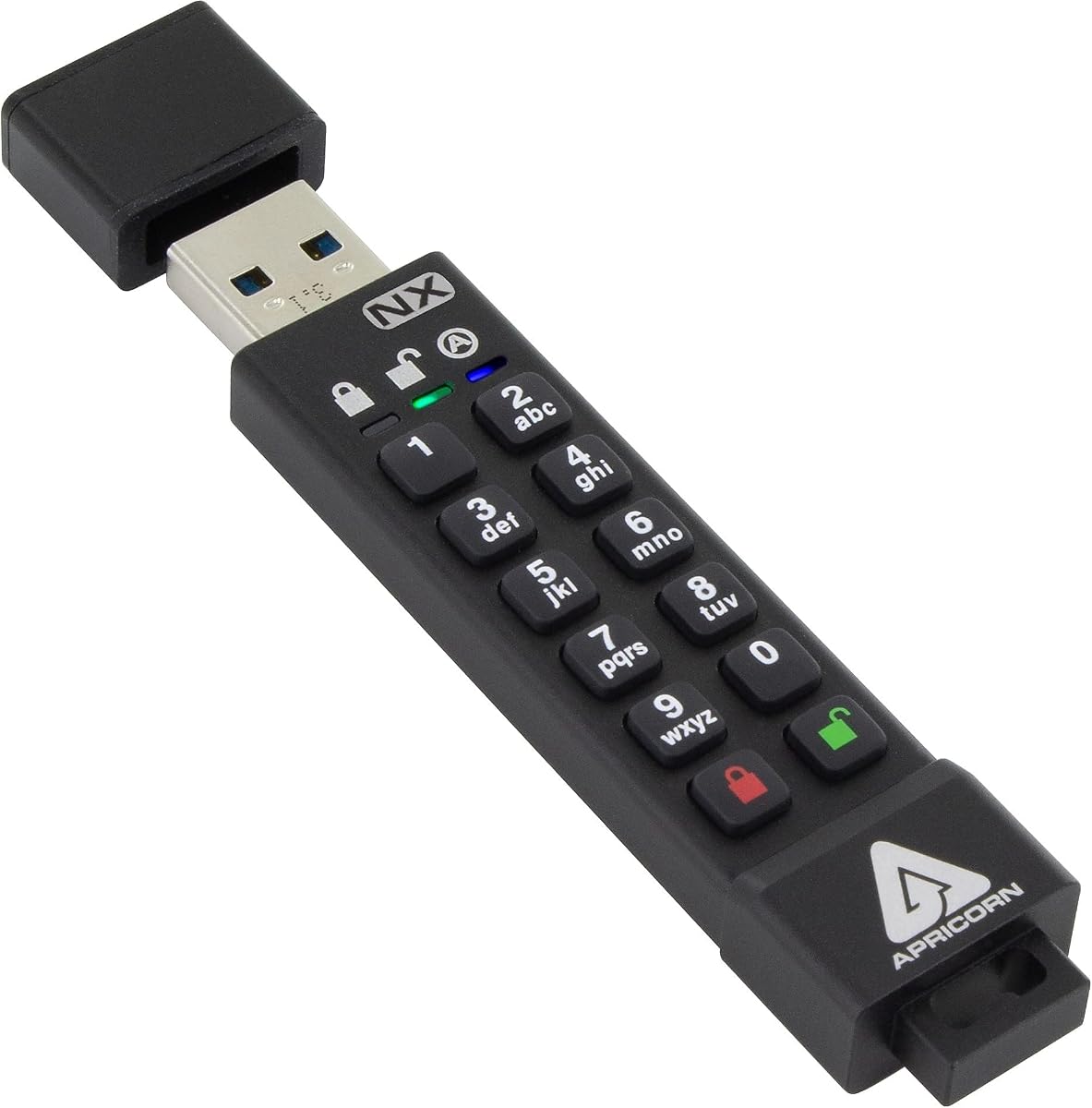
The Apricorn Aegis Secure Key 3 NX stands out as a top choice for users needing verified high security. With its FIPS 140-2 Level 3 validation, it ensures data remains protected even under rigorous scrutiny by government agencies.
We may earn a commission when you buy through this link, at no additional cost to you.
This drive features separate Admin and User modes, allowing for granular control over who can access or modify data. The inclusion of data recovery PINs adds a safety net if credentials are lost, enhancing reliability.
While the setup requires using the Aegis Configurator software, this extra step ensures robust security configurations. The read-only modes are particularly useful for distributing secure files without risk of modification.
For professionals handling sensitive information, this drive offers the peace of mind that comes with certified hardware encryption. It is an excellent investment for those prioritizing data integrity and compliance above all else.
This certification ensures the drive meets strict government standards for cryptographic modules, providing assurance against advanced attacks and physical tampering attempts.
Separate admin and user modes allow organizations to enforce strict policies while giving end users limited access to necessary files only.
We may earn a commission when you buy through this link, at no additional cost to you.
The Kingston IronKey Vault Privacy 50 delivers enterprise-grade security with hardware-based encryption that protects data at the deepest level. Its FIPS 197 certification makes it suitable for government and highly regulated industries.
We may earn a commission when you buy through this link, at no additional cost to you.
Features like brute force and BadUSB attack protection ensure that malicious actors cannot compromise the drive through automated attempts or malicious firmware. The passphrase mode allows for longer, more memorable passwords without sacrificing security.
Write protection settings prevent accidental data changes, adding a layer of safety for read-only distribution. The TAA compliance means it meets specific procurement standards often required for public sector contracts and large enterprises.
This drive is ideal for businesses and government contractors who need proven security features and compliance certifications. While it comes at a premium price, the protection it offers justifies the cost for critical data.
Digitally-signed firmware prevents unauthorized modifications, ensuring the drive runs only trusted code even when plugged into compromised systems.
Users can choose between complex passwords or long passphrases, balancing security requirements with ease of memorization for daily use.
We may earn a commission when you buy through this link, at no additional cost to you.
Designed for modern devices, this drive features a USB 3.2 Type C connector, making it compatible with the latest laptops and smartphones without adapters. The FIPS 140-2 Level 3 validation ensures it meets high security standards for professional use.
We may earn a commission when you buy through this link, at no additional cost to you.
Authentication is software-free, meaning the drive operates independently of external drivers or applications. This plug-and-play experience is enhanced by the separate admin and user modes, which help manage access permissions efficiently across teams.
While the drive relies on an internal battery in some configurations to maintain power during authentication, this design ensures consistent performance regardless of host power management settings. It is a robust solution for mobile professionals.
For users transitioning to USB-C ecosystems, this drive bridges the gap between legacy security standards and modern connectivity. It offers reliable protection for sensitive files while ensuring compatibility with current hardware trends.
The USB 3.2 Type C interface ensures fast transfer speeds and universal compatibility with new devices without needing extra adapters or hubs.
Software-free authentication means the drive works on any system without requiring installation, reducing potential security vulnerabilities from third-party software.
We may earn a commission when you buy through this link, at no additional cost to you.
For those needing secure storage without breaking the bank, the Integral Crypto-197 offers essential hardware encryption at a fraction of the cost of premium models. It is FIPS 197 certified, ensuring a baseline of recognized security.
We may earn a commission when you buy through this link, at no additional cost to you.
The drive automatically locks when removed from a computer, preventing unauthorized access if left unplugged. Its waterproof double-layer design protects against accidental spills or harsh environments, making it durable for field work.
Zero footprint means no software installation is required, simplifying use for non-technical users. The auto-lock feature works alongside a secure entry system that restricts access to those with the correct alphanumeric password.
This drive is perfect for individuals or small businesses with limited budgets but high security needs. While the storage is small, it is sufficient for critical documents and credentials that require protection during transport.
Achieving FIPS 197 certification at a budget price point makes high-level security accessible to a broader range of users and organizations.
The waterproof design ensures the drive remains functional even after exposure to moisture, which is crucial for users in construction or outdoor environments.
We may earn a commission when you buy through this link, at no additional cost to you.
The iStorage datAshur PRO simplifies security by requiring a PIN entry directly on the device before access is granted. This hardware-based approach removes the need for any software on the host computer, reducing infection vectors.
We may earn a commission when you buy through this link, at no additional cost to you.
It is compliant with various government regulations including GDPR and HIPAA, making it suitable for healthcare and legal professionals. The IP57 certification ensures it withstands dust and water, extending its life in tough conditions.
While PIN entry takes a moment longer than a software prompt, it guarantees that unauthorized users cannot bypass security easily. The drive works across multiple operating systems, including Windows, Mac, Linux, and mobile platforms.
This drive is ideal for users who prioritize ease of use and robust physical protection. The combination of high security and durability makes it a reliable choice for carrying sensitive data across different environments.
The physical keypad allows for authentication without any software, ensuring that the host computer remains isolated from the storage device during access.
Compatibility with Windows, macOS, Linux, and Android ensures that the drive can be used on any device without installing additional drivers.
We may earn a commission when you buy through this link, at no additional cost to you.
This drive provides a practical balance between security and cost, featuring a built-in independent chip that handles encryption tasks without software. The AES256-bit algorithm ensures that data remains secure against most decryption attempts.
We may earn a commission when you buy through this link, at no additional cost to you.
An automatic lock feature engages if the drive is unplugged or idle for thirty seconds, adding convenience to security. The reset and wipe function erases all data after ten failed password attempts, protecting against brute force attacks.
While it lacks official FIPS certification, its hardware encryption is robust enough for general business and personal use. The aluminum alloy shell not only protects the electronics but also adds to the portable design for easy carrying.
For users seeking a no-nonsense secure drive without paying for brand premiums, this option offers solid performance. It is particularly well-suited for general storage where high-level compliance is not strictly mandated.
The drive automatically secures data after a short period of inactivity, ensuring that files remain safe even if the device is forgotten connected to a computer.
After a set number of incorrect password entries, the drive resets itself and wipes the data, preventing any unauthorized access attempts from succeeding.
We may earn a commission when you buy through this link, at no additional cost to you.
The Lexar JumpDrive F35 PRO introduces biometric security, allowing users to unlock their files with a simple fingerprint scan. This removes the need to remember complex passwords and offers a fast way to access data.
We may earn a commission when you buy through this link, at no additional cost to you.
With read speeds up to 400MB/s, this drive is significantly faster than many standard USB drives, making it ideal for transferring large media files. The 256-bit AES encryption ensures that data is protected even if the drive is lost.
You can save up to ten different fingerprints, which is useful for shared drives or backup access. However, the fingerprint scanner can sometimes be sensitive to moisture or dirt, requiring occasional cleaning for consistent performance.
This drive is perfect for professionals who value speed and convenience alongside security. The combination of high performance and biometric access makes it a standout choice for creative and technical fields.
Fingerprint authentication allows for quick and secure access without the hassle of entering passwords every time the drive is used.
The ultra-fast read speeds ensure that large files such as video projects can be transferred quickly, saving valuable work time.
We may earn a commission when you buy through this link, at no additional cost to you.
This model builds on the original PRO with even more robust protection, including an IP68 rating for dust and water resistance. It can withstand submersion, making it ideal for extreme environments where other drives might fail.
We may earn a commission when you buy through this link, at no additional cost to you.
The PIN-based authentication ensures that data remains secure regardless of the device it is plugged into. As a FIPS certified drive, it meets strict standards for use in government and security-sensitive sectors globally.
While the transfer speeds are not the fastest on the market, the focus is clearly on durability and compliance. The rugged casing protects against physical damage, ensuring the drive remains functional in harsh conditions.
For users in industrial or field settings, this drive offers the peace of mind that comes with extreme durability. It is a solid choice for those who need security that survives drops, dust, and water exposure.
The IP68 rating ensures the drive remains functional even after prolonged exposure to dust and water, making it perfect for harsh field environments.
FIPS 140-2 Level 3 certification ensures the drive meets rigorous government standards for data protection and security compliance.
We may earn a commission when you buy through this link, at no additional cost to you.
The Ironkey D500S introduces a dual hidden partition, allowing users to create a secret space for highly sensitive data alongside a public area. This feature is industry-first and adds a layer of secrecy for specific files.
We may earn a commission when you buy through this link, at no additional cost to you.
With pending FIPS 140-3 Level 3 certification, it aims to be the most secure option available. The multi-pin option allows different users to have access, while the crypto-erase feature can destroy data instantly in emergencies.
The rugged zinc casing provides physical protection against attacks, ensuring the encryption hardware remains intact. BadUSB attack protection prevents the drive from acting as a malicious keyboard when connected to untrusted systems.
This drive is ideal for executives and security personnel who need advanced privacy features. The combination of hidden partitions and high security certification makes it a top choice for sensitive corporate data.
This feature allows a separate hidden storage space that can be protected with a different password, adding secrecy to sensitive files.
The crypto-erase password allows users to instantly delete all data in emergencies, ensuring compromised information cannot be accessed.
We may earn a commission when you buy through this link, at no additional cost to you.
The Kingston D300S is a classic option that relies on hardware-based AES 256 XTS encryption to keep data secure. It is designed for users who need reliable security in a compact form factor without complex software.
We may earn a commission when you buy through this link, at no additional cost to you.
Its durable casing protects the drive from physical damage, making it suitable for daily carry. The simple plug-and-play interface ensures it works across Windows and Mac systems without additional drivers.
While it is an older model compared to newer biometric or touchscreen drives, it offers proven security performance. The hardware protection ensures that data cannot be accessed without the correct credentials.
For users needing a basic yet secure drive for personal or small business use, this model remains a strong contender. Its reliability and encryption strength make it a dependable tool for secure file transport.
The drive uses dedicated hardware to manage encryption, ensuring that files remain secure even if the host system is compromised by malware.
As a longstanding product in the market, this drive has been proven to work consistently across various operating systems and usage scenarios.
We may earn a commission when you buy through this link, at no additional cost to you.
Selecting the right encrypted USB flash drive requires considering several technical and practical factors. This guide breaks down the key elements to help you make an informed decision.
Look for drives that use hardware-based AES 256-bit encryption, as this is the industry standard for securing data. Software encryption is less secure because it relies on the host computer, which could be compromised. Hardware encryption ensures that data is encrypted at the chip level, providing protection even if the drive is lost or stolen.
Always prioritize models that explicitly state hardware encryption in their specifications.
If you are working in government or regulated industries, check for certifications like FIPS 140-2 Level 3 or FIPS 197. These certifications verify that the encryption module meets rigorous testing standards. Compliance ensures that the drive will be accepted for official contracts and legal data storage requirements.
Ensure the drive has the specific certification required by your organization.
Drives come with various authentication methods including passwords, PINs, fingerprints, and physical keys. PIN-based drives are highly secure because they do not rely on software passwords that can be captured. Biometric options offer convenience but may have higher costs and potential sensitivity issues.
Choose a method that balances your security needs with ease of use.
Ensure the drive works across all devices you plan to use, such as Windows, macOS, Linux, or Android. Some drives require specific software that may not be available on all systems. Compatibility ensures you can access your files wherever you go without technical hurdles.
Check the manufacturer's list of supported operating systems before purchasing.
For users in outdoor or construction environments, look for IP-rated water and dust resistance. Rugged designs with metal casings can protect the drive from drops and physical abuse. Durability ensures your data remains safe even if the drive is exposed to harsh conditions.
Select a drive with an IP rating if you work in challenging environments.
Choose a storage capacity that fits your needs, ranging from 8GB to several terabytes. Faster transfer speeds are essential for large files like videos or software backups. Speed and capacity directly impact your productivity and how much data you can secure at once.
Balance capacity with speed to avoid bottlenecks during data transfers.
Look for features like automatic lock or data wiping after multiple failed attempts. This prevents attackers from guessing your password using automated tools. Such protections are essential for maintaining security against persistent attempts to breach access.
Verify that the drive includes mechanisms to wipe data after failed entry attempts.
Secure drives vary widely in price, from budget to premium models. While cost is a factor, prioritize reliability and security features over the lowest price. A good warranty indicates the manufacturer stands behind the quality and durability of their product.
Invest in a model that offers a solid warranty to protect your purchase.
To use your encrypted drive, simply plug it into a computer and enter your password or PIN on the device or software interface. Ensure you remember your credentials, as lost passwords often result in permanent data loss. Always use the proper eject procedure to avoid corrupting the file system.
Keep the drive in a safe place when not in use to prevent physical damage. For PIN-based drives, avoid exposing the keypad to extreme conditions that could degrade the keys. Regularly back up your data to another secure location to prevent loss from hardware failure.
Update the firmware of your drive if the manufacturer provides tools to do so. This helps maintain security against emerging threats. When storing sensitive data, consider using two-factor authentication or a hidden partition if your drive supports these features.
Hardware encryption uses a dedicated chip to encrypt data, ensuring security even if the computer is compromised. Software encryption relies on the operating system and can be bypassed if the computer has malware. Hardware is generally more secure and often faster for large files.
Most modern encrypted drives support macOS alongside Windows and Linux. However, always check compatibility before buying. Some drives require specific software that must be installed on the Mac to enable the decryption process for access.
FIPS 140-2 Level 3 certification means the drive meets strict government standards for security and tamper resistance. It is designed to protect against physical and logical attacks, making it suitable for high-security government and enterprise use cases.
If you forget your password, recovery options vary by brand. Some drives have recovery PINs or admin modes that allow resetting access. Others may wipe data after failed attempts for security. Always keep your recovery information in a safe place.
Most drives are compatible with any computer with a USB port, but some require software that may not be available on certain systems. Hardware-only drives work universally without software. Always verify OS compatibility to ensure seamless access on all devices.
Many modern drives offer software-free operation, meaning they function immediately upon connection. However, some require a utility to set passwords or access advanced features. Check product details to see if software installation is needed for full functionality.
Some encrypted drives support Android via USB-OTG, but functionality depends on the model. Drives with hardware-only interfaces are more likely to work. Always confirm Android compatibility if you plan to access files from your mobile phone regularly.
Yes, hardware encryption offers superior security compared to software solutions. It protects data even if the drive is lost or stolen. For anyone handling sensitive information, the investment in hardware encryption is justified by the increased protection it provides.
Choosing the right encrypted USB flash drive depends heavily on your security needs and usage environment. Whether you need FIPS compliance for government work or simple protection for personal documents, there is a model to suit every requirement.
Prioritize hardware encryption and compliance standards over flashy features if security is your main concern. A rugged build and compatibility with your devices will ensure you get the most value from your investment over time.
Remember to check current availability and warranty details before finalizing your purchase. The models listed above offer a range of options for securing your valuable data with confidence in any situation.