
ASRock DeskMeet X300 Mini PC Barebone Kit
4.8Editor score
AM4 Socket Support
500W PSU Included
PCIe 3.0 x16 Slot
DDR4 Memory Support
Discover the top AMD barebone PCs for gaming and work in 2026. We compare features, performance, and connectivity to help you choose the perfect compact system.
Barebone PCs with AMD processors offer a unique blend of flexibility and performance for builders who want control over their system configuration. These compact units provide the core motherboard, chassis, and cooling while leaving memory and storage up to you. This approach allows for customized setups tailored to specific needs like gaming, content creation, or home server deployment.
Our team has analyzed the most popular AMD barebone systems available in October 2026. We evaluated processors, graphics capabilities, expansion slots, and connectivity options to find the best options for various users. From entry-level office machines to high-performance mini gaming rigs, each product brings distinct advantages to the table.
Each pick in this guide highlights key specifications and real-world use cases. You will see how different AMD architectures handle multitasking and graphics workloads. Prices and availability change frequently so always check current listings before buying. We focus on value performance and build quality to ensure you get a reliable system.
4.8Editor score

4.0Editor score

3.1Editor score
This side-by-side comparison helps you evaluate the top ten AMD barebone PCs available this month. We focus on processor generation, graphics performance, connectivity options, and physical design. Use this table to quickly spot which system matches your specific requirements for work or play.





This unit brings powerful Ryzen 7 PRO 8845HS performance to a tiny desktop. It supports OCuLink for external GPUs and has dual USB4 ports for high speed data.
We may earn a commission when you buy through this link, at no additional cost to you.
The Ryzen chip delivers excellent multitasking and graphics. It uses 8 cores and 16 threads to handle complex workflows without stalling. The integrated Radeon 780M handles 4K content smoothly.
You must supply your own memory and storage. This adds steps but allows full control over parts. The chassis is solid though prices are high for barebone.
Buy this if you need top tier speed in a small box. It fits gamers and creators who want upgrade options and future proofing.
OCuLink provides lower latency than USB4 for external graphics. This means better frame rates and efficiency when using an eGPU dock.
Dual USB4 ports allow massive data transfer and video output. You can connect three screens easily and use 100W power delivery.
We may earn a commission when you buy through this link, at no additional cost to you.
This system pairs the same powerful AMD chip with advanced cooling. It uses a vapor chamber to move heat fast and keeps temps low.
We may earn a commission when you buy through this link, at no additional cost to you.
The thermal design helps performance stay stable under load. You can run three BIOS modes to balance power and noise. It supports up to four 4K screens.
Barebone means you add memory and drive. OCuLink allows GPU expansion without losing bandwidth. Setup takes time but rewards are worth it.
Perfect for power users who need multi-screen setups. It works well in studios or gaming dens where thermal efficiency is key.
Vapor chamber spreads heat evenly across the heatsink. This prevents hot spots and sustains boost clock speeds longer.
Four 4K outputs make this a pro choice. Connect monitors for trade desks or creative workflows without extra docks.
We may earn a commission when you buy through this link, at no additional cost to you.
This variant adds fingerprint login for quick secure access. It keeps the same high end AMD processor as other models.
We may earn a commission when you buy through this link, at no additional cost to you.
The security feature speeds up daily use. OCuLink is available for external graphics. You get quad 4K output for serious setups.
You must buy your own RAM and SSD. The compact case makes it easy to hide. Ports are plentiful for a small box.
Ideal for office or home use. Security fans will like the fingerprint sensor. It offers great flexibility for custom builds.
Fingerprint unlock removes password delays. It adds a layer of access control without needing extra hardware.
Two M.2 slots allow large drives. You can split OS and data across multiple NVMe modules easily.
We may earn a commission when you buy through this link, at no additional cost to you.
This unit stands out by including a 500W power supply. You get a PCIe slot to add a dedicated graphics card inside.
We may earn a commission when you buy through this link, at no additional cost to you.
The AM4 socket allows many AMD CPUs. It supports Ryzen 5000 series for solid performance. DDR4 RAM keeps parts cheap and common.
You still need to buy CPU and memory. But having PSU inside saves steps. It is built for small form factor enthusiasts.
Great for custom builds on a budget. The PCIe lane lets you add a GPU for gaming. A reliable choice for tinkerers.
Including the power unit simplifies assembly. You avoid external bricks and extra wiring for internal components.
The PCIe x16 slot opens full GPU options. You can fit desktop graphics in a mini case with care.
We may earn a commission when you buy through this link, at no additional cost to you.
This model offers strong multi-threaded performance with Zen 4. It includes OCulink for external GPU and fast storage.
We may earn a commission when you buy through this link, at no additional cost to you.
You get three video outputs for workstations. The system supports 5600MHz DDR5 and PCIe 4.0 SSDs. It is geared toward daily productivity.
OCulink needs an adapter plate. You must buy RAM and storage separately. Wi-Fi 6e keeps connections stable.
Best for office use and media. The balance of speed and ports makes it versatile. Consider warranty before buying.
OCulink offers PCIe speeds to external GPUs. An adapter is needed and the port is non-hot-swappable.
Dual channel DDR5 helps bandwidth. This boosts data movement between CPU and applications.
We may earn a commission when you buy through this link, at no additional cost to you.
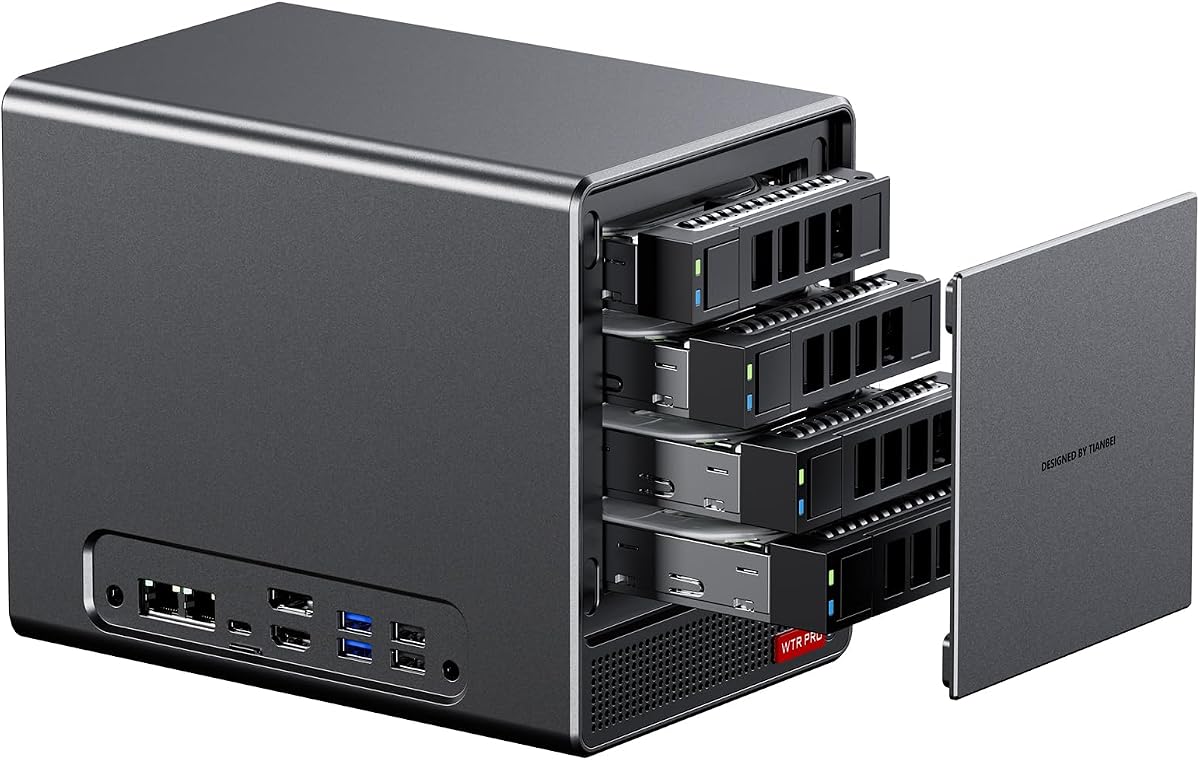
Designed for storage this unit has four drive bays. It uses low power chips to save on electricity bills.
We may earn a commission when you buy through this link, at no additional cost to you.
You get two M.2 slots plus four SATA slots. It is built for NAS systems that run 24 7. Dual LAN ports allow aggregation.
You need to add memory and drives. It runs cool with a large fan. Ideal for home labs or media servers.
Best for data storage needs. The design fits always needs for reliable file access. Confirm specs before purchase.
Up to 88TB with SATA drives. Add NVMe for fast cache or OS install.
Dual LAN ports support link aggregation. This doubles throughput for file transfers.
We may earn a commission when you buy through this link, at no additional cost to you.
At 1.92L this is one of the smallest kits. It supports AM4 Ryzen CPUs and DDR4 RAM for wide choice.
We may earn a commission when you buy through this link, at no additional cost to you.
You get three video outputs and 2.5G LAN. Storage fits two M.2 and two 2.5 drives. It is great for desk setups.
Barebone means add parts yourself. It saves space without losing function. Power adapter is included in box.
Best for small spaces or kiosks. Use it for digital signs or light work. Check CPU list before buying.
Tiny volume allows desktop use. Place it behind a monitor for clean lines.
USB-C and multiple USB A ports. Use it to dock or network devices.
We may earn a commission when you buy through this link, at no additional cost to you.
This ASUS unit brings Ryzen AI and Wi-Fi 7. It is a 0.6L chassis that fits anywhere.
We may earn a commission when you buy through this link, at no additional cost to you.
The toolless design makes upgrades easy. You can add memory or storage without tools. It targets business users needing speed.
Check current reviews before buying. It is pricey but offers new tech. Great for future proofing office PCs.
Best for those who need AI compute. It keeps workstations cool and compact. Consider warranty terms.
Wi-Fi 7 supports faster wireless speeds. Great for large file transfers on wireless.
Ryzen AI adds NPU cores. This helps with local AI tasks.
We may earn a commission when you buy through this link, at no additional cost to you.
This NAS unit offers six drive bays in a mini case. It uses Ryzen 7 5825U for reliable server tasks.
We may earn a commission when you buy through this link, at no additional cost to you.
You get dual 2.5G LAN for network needs. It runs Linux well for custom OS. Power draw is low for 24 7.
You must supply memory and drives. SATA power notes may need tweaks. It is a strong choice for labs.
Best for storage and virtualization. Use it for OpenWrt or Plex. Confirm Linux notes before setup.
Supports Ubuntu and OpenWrt. Good for custom networking tools.
Low power keeps costs down. Use it without heat or noise worries.
We may earn a commission when you buy through this link, at no additional cost to you.
This model offers Wi-Fi 7 and tool free design. It uses Ryzen 200 series for daily tasks.
We may earn a commission when you buy through this link, at no additional cost to you.
The chassis is slim and durable. It works well for 24 7 use. A three year warranty adds peace of mind.
Check compatibility for your apps. It fits office setups needing modern wireless. Good for light workloads.
Best for business users needing speed. It keeps desks clean and reliable. Check reviews before buying.
Supports latest Wi-Fi standards. Great for office networks with high bandwidth.
Three year coverage helps long term. Protects hardware against defects.
We may earn a commission when you buy through this link, at no additional cost to you.
Selecting an AMD barebone PC requires balancing processor power, expansion options, and physical size. These systems let you choose your own memory and storage but come with different chassis and port layouts.
Look for Zen 4 Ryzen chips like the 8845HS for top performance in gaming and multitasking. Older Zen 3 or Zen 2 parts still work well for office use and media centers. More cores help with heavy workloads and virtualization.
Choose a CPU that matches your daily needs. You can upgrade later if you pick a system with standard sockets like AM4.
Radeon 780M integrated graphics deliver strong 4K playback and light gaming. Some units have OCuLink or PCIe slots for external graphics. This expands your power for 3D workloads.
Check if the system supports GPU ports. If you need heavy graphics, plan for eGPU docks or internal add-in cards.
Most barebone kits have DDR4 or DDR5 slots. Aim for dual channel setups for best speed. NVMe slots allow fast boot and load times. Some models add SATA bays for mass storage.
Pick a system that matches your memory needs. Upgrade later if you plan to expand storage or RAM.
USB4 or Thunderbolt ports offer high data rates and video out. HDMI 2.1 and DP1.4 support 4K and 8K displays. Ethernet speed and Wi-Fi version matter for network use.
Count the ports you need now and later. A few extra USB or video outputs save future adapters.
Vapor chamber and multi fan systems keep temps low. Heat spreaders and vents help during sustained loads. Noise levels matter for quiet rooms.
Check reviews for thermal performance. Better cooling keeps speeds steady without loud fans.
Higher wattage PSU units support more load or GPU expansion. External bricks simplify cable management. Some kits include internal PSUs for compact builds.
Ensure the PSU matches your planned parts. A strong unit adds headroom for future upgrades.
Mini cases save desk space but limit airflow and GPU size. Choose sizes under 2L for portability. Some have VESA mounts for monitor back use.
Measure your intended space. A compact unit fits better on shelves or behind screens.
Windows support and Linux compatibility vary. Some offer Pro keys or firmware features like fingerprint unlock. Check BIOS features for updates.
Confirm the OS you need. Many systems support Linux for servers and routers.
Install your memory and storage first by aligning them with the board slots. Use the included screws and follow the guide to avoid static damage.
Keep air vents clear and clean dust regularly. Use compressed air to cool the heatsinks. This helps maintain good thermal performance.
Install updates and drivers from the vendor site. Configure BIOS modes for noise or power needs.
Barebone means the system arrives without memory storage or OS. You add these parts yourself to fit your needs. It gives you flexibility in choosing components.
No you only install RAM and drives into slots. Use the guide and avoid touching sensitive parts. The chassis is usually open for easy access.
Most barebone units do not include Windows. You must buy a license or use Linux. Some vendors provide a key on request.
Some have PCIe slots or OCuLink ports for external GPUs. Check the model for GPU support before you buy. This helps if you need graphics power.
DDR5 offers higher speed and efficiency. But DDR4 is cheaper and common. Pick based on your budget and parts needs.
AMD chips deliver strong cores and graphics at value. They support AM4 or AM5 with good paths. This fits builders and gamers.
Barebone units use little power. They range from low wattage to 65W. This helps on electric bills and heat.
Yes many AMD barebone PCs support Linux. Use Ubuntu or OpenWrt for servers. It works well for custom tasks.
The top picks like the AOOSTAR MACO and GEM12+ deliver top tier Zen 4 power with OCuLink support. ASRock offers strong value with AM4 and included PSU.
Prioritize your need for GPU ports or storage bays. Check cooling and port count before you buy to match your workflow.
Prices and stock change often so review current listings for best deals. Ensure you plan for RAM and SSD to complete your setup.