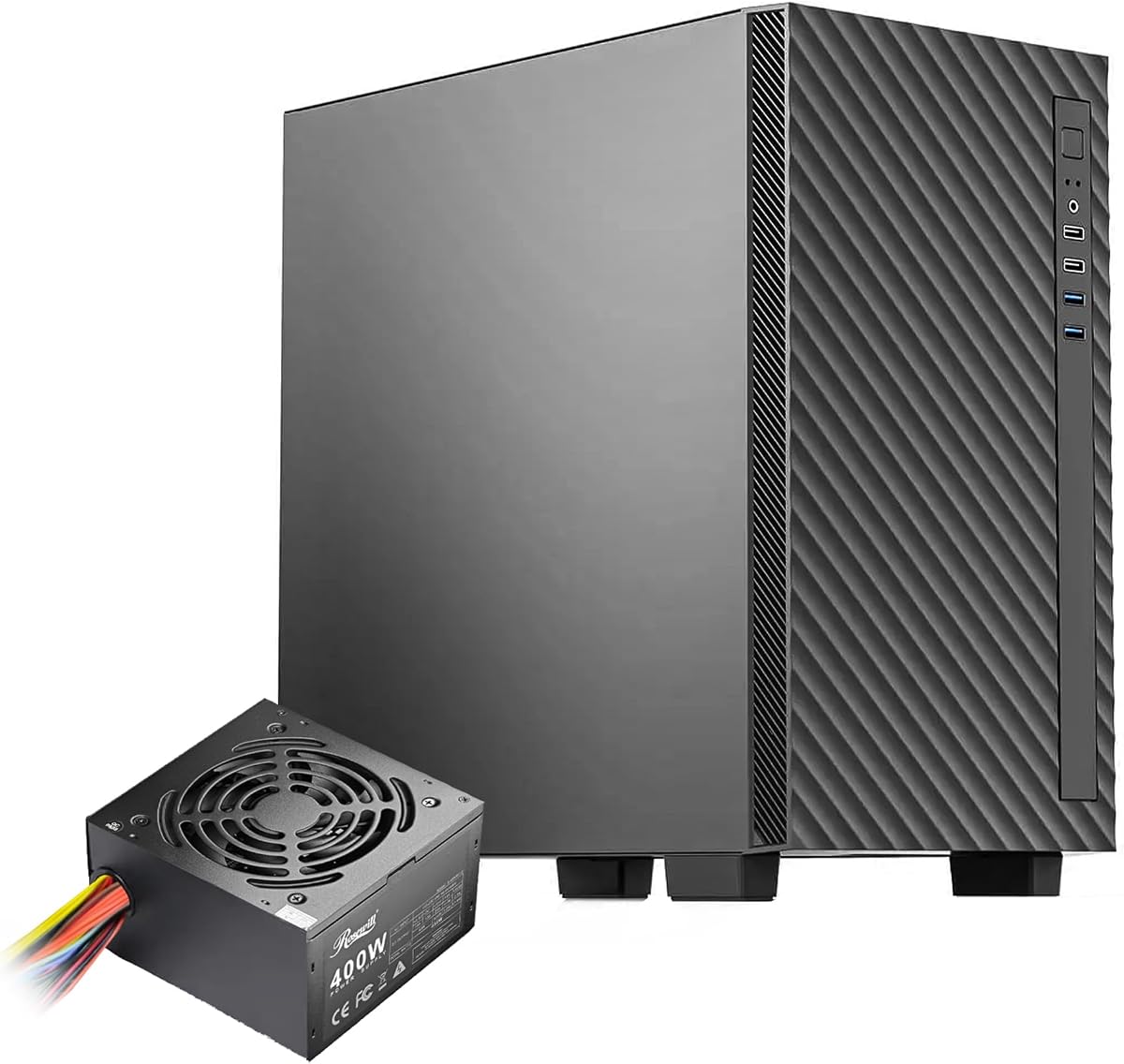
Rosewill FBM-X5
4.9Editor score
Pre-installed 400W PSU
Micro ATX support
PWM rear fan included
Discover the top PC case with power supply bundles for 2026. We compare airflow, build quality, and PSU efficiency to help you build a reliable system.
Finding the right PC case with power supply can simplify your build process significantly. These bundles combine chassis and power unit into one convenient package. They reduce compatibility headaches and save time during assembly for new builders.
We evaluated ten distinct bundles based on airflow potential, expansion options, and PSU certification. Each product was compared against modern standards for cable management and cooling efficiency. Our goal is to highlight systems that offer real value without hidden compromises.
Every pick below shows specific strengths like ARGB lighting or compact footprints. Some focus on budget savings while others prioritize premium materials and cooling. Prices change frequently so verify current deals before ordering your next gaming rig.
4.9Editor score

4.7Editor score

4.4Editor score
This side-by-side comparison highlights key specifications across all ten bundles. We focus on PSU wattage, case form factor, and included cooling solutions to show which options fit your specific hardware needs best.


The Rosewill FBM-X5 stands out as a reliable entry-level option for office builds or light gaming. It comes with a pre-installed 400W power supply which saves you from sourcing a separate unit. The chassis supports Micro ATX motherboards and offers enough room for standard components without taking up too much desk space.
We may earn a commission when you buy through this link, at no additional cost to you.
Its interior layout is straightforward with one 3.5 inch bay and two 2.5 inch bays for storage. The included 120mm PWM fan at the rear ensures basic airflow for heat dissipation. You can also add more fans or radiators up to 240mm if you need better cooling later on.
While the PSU is non-modular and basic, it is CE and FCC certified for safety in low power setups. The case lacks advanced features like tempered glass or extensive RGB options which keeps costs down. This makes it a practical choice for users prioritizing function over flashy aesthetics.
Buy this if you need a simple desktop case that includes power without breaking the bank. It is ideal for home offices or basic multimedia PCs where high-end performance is not the main goal. Check availability before purchasing as stock varies by region.
The mini tower form factor fits easily on desks where space is limited without sacrificing essential expansion slots.
Front and top mounting options allow you to upgrade airflow later if you install more powerful components inside.
We may earn a commission when you buy through this link, at no additional cost to you.
This bundle delivers top tier value by combining a high airflow case with a Gold rated PSU and a solid CPU cooler. The HAF 500 chassis is designed to move air efficiently thanks to its mesh front and dual 200mm ARGB fans. This setup is perfect for gamers who want performance without managing separate component purchases.
We may earn a commission when you buy through this link, at no additional cost to you.
The included 650W PSU is reliable and efficient which helps keep system stability high during load. The Hyper 212 Halo cooler provides excellent heat dissipation for mainstream processors and looks great with its RGB fan. You get everything needed for a balanced build right out of the box.
While the case is large and fits E-ATX boards it may not suit small desks. The cable management system is robust enough to hide the non-modular PSU cables effectively. This ensures a clean look even when using standard power connectors inside the chassis.
Choose this bundle if you want a complete package that balances cooling and power quality. It is suitable for mid range gaming rigs that need room to grow. Verify that your desk can accommodate the size before ordering to avoid fit issues.
The mesh front panel and large fan diameter ensure heat is pushed out quickly to maintain low internal temps.
Adding a dedicated CPU cooler to the case and PSU saves time and ensures thermal performance from day one.
We may earn a commission when you buy through this link, at no additional cost to you.
This case makes a bold visual statement with dual tempered glass panels and eight pre-installed ARGB fans. It supports Micro ATX motherboards and includes a 650W power supply which is a convenient all-in-one solution. The interior is spacious enough to handle long graphics cards and future liquid cooling upgrades.
We may earn a commission when you buy through this link, at no additional cost to you.
The eight fans operate at a consistent speed which can reduce noise fluctuations during temperature changes. This design choice simplifies setup since you do not need to tune fan curves immediately. The top panel offers easy access to USB ports and audio jacks for peripherals.
However the rating suggests there may be trade-offs in build quality or noise control. The fixed fan speed might limit fine tuning compared to PWM setups. Still for those prioritizing looks and airflow out of the box this offers significant value at its price point.
Consider this bundle if you want a fish tank style case with maximum lighting and cooling included. It fits builders who want a standout look without wiring everything themselves. Check the latest reviews for long term durability before making a decision.
The panoramic glass view and eight ARGB fans create an immersive lighting effect for showcase gaming builds.
With eight fans installed you get immediate airflow performance without buying extra units for your system.
We may earn a commission when you buy through this link, at no additional cost to you.
The FBM-Z1-650 brings modern power standards to a compact Micro ATX chassis. It features an 80+ Gold ATX 3.1 power supply which is great for next gen GPUs requiring better power delivery. The front I/O includes a useful USB Type-C port for fast data transfers and charging.
We may earn a commission when you buy through this link, at no additional cost to you.
Despite the premium PSU the case uses a front mount design which can impact intake airflow. It supports radiators up to 360mm which is impressive for its size. The tempered glass side panel allows you to showcase your components while keeping dust out effectively.
You should note that user feedback suggests some compromises in build quality. The compact nature might make cable management tight with longer parts. However for those needing ATX 3.1 support in a small footprint this offers a unique technical advantage.
This is a niche choice for builders needing modern power standards in a mini tower. It suits tech enthusiasts who prioritize PSU specs over traditional airflow layouts. Check current stock and return policies as ratings indicate variable experiences.
ATX 3.1 compliance ensures the PSU can handle modern GPU power spikes safely and efficiently for future builds.
The front panel includes USB-C for convenient connectivity with modern peripherals and portable drives directly.
We may earn a commission when you buy through this link, at no additional cost to you.
The i802 Vibe Series stands out with four vibrant color options for your build. It includes a 700W PSU and an AM1204 Air Cooler with a digital display for monitoring temperatures. The chassis comes with five pre-installed FRGB fans so you get immediate visual impact.
We may earn a commission when you buy through this link, at no additional cost to you.
The digital display on the cooler is a nice touch that adds utility beyond just cooling. It helps you track CPU heat in real time without relying on software. The tempered glass side panel showcases these lights and components clearly for a premium look.
One trade-off is that the fans use fixed RGB which limits color customization. However the 700W power supply offers enough headroom for most mid-range systems. The bundle is designed to be a complete starter kit for those who want style and function.
Buy this if you want a colorful build that looks distinct from standard black cases. The included cooler and PSU make it a strong choice for new builders. Ensure your color choice matches your existing setup before ordering to avoid clashes.
Choose from vivid colors to match your room theme or personal style with a durable finish on the case.
The CPU cooler display shows live temperatures so you can ensure your system stays within safe limits easily.
We may earn a commission when you buy through this link, at no additional cost to you.
The Q300L V1 is known for its open thermal design and modular features. While sold as a case only it fits our guide as a companion for choosing a separate PSU. It supports Micro ATX boards and offers ample space for components within a compact frame.
We may earn a commission when you buy through this link, at no additional cost to you.
Its perforated sides allow air to flow freely which helps keep temperatures low naturally. The I/O panel can be adjusted to different locations on the case for better cable routing. This flexibility is rare at this price point.
Transparent panels let you see inside but you will need to buy a PSU separately. The case has dust filters to keep debris out of your system over time. This makes it a solid base for those who want to pick a specific power unit.
Select this if you prefer building a system with individual component choices. The thermal performance is top notch for its size and price. Pair it with a quality PSU to complete your compact gaming rig effectively.
Perforated panels on all sides promote constant airflow and heat dissipation to keep internal temps low.
The modular I/O lets you move ports to suit your desk setup and cable management preferences easily.
We may earn a commission when you buy through this link, at no additional cost to you.
This in Win case is designed for tiny builds where space is the primary constraint. It includes a standard TFX 300W power supply which is suitable for low power CPUs. The chassis is only 9 liters making it easy to hide in entertainment centers.
We may earn a commission when you buy through this link, at no additional cost to you.
The interior uses smart design to maximize usability within such a small volume. Tool-free drive bays make adding storage simple without needing screwdrivers. The detachable drive cage allows you to adjust space based on your specific hardware needs.
Keep in mind that 300W limits GPU options significantly. This is best for office PCs or media centers rather than gaming rigs. The thermal design focuses on efficiency to handle heat within the tight footprint.
Choose this if you need a PC that fits in tight spaces like a TV stand. It is a unique option for those who value portability over raw performance. Verify component compatibility before buying to avoid clearance issues.
At only 9 liters this case fits easily on shelves or desks where space is extremely limited.
Drive bays and drive cage can be adjusted without tools for quick hardware swaps and upgrades.
We may earn a commission when you buy through this link, at no additional cost to you.
The 4000D RS ARGB introduces a revolutionary FRAME system for customization. You can swap parts like the motherboard tray or I/O panel to suit your needs. It comes with three high performance RS ARGB PWM fans for solid cooling out of the box.
We may earn a commission when you buy through this link, at no additional cost to you.
The InfiniRail system allows flexible fan mounting options without standard screw constraints. This makes it easy to optimize airflow where you need it most. The 3D Y-Pattern front panel ensures minimal air restriction for cool intake.
While this does not include a PSU the chassis design supports standard units easily. The cable management system is robust to keep the interior clean. This case is built for builders who want to personalize their rig over time.
Invest in this if you value modularity and build quality. It is a strong foundation for any mid-tower build. Pair it with a modular PSU to maximize the clean look provided by the chassis.
The FRAME system allows you to upgrade and change parts to grow with your needs or mood.
The InfiniRail mounting lets you position fans exactly where needed for optimal cooling efficiency.
We may earn a commission when you buy through this link, at no additional cost to you.
This bundle is a masterpiece of small form factor engineering. It includes an 850W SFX PSU and a custom 120mm AIO cooler in a 15.7L chassis. The layout supports vertical GPU mounting which adds to the sleek look and cooling efficiency.
We may earn a commission when you buy through this link, at no additional cost to you.
The SFX PSU is designed to fit tightly with custom length cables to reduce clutter. The case extends width to accommodate large GPUs without sacrificing portability. This level of integration is rare in standard off-the-shelf bundles.
Vertical mounting and SFX compatibility mean better airflow but higher costs. The case is exclusively for Mini ITX boards which limits motherboard choices. This trade-off is worth it for builders wanting high performance in a tiny box.
Pick this if you need a compact gaming rig with top power specs. It is perfect for enthusiasts who want a powerful desktop that fits anywhere. Verify component limits before purchasing to ensure compatibility.
The SFX PSU delivers 850W power in a small size ideal for high-end GPU performance in tight spaces.
Vertical GPU mounting improves airflow around graphics cards and enhances the aesthetic appeal of the build.
We may earn a commission when you buy through this link, at no additional cost to you.
The RM750e is a standalone PSU that pairs with any ATX case. It supports ATX 3.1 and PCIe 5.1 standards for modern GPUs. Being fully modular means you can control cable clutter inside your chassis effectively.
We may earn a commission when you buy through this link, at no additional cost to you.
Its fan is designed for silence even under load which helps keep noise low. The capacitors are rated for high temperatures ensuring reliability over long periods. This makes it a solid choice for building a stable system from scratch.
While it does not come in a case bundle it offers unmatched power flexibility. You can match it with any chassis you choose for your specific needs. This is ideal for those who want to select their case separately.
Select this if you want top tier power delivery for a custom build. It fits well with many high performance cases. Ensure your case has enough clearance for the PSU length before buying.
ATX 3.1 and PCIe 5.1 compliance ensures your PSU can handle the latest GPU power spikes efficiently.
The 120mm rifle bearing fan uses a calculated curve to stay quiet even when fully loaded.
We may earn a commission when you buy through this link, at no additional cost to you.
Choosing a bundle requires balancing power needs with chassis fit. We outline key factors to ensure your new PC runs efficiently and safely.
Power supply units (PSUs) are measured in watts to determine how much power they can deliver. Look for ATX 3.1 or Gold certifications for better energy efficiency and stability. Higher wattage allows for future upgrades and prevents system instability.
Always choose a PSU that meets or exceeds your total system power draw. Efficiency ratings like 80 Plus Gold reduce heat and electricity costs over time.
The case size determines which motherboards fit and how much airflow is possible. Mini ITX and Micro ATX cases save space but limit expansion slots and cooling. ATX towers offer more room for larger fans and radiators.
Measure your desk space and decide if you need a compact build or a full tower for better cooling options.
Bundles with fans save time and money compared to buying them separately. Check for ARGB or PWM fans that allow speed control based on temperature. Mesh fronts generally support better airflow than solid panels.
Verify radiator support limits to ensure you can add liquid cooling later if you need extra cooling.
Clean cable routing improves airflow and makes your build look professional. Modularity in PSU cables helps you connect only what you need. Look for routing holes and straps behind the motherboard tray.
A case with good management options will keep your interior organized for easy maintenance and future upgrades.
Ensure the case fits your graphics card length and CPU cooler height. Small cases often have strict limits that block high-end hardware. Measure your parts against the case specs before buying.
Adequate clearance prevents accidental contact and ensures all components fit securely inside the chassis.
Front panel ports determine how easy it is to connect devices. Look for USB 3.0 or USB Type-C ports for fast data transfer and charging. Audio jacks are essential for headsets and speakers.
Check the top or front I/O to ensure you have the right ports for your peripherals without reaching behind the case.
Steel cases generally last longer than plastic alternatives and offer better protection. Thick panels reduce vibration noise during operation. Dust filters help keep internal components clean over time.
Prioritize solid construction to ensure your PC can withstand daily use and transport if you move it often.
Bundles often cost less than buying parts separately so compare total component prices. Ensure the included PSU is high quality and not just a budget unit. A cheap bundle might save cash but harm your components.
Set a spending limit and find a bundle that offers the best specs for your needs without sacrificing safety.
Start by installing the motherboard into the case before connecting power cables. Align the standoffs properly to prevent short circuits. Connect the PSU cables one by one following the motherboard manual for correct positions.
Use the included fans to test airflow and ensure all connections are secure. Turn on the system and check temperatures to confirm cooling is working. Adjust fan speeds in BIOS if noise is too high for your environment.
Dust your PC regularly using compressed air to maintain performance. Keep the PSU vent clear of dust buildup. Check cables annually for wear or loosening to ensure long term stability.
Not all bundles fit every motherboard type. Check the chassis support for ATX Micro ATX or Mini ITX boards before buying. Some compact cases only fit smaller boards so verify compatibility first.
Many bundles include branded units like Corsair or Cooler Master that are reliable. Always check for certifications like 80 Plus Gold or ATX 3.1 to ensure safety and efficiency.
Yes you can replace the PSU with another unit that fits the form factor. ATX cases allow easy swaps but SFX cases need matching SFX power supplies for proper fit.
Front mounts save space in compact designs but may limit airflow. They are common in small ITX builds where interior space is very limited.
Only some bundles include ARGB fans for lighting. Check the specs to see if fans are pre-installed and if they require a controller or motherboard connection.
Most modern gaming PCs need between 500W and 750W depending on the GPU. Higher end graphics cards may require 850W or more to prevent crashes under load.
We compared ten bundles ranging from budget office cases to premium gaming rigs. Top picks like the Cooler Master HAF 500 Bundle offer a strong balance of power and cooling.
Focus on PSU certification and chassis fit to ensure your system runs smoothly. Modern bundles often include enough features to build a complete PC without extra purchases.
Prices and stock fluctuate so verify current deals before ordering. Check reviews and specs to match your specific build requirements.