
Womier DK75 75% Wireless Gaming Keyboard
4.5Editor score
Silent membrane switches
RGB backlight effects
Long battery life
Discover the top green backlit gaming keyboards for 2026. We compare wireless and wired options with RGB lighting, mechanical switches, and ergonomic designs
Finding the right input device can transform your gaming experience. A green backlit gaming keyboard offers a unique aesthetic while providing the functionality you need for intense sessions. These boards blend style with performance to suit many setups.
We evaluated ten leading models based on build quality, connectivity, and customization. Each product was reviewed for its lighting options, switch feel, and overall durability. Our goal is to help you find the perfect fit for your desk.
Every pick includes detailed specs and real-world usage notes to guide your choice. We highlight key features and potential trade-offs so you know what to expect. Please note that availability and pricing may change over time.
4.5Editor score
4.6Editor score
4.8Editor score
This side-by-side comparison highlights the key differences between each model. Look closely at layout size, connectivity types, and switch mechanisms to decide which board aligns best with your specific workflow and gaming preferences.


The AULA F75 stands out as a top-tier option for gamers seeking a balance of performance and aesthetics. With its solid 4.6-star rating, it delivers a smooth typing experience enhanced by pre-lubed switches and a gasket-mounted structure that reduces noise while maintaining stability during intense sessions.
We may earn a commission when you buy through this link, at no additional cost to you.
This keyboard excels in customization thanks to its hot-swappable PCB which allows users to change switches without soldering. The RGB lighting offers 16.8 million colors and music-sync effects that respond dynamically to gameplay. The rotary knob simplifies volume control and mode switching making daily use intuitive and efficient.
While the driver software is currently limited to Windows which might frustrate Mac users the core hardware performance remains exceptional. The battery life is impressive ensuring you won't face interruptions during long gaming marathons. The PBT keycaps feel durable and resist shine even after extended periods of use.
Gamers who value a compact layout without sacrificing function will appreciate the 75% design that keeps arrow keys accessible. Whether you are typing reports or competing in tournaments the F75 offers the reliability and style needed for a high-performance setup that adapts to your workflow easily.
Hot-swappable switches and driver support let you tailor the keyboard to your specific preference without needing specialized tools or skills.
Connect to up to five devices via Bluetooth 5.0 2.4GHz wireless or USB-C for seamless switching between work and play.
We may earn a commission when you buy through this link, at no additional cost to you.
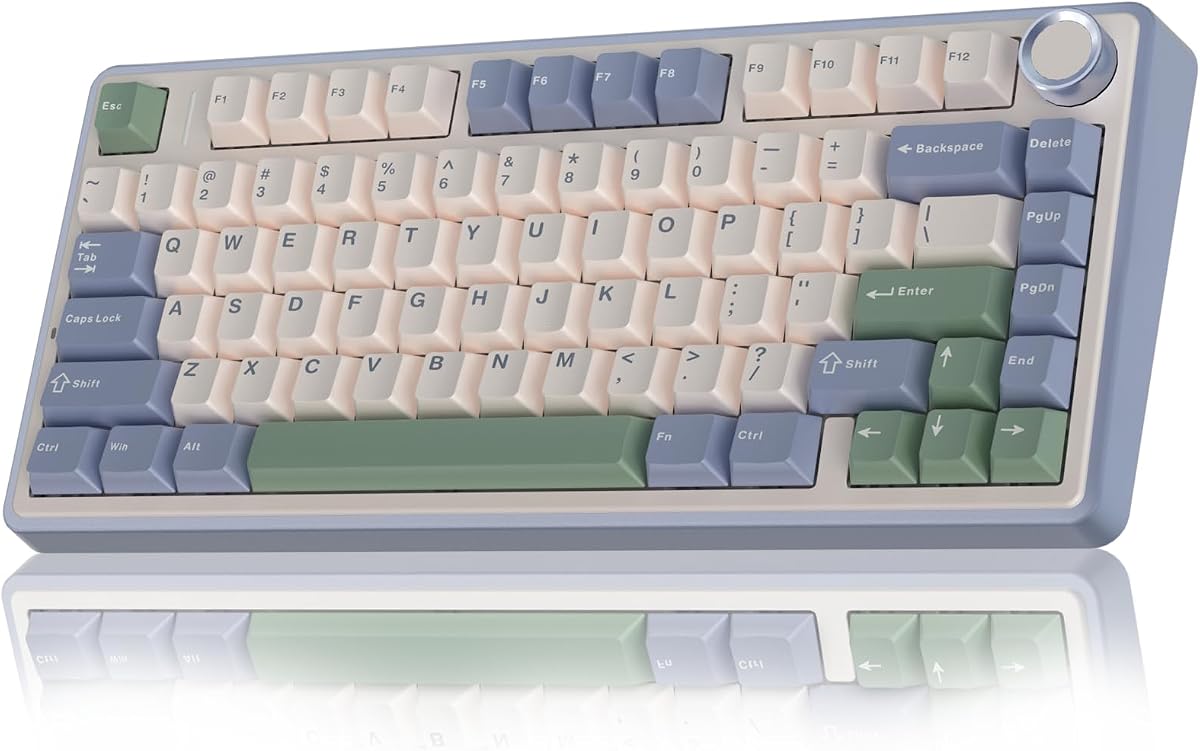
The Womier DK75 offers an accessible entry point into the world of wireless gaming keyboards with a focus on value and comfort. Boasting a 4.5-star rating it provides a quiet typing experience ideal for shared spaces like dorms or offices where noise can be a distraction during late night sessions.
We may earn a commission when you buy through this link, at no additional cost to you.
Its membrane switches are designed to be silent yet responsive providing a cushioned feel that reduces finger fatigue. The keyboard includes a small display screen that shows battery levels and connection status adding a touch of modern convenience. RGB lighting effects are customizable via function keys without needing extra software.
While it lacks the distinct tactile feedback of mechanical switches the DK75 compensates with a durable PBT keycap set that resists oil and wear over time. The 4000mAh battery ensures you can go days without recharging and the triple-mode connectivity allows easy switching between devices for productivity or gaming.
Budget-conscious gamers who still want a sleek wireless design will find this model hard to beat. The combination of a compact layout quiet operation and long battery life makes it a practical choice for those prioritizing function and style without breaking the bank on their setup.
Membrane switches are optimized for minimal noise making this board perfect for libraries or shared rooms without sacrificing responsiveness.
A built-in display screen keeps you informed about battery and connection status at a glance without digging into settings menus.
We may earn a commission when you buy through this link, at no additional cost to you.
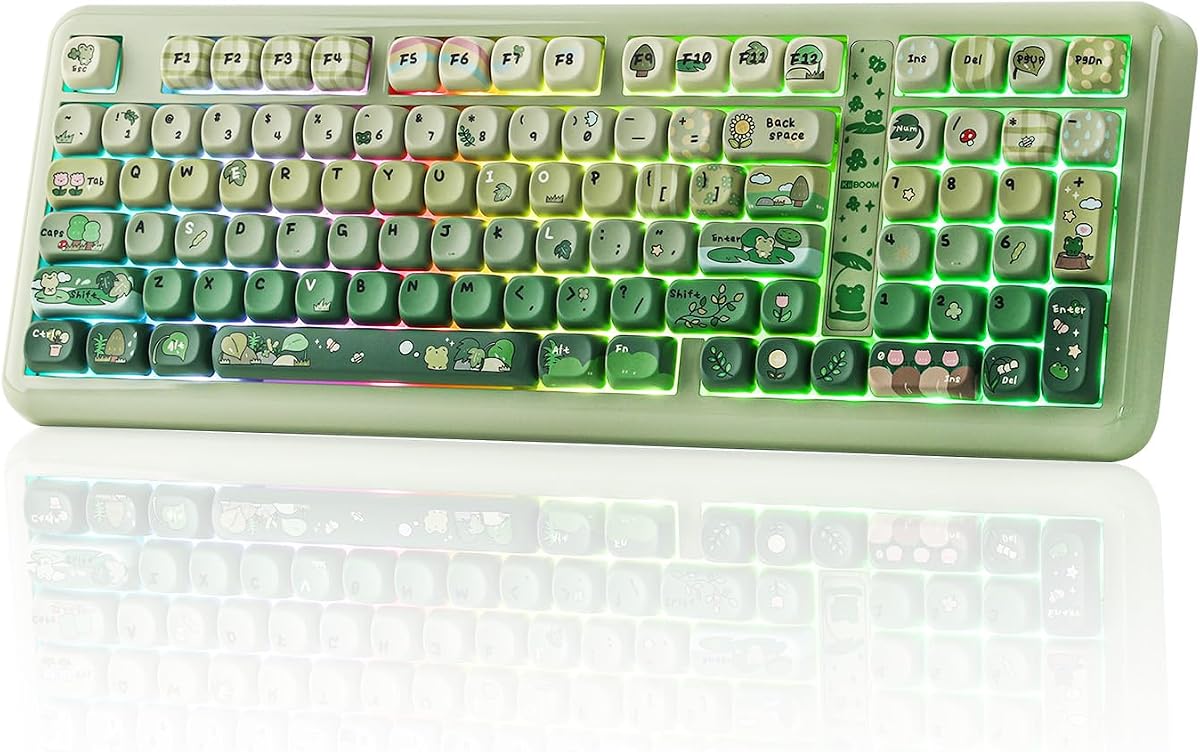
The KiiBoom Phantom98 Lite represents the pinnacle of enthusiast-grade keyboards with a focus on sound and customization. With a near-perfect 4.8-star rating it features a gasket-mounted design that creates a creamy sound profile and isolates the switch from the case for a superior tactile experience.
We may earn a commission when you buy through this link, at no additional cost to you.
VIA compatibility allows for deep remapping and macro creation giving you complete control over every key function. The keyboard supports hot-swappable switches and uses pre-lubed linear switches that offer smooth keystrokes right out of the box. Its 8000mAh battery is massive ensuring weeks of usage on a single charge for most users.
While the higher price point might be steep for casual users the build quality and customization options justify the investment for enthusiasts. The compact 96% layout saves desk space while keeping all essential keys including the numpad which is rare in wireless boards. South-facing RGB lighting provides bright illumination without interfering with keycaps.
If you are a tech enthusiast who enjoys tuning your gear this board delivers unmatched flexibility. The combination of gasket mounting VIA support and a huge battery makes it a premium choice that blends performance with the freedom to create a truly unique typing and gaming experience.
VIA support allows advanced users to remap keys create macros and adjust RGB settings without relying on proprietary software.
A multi-layer sound dampening structure produces a soft creamy thock that enthusiasts love while reducing unwanted ping or rattle.
We may earn a commission when you buy through this link, at no additional cost to you.
The Womier SK80 stands out with its vibrant color multimedia display that adds a personal touch to your desk. Rated 4.6 stars it lets you show custom GIF images connection modes and system info directly on the board creating a visual experience that goes beyond standard LED lighting effects.
We may earn a commission when you buy through this link, at no additional cost to you.
This keyboard features a gasket mount design that enhances stability and reduces typing noise for an immersive gaming experience. The hot-swap PCB allows you to customize the acoustic performance and typing feel by swapping 3-pin or 5-pin switches without needing soldering skills or extra tools.
While the dedicated software for deep customization is currently available only for Windows Mac users may find the features somewhat limited though the hardware remains solid. The frog green aesthetic is unique and charming though it may not suit every decor style compared to more neutral color options available in the market.
Streamers and creators who want a visually dynamic setup will love the ability to display custom animations or status indicators. The compact 75% layout keeps your desk tidy while retaining essential arrow keys for gaming making it a versatile tool for both creative work and intense play sessions.
The multimedia screen lets you upload GIFs and images to personalize your board with unique art or functional status updates.
Hot-swappable sockets support both 3-pin and 5-pin switches allowing you to experiment with different key feels easily.
We may earn a commission when you buy through this link, at no additional cost to you.
The Keymatic Gaming Keyboard bridges the gap between a compact wireless board and a full productivity tool by including a number pad. With a 4.4-star rating it offers a creamy membrane typing feel that is quiet and smooth for long sessions without the loud clatter often associated with mechanical boards.
We may earn a commission when you buy through this link, at no additional cost to you.
Its compact 98-key layout saves space while keeping essential functions accessible including a multimedia knob and a status screen for quick adjustments. The 19-key anti-ghosting ensures that multiple key presses register correctly during fast-paced games making it reliable for casual play and data entry tasks alike.
While the membrane technology may lack the distinct click of mechanical switches it provides a comfortable and fatigue-free experience for extended use. The tri-mode wireless connectivity allows seamless switching between devices and the long-lasting battery ensures you stay productive throughout your day without frequent charging interruptions.
Users who need number entry capabilities but want a modern wireless design will find this board particularly useful. The combination of quiet operation a functional screen and a number pad makes it a practical choice for hybrid workflows where both work and gaming share the same desk space effectively.
A full number pad in a wireless layout is rare and makes this board ideal for accountants or students who use spreadsheets daily.
Advanced silver paste membrane technology delivers quiet keystrokes that won't disturb others while maintaining responsive feedback for gaming.
We may earn a commission when you buy through this link, at no additional cost to you.
The Owpkeenthy Full Size Keyboard provides a classic wired experience with modern mechanical features for those who prioritize stability and full key access. Rated 4.5 stars it uses linear red switches that are quiet and smooth making them ideal for rapid inputs and continuous gaming without disturbing those around you.
We may earn a commission when you buy through this link, at no additional cost to you.
With a full 104-key layout and dedicated numpad this board covers all office and gaming needs without compromise. The XDA profile keycaps offer a uniform height across rows which provides a comfortable and familiar typing feel that reduces finger strain during long hours of writing or playing games on your PC.
The N-key rollover ensures that every keystroke is registered accurately even when multiple keys are pressed simultaneously during complex game combos. RGB lighting adds a customizable flair with 18 different modes allowing you to match the aesthetic of your setup or dim the lights for focused work sessions.
Gamers and typists who prefer a solid wired connection will appreciate the consistent performance and lack of battery concerns. The ergonomic kickstands help maintain a comfortable typing angle while the durable build ensures this board can handle daily heavy use in both professional and entertainment settings effectively.
A wired USB connection eliminates input lag and battery anxiety ensuring consistent performance during competitive gaming or critical work tasks.
XDA profile keycaps provide a uniform surface across rows that feels natural and reduces fatigue during extended typing or gaming sessions.
We may earn a commission when you buy through this link, at no additional cost to you.
The Aula Nova75 brings a high-end feature set to a mid-range price point with a focus on visual feedback and customization. Rated 4.7 stars it features a large TFT display that shows custom GIFs connection details and system info offering a dynamic interface that complements your desktop environment effectively.
We may earn a commission when you buy through this link, at no additional cost to you.
Its gasket-mounted design with pre-lubed linear switches delivers a comfortable typing experience and a clean sound profile. The hot-swap PCB supports 3-pin or 5-pin switches allowing you to upgrade or tweak your setup without needing to solder or replace the entire board for better performance.
The dedicated software allows for deep customization of macros RGB lighting and screen content though it is currently optimized for Windows systems. A massive 8000mAh battery ensures you can use the keyboard for weeks without recharging and the tri-mode connectivity allows seamless switching between multiple devices effortlessly.
Tech enthusiasts who love visual customization will find the display screen a standout feature that adds personality and functionality to your setup. Whether you use it for gaming productivity or streaming the Nova75 offers a blend of hardware quality and software tools that adapts well to diverse usage scenarios.
The TFT display provides instant access to system stats and custom media making it a hub for both function and personal expression.
Hot-swappable design allows easy upgrades to different switches or repair without soldering keeping your keyboard future-proof and versatile.
We may earn a commission when you buy through this link, at no additional cost to you.
The Aula F75 delivers a refined mechanical experience with a focus on sound quality and portability for desktop users. With a 4.8-star rating it uses pre-lubricated stabilizers and switches to produce a smooth creamy sound that appeals to enthusiasts seeking a satisfying tactile and auditory experience while typing.
We may earn a commission when you buy through this link, at no additional cost to you.
Its gasket structure includes five sound-absorbing layers that reduce cavity noise and enhance the stability of each keystroke. The PBT Manga keycaps provide a durable and stylish surface that resists shine over time and the hot-swappable PCB lets you customize the feel without soldering or permanent modifications.
A 4000mAh battery combined with smart power management ensures long usage times between charges and keeps you connected to your devices efficiently. While the driver software is currently limited to Windows the core hardware performance and compact 75% layout make it a strong option for gamers who value desk space.
Those looking for a compact board that does not compromise on sound or feel will find the F75 exceptional. The combination of a high battery capacity customizable switches and a refined typing experience makes it an excellent choice for both competitive gaming and daily work tasks on your desk.
Multiple sound dampening layers inside the case create a rich creamy sound that enthusiasts appreciate for its premium quality and smooth feel.
The 75% layout saves space while keeping arrow keys and essential controls accessible making it ideal for smaller desks or travel.
We may earn a commission when you buy through this link, at no additional cost to you.
The Redragon K742 brings enthusiast features to a competitive price point with a focus on deep customization and sound tuning. Rated 4.6 stars it uses a gasket structure with five layers of sound-dampening paddings to create a satisfying thocky sound that remains consistent and quiet during heavy use.
We may earn a commission when you buy through this link, at no additional cost to you.
VIA support allows you to remap keys and edit macros without relying on proprietary drivers giving you full control over the keyboard layout. The hot-swappable PCB supports 3-pin and 5-pin switches so you can swap out switches or repair individual keys without soldering tools or permanent changes to the board.
Its tri-mode connectivity lets you switch between up to three devices with a single click making it versatile for hybrid work and gaming setups. The 4000mAh battery provides reliable power for extended use and the compact 98% layout saves desk space while retaining essential functions like a number pad and media keys.
Users who enjoy tweaking their gear to perfection will appreciate the flexibility offered by VIA and hot-swap sockets. Whether you use it for coding gaming or general productivity this board delivers a premium typing experience and customizable features that adapt to your specific needs and preferences effectively.
VIA support means you can store layouts locally on the keyboard and access them on any computer without installing extra software or drivers.
A multi-layer dampening structure reduces unwanted rattle and ping delivering a professional sound profile out of the box or after customization.
We may earn a commission when you buy through this link, at no additional cost to you.
Choosing the right keyboard involves balancing aesthetics with practical features like connectivity and layout. This guide breaks down the key factors to help you find a green backlit model that fits your specific needs.
Mechanical switches offer distinct tactile feedback and durability while membrane switches provide a quieter and softer typing experience. Consider whether you prefer the click of mechanical switches or the smooth feel of membrane boards for long sessions.
Look for pre-lubed or gasket-mounted designs if you value sound quality and a premium typing feel. These features reduce noise and enhance comfort during extended use.
Full-size keyboards include a number pad but take up significant desk space while 75% or 60% layouts save room and keep essential keys accessible. Choose a layout that matches your typical tasks and desk dimensions.
Compact layouts are ideal for gamers who want more mouse room whereas full-size boards benefit users who rely on number entry. Ensure the layout includes necessary arrow keys for gaming productivity.
Tri-mode keyboards offer Bluetooth 5.0 2.4GHz wireless and USB-C wired connections for maximum flexibility. Wired connections ensure zero latency while wireless provides a cleaner desk setup for gaming and work.
Check how many devices the keyboard can connect to and how quickly it switches between them. Seamless switching is vital for users who alternate between PCs and tablets frequently.
RGB lighting can be controlled via on-board buttons or dedicated software offering presets or deep customization. Green backlit keyboards often feature specific color zones or effects that match your theme.
Ensure the software allows you to adjust brightness and effects to suit your environment. Some boards support music sync which adds a dynamic visual layer to your gaming experience.
Wireless keyboards rely on battery capacity often ranging from 4000mAh to 8000mAh. Higher capacity means longer usage between charges which is crucial for uninterrupted sessions.
USB-C fast charging is a valuable feature that minimizes downtime. Look for auto-sleep modes that help preserve power when the keyboard is not in use.
High-quality materials like PBT keycaps resist shine and provide a durable texture over time. Gasket-mounted structures improve stability and reduce noise compared to traditional plate mounts.
Check the overall weight and material of the chassis for sturdiness. A solid build ensures the keyboard stays in place during intense gaming and typing sessions.
Software allows for deep customization of macros RGB and key mappings. Ensure the software supports your operating system to fully utilize the keyboard's features.
Programmable macros can give you an edge in games or speed up workflows. Look for models with robust driver support or open-source options like VIA.
Green backlit keyboards vary in price based on features like hot-swap capability and multimedia displays. Set a budget that aligns with your priorities for build quality and customization.
Consider the long-term value of features like PBT keycaps and hot-swap PCBs that allow future upgrades without replacing the entire keyboard. Balance upfront cost with durability.
To start pairing your wireless keyboard enable Bluetooth on your device and put the keyboard into pairing mode using the dedicated switch or function key. For wired use simply connect the USB-C cable to your computer and adjust the typing angle using the built-in kickstands.
Customize your RGB lighting using the function key combinations or the dedicated software if provided. Many models allow you to adjust brightness and effects directly without installing drivers. This helps tailor the look to your desk setup immediately.
Maintain your keyboard by regularly wiping the keycaps with a soft cloth to remove dust and oils. Avoid liquid cleaners directly on the switches and use compressed air for deep cleaning. This practice ensures the board remains responsive and looks fresh for years.
Many of the featured models support Mac with basic functionality via Bluetooth or USB. However some advanced customization software is currently optimized for Windows. Check the product description for OS compatibility before purchasing to ensure full feature access.
Several models like the AULA F75 and KiiBoom Phantom98 Lite feature hot-swappable PCBs. This allows you to replace switches without soldering giving you flexibility to experiment with different feels or replace faulty keys easily.
Yes most models offer 16.8 million RGB color options with various preset effects. You can adjust brightness and speed using function keys or software to create a look that matches your green-themed setup or mood.
Battery life varies by model and usage intensity but generally ranges from one to several weeks on a single charge. Features like auto-sleep help conserve power when the keyboard is not in active use.
Absolutely many of these boards feature compact layouts and programmable keys that benefit both gaming and productivity. The inclusion of number pads on some models also makes them ideal for tasks requiring frequent number entry.
Membrane switches offer a quiet and softer typing experience while mechanical switches provide tactile feedback and durability. Choose based on your preference for sound and feedback during long typing or gaming sessions.
The ten keyboards reviewed offer a range of options from budget-friendly membrane boards to premium mechanical designs. Models like the AULA F75 and KiiBoom Phantom98 Lite stand out for their build quality and customization capabilities.
When selecting a keyboard prioritize features that match your workflow such as battery life layout size and switch type. Wireless options provide flexibility while wired boards ensure consistent performance without battery concerns.
Remember to check current availability and pricing as product specs and deals may change over time. We hope this guide helps you find the perfect green backlit gaming keyboard to elevate your setup and daily usage.