
Mini PC Intel Pentium N3700
3.7Editor score
Low 6W TDP power usage
Supports 4K dual display
Compact portable design
Discover the best Mini Pcs for Homelab comparing performance and networking features to help you build your perfect home server setup efficiently.
Mini PCs have revolutionized how enthusiasts build home labs by offering powerful computing in compact footprints. These devices support virtualization, network routing, and media servers without consuming excessive desk space or power.
We evaluated ten top models based on processor strength, network port availability, and expansion capabilities. Each unit was assessed for its ability to handle continuous workloads typical of homelab environments and server tasks.
Every pick highlights specific strengths like dual LAN ports or upgradeable RAM to match your project needs. Keep in mind that prices fluctuate frequently so verify current listings before making your final purchasing decision.
3.7Editor score

4.6Editor score

4.3Editor score
This side-by-side comparison highlights the key specifications and networking features of each model to help you identify the most suitable unit for your specific homelab requirements and budget constraints.


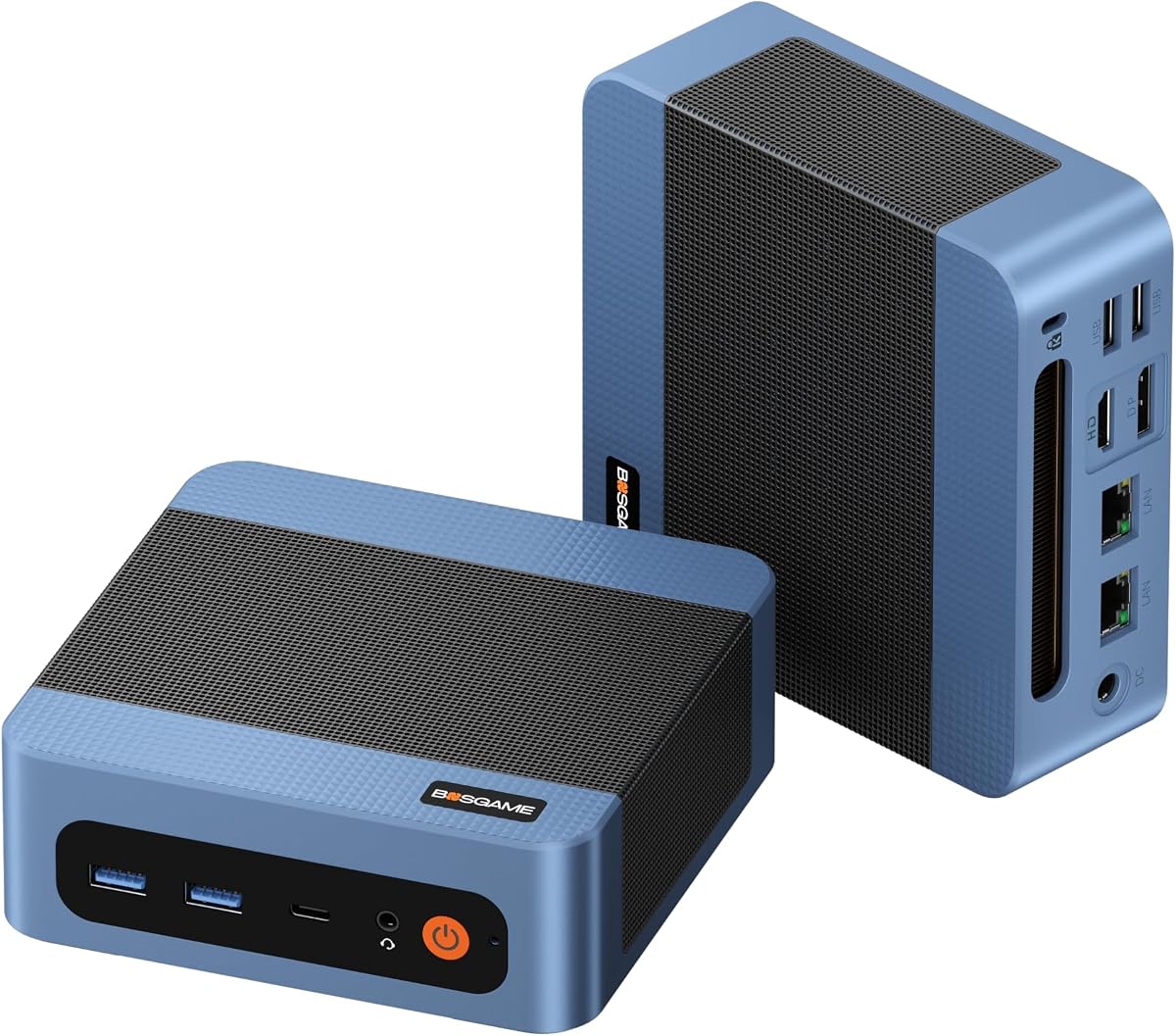


The BOSGAME E5 Mini pc stands out as a top contender for homelab enthusiasts due to its balanced mix of performance and networking capabilities. With a solid rating and reliable architecture, it offers the stability needed for 24/7 server operations without consuming excessive power.
We may earn a commission when you buy through this link, at no additional cost to you.
Its standout feature is the dual 2.5GbE LAN ports powered by Realtek RTL8125 controllers. This allows you to easily set up a software router or firewall like pfSense without needing additional hardware. The 4-core 8-thread Ryzen 3 5300U provides enough processing power for multiple virtual machines and containerized applications.
While it comes with 8GB RAM and 256GB SSD, both are expandable. You can upgrade memory to 64GB and add a second NVMe drive via the empty M.2 slot. The only trade-off is the DDR4 limitation which is acceptable for most homelab workloads but might not suit extreme memory bandwidth scenarios.
This unit is ideal for anyone building a home server, NAS, or network lab. Its quiet operation and triple display support make it versatile for monitoring dashboards. We recommend it as the best overall choice for those needing reliable networking and easy expansion.
The dual 2.5GbE LAN ports enable seamless separation of WAN and LAN traffic for advanced homelab routing and firewall setups.
Dual SODIMM slots and an extra M.2 NVMe slot ensure you can grow storage and RAM as your lab projects expand over time.
We may earn a commission when you buy through this link, at no additional cost to you.
The BOSGAME E5 Plus Mini PC builds upon the previous E5 model with a slightly refined processor and robust connectivity options. It scores well for daily computing and homelab tasks thanks to its responsive performance and comprehensive port selection.
We may earn a commission when you buy through this link, at no additional cost to you.
Powered by the Ryzen 3 5400U with a 4.0GHz boost clock, it handles multitasking smoothly. The dual 2.5GbE LAN ports are crucial for homelab users who need to separate network traffic or run a firewall appliance efficiently.
Although it ships with 8GB DDR4 RAM and a 256GB SATA SSD, the motherboard supports upgrades up to 64GB RAM and an additional NVMe SSD. The SATA drive is fast enough for most apps but upgrading to NVMe will improve boot times significantly.
This model suits users who need a reliable workstation for virtualization and networking experiments. Its support for Windows 11 Pro and Ubuntu makes it flexible for various operating system preferences. It is a strong choice for those prioritizing network performance.
Dual 2.5GbE Ethernet ports provide ample bandwidth for high-throughput file transfers and complex network topology experiments.
Compatibility with both Windows 11 Pro and Ubuntu ensures you can tailor the environment to your specific homelab needs.
We may earn a commission when you buy through this link, at no additional cost to you.
The Getorli Mini PC brings a significant performance jump with its 6-core Ryzen 5 7430U processor. This makes it ideal for heavier homelab workloads that require more threads for parallel processing and virtualization tasks.
We may earn a commission when you buy through this link, at no additional cost to you.
With 16GB of DDR4 RAM coming out of the box, you save the initial cost of upgrading memory. The dual 2.5G LAN ports ensure that network throughput remains high even under heavy load from multiple clients or services.
Its aluminum alloy shell and honeycomb heat dissipation design keep temperatures low during extended operations. WiFi 6 is another great addition for wireless clients needing stable connectivity. The only downside is that it still uses DDR4 which is common but limits peak speeds.
This unit is perfect for advanced homelab users who need more processing power without moving to a full tower. It supports triple 4K displays for detailed monitoring dashboards. We recommend it for those who want ready-to-use power for complex server setups.
The 6-core 12-thread architecture handles multiple virtual machines simultaneously without stuttering or performance drops.
WiFi 6 support ensures low latency and high bandwidth for wireless devices accessing your home server or router.
We may earn a commission when you buy through this link, at no additional cost to you.
The Mini PC with Intel Pentium N3700 offers an incredibly low power entry point for those starting their homelab journey. Its 6W TDP ensures minimal electricity usage and heat output which is perfect for 24/7 operation in small spaces.
We may earn a commission when you buy through this link, at no additional cost to you.
While the processor is basic with 4 cores and 4 threads it handles lightweight tasks well. You can run simple Docker containers or basic file services. The Gigabit LAN port is sufficient for entry-level home networking but lacks the speed of 2.5GbE.
It includes 8GB RAM and 128GB SSD but supports expansion up to 2TB. The dual 4K display support via HDMI makes it versatile for media playback. The only real limitation is the CPU which may struggle with heavy virtualization demands.
This device is best suited for users on a tight budget or those needing a secondary node for monitoring or storage. Its portability and silent design allow it to hide easily. It is a great budget option for basic homelab tasks.
At just 6W TDP this unit keeps energy costs extremely low for always-on servers or network appliances.
Two HDMI ports enable dual screen setups for media streaming and system monitoring simultaneously.
We may earn a commission when you buy through this link, at no additional cost to you.
The KAMRUI Mini PC stands out for its dual Gigabit LAN ports at a competitive price point. This makes it a natural choice for DIY router projects or firewall appliances where separate network connections are essential.
We may earn a commission when you buy through this link, at no additional cost to you.
Powered by the Ryzen 5 3501U it offers solid multi-threaded performance. The Vega 8 graphics are surprisingly capable for light media decoding and general desktop use. It supports triple 4K displays which is rare in this price range.
You can expand RAM to 32GB and storage up to 4TB via M.2 slots. The USB-C port supports 65W Power Delivery allowing single-cable setups though video output requires HDMI or DP. The cooling design keeps it whisper quiet during loads.
This unit is excellent for budget-conscious homelab enthusiasts needing specific network features. It handles virtualization and media services efficiently. We recommend it for those who prioritize LAN ports and multi-monitor setups on a budget.
Dual built-in Gigabit ports remove the need for USB adapters or separate switches for network segmentation.
Triple display outputs enable comprehensive monitoring dashboards for server health and network traffic analysis.
We may earn a commission when you buy through this link, at no additional cost to you.
The BOSGAME E5 11 Pro Mini PC comes pre-installed with Windows 11 Pro which is a major convenience for users wanting immediate setup. It shares the robust architecture of other E5 models ensuring reliable performance for homelab duties.
We may earn a commission when you buy through this link, at no additional cost to you.
Its dual 2.5GbE LAN ports make it ideal for network enthusiasts needing high-speed connections. The Ryzen 3 5300U provides enough processing power for multiple browser tabs and VMs. It boots quickly thanks to the included NVMe SSD.
Memory can be upgraded to 64GB and storage extended via an extra M.2 slot. The quiet cooling system ensures it remains unobtrusive even in living areas. The premium price reflects the clean system and warranty support provided by the manufacturer.
This model suits users who want a business-ready device for home server tasks. The included OS license saves time and hassle. We recommend it for those who value out-of-the-box convenience and professional-grade hardware features.
Windows 11 Pro pre-installation provides ready access to advanced features without extra licensing steps.
Extended warranty coverage ensures peace of mind for long-term homelab deployment and maintenance.
We may earn a commission when you buy through this link, at no additional cost to you.
This variant of the BOSGAME E5 offers a generous 16GB RAM and 512GB NVMe SSD out of the box. It is designed for users who want to avoid immediate upgrades while maintaining high performance for complex tasks.
We may earn a commission when you buy through this link, at no additional cost to you.
The dual 2.5GbE LAN ports continue to be a highlight for networking enthusiasts. The Ryzen 3 5300U ensures smooth multitasking for office applications and virtual machines alike. Boot times are fast thanks to the NVMe drive.
Expansion remains possible with slots for 64GB RAM and a second drive. The triple 4K display capability is perfect for monitoring dashboards. The only drawback is the cost which is higher than the base model though justified by the specs.
This unit is ideal for those who want a ready-to-use powerful workstation without tinkering. It suits both home office and homelab scenarios. We recommend it for users valuing convenience and performance in a compact footprint.
16GB RAM and 512GB storage provide ample resources for multiple services right out of the box.
Dual 2.5GbE ports ensure your internal network and internet routing remain fast and responsive.
We may earn a commission when you buy through this link, at no additional cost to you.
The C3 Mini PC uses the Intel Core i3-5005U which is known for stable and efficient single-core performance. It is optimized for continuous operation making it suitable for industrial or commercial setups.
We may earn a commission when you buy through this link, at no additional cost to you.
It comes with 512GB SSD storage and 8GB RAM which can be expanded. The Intel HD Graphics 5500 supports 2.5K video streams for media use. Gigabit Ethernet ensures decent network speeds though it lacks the advanced dual LAN of other models.
The design supports Ubuntu Linux and allows for flexible deployments. It runs quietly due to low power architecture. The main limitation is the lack of Windows 11 support which may restrict some users requiring that OS.
This device is great for Linux users or simple server tasks. Its efficiency and storage capacity make it practical for home use. We recommend it for budget users who prioritize storage over latest CPU features.
Optimized for 7×24 operation ensuring reliable performance for continuous server or display tasks.
Full support for Ubuntu and other Linux distros makes it flexible for open-source homelab projects.
We may earn a commission when you buy through this link, at no additional cost to you.
The BOSGAME P6 Neo Mini Gaming PC offers top-tier performance with its Ryzen 7 6800H and massive 24GB LPDDR5X RAM. It is designed for users who need serious computing power in a small form factor.
We may earn a commission when you buy through this link, at no additional cost to you.
The 8-core processor and PCIe 4.0 SSD deliver incredible speed for data-heavy homelab workloads. Dual Gigabit Ethernet ensures reliable connectivity while WiFi 6E supports modern high-speed wireless protocols. Triple 4K displays enable extensive multitasking.
While the onboard RAM cannot be upgraded, 24GB is already ample for most tasks. The cooling system keeps noise low even under load. The only drawback is the price which reflects its premium components and gaming capabilities.
This unit is perfect for advanced users who need power for media transcoding or complex virtualization. It suits those who want a single device for work and entertainment. We recommend it for premium homelab deployments.
The 8-core Ryzen 7 CPU handles heavy transcoding and multiple high-performance virtual machines efficiently.
WiFi 6E and Bluetooth 5.3 provide fast wireless options for modern peripherals and network access.
We may earn a commission when you buy through this link, at no additional cost to you.
The Bmax Mini PC B1 Plus is a compact solution with unique dual M.2 SSD slots allowing flexible storage expansion. It is designed for basic office tasks and light homelab duties where portability is key.
We may earn a commission when you buy through this link, at no additional cost to you.
Powered by the Celeron J3355 it handles web browsing and documents well. The 128GB eMMC is small but you can add larger SSDs via the extra slots. Dual 4K HDMI ports are useful for simple monitoring setups.
It includes 6GB RAM which is fixed and non-upgradeable. This limits its use for heavy multitasking or virtualization. The One-Click Restore feature helps quickly recover the system if errors occur.
This unit is best for users needing a small home office PC or simple file server. Its compact size makes it easy to mount anywhere. We recommend it for entry-level home setups with modest requirements.
Dual M.2 slots allow combining SATA and NVMe drives for customized storage solutions without replacing the OS drive.
Built-in One-Click Restore ensures quick recovery from system errors with minimal technical effort.
We may earn a commission when you buy through this link, at no additional cost to you.
Selecting the right mini PC for your homelab involves balancing processing power, network capabilities, and expansion options. This guide breaks down the essential factors to ensure you choose a unit that meets your technical needs and long-term goals.
The CPU determines how many virtual machines or containers you can run simultaneously. For heavy homelab tasks look for processors with multiple cores like Ryzen 5 or Core i5. These ensure smooth multitasking without throttling during peak loads.
Focus on core count over clock speed for server tasks since most workloads benefit from parallel processing rather than single-core bursts.
Dual Ethernet ports are highly valuable for homelab enthusiasts running routers or firewalls. This allows you to separate WAN and LAN traffic physically without extra switches. Speeds like 2.5GbE provide future-proofing for high-throughput file transfers.
Always verify the LAN port count and speed before buying if networking experiments are a priority in your lab setup.
Memory is critical for running virtual machines and databases smoothly. Aim for at least 16GB RAM if you plan to run multiple services. Check if the unit has SODIMM slots for expansion since onboard RAM cannot be upgraded later.
Prioritize models with accessible RAM slots to avoid the need to replace the entire unit as your lab grows.
Adequate storage ensures you can host media files or logs without constant management. Look for M.2 NVMe slots for speed and SATA slots for high capacity. Some units offer dual M.2 slots which is ideal for system plus data separation.
Choose units with flexible storage expansion to accommodate growing media libraries and backup drives over time.
Since many homelab units run 24/7 efficiency matters for electricity bills and heat generation. Look for low TDP ratings like 15W or 28W. These consume less power while providing enough performance for basic server tasks.
Select models with efficient power supplies to minimize energy costs during continuous operation.
Support for multiple operating systems like Windows and Linux is essential for flexibility. If you plan to run pfSense or Ubuntu ensure the hardware drivers are compatible. Some units lock out newer OS versions due to TPM or processor requirements.
Verify the hardware supports the OS you intend to use before purchasing to avoid compatibility hurdles.
A compact design helps fit multiple units in a rack or cabinet. Ensure the cooling system is quiet enough for residential spaces. Copper heat pipes and efficient fans maintain performance without becoming a nuisance.
Prioritize silent cooling designs if your lab will be located in living areas or home offices.
Multi-monitor support is useful for dashboards and server monitoring. Check for HDMI and DisplayPort counts to see if you can connect multiple screens. Triple 4K support is rare but valuable for complex visual setups.
Verify the video port count if you need dedicated screens for network traffic or system metrics monitoring.
Begin by securing the mini PC in a stable position with proper ventilation. Attach peripherals like monitors and network cables using the available ports. Boot the system and install your preferred operating system or homelab software.
Configure network settings by connecting the LAN ports to your router and internal network. Enable necessary services like SSH or remote desktop to manage the device remotely. Update firmware and drivers regularly to maintain security and performance.
Monitor temperatures and system load to ensure stability. Clean dust filters periodically to prevent overheating during long runs. Backup important data to an external drive or cloud service to avoid loss during hardware failures.
Yes, many modern mini PCs with quad-core processors and 16GB RAM are capable of running multiple virtual machines. Ensure the CPU supports virtualization extensions like VT-x or AMD-V to use this feature effectively.
Absolutely, models with dual Ethernet ports are ideal for running firewall software like pfSense. They provide physical separation between your internet connection and internal network for better security.
Most mini PCs reviewed include at least one M.2 slot for NVMe SSDs. Some models offer two slots allowing you to add a second drive without removing the original storage.
Mini PCs generally consume between 15W and 30W under load making them very energy efficient compared to full towers. This makes them perfect for 24/7 server or storage tasks.
Many models come with upgradeable RAM slots allowing you to increase memory from 8GB to 32GB or 64GB. Check the specific product details as some use onboard memory that cannot be upgraded.
Most mini PCs are designed to operate quietly with noise levels often below 25dB. Proper ventilation and clean filters help maintain this quiet performance over time.
The BOSGAME E5 series leads our list with its robust networking and expandability. The Getorli Mini PC offers a great balance of performance and RAM while the Pentium model remains a solid budget option.
Prioritize dual LAN ports and upgradeable memory when selecting your unit to ensure longevity. Matching the hardware to your specific projects will help you avoid unnecessary upgrades later.
Always check current listings and prices as they fluctuate regularly. Investing in a reliable mini PC today sets the foundation for a scalable and efficient homelab for years to come.