
CyberPower CP1500PFCLCD PFC Sinewave UPS Battery Backup and Surge Protector
4.5Editor score
1500VA PFC Sinewave Output
12 Outlets With USB Charging
Automatic Voltage Regulation
Discover the top battery backup for Workstation PC models reviewed for performance, reliability, and surge protection to keep your critical systems running
A reliable battery backup for Workstation PC is essential for protecting your investment against unexpected power outages and electrical surges. Without proper protection, data loss and hardware damage can occur instantly during voltage fluctuations or blackouts.
We evaluated ten leading uninterruptible power supplies based on runtime capacity, outlet configuration, waveform technology, and warranty coverage. Our analysis focuses on models that deliver consistent power quality and safety for demanding workstation environments.
Each pick highlights key specifications, pros, cons, and ideal use cases to help you choose the right unit. Note that prices change frequently, so check current listings before purchasing to ensure you get the best value available today.
4.5Editor score

4.4Editor score

4.7Editor score
This comparison table lists all ten selected units with their core specifications side by side. Review the VA ratings, outlet counts, and key features to find the model that best fits your workstation power needs.


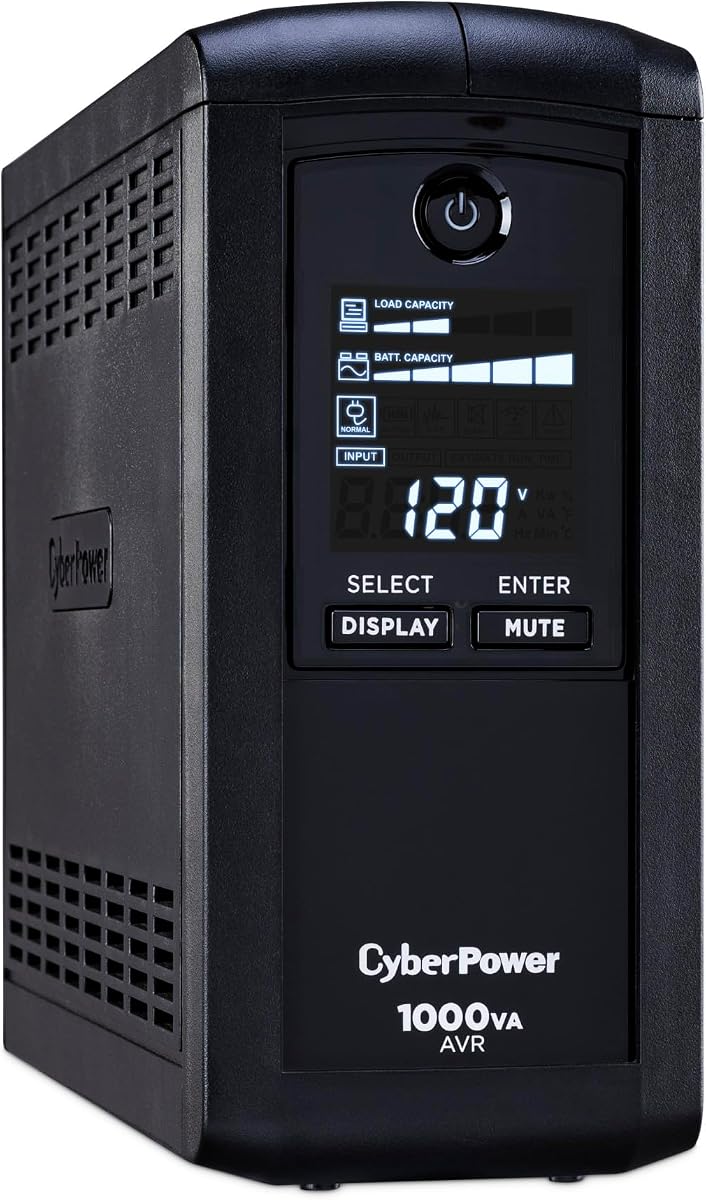


This CyberPower CP1500PFCLCD unit stands out as an affordable yet powerful choice for workstation users needing reliable power protection. It boasts a 4.5 star rating from countless verified purchasers who appreciate its robust build quality and consistent performance under load.
We may earn a commission when you buy through this link, at no additional cost to you.
The device delivers 1500VA/1000W with pure PFC sinewave output, making it safe for active power factor corrected supplies found in modern workstations. Its 12 outlets allow you to connect the main tower plus multiple monitors, routers, and peripherals without daisy chaining power strips.
While the lead acid battery will eventually need replacement after a few years, the included three year warranty covers this component. The automatic voltage regulation feature helps extend battery life by correcting minor voltage fluctuations without draining the backup power.
If you need to protect critical workstation equipment without breaking the bank, this model is an excellent starting point. Its balance of capacity, outlet flexibility, and sinewave protection makes it the top budget pick for this guide.
Modern power supplies often require pure sine wave output to operate efficiently. This unit provides that essential waveform to prevent overheating and noise in sensitive electronics.
With twelve outlets split between battery backup and surge-only protection, you have the flexibility to power your entire workstation setup in one location.
We may earn a commission when you buy through this link, at no additional cost to you.
The CP1500AVRLCD3 model offers a strong alternative for users who need ample outlets and monitoring features without the premium cost of true sine wave technology. It holds a 4.5 star rating reflecting its reliability in standard workstation setups.
We may earn a commission when you buy through this link, at no additional cost to you.
This UPS provides 1500VA capacity with nine hundred watts of backup power, sufficient for most mid range desktop workstations. The intelligent LCD panel gives real time feedback on battery life and load, helping you manage runtime effectively during an outage.
Since it uses simulated sine wave output, it is best suited for conventional power supplies rather than active PFC units. Automatic voltage regulation helps maintain stable input voltage, reducing the frequency of battery switches and extending overall battery lifespan.
Choose this model if you prioritize outlet count and monitoring capabilities while keeping costs moderate. It serves well for home offices where standard electronics need reliable surge protection and short term backup power.
The color LCD panel alerts you to potential issues before they impact your equipment, giving you peace of mind during critical work sessions.
Simulated waveforms are cost effective but may not suit all devices. Check your power supply specifications to ensure compatibility with this output type.
We may earn a commission when you buy through this link, at no additional cost to you.
The EC850LCD stands out for its eco friendly design that intelligently manages power consumption for connected peripherals. With a 4.4 star rating, it is favored by environmentally conscious users seeking cost effective power management.
We may earn a commission when you buy through this link, at no additional cost to you.
This unit delivers 850VA of capacity, ideal for smaller workstations or office setups where power draw is minimal. The standout feature is the eco mode outlets that automatically cut power to peripherals like printers when the main PC enters sleep or off mode.
While the wattage is lower than other models, it remains sufficient for basic computing tasks and monitoring. The LCD panel provides essential status updates, ensuring you always know the current battery health and runtime availability.
Select this unit if energy efficiency is a priority for your workspace. It helps lower electricity bills over time by eliminating phantom load from idle peripherals while still providing essential surge and backup protection.
By turning off power to connected devices when the computer is off, this UPS eliminates unnecessary energy drain and reduces monthly utility costs significantly.
Connect your printer or external hard drive to the eco outlets so they stay off when you are not actively using your workstation.
We may earn a commission when you buy through this link, at no additional cost to you.
This CP1000PFCLCD model delivers the safety of PFC sinewave output in a more compact form factor. It holds a 4.2 star rating and is often chosen by users needing pure sine wave protection without the bulk of higher capacity units.
We may earn a commission when you buy through this link, at no additional cost to you.
With 1000VA capacity and 600 watts, it suits lightweight workstation configurations where space is limited. The ten outlets provide ample connectivity for the main unit and a couple of monitors while still supporting USB charging for mobile devices.
The automatic voltage regulation feature helps extend battery life by correcting minor fluctuations before they require a switch to battery power. This efficiency translates into longer backup times for essential systems during short power dips.
Opt for this unit if you need pure sine wave protection but do not require maximum wattage. It balances performance with size making it a practical choice for smaller desks or home office environments.
Pure sine wave ensures that even sensitive electronics run without risk of damage or performance issues during a power outage event.
The footprint is optimized to fit under desks or in tight spaces without sacrificing critical outlet availability or protection features.
We may earn a commission when you buy through this link, at no additional cost to you.
The AVRG900LCD earns a high 4.6 star rating for its comprehensive protection including data lines. It is particularly useful for workstations connected to phone or network lines that could be vulnerable to surges traveling through cables.
We may earn a commission when you buy through this link, at no additional cost to you.
This unit offers 900VA capacity with 480 watts of backup power, suitable for basic systems. The data line protection feature adds an extra layer of safety for your modem or router ensuring your connection stays protected from external electrical events.
Twelve outlets give you flexibility to plug in multiple devices while the LCD provides clear status updates. The automatic voltage regulation feature helps stabilize power input without needing to switch to battery every time voltage dips slightly.
Choose this model if network connectivity is vital to your workflow and you want protection beyond AC outlets. It is a robust choice for home offices where modems and routers share power sources with the main PC.
Surges can travel through phone or network lines and damage connected gear. This UPS safeguards those connections in addition to AC power.
The strong user rating reflects reliability and value, confirming that customers trust this unit for consistent performance over time.
We may earn a commission when you buy through this link, at no additional cost to you.
The CP1000AVRLCD is a dependable all around choice with a solid 4.5 star rating. It balances basic backup capacity with clear status monitoring to keep your workstation running through brief power interruptions.
We may earn a commission when you buy through this link, at no additional cost to you.
Delivering 1000VA and 600 watts, this UPS supports typical desktop setups. The intelligent LCD panel shows estimated runtime and battery capacity so you can gauge how much time you have to save work or shut down safely.
Automatic voltage regulation helps protect the battery from unnecessary cycling by stabilizing minor input fluctuations. This feature extends the overall life of the internal battery reducing long term maintenance costs.
If you need a straightforward and affordable solution for your workstation, this unit fits the bill. It provides essential protection without unnecessary complexity, making it easy to integrate into existing office layouts.
The display shows how long the battery can keep your devices running based on current load, helping you plan for graceful shutdowns.
AVR technology reduces the frequency of battery use during minor voltage dips, keeping the battery fresher for when you really need it.
We may earn a commission when you buy through this link, at no additional cost to you.
The GOLDENMATE 2000VA UPS earns our Editor's Choice badge for its advanced lithium technology and impressive capacity. With a 4.4 star rating, it is increasingly favored by professionals who demand high performance and long term reliability.
We may earn a commission when you buy through this link, at no additional cost to you.
This unit delivers 2000VA and 1600W with pure sine wave output, supporting even the most power hungry workstation components. The LiFePO4 battery offers over 3000 charge cycles and a ten year lifespan, drastically reducing total cost of ownership.
The outlet spacing allows larger adapters to fit side by side and it includes USB ports and PC communication ports for shutdown automation. Automatic voltage regulation keeps your system safe from common power issues without draining the battery.
Choose this premium lithium model if you want a maintenance free solution that lasts years without battery replacement. Its high capacity ensures your workstation stays online longer during extended outages.
LiFePO4 batteries offer superior cycle life and safety compared to traditional lead acid types, ensuring consistent performance for over a decade.
With 1600 watts available, you can run multiple high draw devices simultaneously without overloading the backup system during an outage.
We may earn a commission when you buy through this link, at no additional cost to you.
The ST900U offers a slim footprint that fits easily under desks while still providing twelve outlets for your devices. It holds a 4.5 star rating for its dependability in light duty home office scenarios.
We may earn a commission when you buy through this link, at no additional cost to you.
With 900VA capacity and 500 watts, it covers essential components like a single tower and monitor. The GreenPower design reduces idle power consumption making it an eco friendly choice for environments where the unit runs 24/7.
The slim profile is a major advantage in small workspaces where bulkier models would be intrusive. Wide spacing on the panel accommodates large power adapters, ensuring you can use all outlets simultaneously.
Select this unit for light backup needs where space is at a premium. It provides reliable protection for standard office electronics without the bulk or cost of higher capacity units.
The slim form factor ensures this UPS fits neatly into cramped workspaces without obstructing your daily workflow or desk space.
Efficient internal components reduce wasted energy while the unit is running, contributing to lower electricity usage over time.
We may earn a commission when you buy through this link, at no additional cost to you.
This CP850AVRLCD model provides straightforward protection for smaller workstations on a tight budget. With a 4.5 star rating, it proves that affordable units can still deliver reliable surge and backup protection for essential gear.
We may earn a commission when you buy through this link, at no additional cost to you.
The 850VA capacity supports basic desktop configurations. The LCD panel keeps you informed about battery health and runtime, so you know exactly when to shut down if a power outage occurs.
Automatic voltage regulation helps stabilize incoming power to reduce battery wear and ensure consistent performance. Nine outlets are available to connect your main devices without needing extra power strips.
Choose this unit for entry level protection where budget is a primary concern. It offers a solid foundation for safeguarding data and hardware during minor power fluctuations.
This model demonstrates that effective power protection does not need to be expensive, making it accessible for all workstation users.
Setup is straightforward with clear labeling and standard plugs so you can plug your devices in and start protecting your data immediately.
We may earn a commission when you buy through this link, at no additional cost to you.
The BRG1500AVRLCD2 model tops our premium list with a 4.7 star rating and a five year warranty. It combines capacity with advanced features designed for demanding professional environments needing long term support.
We may earn a commission when you buy through this link, at no additional cost to you.
Delivering 1500VA and 900 watts, this unit handles significant loads with ease. The color LCD display provides detailed monitoring and alerts for potential issues, giving administrators clear visibility into power health and status.
Remote management capabilities allow network monitoring via optional cards enabling integration into larger server rooms or managed office networks. USB ports are included for convenient mobile device charging without using AC outlets.
Choose this unit for high value workstations where extended warranty and remote monitoring justify the cost. It ensures your critical data and hardware remain safe with professional grade features.
Extended warranty coverage provides peace of mind for professional users, ensuring support for a longer period without extra costs.
Optional management cards allow this UPS to report status to central systems ensuring IT teams can respond to power issues remotely.
We may earn a commission when you buy through this link, at no additional cost to you.
Selecting the right UPS requires understanding your power needs, budget, and the specific electronics you want to protect.
VA (Volt Ampere) and wattage ratings determine how much power the unit can deliver. You must ensure the total wattage of your components does not exceed the UPS capacity. Always leave a 30 percent headroom to avoid overloading the unit during outages.
Calculate your PC monitor and peripheral wattage to choose a unit that fits your needs without unnecessary overspending.
Active PFC power supplies require pure sine wave output to operate safely. Simulated sine wave units are cheaper but may cause issues or inefficiency with modern workstations. Check your power supply specifications to determine compatibility.
Invest in a PFC Sinewave model if you have high end workstation hardware to ensure stable operation.
Workstations often require multiple outlets for the tower, monitors, and accessories. Look for units with enough backup outlets to cover your essential gear. Wide spacing prevents bulky plugs from blocking adjacent sockets.
Count your devices before buying to avoid needing extra power strips which defeats the purpose of backup power.
Lead acid batteries typically last three to five years. Lithium units offer longer lifespans but come at a higher price. Consider how often you can afford to replace batteries to decide which type suits your workflow.
Lithium options provide maintenance free operation but cost more upfront compared to traditional lead acid models.
AVR corrects minor voltage fluctuations without using battery power. This feature extends battery life and keeps equipment safe from brownouts. It is a standard feature on most mid to high end units.
Ensure your chosen UPS includes AVR to maximize battery longevity and provide consistent power quality.
Warranty terms vary from three to five years. Some manufacturers include equipment guarantees that cover connected devices. Look for clear support policies that include battery replacement coverage.
A longer warranty indicates manufacturer confidence and protects your investment from defects or early battery failure.
USB or network ports allow the UPS to signal your computer to shut down safely. This automation protects against data loss during long outages. Check if your OS supports the included software.
Prioritize units with communication ports if you need unattended operation and data security.
Larger batteries add weight and size to the unit. Ensure you have adequate floor space under your desk. Consider portability if you plan to move the unit frequently.
Balance capacity needs with available space to find a practical fit for your office layout.
Connect your PC monitor and critical peripherals directly to the backup outlets. Plug non essential devices like speakers or printers into surge only ports if you have extra outlets.
Perform a self test periodically using the unit's built in options. This ensures the battery remains functional and ready to deliver power when you need it most.
Avoid placing the unit near heat sources or in direct sunlight. Extreme temperatures can degrade battery chemistry and shorten the overall lifespan of the device.
Runtime depends on the load and capacity. A typical 1000VA unit might offer 10 minutes for a full workstation while lower wattage units provide shorter times. Check the manufacturer's runtime charts.
Most units allow battery replacement but check warranty terms. Some lithium units do not require replacement for years while lead acid batteries need regular changes every few years.
Standby units switch to battery only during outages while line interactive models regulate voltage continuously. Line interactive units offer better protection against fluctuations without using battery power.
Most modern UPS models include surge protection. Check the specifications to confirm the Joule rating. It usually covers connected devices from voltage spikes.
Add the wattage of all connected devices to find total demand. Choose a UPS with a higher wattage rating than this total to ensure adequate headroom and safety.
Without backup power data can be lost instantly. A UPS gives you time to save files and shut down safely preventing corruption and loss of important work.
Clicking often means it is switching to battery due to a power dip. If it happens constantly check your power source or the unit's voltage settings for potential issues.
Generators may produce unstable waveforms not recognized by the UPS. Use with caution and check your manual. Pure sine wave generators are safer for most UPS systems.
Our top picks offer reliable protection for all budget and performance levels. The CyberPower models cover standard needs while GOLDENMATE offers advanced lithium tech.
Prioritize pure sine wave and automatic voltage regulation for modern workstation equipment. Always ensure the wattage capacity matches your specific device requirements.
Check current pricing and warranty details before buying as they may change over time. Select the unit that best fits your long term data safety needs.