
CENMATE Aluminum 4 Bay
4.3Editor score
Affordable 4-bay enclosure
Supports 2.5 and 3.5 drives
Built-in cooling fan included
Direct Attached Storage offers a reliable way to expand your computer capacity without networking complexity. These devices connect directly via USB or Thunderbolt for fast access to large files and media libraries.
We evaluated ten top DAS models based on speed, build quality, cooling, and compatibility. Each unit supports multiple drives for massive storage without the overhead of a full network attached system.
Each pick highlights unique strengths like hardware RAID or hybrid bays. Prices and stock change frequently, so verify current details before buying. Your ideal solution depends on your specific workflow and drive count needs.
4.3Editor score

4.2Editor score

3.5Editor score
As an Amazon Associate we earn from qualifying purchases.
This table compares all ten DAS models side by side. Review key specs like bay count, interface speed, and RAID support to find the right fit for your storage goals.


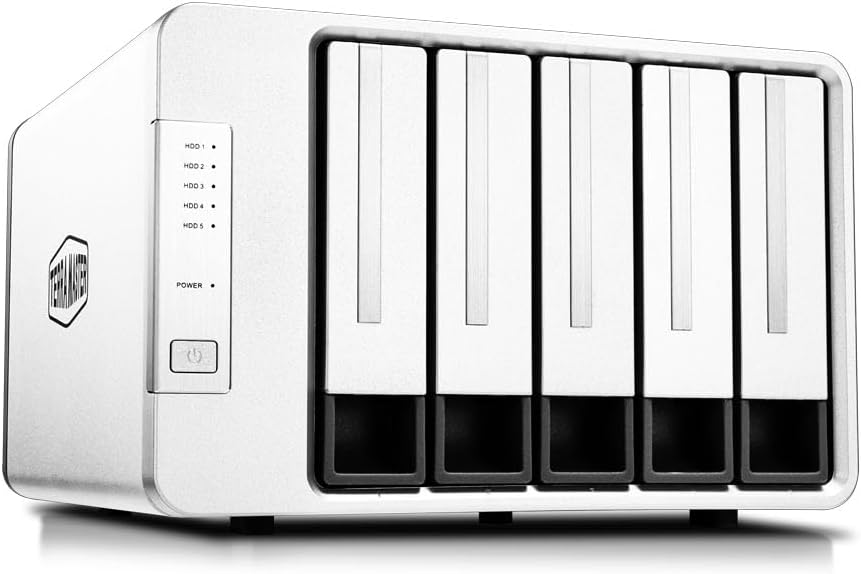


The TERRAMASTER D4-320 delivers top-notch performance for users needing fast, direct access to multiple drives. Rated 4.2 stars, it shines with USB 3.2 Gen2 speeds and quiet operation.
We may earn a commission when you buy through this link, at no additional cost to you.
Its standout quality is the blend of speed and convenience. You get up to 10Gbps transfer rates and support for up to 30TB per drive. The tool-free trays make swapping drives easy without tools.
While it lacks hardware RAID, this simplifies use for straightforward storage expansion. The noise level drops below 21 dB in standby, making it suitable for quiet environments like offices.
Buy this if you need reliable, fast DAS for video editing or backups. It’s a strong choice for anyone wanting plug-and-play convenience with high capacity and speed.
The intelligent fan adjusts speed based on drive temperature, keeping noise low during idle and cooling effectively under load.
No drivers are needed for Windows, macOS, or Linux. The USB Type-C interface works with Thunderbolt ports too.
We may earn a commission when you buy through this link, at no additional cost to you.
The QNAP TR-004 stands out as a budget-friendly option with hardware RAID capabilities. Rated 4.2 stars, it offers solid value for those needing RAID without a full NAS.
We may earn a commission when you buy through this link, at no additional cost to you.
Its key strength is hardware RAID support for 0, 1, 5, and JBOD modes. This adds reliability without software overhead. The lockable bays protect your drives from unauthorized access.
Note that it only works as a storage pool for specific QNAP NAS units, not as a combined volume. This limits flexibility if you plan to migrate drives often.
Buy this if you own a compatible QNAP NAS and want affordable expansion with redundancy. It’s ideal for users prioritizing RAID features on a budget.
Choose from RAID 0, 1, 5, or JBOD to balance speed and redundancy. No software setup is needed on the host.
Lockable drive bays add physical security to your storage. Keep your data safe from accidental removal or theft.
We may earn a commission when you buy through this link, at no additional cost to you.
The TERRAMASTER D8 Hybrid is a premium innovation blending HDD capacity with NVMe speed. Rated 3.5 stars, it offers unique flexibility for tiered storage workflows.
We may earn a commission when you buy through this link, at no additional cost to you.
Its standout quality is the 4 HDD plus 4 NVMe bays. You store cold data on cost-effective HDDs and hot data on fast NVMe SSDs. This optimizes both cost and speed.
While powerful, the hybrid setup may require manual data management. It also comes at a higher price. However, the performance benefits justify the cost for pros.
Buy this if you need massive storage with fast access to active projects. It’s perfect for editors managing huge libraries and frequent edits.
Store frequently accessed files on NVMe for speed, while archives stay on HDD. This balances performance and cost effectively.
USB 3.2 Gen2 supports up to 10Gbps. NVMe SSDs can reach up to 980MB/s speeds for fast workflow.
We may earn a commission when you buy through this link, at no additional cost to you.
The CENMATE Aluminum 4 Bay offers solid performance at a budget price. Rated 4.3 stars, it’s great for home or office use needing simple, direct storage.
We may earn a commission when you buy through this link, at no additional cost to you.
Its key strengths are the durable aluminum build and support for both 2.5 and 3.5 drives. Tool-free trays make setup quick. Plug-and-play works across major OS.
Fan noise around 40-50dB may bother noise-sensitive users. USB 3.0 limits speeds to 5Gbps. However, these trade-offs keep costs low.
Buy this if you want affordable, reliable expansion. It’s ideal for users on a budget who don’t need top-tier speeds.
The aluminum alloy shell provides durability and heat dissipation. Keeps drives secure and protected during transport or use.
No drivers are needed. Just plug in and your drives show up instantly in Windows, Mac, or Linux.
We may earn a commission when you buy through this link, at no additional cost to you.
The SABRENT 5-Bay DS-SC5B provides reliable 5-drive access with 10Gbps speed. Rated 4.1 stars, it’s great for users needing capacity and stability.
We may earn a commission when you buy through this link, at no additional cost to you.
Its strengths include dedicated controllers per bay and a quiet PWM fan. Tool-free hot-swap and per-bay power switches offer control. Internal power removes external bricks.
It lacks hardware RAID, so drives are independent. The price is higher than basic options. Still, stability and quiet operation justify it.
Buy this if you need reliable storage for active work. It’s perfect for professionals valuing stability and quick drive access.
Each drive gets its own ASMedia controller. This prevents one drive from affecting others during operation.
The PWM fan ramps up only when needed. Keeps noise low during idle while protecting drives under load.
We may earn a commission when you buy through this link, at no additional cost to you.
The TERRAMASTER D8 Hybrid 2 offers hybrid storage with powerful power management. Rated 5.0 stars, it’s excellent for workflows needing speed and capacity.
We may earn a commission when you buy through this link, at no additional cost to you.
Its standout feature is TPM Power Management. Switch between Save and Active modes to balance efficiency. Up to 1020MB/s read speeds with NVMe SSDs.
It lacks built-in RAID but supports third-party software. The hybrid setup requires manual file placement. Still, performance and features are top-tier.
Buy this if you need fast, flexible storage for pros. It’s ideal for video editors needing quick access to active projects.
TerraMaster Power Management optimizes energy and performance. Switch modes easily to save power or boost speed.
Combine 4 HDDs and 4 NVMe SSDs. Store archives on HDD and active files on NVMe for speed.
We may earn a commission when you buy through this link, at no additional cost to you.
The TERRAMASTER D5-310 offers hardware RAID controlled by a simple knob. Rated 3.6 stars, it’s great for users needing redundancy without complex setup.
We may earn a commission when you buy through this link, at no additional cost to you.
Its key strengths are easy RAID switching and hot spare support. The knob allows quick mode changes. Free backup software and temperature fans add value.
USB 3.1 Gen 1 limits speeds to 5Gbps. RAID options are fewer than some. But for simple RAID needs, it’s effective.
Buy this if you want easy, reliable RAID. It’s ideal for users needing redundancy with minimal fuss.
Switch RAID modes instantly with a dial. No software configuration is needed to change redundancy levels.
A spare drive replaces failed drives automatically. Minimizes downtime and keeps your data safe.
We may earn a commission when you buy through this link, at no additional cost to you.
The WAVLINK 4-Bay HDMI adds video output to standard storage. Rated 4.0 stars, it’s unique for media playback or multi-display setups.
We may earn a commission when you buy through this link, at no additional cost to you.
Its standout feature is 4K HDMI video output. Combined with 10Gbps speeds, it’s great for content creators. Aluminum build and fans keep drives cool.
Note that video requires host USB-C support. 2.5 drives need extra brackets. These quirks may limit some users.
Buy this if you want media playback from your storage. It’s ideal for home theaters or quick preview setups.
View files directly on a TV or monitor. No computer needed for media playback when using HDMI output.
10Gbps speeds handle large media files. Efficient transfers speed up workflows for creators and editors.
We may earn a commission when you buy through this link, at no additional cost to you.
The ORICO 5 Bay offers massive capacity at an affordable price. Rated 4.0 stars, it’s great for home storage expansion or backups.
We may earn a commission when you buy through this link, at no additional cost to you.
Its key strengths are 110TB support and magnetic cover for quick access. Honeycomb holes aid cooling. Multiple protections ensure safety.
Linux systems may only read one drive at a time. Fan noise could bother quiet users. Still, value and capacity are strong.
Buy this if you need cheap, large storage. It’s ideal for home backups and media libraries.
No tools needed to access drives. The magnetic cover allows quick access when you need to swap disks.
Over-voltage and overheat protection secure data. Multiple safety features keep drives safe during power fluctuations.
We may earn a commission when you buy through this link, at no additional cost to you.
The QNAP TR-002 offers compact storage with RAID features. Rated 4.0 stars, it’s great for small-scale NAS expansion or direct use.
We may earn a commission when you buy through this link, at no additional cost to you.
Its key strengths are hardware RAID and lockable bays in a small design. Expand QNAP NAS easily. Plug-and-play works across OS.
Limited to 2 bays, so total capacity is lower. Not ideal for massive needs. But great for smaller setups.
Buy this if you need compact, secure storage. It’s ideal for small teams needing basic RAID redundancy.
Add drives to your QNAP NAS easily. The TR-002 adds capacity without extra networking hardware.
Keep drives secure with lockable bays. Prevents accidental removal and protects data physically.
We may earn a commission when you buy through this link, at no additional cost to you.
Selecting the right DAS depends on your storage needs, budget, and workflow. Consider these factors to find the perfect enclosure for your drives.
Determine how many drives you need now and later. More bays allow larger capacity but increase size and cost. Ensure the unit supports drive sizes you plan to use.
Pick a bay count that fits current and future needs. Don’t overpay for unused bays.
USB 3.2 Gen2 and Thunderbolt offer higher speeds than USB 3.0. Fast interfaces reduce transfer times for large files. Match the interface to your computer ports.
Choose USB 3.2 or Thunderbolt for speed. Avoid older interfaces if you transfer big files often.
Hardware RAID adds redundancy without software overhead. Software RAID is more flexible but requires host resources. Decide if redundancy is needed.
Use hardware RAID for reliability. Opt for individual drives if simplicity is priority.
Aluminum housings dissipate heat better and protect drives. Plastic cases may be cheaper but offer less protection. Check for sturdy trays and cables.
Pick aluminum for durability and cooling. Ensure cables and trays are high quality.
Fans keep drives cool but add noise. Fanless units are quiet but may throttle speed. Check dB ratings for quiet environments.
Balance cooling with noise needs. Look for smart fan controls for quiet operation.
Ensure support for your OS like Windows, macOS, or Linux. Some units work best with specific NAS models. Check driver requirements.
Verify OS compatibility before buying. Choose plug-and-play for simplicity.
Budget DAS units offer basic features at lower cost. Premium models add RAID, hybrid bays, or video output. Decide what features justify cost.
Buy what fits your budget. Don’t overpay for features you won’t use.
Connect your DAS via the provided USB-C cable to a host port. Ensure the host supports the required speed like USB 3.2 or Thunderbolt for optimal performance.
Install drives securely in the bays using tool-free trays. Match power adapters to your enclosure. Avoid placing it near heat sources or moisture.
Perform regular backups and check drive health. Monitor temperatures via software or indicators. Keep firmware updated if available for stability.
DAS offers faster speeds and lower cost but lacks network access. NAS provides network-wide access and better sharing. Choose DAS for single-user fast backups.
New drives often come unformatted. Format to a compatible file system like exFAT. Check the manual for supported systems.
Yes, most enclosures support both SSDs and HDDs. Check bay sizes like 2.5 or 3.5 to match your drives.
RAID protects against drive failure but not power loss. Use a UPS to protect against sudden outages and data corruption.
Use vendor software like TPC Backupper or third-party tools. Monitor fans and vents to ensure cooling is working properly.
Most units include USB-C to USB-C or USB-A cables. Check if your host needs an adapter for older ports.
Yes if the unit supports it. Eject drives via OS before removing to avoid corruption. Check if the enclosure supports hot swap.
Most modern DAS work plug-and-play on Linux. Older units may need specific drivers. Check vendor support pages for details.
We highlighted top picks like the TERRAMASTER D4-320 and QNAP TR-004 for their performance and features. Consider your needs for speed and capacity.
Prioritize interface speed and build quality. Choose hardware RAID if redundancy matters. Match your workflow to the enclosure type.
Prices and availability change often. Check current stock before buying. Verify compatibility with your drives and host system.